WhatsApp, native and fast. ZapFast is a WhatsApp client written in Rust
with egui. It uses
whatsapp-rust for the WhatsApp Web
protocol. It runs on Linux, macOS, and Windows, links to your phone as a
companion device, and has no browser engine. In our Linux test, it opens in
under a second and uses about 200 MB of idle RAM, compared with 1.13 GB for
WhatsApp Web and its Chromium processes. See the measurements.
Want Spotify just as fast and native?Spotifast
is ZapFast's sibling: the same native interface, for Spotify. Both are built
on fastframe, the shared foundation for
native Rust apps built with egui.
Links to your phone. Scan a QR code or link with your phone number.
Recent history is copied to this computer after linking and stored here.
Chats. See pinned, unread, muted, and archived chats, typing indicators,
and message status. Search chats, saved messages, and contacts. The
Search icon in a chat's header (or Ctrl+F) opens a pane beside the
chat, as in WhatsApp Desktop, listing its matches newest first with the time
and the line that matched. The calendar narrows them to one day, or lists
that day's messages when the field is empty. Clicking a result, or reaching
it with the arrow keys and pressing Enter, brings it into view with a brief
flash; Escape closes the calendar, then the pane. The pane can be dragged
wider, and in a narrow window it lies over the conversation instead of
squeezing it. The newest 80 matches are listed, and the pane says when there
are more. Right-click a group or a followed channel and choose Leave group
or Leave channel to leave it, with the option to archive it in the same
step; the local history stays on this computer and the chat keeps its
messages.
Filter the list to unread, private (one-to-one), favorites, or group chats
with the chips under the search bar; a chip with unread chats shows how many
it has. Right-click a chat and choose Add to favorites to mark it.
Favorites sync with your phone both ways, and the Favorites chip lists
them in the phone's order below any pinned chats. A chat added here goes to
the end of the list; channels cannot be favorites.
Followed channels have their own Channels chip and stay out of the other
filters; right-click it to mute or unmute every channel at once. Archived
opens the archived chats. Right-click a chat and choose Mark as unread
to put an empty dot on it, as on the phone; the mark syncs with your phone
both ways, and opening the chat or a new message clears it. Opening a chat with
unread messages scrolls to an "unread messages" divider above the first one.
Pinned chats stay in pin order (most recently pinned first), regardless of
new messages. Like on the phone, you can pin up to three chats. Chat and contact name searches ignore accents, so Angel
finds Ángel.
The filters stay on one row and scroll horizontally in narrow sidebars.
Unnamed groups use a shared participant summary for their title and subtitle.
It names each saved contact by its whole first name as saved on the phone (the
first word of the name when none is known), repeated names appear as Andrea ×3, and your
own entry is shown as You. The sender before a group's last message goes by
the same name. Contacts synced by an older version are read once more from the
phone after updating, so their first names are known too.
Incomplete group metadata preserves known names and retries with backoff;
an empty cached subject remains eligible for recovery.
Typing indicators show other participants, excluding your own linked devices.
Newsletter channels are read-only; publishing channel posts is not supported.
Channels show their own pictures, read from the channel's details on WhatsApp.
Account privacy. Settings, Privacy shows who can see your last seen,
online status, profile photo, and About, who can add you to groups, your
account read receipts, and whether unknown callers are silenced, and
changes them on your phone, so a change applies on every linked device. A
category set to My contacts except shows as such; the people it excludes
are chosen on the phone. The values are read when ZapFast connects and when
Settings opens; without a connection they cannot be changed.
Read state across devices. Reading a chat syncs its unread badge with
your phone and other linked devices, including when read receipts are off.
Replies from another device clear preceding unread messages. The read-receipt
toggle also controls voice-message played receipts; account privacy is checked
before sending receipts in direct chats. A hidden window does not read messages.
Conversations. See replies, reactions, edits, deleted messages, read
receipts, sender names, and group pictures. Older messages load as you
scroll up, first from the local archive and then from your phone.
Group messages show two gray checks after every recipient has received
them, and blue checks after every recipient has read them. The recipient
list and individual receipts are saved locally; later membership changes
do not change that list. If the original recipients are unknown, ZapFast
waits for the phone's aggregate status instead of guessing from one reader.
A message that could not be sent says "Not sent" beside its time. ZapFast
does not retry it; send it again yourself. Timestamps follow the system's
12-hour or 24-hour clock: the time format on Windows and macOS, and GNOME's
clock format or the time locale (LC_TIME) on Linux. Select in a
message's menu, or Ctrl-click (Command-click on macOS) on a message, starts
a selection: click more messages to add or remove them, Shift-click to add
everything up to the one you click, or drag across messages to add every
one you pass (the list scrolls when you hold the pointer at its top or
bottom edge). A drag that starts beside the bubbles, off the text, starts a
selection too; a drag over the text outside a selection still selects the
text to copy. Then Forward… sends them together,
in their original order, or Escape cancels. A batch goes out one message at
a time, each starting once the one before it reached WhatsApp, so a picture
cannot overtake the text that came before it.
WhatsApp formatting. Bold, italic, strikethrough, code, lists, quotes,
mentions, and link previews are supported. Links are clickable. Hebrew,
Arabic, and mixed lines follow the Unicode Bidirectional Algorithm, so
numbers, punctuation, and embedded words stay in reading order and brackets
face the right way. As in WhatsApp, a message whose first strong character is
Hebrew or Arabic is aligned to the right, with its time on its own line when
the text has more than one. Carets and copied text stay on the logical message.
Text uses the system's interface font (San Francisco on macOS, Segoe UI
on Windows, the desktop's system-ui font on Linux), or the bundled Inter
if you choose it under Settings > Appearance > Font, and emoji look as they
do in the system's other apps: Apple Color Emoji on macOS, Segoe UI Emoji on
Windows, and the desktop's emoji font on Linux. The bundled Noto Color Emoji
draws whatever those lack (country flags on Windows, or every emoji on a
Linux desktop without an emoji font). Emoji-only messages are larger.
Readable text. Secondary text in the built-in light and dark themes
reaches WCAG AA contrast. Inside message bubbles, times, ticks, and other
grey text adjust to the bubble's colour, in custom themes as well.
Screen-reader access. AccessKit exposes the interface to desktop
accessibility services. Custom buttons, chat rows, settings switches and
message text include readable labels. Windows NVDA navigation still needs
platform verification; keyboard and screen-reader support is not complete.
In the chat view, Tab cycles through the message input, send/voice button,
the plus menu, emoji, profile, sidebar toggle, New chat, Settings, search,
and chat filters, then returns to the input. Shift+Tab reverses that order;
hidden controls are skipped. Messages, reactions and chat rows are not stops
in this cycle; Alt+Up/Down switches conversations. Menus, dialogs and Settings
keep their own Tab navigation. Every focus border is a single one-pixel inset
outline following the control's shape, including circular voice buttons.
Text fields stay outlined while active; other outlines hide when you use the
mouse. Focus stays below menus, dialogs, and toasts.
Safer desktop opening. Links open only web pages or email addresses.
Common documents and media open in their default apps; executable, script,
and unrecognized attachment formats open their containing folder instead.
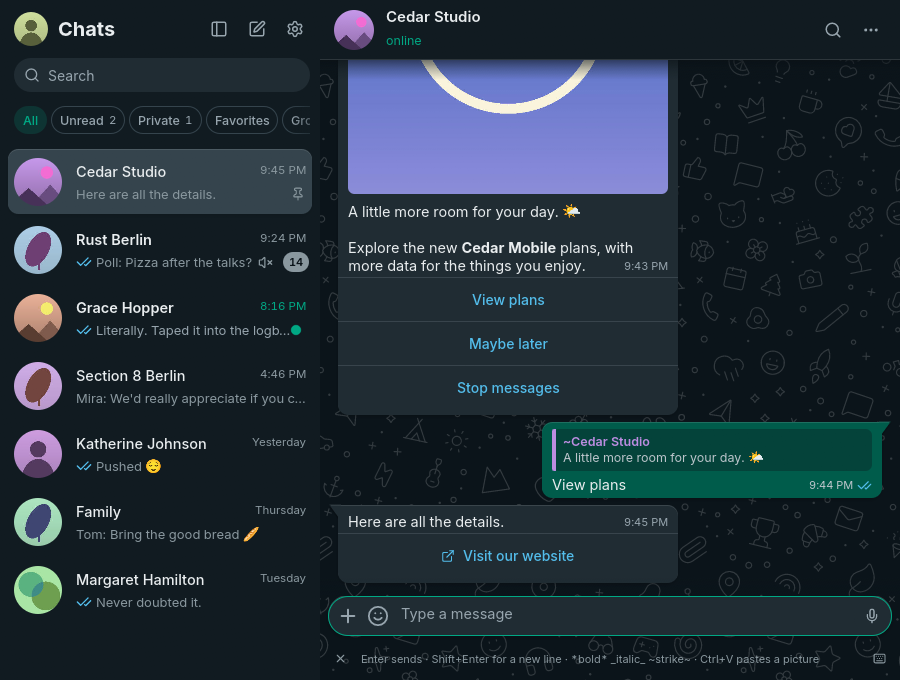
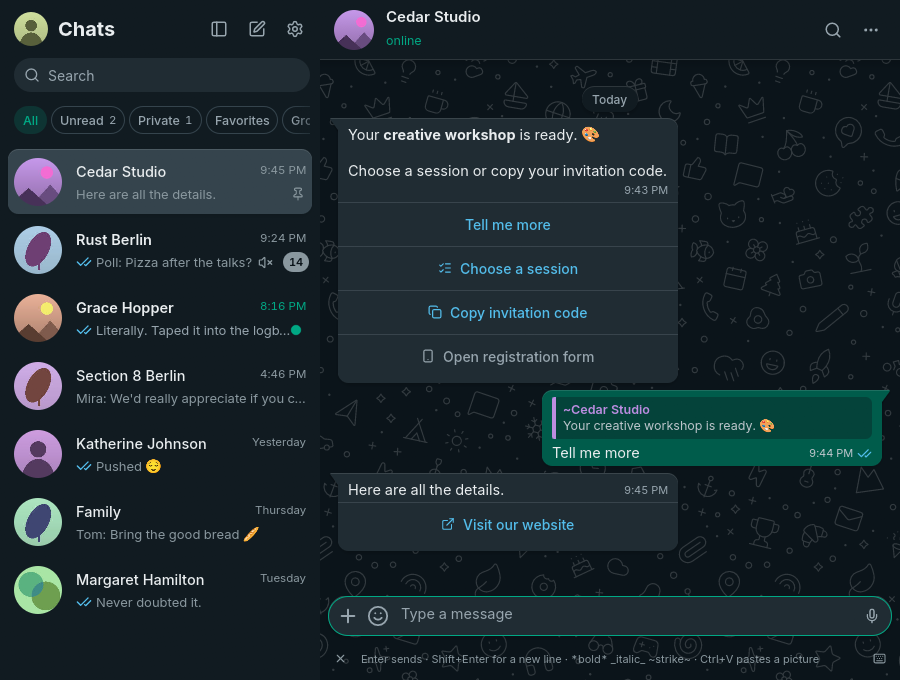
Use interactive messages. Business templates and button messages show their
image above the text and their options in separate rows below the timestamp.
Reply buttons send the selected option with a quote of the original message.
Simple lists open a choice dialog, web links open in your browser, and copy-code
buttons copy to the clipboard. Unavailable actions have a phone icon and an
explanation. Lists group choices by section, with descriptions and keyboard support.
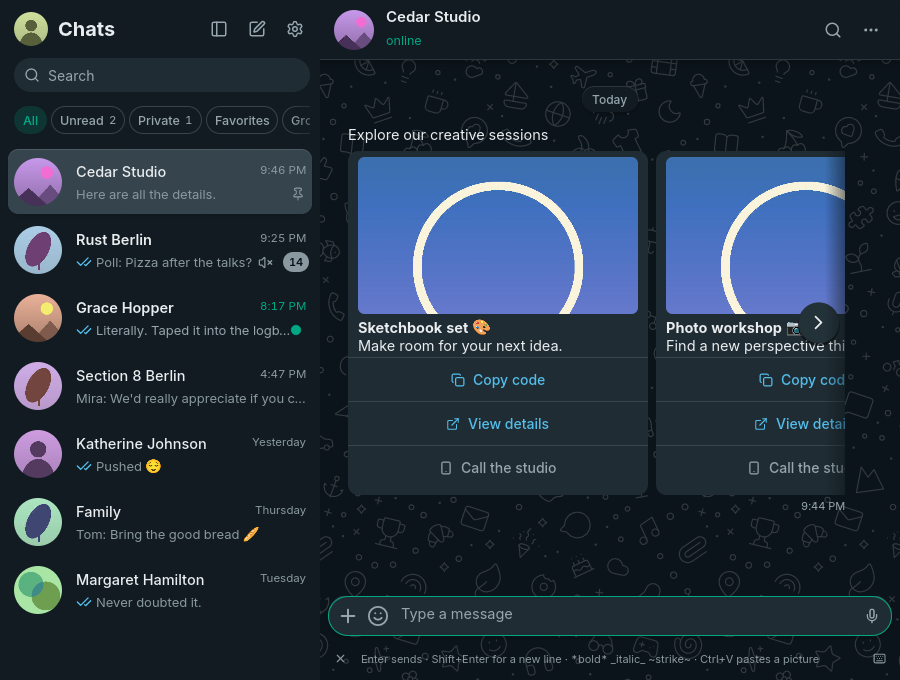
Carousels show separate cards in a horizontal strip, with images, web links,
and copy-code actions. Short carousels keep the timestamp beside their last
card. When more cards are offscreen, overlaid previous/next arrows move one
card at a time. Shift + mouse wheel and horizontal touchpad scrolling also
work over the cards, without a bottom scrollbar. Their text can be selected, copied, and searched.
Images use the same download, retry, and automatic-download setting as photos.
Previously unsupported messages are recovered from the local archive when their
original message is available and they have not been edited, without relinking.
Other embedded attachments and templates containing only a
reference to server-side text still need the phone.
Meta AI replies show as text, with code in monospace blocks and tables as
rows; their images, maps, and other media parts still need the phone, and a
reply made only of those shows as an unsupported message.
Errors stay readable. Confirmations such as "Copied" fade after a few
seconds. Error messages stay above the composer until you dismiss them, and
a button copies their text for a bug report. A repeated error replaces its
earlier copy, and only the three newest are kept.
Send attachments with captions. Paste a picture or copied files, drop
files, or choose Send files from the plus menu. They stay in the composer until you send them or press Escape.
Pasting a picture uses its image data without adding the source URL or HTML
to your caption. Files copied in Finder, Explorer, or a Linux file manager
paste as the files themselves, not their icons. Text-only clipboard contents
still paste as text.
MP3, M4A, AAC, and OGG files go as audio messages; other audio, such as
WAV or FLAC, goes as a document so the recipient gets the original file.
An MP4 video goes with a preview picture, its size, and its length, so it
shows as a video before it is downloaded and plays in its message here too.
Mute chats for eight hours, one week, or indefinitely. The setting also
applies on your phone and to desktop notifications. Mute changes from your
phone survive history arriving later, including during initial linking.
Existing installations request one settings refresh after upgrading to
recover previously lost mute settings and pin order, without relinking.
Read the last message from the chat list. When a chat's one-line
preview is cut short, resting the pointer on it shows the whole message in
a tooltip, as in WhatsApp Web, without opening the chat or marking it read.
Delete chats. Remove a chat and its messages from the chat list's
right-click menu. The phone deletes it first, so this needs a connection,
and the chat only leaves this computer once the phone has confirmed. Chats
you delete or clear on the phone disappear here as well, and history that
was already on its way does not bring them back.
Clear chats. Empty a chat's messages from the menu in its header, in the
same way as WhatsApp Web, and keep the chat itself in the list. The phone
clears it first, so this needs a connection, and the messages only go from
this computer once the phone has confirmed. Starred messages and downloaded
media go with them, and history that was already on its way does not bring
them back.
Voice messages. Play, seek, record, reply with, and send voice messages
in the chat. The speed chip cycles between 1x, 1.5x, and 2x, and the
message menu offers 1x, 1.25x, 1.5x, 1.75x, and 2x, keeping the speaker's
pitch; the last choice applies to later messages. When one ends, playback
carries on through the voice messages right after it that you have not
heard yet, as on the phone; any other message ends the run. The app
normalizes quiet recordings and handles OGG/Opus without external tools. On Linux and
Windows, music and other media playing in other apps pause while you record
or play a voice message, or watch a video with sound, and resume afterwards;
only players that were
playing are resumed. Pause other media while recording or playing in
Settings turns this off. Linux uses MPRIS, so any player that implements it
works; macOS has no public API for this, so the switch is hidden there.
Send messages. Press Enter to send text and Shift+Enter for a new line.
You can swap these keys in Settings. The composer is focused when you open
or return to a conversation, and clicking empty conversation space returns
focus to it; invoking search keeps focus in search, and
Escape clears search and returns to the composer; another Escape closes the
chat and saves your text draft. Drafts are kept in the encrypted archive, so
unsent text survives closing ZapFast and restarting, and the chat list shows
a chat's draft in its row, after "Draft:". Open menus, dialogs, and
unfinished actions are dismissed first. Sending while reading older messages
keeps your place; use the newest-message button or End to return to the latest
message. The chat list scrolls to the top after you send, where the chat now
is; under the Favorites chip the list keeps the phone's order and stays in
place. Type :name to autocomplete an emoji without leaving the composer,
or @ in a group to mention a member.
Reply, react with any emoji, edit, forward, delete, and check when a message was sent,
delivered, or read. Replies can be text, attachments, voice messages,
stickers, or GIFs. A reply never goes out without its quote: if the
original is no longer available on this computer, nothing is sent, the text
or attachments return to the composer, and a voice message waits above it
to be sent again or discarded. Cancel the reply to send without a quote.
Quotes carry a bar and name in the quoted person's colour; clicking one
scrolls back to the original, which flashes briefly, as a search result
does. The same right-click menu copies a message's ID, which
helps when looking one up for a bug report.
Opening a message's context menu outlines that message until the menu closes.
The full reaction picker stays beside the menu and adds a target preview.
The conversation stays still while you choose; the emoji
grid can scroll. Quick reactions learn from usage on this computer, independently
of inserted emoji. These preferences do not sync from the phone.
Hovering a message also shows a small smiley control beside it; clicking it
opens the full reaction picker for that message, so right-click is never required.
Deleting a message asks first and says which copies go:
deleting for everyone leaves "This message was deleted" in the chat, while
deleting for yourself removes the message from this computer only. Neither
can be undone, because the archive here is the only copy.
Disappearing-message timers. Outgoing messages use the chat's known
timer, including replies, attachments, edits, and forwards. Forwarded copies
use the destination chat's timer. Received messages remain in the local archive
after they expire on the phone.
A clock badge on chat avatars shows enabled timers and follows changes from
the phone. Changing the default timer for new chats leaves existing chats alone.
View attachments. ZapFast downloads files up to 64 MiB automatically or
on click. Photos, stickers, GIFs, voice messages, audio, locations, contacts,
polls, and link previews appear in the chat. Click a downloaded JPEG, PNG,
WebP, or GIF photo to preview it in ZapFast with fit and zoom controls, or
choose Open externally. In the preview, the mouse wheel and Ctrl+wheel
(Cmd+wheel on macOS) zoom around the pointer, as does a trackpad pinch on
macOS and Windows. Drag a zoomed picture to move it; where a trackpad scrolls
smoothly (macOS, Wayland), two-finger scrolling moves it instead of zooming.
Double-click to switch between fitting the window and the original size.
Copy the image to your clipboard via the copy button in the header, the
right-click menu (Copy image), or
Ctrl+C (Cmd+C on macOS); a downloaded image's message menu has Copy image
too, without opening the preview. Click a video to play it in its message, with
sound, a seek bar, and a mute switch; round video messages play inside their
circle with a progress ring, like on the phone. Double-click a video, or use
the button at the end of its controls, to play it over the whole window at a
higher resolution: there Space plays and pauses, the left and right arrows
jump five seconds, M mutes, and Escape, the close button, or a click beside
the picture puts it back in its message. A video that is not
downloaded yet downloads first and then plays. Videos in codecs other than
H.264, such as HEVC, open in your system player, and so does Open in system
player in a video's right-click menu. Unsupported pictures and documents
keep opening in their default desktop apps. Save as… in a downloaded
attachment's right-click menu keeps a copy wherever you choose, starting in
your Downloads folder. Profile pictures and downloaded images support
Windows drive paths and filenames with spaces or non-ASCII characters.
If an attachment has expired, ZapFast asks your
phone to upload it again. Downloads stop after two minutes with an inline
retry error if they cannot finish; the menu disables Download while one is running.
Cached attachment filenames use extensions of at most 16 ASCII letters, digits,
or hyphens; invalid or empty extensions are saved as .bin. A photo, video,
or voice message sent to be viewed once shows as a view-once placeholder:
WhatsApp opens it only on your phone, as it does in WhatsApp Web.
Polls. Choose Create poll from the plus menu beside the message
field to create a poll with 2–12 answers. Turn off Allow multiple
answers for a single-choice poll.
Click an answer in a poll to vote; click a selected answer again to remove
it. Each option shows a result bar and a checkmark for your selection.
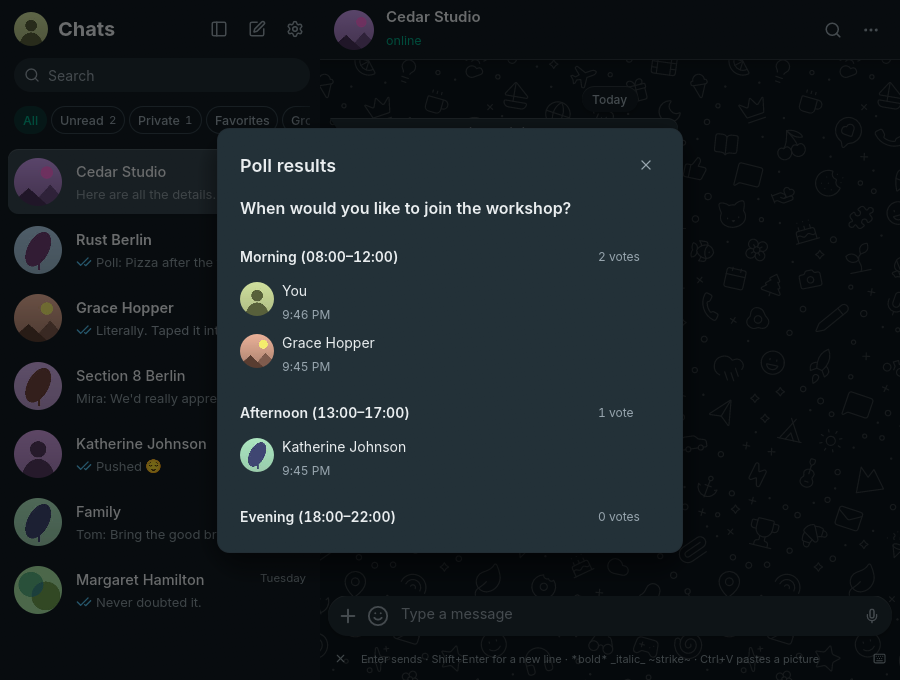
Show votes lists participants and vote times, updating as votes arrive.
Results and your selection are retained in the encrypted archive, including
votes received through phone history. New polls received live start at zero votes
without asking the phone for earlier results. Polls from history or offline
delivery automatically request earlier votes when visible. Until a usable
snapshot arrives, results are labelled incomplete and requests retry with backoff;
no refresh button or relinking is needed.
Voting needs the original poll's key;
if that key is missing, the message explains that voting is available on your
phone. Creating polls in disappearing-message chats is not yet supported by
the protocol library's poll API, so ZapFast blocks it instead of ignoring the timer.
Emoji, GIF, and sticker picker. Search emoji and GIFs, use recent emoji
and stickers, and add stickers to Favorites with a right-click. Favorites
sync with your phone both ways, and Recent holds only stickers you sent. Emoji autocomplete and
picker search select their first match; use the arrow keys and Enter to
choose it. GIF search needs a free GIPHY API key unless the build includes
one.
Sticker packs. A tab strip like WhatsApp's holds Recent, Favorites, and
every pack. ZapFast adds a Received tab (the speech bubble) with the
stickers people sent you that are already downloaded, newest first, each
once, leaving out locked chats. Search stickers by emoji, by a word that
names one, or by pack name. Import a pack from a signal.art link or
.wastickers file, or make your own packs from any sticker with a
right-click. Open WhatsApp sticker packs shared in a chat and add them, or
send any of your packs as one.
Turn any picture into a sticker: crop it square, keep its transparent
background, and tag it with emojis.
Animated packs remain animated. Packs are stored as WebP files on your
computer.
Consistent names. Names from your address book come first, as on the
phone, and public WhatsApp profile names (shown with a ~) fill in, across
chats, replies, mentions, and notifications.
Groups. See members, sender names, and sender pictures (shown in groups
only, as on WhatsApp). Announcement
groups are read-only for non-admins. Rename a group with the pencil beside
its name in the group's info (Enter saves, Escape cancels), and click its
photo to change or remove it; the picture is cropped to a centred square
and sent at up to 640 pixels. These appear when WhatsApp lets you edit the
group's info (every member, or only admins when the group is set that
way), apply for everyone in the group, and show here once WhatsApp accepts
them. Changes made on the phone or by other members arrive as before. Clicking a chat.whatsapp.com invite
link shows the group's name, size, and description, and joins it (or sends a
join request when admins approve members) without leaving ZapFast.
Presence. See online, last-seen, and typing status, and send your typing
status. Like WhatsApp Web, ZapFast shows you as online only while its window
is focused, and goes offline ten seconds after you switch away or hide it to
the tray, so your phone keeps receiving notifications meanwhile.
Idle rendering. History-sync progress updates when data arrives. Animated
stickers and GIFs show a still first frame and play while hovered in the
focused window, keeping idle conversations from continuously repainting.
Sync recovery. A conflicting app-state collection is recovered through
whatsapp-rust, including requesting a fresh snapshot from the paired phone
when validation fails. Private read-state updates run one at a time. Failures
pause the whole queue with backoff from 30 seconds to 15 minutes; pending reads
remain saved and resume automatically. New messages can still arrive.
Connects over either address family. On a direct connection, ZapFast
dials every address the WhatsApp host resolves to, IPv6 and IPv4, starting
the next one a quarter of a second after the last, and keeps the first that
answers. A network whose IPv6 has a route but no path past the gateway, as on
some phone hotspots and captive portals, still links over IPv4. Each
reconnect resolves the names again, so changing networks does not need a
restart. With a proxy configured, ZapFast dials the proxy instead:
socks5h:// and http:// proxies resolve WhatsApp's host themselves, and
socks5:// hands the proxy the first address this computer resolves.
Reconnects after sleep. After the computer wakes from sleep, or when the
connection has received nothing for two minutes, ZapFast reconnects and
fetches what arrived meanwhile, instead of waiting on a connection that
looks open but no longer delivers.
Runs in the background. Closing the window keeps ZapFast linked in the
system tray. Reopen it from the tray or by launching it again. Quit from the
tray or with Ctrl+Q, or disable this behavior in Settings. The window
reopens where you left it; on Windows and X11, one that would open on no
connected monitor (for example on a display that is now unplugged) moves to
the middle of the primary monitor.
Start at login. Turn on Start at login in Settings to start ZapFast in
the tray when you log in, without opening a window. It adds
~/.config/autostart/zapfast.desktop on Linux, a LaunchAgent in
~/Library/LaunchAgents on macOS, or a Run entry for your user on Windows,
and removes it when turned off. zapfast --start-hidden does the same by hand;
it opens the window anyway when no tray is available. The Flatpak does not
offer this setting yet.
Desktop notifications. Get notifications with the chat picture when you
are away from the open chat. Muted chats do not notify you, and archived
chats stay quiet until you unarchive them. Windows notifications
identify ZapFast as the sender and show chat pictures as small circular icons;
installed and portable builds register this identity in the current user's registry.
On Linux and Windows, clicking a notification opens the chat at the message
it announced. On Linux, reading the chat here or on another device dismisses
its outstanding notifications. Linux keeps this link for the 32 most recent
notifications: older ones stay on the desktop, but clicking them or reading
their chat no longer reaches them. On macOS, notifications use
the installed ZapFast application's identity without an application chooser;
unregistered development builds skip notifications if that identity is unavailable.
Sounds follow Pidgin: Message sound plays for every new message, in
chats and groups alike, and Mention sound when someone in a group
mentions you or replies to one of your messages. Each can be Pidgin's classic
message sound (the default for messages), its alert (the default for
mentions), the system's notification sound, no sound, or an audio file
(WAV, MP3, or OGG Vorbis) that ZapFast plays itself. Turning off Play
sounds for group messages keeps group notifications silent unless they
mention or answer you. Notification sound in a chat's right-click menu
gives that chat its own sound for every message in it, mentions included,
stored in the encrypted archive.
Unread count on the taskbar. Linux desktops that implement the Unity
Launcher API show the number of unread chats on the app icon; KDE Plasma needs
Show badges enabled in Task Manager. On Windows, ZapFast overlays a compact
count on its taskbar button while the window is open, showing 99+ above 99.
Windows must be using its regular taskbar icon size for overlays to appear. As
in WhatsApp, the count is of chats, not of the messages in them or of toasts
kept in Windows notification history: archived, muted, and locked chats are
left out, and a chat marked unread counts. Reading a chat lowers the count,
and zero removes the overlay.
Update notices. ZapFast checks GitHub once a day and shows a download
link when a newer release is available. You can turn this off in Settings.
Themes. Light, dark, follow the system, or a local JSON palette. Native
Linux packages can follow Omarchy colors without restarting the app. Zoom with
Ctrl+plus and Ctrl+minus. On Linux text is hinted and antialiased as the
desktop asks (its font settings through the desktop portal, else
fontconfig), and follows changes to them without a restart.
Copy text. Select part of a message or copy across messages in
WhatsApp's [time, date] Name: format. Contact names and numbers are also
selectable, with Brazilian numbers shown as (DDD) XXXX-XXXX or
(DDD) XXXXX-XXXX.
Keyboard shortcuts.Ctrl+K or Ctrl+Shift+F searches your chats,
where ↑/↓ selects a matching chat and Enter opens it ready for typing;
Ctrl+F searches the open chat as in WhatsApp (↑/↓ walk the results
and Enter jumps to one; with no chat open it searches your chats, and in
Settings it searches the settings), Alt+↑/↓ or WhatsApp's
Ctrl+Shift+[/Ctrl+Shift+] switches chats and
keeps the active chat visible in the list, ↑ in an empty input edits your
previous message, PgUp/PgDn scroll the open chat by about a page,
Home/End jump to the top or newest message of the open chat (when the
input is empty), Esc cancels the current action, Ctrl+L focuses the
message input, Ctrl+N opens New chat, Ctrl+B collapses or expands the
chat list, Ctrl+Shift+L locks ZapFast when an app lock password is set,
and ? (outside text fields) or
Ctrl+/ opens Keyboard shortcuts (use Command instead of Ctrl on macOS).
The × at the left of the shortcut hints
hides the bar; bring it back with Show shortcut hints under the message
box in the Keyboard shortcuts dialog.
Collapsed chat list. Hiding the chat list (Ctrl+B, or the button beside
New chat) leaves a narrow column of avatars.
It shows the same chats as the full list under the current filter, with
unread badges (dimmed for muted chats); hovering names a chat, clicking opens
it, and Ctrl+B brings the full list back.
Local storage. Messages, contacts and sticker metadata are stored in a
SQLCipher-encrypted archive, unlocked automatically through your OS keyring.
Existing plaintext archives are migrated on first use. Attachments remain
ordinary files in the cache directory. Unlinking deletes both and removes this device from
your phone.
What it does not do yet
Play videos in codecs other than H.264 in the app (they open in your system
player).
Calls, status posts, communities, newsletters, and group administration
beyond a group's name and photo (members, admins, descriptions, settings).
Submit interactive forms, payments, shopping flows, or carousel selections.
Use these in WhatsApp Web or on your phone. Embedded videos and documents,
and templates without readable text also need another client.
Installing
On macOS with Homebrew: brew install --cask crmne/tap/zapfast.
ZapFast was previously called FastsApp. Version 0.13.0 introduces the new
package and executable names. On Arch Linux:
yay -S zapfast-bin      # the released build, ready made
yay -S zapfast          # the release, built from source
yay -S zapfast-git      # built from the latest commit
With Nix, install the package directly from its flake:
nix profile install github:crmne/zapfast
NixOS configurations can add the repository as a flake input and include
inputs.zapfast.packages.${pkgs.system}.default in
environment.systemPackages.
zapfast-vX.Y.Z-<target>.tar.gz, with the desktop file and icon in packaging/
Linux x86_64 and arm64, one file
zapfast-X.Y.Z-x86_64.AppImage or -aarch64.AppImage: make it executable and run it
Windows x64 and arm64
zapfast-vX.Y.Z-<target>-setup.exe (no administrator rights needed), or the .zip
macOS, universal
zapfast-vX.Y.Z-macos-universal.dmg
On macOS, the rounded Dock icon matches the app bundle. Native menus provide
Settings, editing, search, view controls, and window commands. The traffic
lights share the chat header, leaving more room for conversations in a normal
window. Settings is also available with ⌘,.
The macOS release process signs the app with Developer ID, submits the DMG
to Apple's notarization service, and staples and validates its ticket before
publishing. Open the DMG and drag ZapFast to Applications.
When upgrading from FastsApp on macOS, quit the old app and remove its
application bundle after installing ZapFast.
Releases before 0.13.0 keep their original FastsApp filenames.
Flatpak
Flatpak packaging lives in packaging/flatpak/, following Spotifast's source
manifest and release-bundle setup. Future releases will attach an x86_64
.flatpak bundle; install a downloaded bundle with flatpak install --user FILE
and run flatpak run rocks.zapfast.ZapFast. Flathub publication is pending;
ZapFast is not yet listed there. See PACKAGING.md for local builds
and preparing a Flathub submission. File selection uses desktop portals;
the sandbox has no general access to your home directory.
Archive encryption
The archive key is a random 256-bit secret in Secret Service on Linux, Keychain
on macOS, or Windows Credential Manager. Linux needs a working Secret Service
provider (for example GNOME Keyring or KeePassXC with Secret Service enabled).
If the keyring is locked or unavailable, unlock it and click Retry; ZapFast keeps
its archive intact and waits before connecting. It never saves a replacement
plaintext archive. Back up both the archive and its OS keyring key: copying only
archive.db to another computer is insufficient.
A missing key is different from a locked keyring. If ZapFast says the key is
missing, restore the original OS credential store or use the original profile
location. Do not delete the archive or create replacement credentials: neither
can decrypt the existing archive. If the original key cannot come back,
Start over… on that screen renames the unreadable archive to
archive-unreadable-<date>.db beside it, forgets the linked session, and
shows the linking screen: linking again brings recent history back from your
phone. If the saved key has an invalid length, ZapFast replaces it only after
the unreadable archive has been moved aside; retrying leaves it unchanged while
the archive is still present. This cannot recover a key already lost by the
OS credential store. Remove the old ZapFast entry under Linked devices on the
phone afterwards. For help, report the OS, app version, whether
the profile was moved/restored, and the error text with personal paths removed.
Never attach the archive, keys, or full logs from older releases.
Only archive.db and its SQLite journal/WAL are encrypted. Device credentials in
session.db, downloaded media, profile pictures, favorite sticker files and settings
remain ordinary files. Use full-disk encryption for those files, swap, backups and
remnants of the old plaintext archive. Migration removes the original only after
verifying its encrypted copy; deletion cannot guarantee erasure from SSDs or
snapshots. Keyring unlocking also does not protect against software running as you
while your login is unlocked.
From source
ZapFast needs Rust, a C/C++ toolchain, CMake and Perl (for bundled OpenSSL). rust-toolchain.toml pins the exact version. On Linux,
it also needs GUI development packages:
With Nix, nix develop provides the pinned Rust toolchain and all native build
dependencies. From the checkout, use nix build .#zapfast to build the package
or nix run .#zapfast to run it.
cargo install puts the binary on your PATH, but it does not add a launcher
entry. On Linux, a source build can have the entry the packages install:
The script installs the binary, the icon, and a desktop entry under
~/.local (or the prefix you pass), with Exec= set to the installed binary's
full path, since a graphical session often lacks ~/.local/bin on PATH. It
is Linux-only; on macOS and Windows use a packaged release or run the binary
directly.
whatsapp-rust is pinned to a Git commit because version 0.7.0 on crates.io
enables a simd feature that needs nightly Rust. The pinned commit builds on
stable Rust and includes the upstream fixes for missing app-state snapshots and
conflicts that make no progress. ZapFast does not reset your session to recover
a collection.
Using it
On first start, scan the QR code from WhatsApp under Linked devices,
Link a device. To link without the camera, click Link with phone number
instead, enter your number with its country code, then enter the shown code
on your phone.
WhatsApp then sends your recent history. This can take a few minutes. A banner
shows the progress. New messages arrive live, and your phone does not need to
stay on the same network.
Right-click a chat or message to open its menu. Double-click beside a message,
or on its edge, to reply to it (a double-click on its text still selects the
word). Open Settings from the gear or with Ctrl+,, and close them the same
way. The pencil opens New chat, with Message yourself and
+ Add contact at the top, followed by searchable contacts. Add contact also
lets you message a new number without saving it. Also save to your phone's
contacts in that dialog adds the contact to your phone's address book too, as
the phone asks; the next contact starts from your last choice. You
can also open a group member's contact card. Renaming a contact opens with its
first and last name as saved, each of which may hold several words; a name
saved without a separate first name opens whole in the first-name field. Saved
names sync through WhatsApp to your phone and linked devices.
Locked chats
Lock chat in a chat's right-click menu moves the chat into a locked
folder: it disappears from the chat list, search, and the unread badge, and
its messages never raise a desktop notification. The lock state syncs
with your phone and other linked devices.
Choose Locked beside the other chat filters, type your local code, and press
Enter or choose Open locked chats.
The tab appears when locked chats exist, without a count or names before opening.
If no local code exists, it offers to set one up. The local code is separate
from your phone's code and is a visibility control, not an extra encryption layer.
Search inside the open tab filters its chats. Leaving it, changing or clearing
the code in Settings, or closing the window hides the locked chats and closes
any open locked conversation. Typing the code into ordinary search remains
an alternative way in. Revealed locked chats are currently read-only:
sending messages and forwarding into them remain disabled.
After linking or upgrading, chats wait up to ten seconds for WhatsApp's lock
state before appearing. Chats already known to be locked stay hidden. If the
lock state cannot be confirmed in time, the chats appear with a notice that
chats locked on the phone may show until they sync, and recovery keeps retrying
in the background. The recovered state is saved in the encrypted archive for
offline use.
Protocol logs omit private payloads and raw error details, including verbose
logging. Panic logs record the source location without the panic payload.
Pairing signature failures and rate limits retain a diagnostic category.
Offline previews for these states use --demo --demo-page channel,
--demo --demo-page locked, --demo --demo-page locked-open, and
--demo --demo-page keyring. The open locked-folder preview uses demo-code.
Use --demo-page locked-prompt, locked-setup, new-chat, unnamed-group,
or react-picker for the new dialogs, shared group summaries, and reactions.
group-info, group-info-rename, group-info-saving, and group-info-locked
show a group's info with its name and photo editable, being renamed, saving,
and locked to admins. meta-ai shows a Meta AI reply with code and a table.
The protocol dependency includes the upstream WhatsApp Business pairing fix.
Device-store migration waits until an updated window is acknowledged, preserving
startup rollback; an unused legacy column is retained for 0.14 compatibility.
App lock
Like WhatsApp Web's screen lock, Settings > Privacy > App lock hides
ZapFast behind a password. It is off until you choose Set password… and
type a password of at least six characters twice. ZapFast then starts locked
and locks again after 1 minute, 15 minutes (the default), or 1 hour without
input in its window, a choice under Lock after. Time spent hidden in the
tray counts as time without input. Lock ZapFast in the tray menu and
Ctrl+Shift+L lock it at once; the tray entry is there while a password is
set. Change password… and Turn off… ask for the
current password first.
While locked the window shows only the lock screen: no chats, names,
pictures, or messages, and shortcuts, pasting, and dropped files do nothing.
Messages keep arriving but stay unread, and their desktop notifications say
only "New message" from ZapFast, without the chat, the sender, the text, or a
picture, with the message sound but no per-chat or mention sound, since those
would tell who wrote. Clicking one opens the message after you unlock.
Locking withdraws the notifications still on the desktop on Linux. The unread
count on the taskbar stays, since a number names no one and says nothing
that a "New message" notification does not. Voice messages and videos stop,
and a recording in progress is discarded.
Wrong passwords make the next try wait, from one second after the third up
to half a minute. Forgot password? Unlink this computer on the lock screen
is the only way back in without it: after you confirm, it unlinks this
computer as Unlink this computer does, which deletes the chats stored
here, and the lock lifts once WhatsApp has unlinked it. Link again with a new
code. Any unlink, including one from your phone, turns the app lock off.
The app lock keeps people using this computer out of your chats. It encrypts
nothing beyond what the archive already is, and someone who can edit your
files can remove it from settings.json. ZapFast stores only a salted
PBKDF2-HMAC-SHA256 verifier of the password (600,000 rounds), in
settings.json beside the locked-chats code, because the lock screen must
appear before the archive opens. It is independent of the locked-chats code:
unlocking one never opens the other, and locking ZapFast closes the locked
tab. Preview it with --demo --demo-page app-lock (the password is
demo-password), app-lock-wrong, app-lock-forgot, app-lock-settings,
or app-lock-setup.
Interactive messages
Business messages keep their image, formatted text, timestamp, and options
together in one bubble. Reply buttons immediately send the selected response,
quoting the original message so the business can recognize your choice. Simple
list buttons open a centered dialog with sections, descriptions, and a full-row
selection target; choosing an item sends that response. Hover highlights
the full action row, following the card edges. Link buttons
open your browser, and copy-code buttons copy the offered code locally.
Carousels retain separate cards and images in a horizontally scrollable strip.
Each card can open web links or copy codes; reply, calling, and shopping actions
that require an unsupported carousel envelope stay unavailable.
Reply buttons require a connection and a writable conversation. They pause while
sending, and become available again if the send fails. Actions with a phone icon
are unavailable in ZapFast; use WhatsApp Web or your phone. Hovering explains
which restriction applies. Replies from other devices retain their quotes too.
Text and reply options
Image and website link
Carousel cards
Poll participant details
These screenshots use synthetic offline chats. See the
usage guide for
download behavior and the remaining limitations.
Finding a setting
The search field at the top of Settings narrows the page to the settings
whose name or description contains what you type, ignoring case and accents,
and hides sections with nothing left. A match on a section's name keeps the
whole section. Translated settings are found in the interface language and in
English. Ctrl+F on the Settings page focuses the field, and Esc clears it.
Interface language
Settings > Appearance > Language chooses the interface language. Auto
follows the first of the operating system's preferred languages that ZapFast
has a translation for, and falls back to English when it has none. Brazilian
Portuguese, German, Spanish, Italian, French, Russian, Simplified Chinese,
and Turkish cover the chat list, search, composer, shortcut hints, Settings,
and dates. Translations are compiled from gettext PO
files at build time, with no runtime parsing or network access. Message
contents, contact names, logs, and protocol errors are never translated, and
copied messages keep WhatsApp's [time, date] Name: format.
Proxy
Settings > System > Proxy sends the WhatsApp connection, media, profile
pictures, GIF search, Signal sticker imports, and update checks through a proxy. It accepts
socks5h://host:port (the proxy resolves names, as Tor expects),
socks5://host:port, and http://host:port, each with an optional
user:password@. A bare host:port is an HTTP proxy. Changing it reconnects
at once. When the field is empty, ZapFast uses ALL_PROXY or HTTPS_PROXY
from the environment and honors NO_PROXY.
Files
What
Linux
Notes
Settings
~/.config/zapfast/settings.json
JSON, safe to edit; the app lock password and the locked-chats code are kept only as salted verifiers
Device keys
~/.local/state/zapfast/session.db
Owned by whatsapp-rust; deleting it unlinks
Messages
~/.local/state/zapfast/archive.db
SQLCipher-encrypted SQLite, unlocked by the OS keyring; raw messages retain attachment keys
Attachments, avatars
~/.cache/zapfast/
Safe to delete; Settings > Files > Change… sends new downloads to another folder, leaving earlier ones in place
Favorite stickers and packs
~/.local/state/zapfast/stickers/
Plain WebP files; each pack is a folder
Wallpaper image
~/.local/state/zapfast/wallpaper.jpg
Copy of the chosen picture, or .png, .webp, .gif; deleted by Remove image
Log of the last run
~/.local/state/zapfast/zapfast.log
--verbose for more; Settings > Files > Log > Open shows it in its folder when no app opens it
macOS and Windows use the standard platform directories selected by the
directories crate. On first start, ZapFast moves settings, the linked session,
message archive, favorite stickers, caches, and window state from fastsapp
(or the earlier fastwhatsapp) paths. Existing ZapFast directories take
precedence and are never overwritten. Quit FastsApp before starting ZapFast;
if an older copy is still running, the new launch brings its window forward.
Your phone may keep showing the old linked-device name until you link again.
On Linux and macOS, ZapFast restricts its configuration, state, and cache
directories to the current user (0700), including existing installations.
Startup stops if those directories cannot be created or secured, before opening
logs or databases. Windows uses the permissions inherited from your user profile.
Local themes
Settings → Appearance → Theme uses the same picker as Spotifast, with
Follow system, Light, Dark, and its Catppuccin, Catppuccin Latte, Nord, Ristretto,
Tokyo Night, Rose Pine, Rose Pine Moon, and Rose Pine Dawn palettes.
Choose Open themes folder below the picker to add
JSON palettes beside settings.json; How to make a theme opens
the guide with every colour name. The
bundled palettes are written into the themes folder once, as ordinary files
to read or change; ZapFast never rewrites them, and a deleted one stays
deleted. For example:
Unspecified colors inherit the light or dark base. Spotifast palettes also work:
chat backgrounds, bubbles, and links derive from their interface colors when not
specified. Color names match Palette
in src/theme.rs; use #RRGGBB or #RRGGBBAA. The last accepted palette is cached
in settings, so a missing or damaged theme file does not reset your appearance.
Linux watches the themes folder for changes without periodic repaints. On other
platforms, use zapfast reload-themes after editing. The command also works while
the window is closed and never launches a stopped app.
Settings → Appearance → Wallpaper offers Theme first, then WhatsApp's
light and dark wallpaper colours, with a live preview that shows exactly what
the chat will. Theme, the default, uses the active palette's chat colour, so a
local or Omarchy theme colours the conversation too and a theme change shows at
once. Settings from earlier versions that still had the old default (Beige, or
Black in dark mode) move to Theme once; a colour you chose stays. Add
doodles controls only the SVG layer, so disabling it leaves the selected
background colour in place; the doodles switch between dark and light lines to
stay visible on any colour. Light and dark selections are stored independently,
and the embedded SVG is rendered at its native size and repeated across the
conversation without stretching.
Choose image… on the same page uses a picture of your own instead, in light
and dark mode alike, filling the conversation and cropped from the centre
without stretching. ZapFast keeps its own copy as wallpaper.jpg (or .png,
.webp, .gif) in its state directory, so the original can move; a picture
larger than 2560 pixels on its long side is scaled down first. The image
replaces the colour and doodles, which return with Remove image, which also
deletes the copy. If the copy goes missing or cannot be read, the colour shows
instead.
On Omarchy, Follow system and Omarchy read the active desktop palette and
follow its changes in native, portable, and source builds, even without installed
hooks. Other desktops keep their normal light/dark system preference. Native
packages additionally register a missing per-user template and theme hook on
first launch; existing user files are preserved. Flatpak uses the desktop's
light/dark preference and does not read host theme files or install desktop hooks.
Updating ZapFast
ZapFast checks GitHub once a day when Check for updates is enabled.
Click Update in the banner to download and verify a newer release, then
Restart to update when convenient. Download updates automatically is
optional and off by default; it downloads in the background and still waits for
you to restart. Downloads contact GitHub's API and release-asset hosts and are
checked against the release's SHA-256 checksums. Before downloading a package,
the updater verifies the checksum manifest's Ed25519 publisher signature using
its embedded public key. Missing or invalid signatures stop the update.
The updater keeps a backup and restores it if the updated app cannot start;
its helper writes what it did to helper.log in the update's staging folder
beside the app.
Release builds also carry GitHub provenance attestations, independently
verifiable with gh attestation verify FILE -R crmne/zapfast.
See update signing for key custody and recovery.
The in-app updater supports marked portable downloads, the Windows installer,
and the macOS app in Applications. Keep zapfast-portable.txt beside a portable
executable. AUR, DEB, RPM, Flatpak, Cargo and Homebrew installations use their
package manager, and an AppImage is replaced by downloading the new one. Older portable downloads without the marker need one manual
upgrade. No account or additional service is needed.
Developing
cargo run --features demo -- --demo            # sample chats, no connection
cargo run --features demo -- --demo-page login # or settings, pair, info, light, …
cargo run --features demo -- --demo-shot shot.png --demo-page chat,light
cargo run --features demo -- --demo-tour      # Space starts/replays a 41-second tour
cargo run --features demo -- --demo-tour --demo-tour-script whats-new # what 0.16 added
cargo run --features demo -- --demo-hover 900,400 # holds a fake pointer there
cargo test --all-features                      # includes a headless layout of every screen
cargo clippy --all-targets --all-features -- -D warnings
To include a default GIPHY key for GIF search, set it at build time. A key in
Settings overrides it:
ZAPFAST_GIPHY_KEY=your-key cargo build --release
The earlier FASTSAPP_GIPHY_KEY build variable remains supported as a fallback.
AGENTS.md describes the architecture and the rules for changes.
CI checks the complete lockfile against RustSec advisories with cargo audit.
Candidate-specific manual checks and results are tracked in the release PR.
Recording a demo
The demo feature uses offline sample chats in a fresh temporary directory.
It does not open your linked account, read your message archive, connect to
WhatsApp, or register a tray icon. You can run it alongside your regular app.
The ZapFast Demo window waits for Space. The 41-second tour starts with
search, switches chats with keyboard shortcuts, scrolls, right-clicks a message
and selects Reply, types quickly, completes emoji and mentions, searches the GIF
picker and sends a still sticker, opens group information and the shortcut list,
and changes themes through Settings. It uses the normal mouse and keyboard handlers;
a local responder handles outgoing messages with no WhatsApp connection.
The demo's profile pictures, photos, video clips, GIF-search thumbnails, and captioned stickers
are stock media compiled into demo builds only, all CC0 or in the public domain
(assets/demo/SOURCES.md lists each source); demo GIF search uses these local
fixtures, and the remaining stickers come from the bundled Noto emoji font. The tour makes no
sound and holds its final frame. Space rebuilds the sample and replays.
For an automatic start, add --demo-tour-delay 5000 (milliseconds).
Use --demo instead of --demo-tour to explore the sample chats yourself.
--demo-tour-script whats-new plays an 86-second tour of what ZapFast 0.16
added instead: the composer's plus menu and poll dialog, searching a chat and
narrowing it to a day, the photo preview, videos and round video messages
playing in place, sticker shelves and sticker search, message info in a group,
the Favorites and label chips and a chat's menu, recording a voice message and
choosing a playback speed, the chat list folded to avatars, hover controls,
Ctrl-click and Shift-click selection with Forward, and Settings (languages,
search, and the light theme). --demo-tour-script launch is the default.
Demo runs never open the microphone: recording plays back a synthetic tone.
Use --demo-page rtl-self for a self-chat of mixed Hebrew, Arabic, and
English lines.
Use --demo-page composer-tools to preview the WhatsApp-style composer pill
and its attachment and poll menu. typing, mention, and
emoji-complete preview the multiline field and inline suggestions.
Use --demo-page chat-menu to preview the compact chat context menu,
--demo-page chat-header-menu for the menu at the top of an open chat, and
--demo-page chat,voice,voice-menu for a voice message's menu with its speeds.
--demo-page video shows a video and round video messages,
--demo-page video-expanded the video over the whole window, and
video-playing or note-playing starts one of them, silently.
For deterministic theme screenshots, --demo-page settings,omarchy and
--demo-page settings,omarchy-light preview following dark and light Omarchy
palettes without changing the desktop theme.
Use --demo-page shared-contact for an offline shared-contact card with synthetic
vCard data, or --demo-page interactive for text and button messages, or
--demo-page interactive-media for messages with an image, and
--demo-page interactive-list for a list message,
--demo-page interactive-list-dialog for its grouped choice dialog, --demo-page carousel
for a scrolling strip or --demo-page carousel-pair for two cards, and --demo-page poll-empty, poll-voted, or poll-results
for voting states. Use --demo-page interactive-actions for reply, list, copy-code, and unavailable
form actions. Add ,light to
preview any of these in the light theme. Capture the app's own frame without desktop
content:
On Omarchy, run omarchy screenrecord, select the demo window, then press Space
in ZapFast. Recording has no audio unless you explicitly enable desktop or
microphone audio. Stop with omarchy screenrecord --stop-recording after the
tour finishes. The default capture records a fixed rectangle, so keep the demo
window visible and stationary until recording stops.
To annotate the video with a visible pointer, click rings, and outlined shortcut
labels, add --demo-tour-events tour.json when launching the tour. After
recording, run:
Set --start to the recording time (in seconds) when you pressed Space. The
export trims the setup footage, adds a caption band below the app, and produces
a silent H.264 MP4. It requires ffmpeg with libass support and ffprobe.
--scale 1.5 keeps 1.5 pixels per point, for example 1920 pixels across from a
1280-point window recorded at 2x; the default is one pixel per point.
These annotations are added during video export, not drawn by the app. The
trace contains only pointer coordinates and shortcut labels, not typed text.
Instead of recording the screen, the tour can save its own frames. With
--demo-tour-frames DIR, it starts at once, plays on a virtual clock (steady
frame times even when a frame is slow to draw), writes every frame as a PNG
at the window's pixel size, and quits when the tour ends. --demo-fps sets the
rate (30 by default). The window still has to be shown somewhere; a virtual
output keeps it off your screens. Then assemble and annotate the frames:
ZapFast is an unofficial client and is not affiliated with WhatsApp or
Meta. Using an unofficial client may be against WhatsApp's terms of service
and could get an account suspended. Use it at your own risk.
Packaging maintenance
Release packaging uses the native-packages gem. macOS release builds automatically sign and notarize when the Apple CI credentials are configured. native-packages.yaml declares packages and downstream repositories; native recipes and installation assets live in packaging/; see PACKAGING.md for local commands and CI behavior.
License
MIT. Inter and Noto Color Emoji are under the SIL Open Font License; the icons
and the chat wallpaper doodles are from Lucide (ISC).
The notification sounds are Pidgin's, under the GPL-2.0
(see assets/sounds/).
zapfast (crmne/zapfast)
Choose a tag and it will appear here. With no tags selected, all catalog projects are shown.
Searching Database…
Choose a tag and it will appear here. With no tags selected, all catalog projects are shown.
What is this?ZapFast is a native WhatsApp desktop client written in Rust with the egui GUI toolkit. It connects to WhatsApp using the whatsapp-rust library and runs without any browser engine.
Is this a browser wrapper like WhatsApp Web, or something else?It is a fully native app, not a browser shell: there is no embedded Chromium or browser engine, which is why it starts fast and uses little memory.
How do I link ZapFast to my WhatsApp account?Download it for your OS from zapfast.rocks, open it, and scan a QR code or link with your phone number the same way you would link WhatsApp Web or Desktop; recent chat history is then copied to your computer.
Do I need an existing WhatsApp account on my phone?Yes, ZapFast pairs with your phone as a companion device over the WhatsApp protocol, so you need an active WhatsApp account on a phone to link with.
What happens if a message fails to send?It is marked 'Not sent' next to its timestamp, and ZapFast does not automatically retry it; you have to resend it yourself.
Which operating systems does it support?Linux, macOS, and Windows, all from the same native codebase.
Where does my chat history actually live?Recent history is copied from your phone to your computer right after linking and stored locally there.
How much faster is it than WhatsApp Web?In the project's own Linux test it opens in under a second and uses about 200 MB of idle RAM, versus 1.13 GB for WhatsApp Web running in Chromium.
What is Spotifast and fastframe?Spotifast is ZapFast's sibling app offering the same native, fast interface for Spotify, and both are built on fastframe, a shared foundation for native Rust/egui desktop apps.
Is it usable with a screen reader?ZapFast uses AccessKit to expose its UI to desktop accessibility services, with labeled buttons, chat rows, and settings, though Windows NVDA support still needs further verification.
Can I search inside a specific chat?Yes, the search icon in a chat header (or Ctrl+F) opens a side pane listing matches newest-first with timestamps, and a calendar can narrow results to a single day.



 ZapFast is a native WhatsApp desktop client written in Rust with the egui GUI toolkit. It connects to WhatsApp using the whatsapp-rust library and runs without any browser engine.