




What is this?
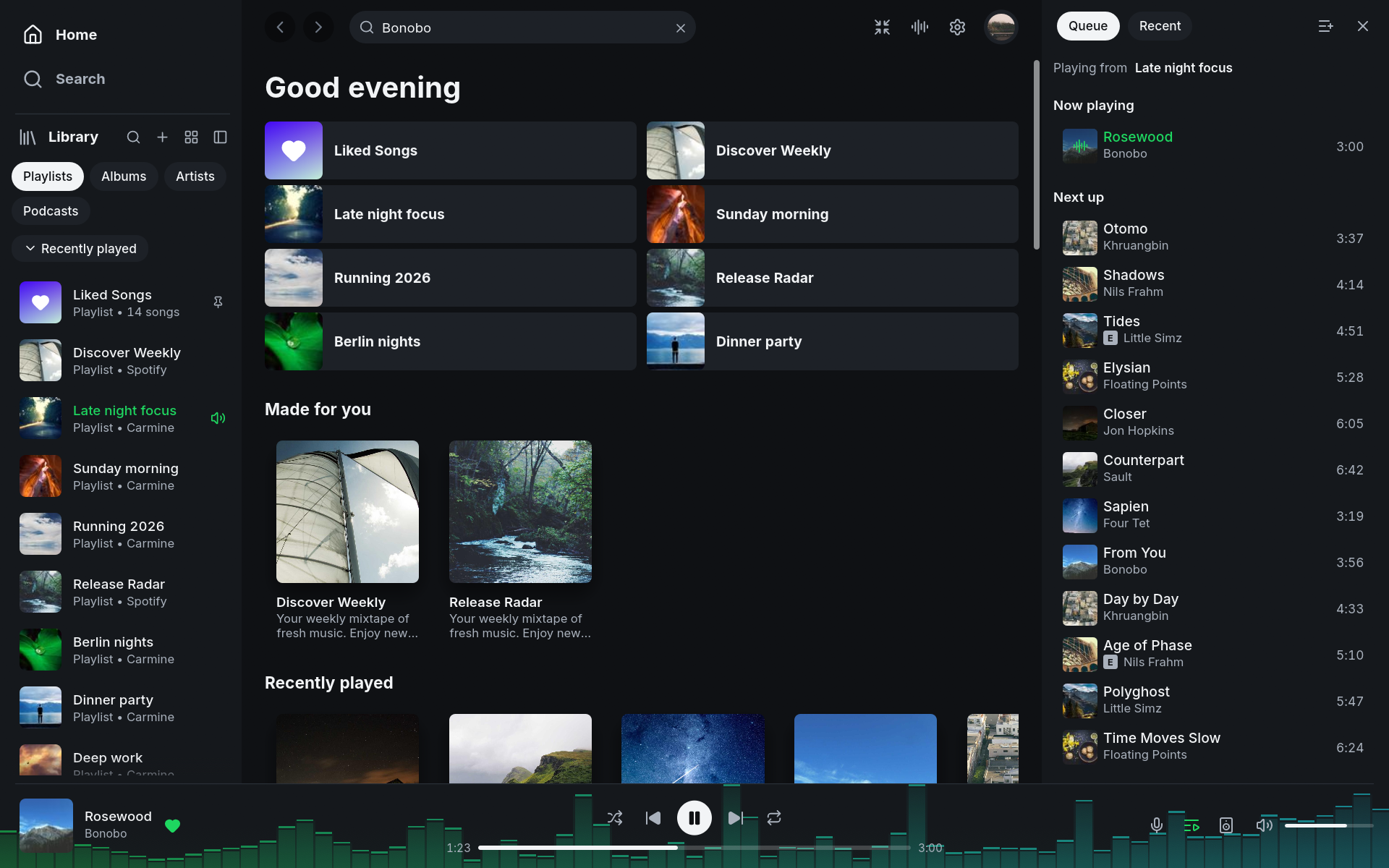
 Fastpotify is a lightweight, native Spotify client written in Rust with the egui toolkit, playing music through librespot while using a fraction of the RAM of Spotify's official desktop app.
Fastpotify is a lightweight, native Spotify client written in Rust with the egui toolkit, playing music through librespot while using a fraction of the RAM of Spotify's official desktop app.Is this a separate Spotify client, or does it patch the official Spotify app?It is a standalone third-party desktop client, not a cracked or patched version of Spotify. It signs in through Spotify's real consent pages and keeps DRM intact rather than ripping tracks.
It is a standalone third-party desktop client, not a cracked or patched version of Spotify. It signs in through Spotify's real consent pages and keeps DRM intact rather than ripping tracks.Can I use it with a free Spotify account?You can browse and search with a free account, but actually playing music through Fastpotify — on this computer or on another device — requires a Spotify Premium subscription.
You can browse and search with a free account, but actually playing music through Fastpotify — on this computer or on another device — requires a Spotify Premium subscription.Can it control speakers and other devices, or only play locally?It also acts as a remote — it finds librespot, spotifyd, and compatible hardware receivers over mDNS, and you can move playback to them and keep controlling it from Fastpotify's device picker.
It also acts as a remote — it finds librespot, spotifyd, and compatible hardware receivers over mDNS, and you can move playback to them and keep controlling it from Fastpotify's device picker.Does signing in through Fastpotify risk getting my Spotify account suspended?The maintainers say they are not aware of any account suspensions from using Fastpotify or another librespot-based player with Premium, since it uses official sign-in, standard Premium audio quality, and intact DRM.
The maintainers say they are not aware of any account suspensions from using Fastpotify or another librespot-based player with Premium, since it uses official sign-in, standard Premium audio quality, and intact DRM.Does Fastpotify ever see my Spotify password?No — signing in opens Spotify's own consent page using Authorization Code with PKCE, so Fastpotify never handles your password, and the resulting tokens are stored in your OS's secure credential store.
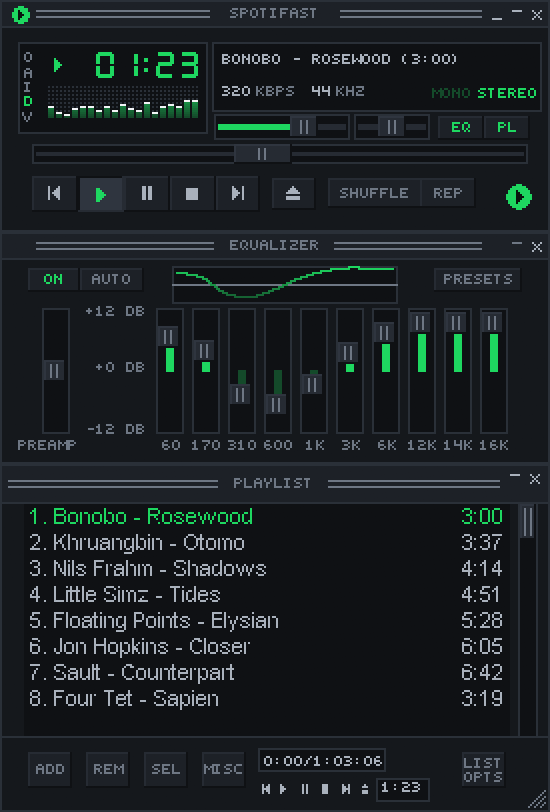
No — signing in opens Spotify's own consent page using Authorization Code with PKCE, so Fastpotify never handles your password, and the resulting tokens are stored in your OS's secure credential store.What is the Winamp mini player feature?Ctrl+M opens a small classic-style player that loads real Winamp .wsz skins at 1x–4x scale, complete with a spectrum analyser, playlist, and ten-band equalizer.
Ctrl+M opens a small classic-style player that loads real Winamp .wsz skins at 1x–4x scale, complete with a spectrum analyser, playlist, and ten-band equalizer.What does MilkDrop add?It bundles the projectM visualiser in its own process, running in fullscreen and auto-downloading over 10,000 classic .milk presets (about 26 MB) on first use.
It bundles the projectM visualiser in its own process, running in fullscreen and auto-downloading over 10,000 classic .milk presets (about 26 MB) on first use.Can I control playback from a terminal or hotkey?Yes — on Linux it exposes itself as an MPRIS player so tools like playerctl work out of the box, while on macOS and Windows the fastpotify binary offers subcommands like next, play-pause, and like that talk to the running instance.
Yes — on Linux it exposes itself as an MPRIS player so tools like playerctl work out of the box, while on macOS and Windows the fastpotify binary offers subcommands like next, play-pause, and like that talk to the running instance.What happens when I close the window?Fastpotify keeps running in the system tray instead of quitting, so media keys and the tray icon keep controlling playback; you can make the close button quit instead from Settings.
Fastpotify keeps running in the system tray instead of quitting, so media keys and the tray icon keep controlling playback; you can make the close button quit instead from Settings.What are similar projects?spotatui, Omarchy-Spotify, spotifyd, Levyra-deepsound, spotify-tui, SimpMusic, openframe-saas-desktop, cliamp
spotatui, Omarchy-Spotify, spotifyd, Levyra-deepsound, spotify-tui, SimpMusic, openframe-saas-desktop, cliampWhich topics is it in?egui, playlist, spotify, linux-desktop, media-player, tray, music-player, lightweight, music, native, oauth, homebrew
egui, playlist, spotify, linux-desktop, media-player, tray, music-player, lightweight, music, native, oauth, homebrew