
agentic-inbox README

The project's README from github.com/cloudflare/agentic-inbox. As one markdown file: README.md.

Agentic Inbox

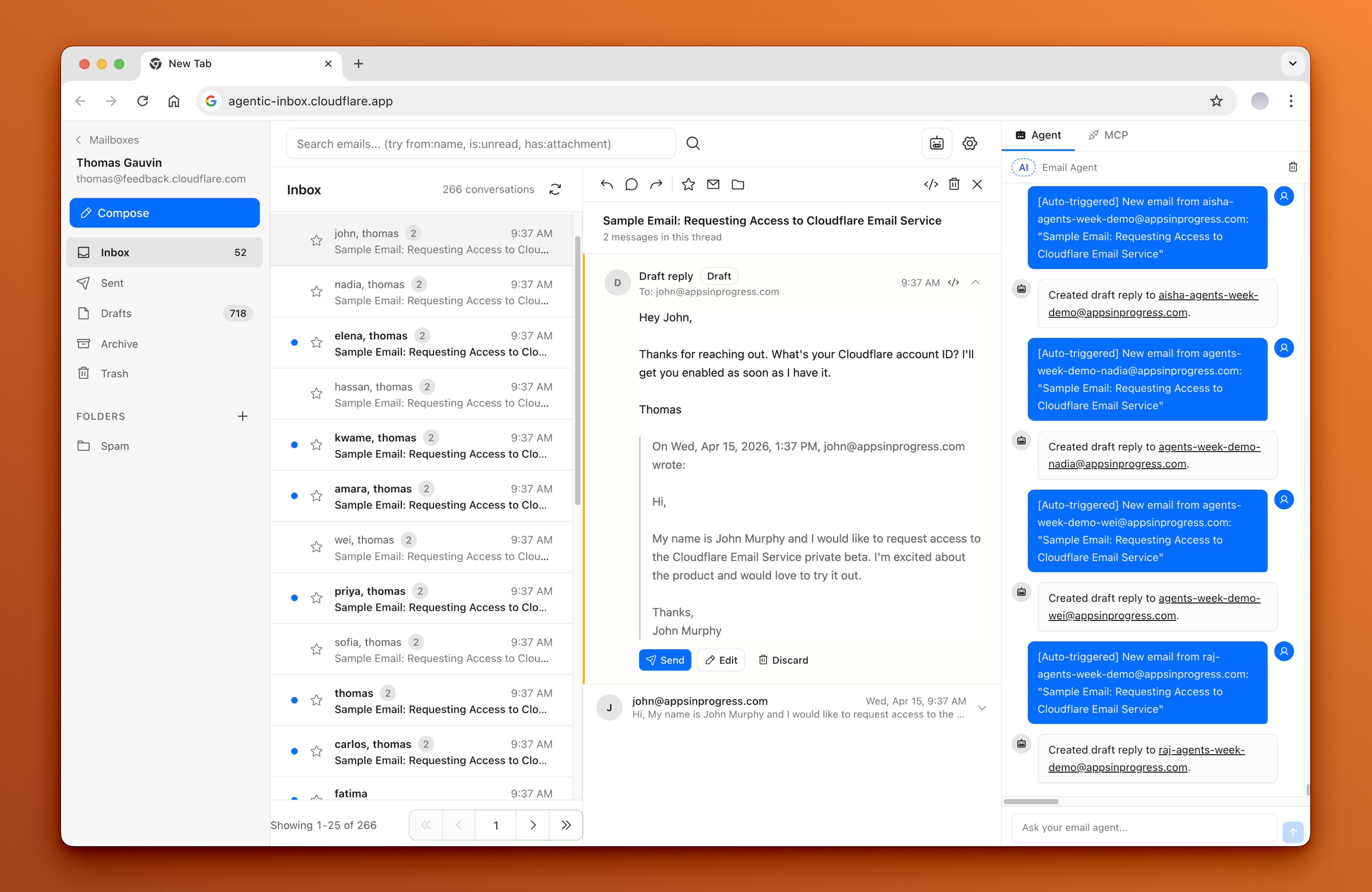
A self-hosted email client with an AI agent, running entirely on Cloudflare Workers

Agentic Inbox lets you send, receive, and manage emails through a modern web interface -- all powered by your own Cloudflare account. Incoming emails arrive via Cloudflare Email Routing, each mailbox is isolated in its own Durable Object with a SQLite database, and attachments are stored in R2.

An AI-powered Email Agent can read your inbox, search conversations, and draft replies -- built with the Cloudflare Agents SDK and Workers AI.

Agentic Inbox screenshot

Read the blog post to learn more about Cloudflare Email Service and how to use it with the Agents SDK, MCP, and from the Wrangler CLI: Email for Agents.

How to setup

Important: Clicking the 'Deploy to Cloudflare' button is only one part of the setup. You must follow the After deploying steps as well. For a full step-by-step guide with screenshots, refer to this comment: https://github.com/cloudflare/agentic-inbox/issues/4#issuecomment-4269118513

To set up

  1. Deploy to Cloudflare. The deploy flow will automatically provision R2, Durable Objects, and Workers AI. You'll be prompted for DOMAINS, which is the domain (yourdomain.com) you want to receive emails for ([email protected]).

    Deploy to Cloudflare

  2. Configure Cloudflare Access -- Enable one-click Cloudflare Access on your Worker under Settings > Domains & Routes. The modal will show your POLICY_AUD and TEAM_DOMAIN values. TEAM_DOMAIN can be either your Access team URL or the full .../cdn-cgi/access/certs URL. You must set these as secrets for your Worker.

  3. Set up Email Routing -- In the Cloudflare dashboard, go to your domain > Email Routing and create a catch-all rule that forwards to this Worker

  4. Enable Email Service -- The worker needs the send_email binding to send outbound emails. See Email Service docs

  5. Create a mailbox -- Visit your deployed app and create a mailbox for any address on your domain (e.g. [email protected])

Troubleshooting Access

  1. If you see Invalid or expired Access token, that usually means POLICY_AUD or TEAM_DOMAIN secrets are incorrect.
  2. If you see Cloudflare Access must be configured in production, this application is intentionally enforcing Cloudflare Access so your inbox is not exposed to anyone on the internet.

Features

Stack

Getting Started

npm install
npm run dev

Configuration

  1. Set your domain in wrangler.jsonc
  2. Create an R2 bucket named agentic-inbox: wrangler r2 bucket create agentic-inbox

Deploy

npm run deploy

Prerequisites

Any user who passes the shared Cloudflare Access policy can access all mailboxes in this app by design. This includes the MCP server at /mcp -- external AI tools (Claude Code, Cursor, etc.) connected via MCP can operate on any mailbox by passing a mailboxId parameter. There is no per-mailbox authorization; the Cloudflare Access policy is the single trust boundary.

Architecture

┌──────────────┐     ┌──────────────────┐     ┌─────────────────┐
│   Browser    │────>│  Hono Worker     │────>│  MailboxDO      │
│  React SPA   │     │  (API + SSR)     │     │  (SQLite + R2)  │
│  Agent Panel │     │                  │     └─────────────────┘
└──────┬───────┘     │  /agents/* ──────┼────>┌─────────────────┐
       │             │                  │     │  EmailAgent DO  │
       │ WebSocket   │                  │     │  (AIChatAgent)  │
       └─────────────┤                  │     │  9 email tools  │
                     │                  │────>│  Workers AI     │
                     └──────────────────┘     └─────────────────┘

License

Apache 2.0 -- see LICENSE.

agentic-inbox (cloudflare/agentic-inbox)

Searching Database…

这是什么?Agentic Inbox 是一款可自托管的邮件客户端,内置 AI 智能体,完全运行在你自己的 Cloudflare 账户上,使用 Cloudflare Workers、Durable Objects、R2 存储和 Workers AI。
我该怎么让它运行起来?点击 'Deploy to Cloudflare' 按钮,它会自动配置 R2、Durable Objects 和 Workers AI。之后你还需要手动完成部署后的步骤:配置 Cloudflare Access、设置 Email Routing 的 catch-all 规则、启用 Email Service,并创建一个邮箱。
部署它之前我需要准备什么?一个带有自有域名的 Cloudflare 账户,需启用 Email Routing 用于收信,启用 Email Service 用于发信,并启用 Workers AI 以便智能体运行。
点击 'Deploy to Cloudflare' 就能完成全部设置吗?不能。部署只会配置基础设施。你仍需完成部署后的步骤,而且 Cloudflare Access 是强制启用的,如果没有配置,应用在生产环境中将拒绝运行。
通过我 Cloudflare Access 策略的人能看到所有邮箱吗?能。应用没有针对单个邮箱的授权机制,因此任何通过共享 Access 策略的用户(包括通过 /mcp 端点连接的外部 AI 工具)都可以访问应用中的所有邮箱。
内置 AI 智能体实际能做什么?它有 9 个邮件工具,可用于读取、搜索、起草和发送邮件;它还会自动为新收到的邮件生成草稿回复,实际发送前始终需要明确确认。
我能把 Claude Code 或 Cursor 之类的外部 AI 工具连接到我的收件箱吗?可以。应用在 /mcp 运行一个 MCP 服务器,外部 AI 工具可以连接它,并通过传入 mailboxId 参数操作任意邮箱。
为什么每个邮箱都有自己的 Durable Object?为了隔离。每个邮箱都运行在自己的 Durable Object 中,拥有独立的 SQLite 数据库,而附件则单独存储在 R2 中。
哪个 AI 模型驱动这个智能体?该智能体基于 Cloudflare Agents SDK 构建,使用 Workers AI 模型 @cf/moonshotai/kimi-k2.5。
Creator
cloudflare
Size
3.4 MB
Stars
8.3K
Updated
CommitApr 17
Age
6mo
Commits · 90 Days