8.4K ·GitHub
Что это такое?
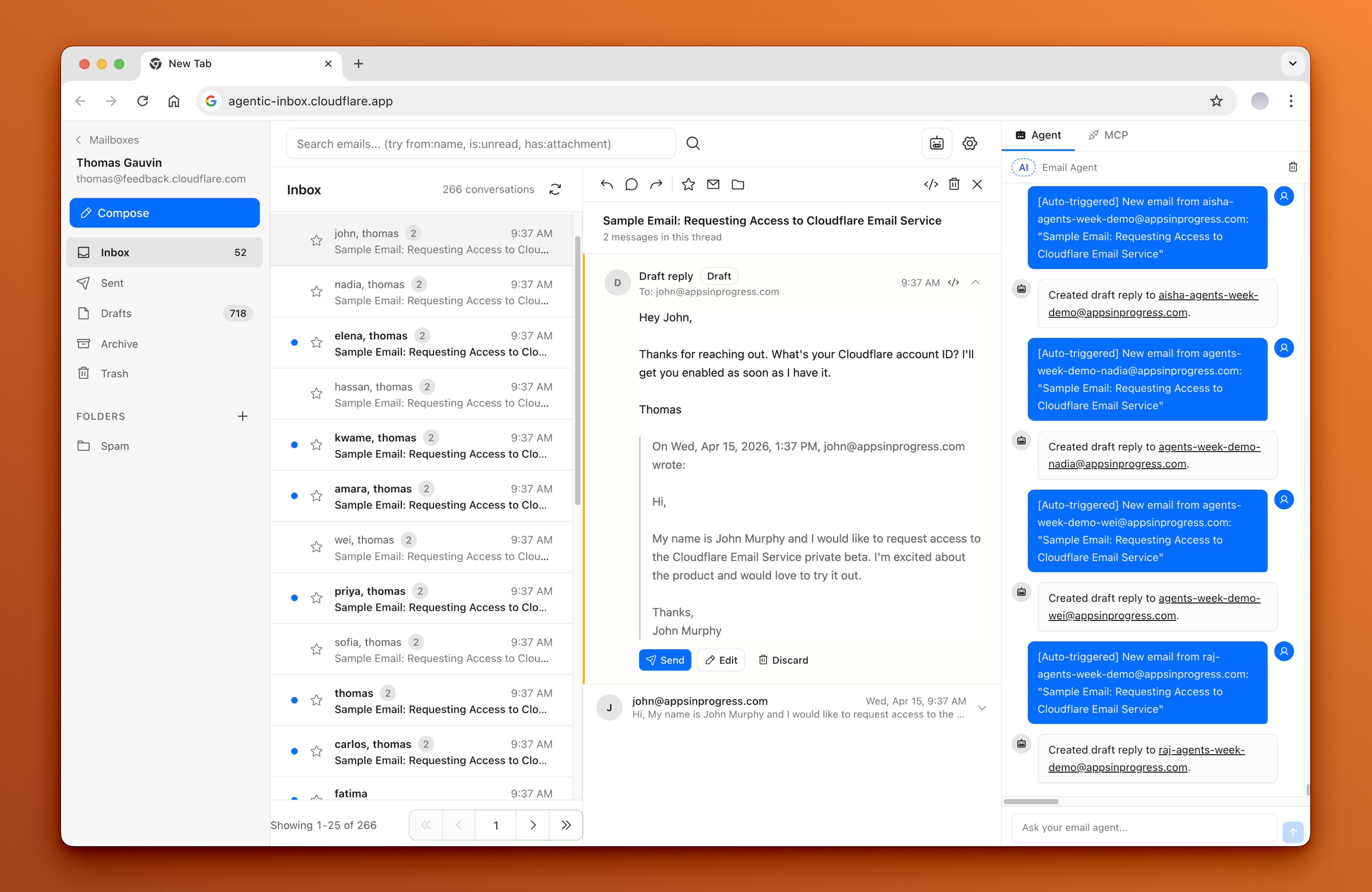
 Agentic Inbox — это почтовый клиент, который вы размещаете у себя, со встроенным ИИ-агентом. Он работает полностью в вашем собственном аккаунте Cloudflare и использует Cloudflare Workers, Durable Objects, хранилище R2 и Workers AI.
Agentic Inbox — это почтовый клиент, который вы размещаете у себя, со встроенным ИИ-агентом. Он работает полностью в вашем собственном аккаунте Cloudflare и использует Cloudflare Workers, Durable Objects, хранилище R2 и Workers AI.Как это запустить?Нажмите кнопку 'Deploy to Cloudflare': она автоматически подключит R2, Durable Objects и Workers AI. Затем нужно вручную выполнить шаги после развёртывания: настроить Cloudflare Access, создать правило catch-all в Email Routing, включить Email Service и создать почтовый ящик.
Нажмите кнопку 'Deploy to Cloudflare': она автоматически подключит R2, Durable Objects и Workers AI. Затем нужно вручную выполнить шаги после развёртывания: настроить Cloudflare Access, создать правило catch-all в Email Routing, включить Email Service и создать почтовый ящик.Что нужно иметь до развёртывания?Аккаунт Cloudflare со своим доменом, включённый Email Routing для получения писем, включённый Email Service для отправки и включённый Workers AI, чтобы агент мог работать.
Аккаунт Cloudflare со своим доменом, включённый Email Routing для получения писем, включённый Email Service для отправки и включённый Workers AI, чтобы агент мог работать.Полностью ли настраивает приложение нажатие 'Deploy to Cloudflare'?Нет — развёртывание только создаёт инфраструктуру. Шаги после развёртывания всё равно нужно выполнить. Кроме того, Cloudflare Access обязателен: если он не настроен, приложение откажется запускаться в продакшене.
Нет — развёртывание только создаёт инфраструктуру. Шаги после развёртывания всё равно нужно выполнить. Кроме того, Cloudflare Access обязателен: если он не настроен, приложение откажется запускаться в продакшене.Может ли любой, кто проходит мою политику Cloudflare Access, увидеть все почтовые ящики?Да — авторизации для каждого ящика отдельно нет, поэтому любой пользователь, прошедший общую политику Access (в том числе внешние ИИ-инструменты, подключённые через эндпоинт /mcp), может получить доступ ко всем ящикам в приложении.
Да — авторизации для каждого ящика отдельно нет, поэтому любой пользователь, прошедший общую политику Access (в том числе внешние ИИ-инструменты, подключённые через эндпоинт /mcp), может получить доступ ко всем ящикам в приложении.Что на самом деле умеет встроенный ИИ-агент?У него есть 9 инструментов для работы с почтой: чтение, поиск, составление и отправка сообщений. Он также автоматически готовит черновик ответа на новые входящие письма, а перед фактической отправкой всегда требует явного подтверждения.
У него есть 9 инструментов для работы с почтой: чтение, поиск, составление и отправка сообщений. Он также автоматически готовит черновик ответа на новые входящие письма, а перед фактической отправкой всегда требует явного подтверждения.Можно ли подключить к моему почтовому ящику внешние ИИ-инструменты, например Claude Code или Cursor?Да — приложение запускает MCP-сервер по адресу /mcp, поэтому внешние ИИ-инструменты могут подключаться и работать с любым ящиком, передавая параметр mailboxId.
Да — приложение запускает MCP-сервер по адресу /mcp, поэтому внешние ИИ-инструменты могут подключаться и работать с любым ящиком, передавая параметр mailboxId.Зачем каждому ящику отдельный Durable Object?Для изоляции: каждый ящик работает в своём Durable Object со своей базой данных SQLite, а вложения хранятся отдельно в R2.
Для изоляции: каждый ящик работает в своём Durable Object со своей базой данных SQLite, а вложения хранятся отдельно в R2.Какая ИИ-модель работает внутри агента?Агент построен на Cloudflare Agents SDK и использует модель Workers AI @cf/moonshotai/kimi-k2.5.
Агент построен на Cloudflare Agents SDK и использует модель Workers AI @cf/moonshotai/kimi-k2.5.What are similar projects?codflow, DoulorCloud, company-brain, crm, talorys, moltworker, emdash, cloudflare-os
codflow, DoulorCloud, company-brain, crm, talorys, moltworker, emdash, cloudflare-osWhich topics is it in?jwt, cloudflare-workers, serverless, storage, email, cloudflare, tailwindcss, authentication, sqlite, cloud, mcp-server, web-app
jwt, cloudflare-workers, serverless, storage, email, cloudflare, tailwindcss, authentication, sqlite, cloud, mcp-server, web-app