



















75.4K ·GitHub
What is this?
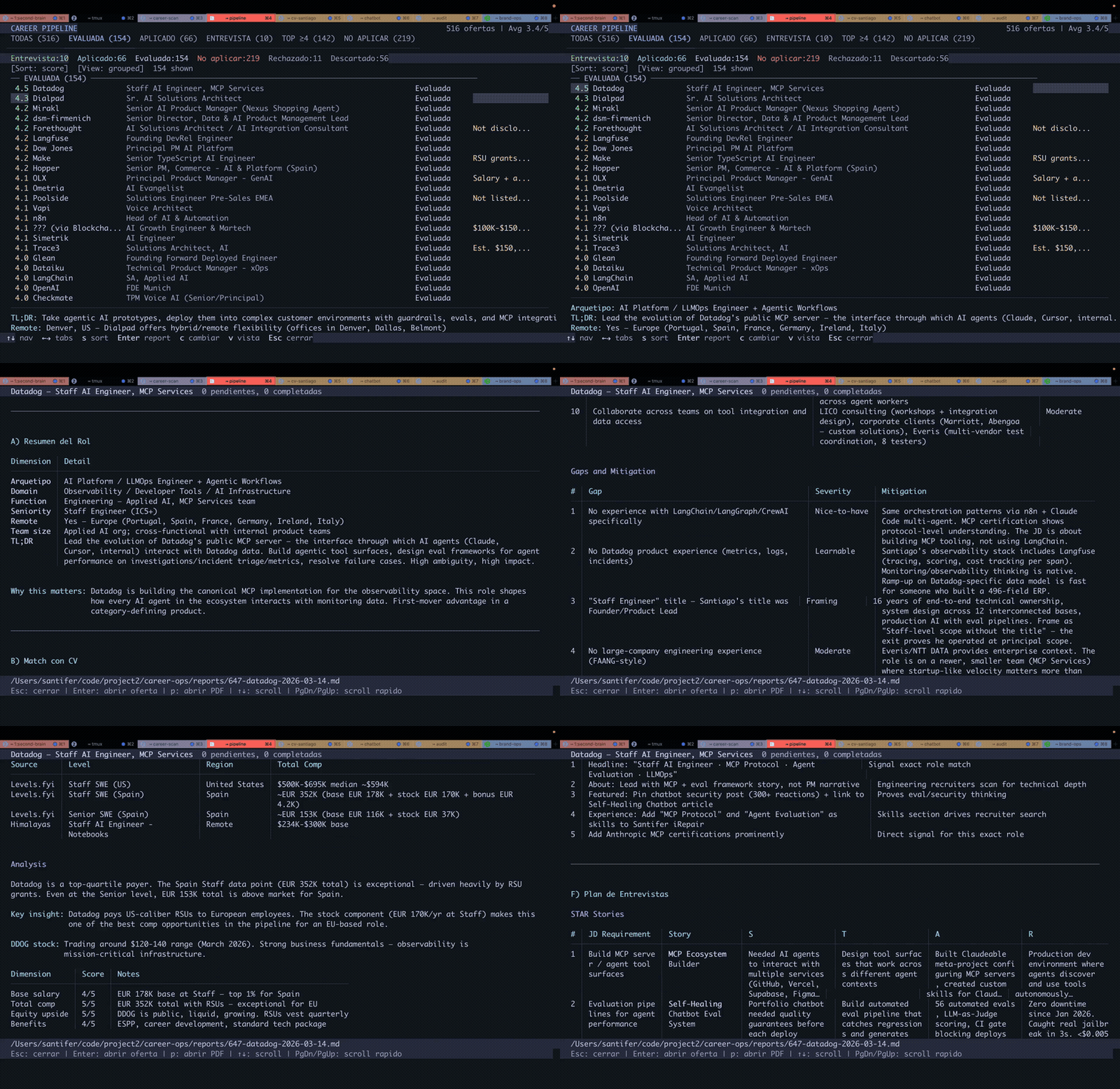
 career-ops is an open-source AI job search agent that runs locally inside your AI coding CLI (Claude Code, Codex, OpenCode and more) to scan job boards, score each job 1-5 against your CV, tailor a resume and cover letter per listing, and track every application — but you always press Submit yourself.
career-ops is an open-source AI job search agent that runs locally inside your AI coding CLI (Claude Code, Codex, OpenCode and more) to scan job boards, score each job 1-5 against your CV, tailor a resume and cover letter per listing, and track every application — but you always press Submit yourself.Is this a standalone app or does it live inside another tool?It's an agent skill package, not a standalone app you open — your existing AI coding CLI (Claude Code, Codex, OpenCode, Antigravity, Gemini CLI, etc.) loads it and runs its slash commands and scripts for you.
It's an agent skill package, not a standalone app you open — your existing AI coding CLI (Claude Code, Codex, OpenCode, Antigravity, Gemini CLI, etc.) loads it and runs its slash commands and scripts for you.How do I get it running?Run 'npx @santifer/career-ops init' — it clones the latest release into ./career-ops and installs dependencies; on first launch it walks you through setting up your CV, profile and target roles just by chatting. For a persistent command instead of npx, run 'npm i -g @santifer/career-ops'.
Run 'npx @santifer/career-ops init' — it clones the latest release into ./career-ops and installs dependencies; on first launch it walks you through setting up your CV, profile and target roles just by chatting. For a persistent command instead of npx, run 'npm i -g @santifer/career-ops'.Which coding agents does it work with, and what else do I need?You need Node.js (npx ships with it) and an AI coding CLI that supports agent skills — Claude Code, Codex, OpenCode, Antigravity CLI, Gemini CLI, Grok Build and other agent-skill-standard CLIs are all supported. Under the hood it uses Playwright to navigate job portals.
You need Node.js (npx ships with it) and an AI coding CLI that supports agent skills — Claude Code, Codex, OpenCode, Antigravity CLI, Gemini CLI, Grok Build and other agent-skill-standard CLIs are all supported. Under the hood it uses Playwright to navigate job portals.Does it submit job applications for me?No — career-ops only evaluates, drafts, and recommends; you always have the final call and press Submit yourself. It explicitly never sends emails or clicks an apply button, and it tells you not to apply to anything scoring below 4.0/5.
No — career-ops only evaluates, drafts, and recommends; you always have the final call and press Submit yourself. It explicitly never sends emails or clicks an apply button, and it tells you not to apply to anything scoring below 4.0/5.Who is this built for?Job seekers who want an AI-driven filter instead of spray-and-pray applying — it's aimed at people willing to feed it their CV and career context so it can learn their profile and improve its scoring over time.
Job seekers who want an AI-driven filter instead of spray-and-pray applying — it's aimed at people willing to feed it their CV and career context so it can learn their profile and improve its scoring over time.Can I run this on Windows, Mac or Linux?Yes — it's a Node.js CLI package that installs via npx/npm, so it runs cross-platform wherever Node 18+ and your AI coding CLI are available; a Docker setup is also provided.
Yes — it's a Node.js CLI package that installs via npx/npm, so it runs cross-platform wherever Node 18+ and your AI coding CLI are available; a Docker setup is also provided.What does the A-H evaluation report actually contain?It covers role summary, CV match with per-requirement importance weighting, level strategy, comp research, personalization, STAR+R interview prep, a posting-legitimacy check that flags scams and ghost jobs, and a work-authorization blocker check — reaching a single holistic 1-5 score.
It covers role summary, CV match with per-requirement importance weighting, level strategy, comp research, personalization, STAR+R interview prep, a posting-legitimacy check that flags scams and ghost jobs, and a work-authorization blocker check — reaching a single holistic 1-5 score.Can I run career-ops for free or on a budget?Yes — docs/RUNNINGONABUDGET.md covers using cheap or local models, and docs/FREETIER.md documents running it at zero cost on Antigravity CLI's free tier.
Yes — docs/RUNNINGONABUDGET.md covers using cheap or local models, and docs/FREETIER.md documents running it at zero cost on Antigravity CLI's free tier.Does it only find jobs, or also help with interviews and negotiation?Beyond scanning and tailoring CVs, it builds an interview story bank (STAR+Reflection), runs interview prep and debriefs, generates salary negotiation scripts, and analyzes a contract's clauses before you accept an offer.
Beyond scanning and tailoring CVs, it builds an interview story bank (STAR+Reflection), runs interview prep and debriefs, generates salary negotiation scripts, and analyzes a contract's clauses before you accept an offer.How does it find jobs to evaluate?It scans 100+ pre-configured companies (Anthropic, OpenAI, ElevenLabs, Retool, n8n, etc.) plus custom queries across Ashby, Greenhouse, Lever, Wellfound and company career pages using Playwright.
It scans 100+ pre-configured companies (Anthropic, OpenAI, ElevenLabs, Retool, n8n, etc.) plus custom queries across Ashby, Greenhouse, Lever, Wellfound and company career pages using Playwright.What are similar projects?ai-job-search, job-application-agent, Resume-Matcher, Awesome-CV, rendercv, ASu-skills, get_jobs, pinloop-cli
ai-job-search, job-application-agent, Resume-Matcher, Awesome-CV, rendercv, ASu-skills, get_jobs, pinloop-cliWhich topics is it in?job-hunting, cv, interview-prep, resume, latex, job-search, playwright, career, cli-tool, local-first, ai-agent, agent-skills
job-hunting, cv, interview-prep, resume, latex, job-search, playwright, career, cli-tool, local-first, ai-agent, agent-skills