Live website: https://www.crucix.live/
Explore the public demo first, then clone the repo to run Crucix locally.
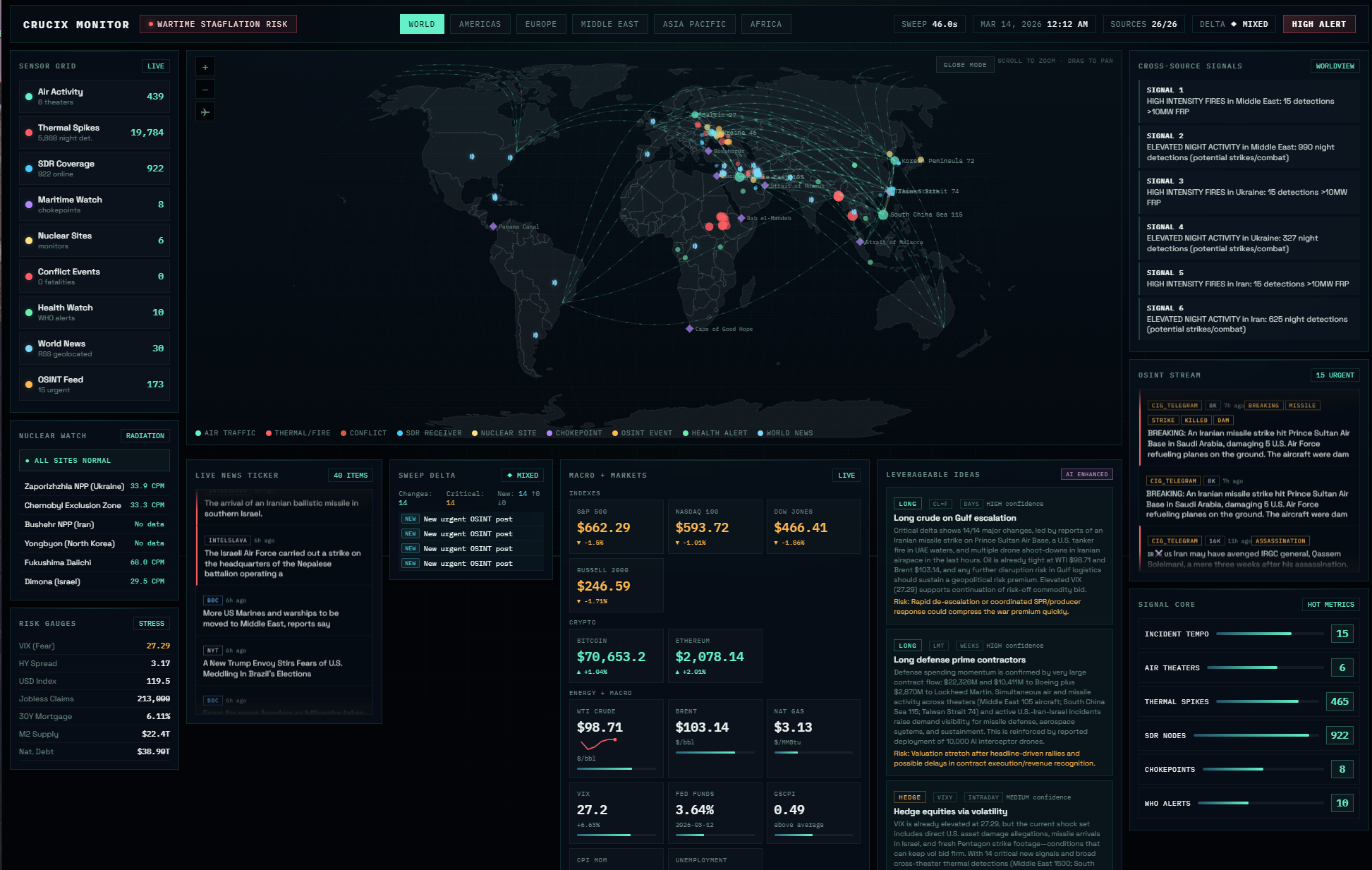
Crucix pulls satellite fire detection, flight tracking, radiation monitoring, satellite constellation tracking, economic indicators, live market prices, conflict data, sanctions lists, and social sentiment from 27 open-source intelligence feeds — in parallel, every 15 minutes — and renders everything on a single self-contained Jarvis-style dashboard.
Hook it up to an LLM and it becomes a two-way intelligence assistant — pushing multi-tier alerts to Telegram and Discord when something meaningful changes, responding to commands like /brief and /sweep from your phone, and generating actionable trade ideas grounded in real cross-domain data. Your own analyst that watches the world while you sleep.
Try the live demo first at https://www.crucix.live/, then clone the repo when you want the full local stack.
No cloud. No telemetry. No subscriptions. Just node server.mjs and you're running.
Token / Asset Warning
[!WARNING]
Crucix has not launched any official token, coin, NFT, airdrop, presale, or other blockchain-based asset.
Any token or digital asset using the Crucix name, logo, or branding is not affiliated with or endorsed by Crucix.
Do not buy it, promote it, connect a wallet to claim it, sign transactions, or send funds based on third-party posts, DMs, or websites.
Why This Exists
Most of the world's real-time intelligence — satellite imagery, radiation levels, conflict events, economic indicators, flight tracking, maritime activity — is publicly available. It's just scattered across dozens of government APIs, research institutions, and open data feeds that nobody has time to check individually.
Crucix brings it all into one place. Not behind a paywall, not locked in an enterprise platform, not requiring a security clearance. Just open data, aggregated and cross-correlated on your own machine, updated every 15 minutes.
It was built for anyone who wants to understand what's actually happening in the world right now — researchers, journalists, traders, OSINT analysts, or just curious people who believe access to information shouldn't depend on your budget.
Quick Start
# 1. Clone the repo
git clone https://github.com/calesthio/Crucix.git
cd Crucix

# 2. Install dependencies (just Express)
npm install

# 3. Copy env template and add your API keys (see below)
cp .env.example .env

# 4. Start the dashboard
npm run dev
If npm run dev fails silently (exits with no output), run Node directly instead:
node --trace-warnings server.mjs
This bypasses npm's script runner, which can swallow errors on some systems (particularly PowerShell on Windows). You can also run node diag.mjs to diagnose the exact issue — it checks your Node version, tests each module import individually, and verifies port availability. See Troubleshooting for more.
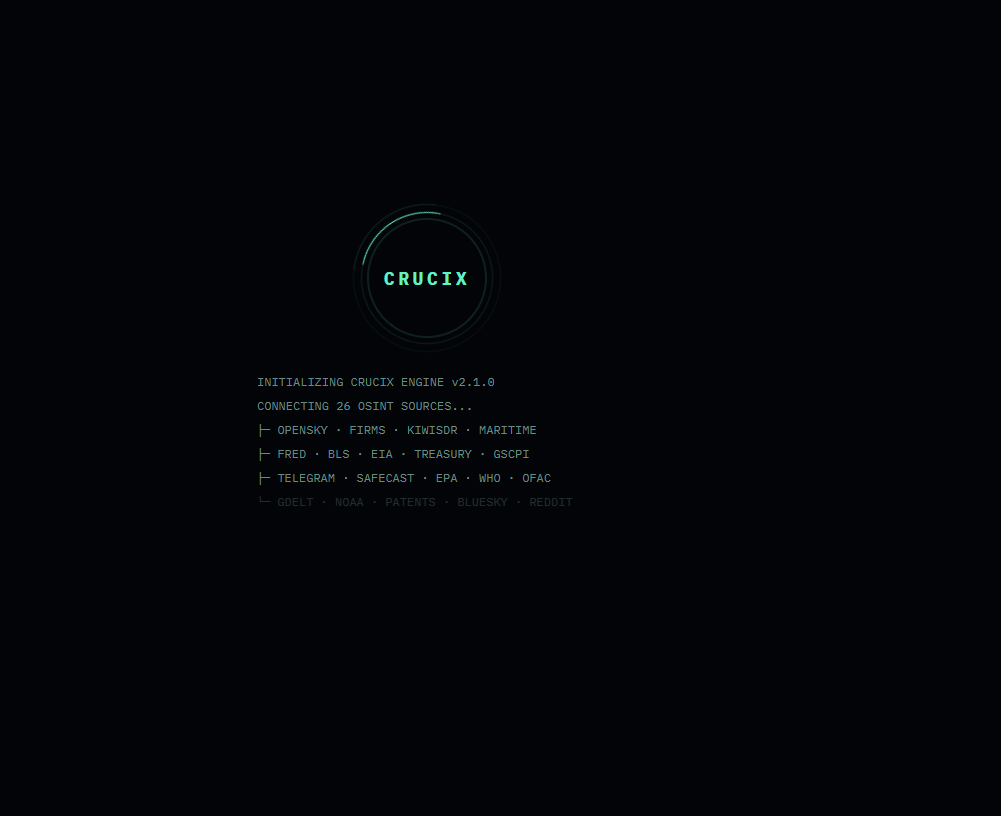
The dashboard opens automatically at http://localhost:3117 and immediately begins its first intelligence sweep. This initial sweep queries all 27 sources in parallel and typically takes 30–60 seconds — the dashboard will appear empty until the sweep completes and pushes the first data update. After that, it auto-refreshes every 15 minutes via SSE (Server-Sent Events). No manual page refresh needed.
Requirements: Node.js 22+ (uses native fetch, top-level await, ESM)
Docker
git clone https://github.com/calesthio/Crucix.git
cd Crucix
cp .env.example .env    # add your API keys
docker compose up -d
Dashboard at http://localhost:3117. Sweep data persists in ./runs/ via volume mount. Includes a health check endpoint.
What You Get
Live Dashboard
A self-contained Jarvis-style HUD with:
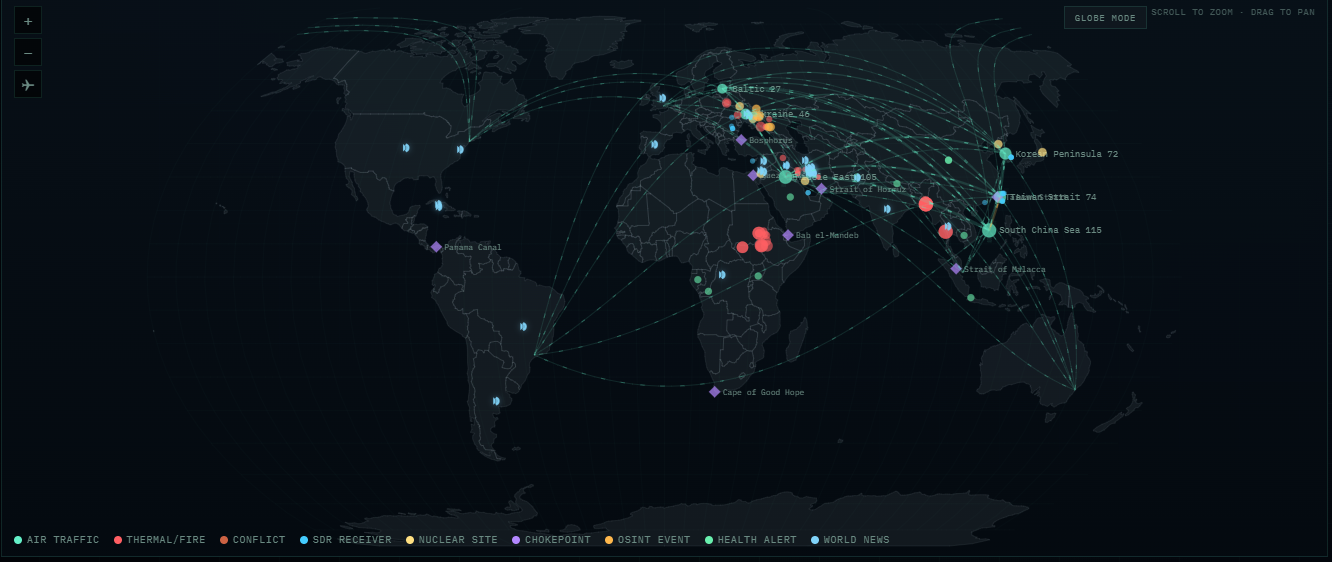
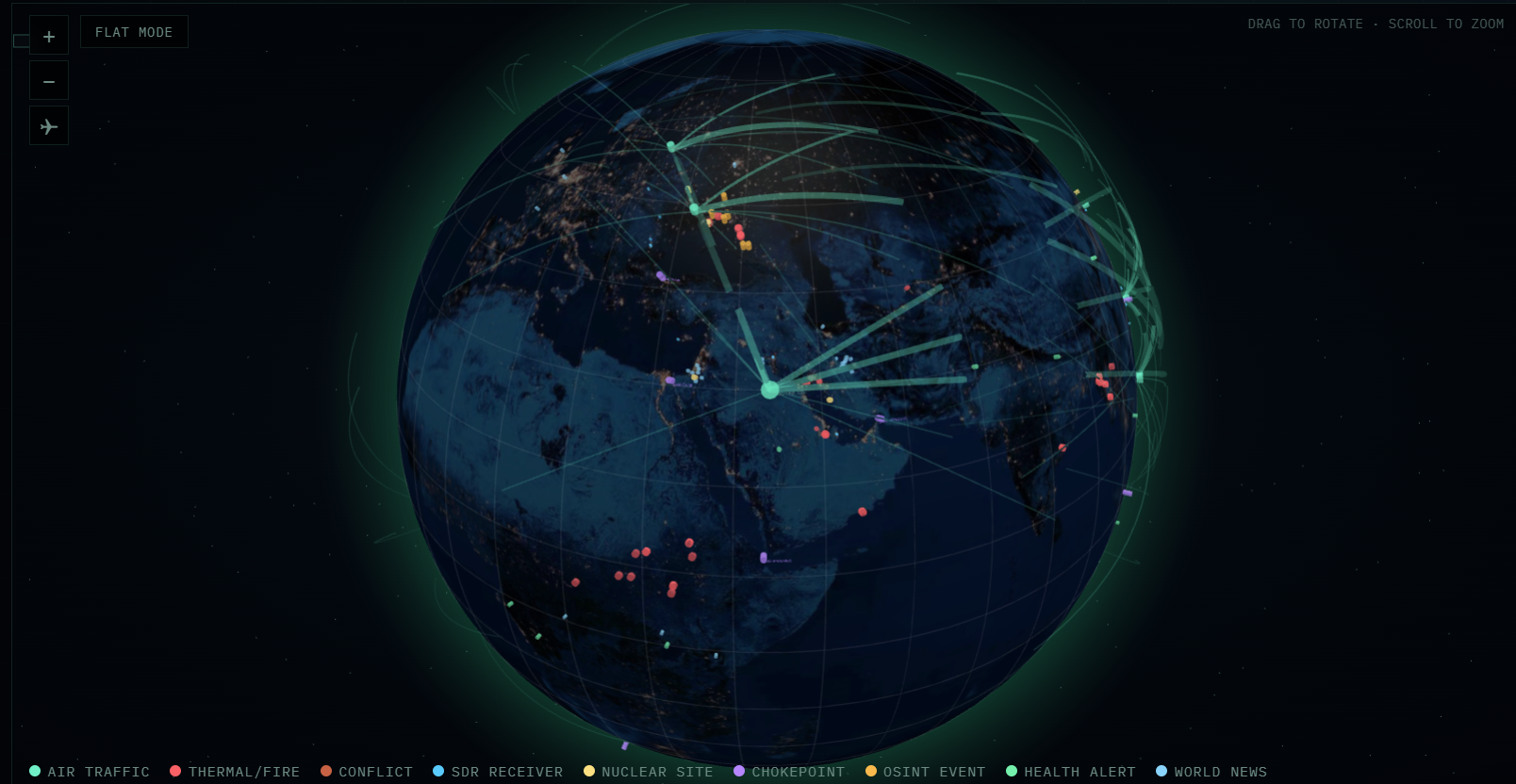
- 3D WebGL globe (Globe.gl) with atmosphere glow, star field, and smooth rotation — plus a classic flat map toggle
- 9 marker types across both views: fire detections, air traffic, radiation sites, maritime chokepoints, SDR receivers, OSINT events, health alerts, geolocated news, conflict events
- Animated 3D flight corridor arcs between air traffic hotspots and global hubs
- Region filters (World, Americas, Europe, Middle East, Asia Pacific, Africa) — rotates the globe or zooms the flat map
- Live market data — indexes, crypto, energy, commodities via Yahoo Finance (no API key needed)
- Risk gauges — VIX, high-yield spread, supply chain pressure index
- OSINT feed — English-language posts from 17 Telegram intelligence channels (expandable)
- News ticker — merged RSS + GDELT headlines + Telegram posts, auto-scrolling
- Sweep delta — live panel showing what changed since last sweep (new signals, escalations, de-escalations with severity)
- Cross-source signals — correlated intelligence across satellite, economic, conflict, and social domains
- Nuclear watch — real-time radiation readings from Safecast + EPA RadNet
- Space watch — CelesTrak satellite tracking: recent launches, ISS, military constellations, Starlink/OneWeb counts
- Leverageable ideas — AI-generated trade ideas (with LLM) or signal-correlated ideas (without)
The VISUALS FULL / VISUALS LITE button in the top bar only changes rendering behavior - it does not remove data sources or reduce sweep coverage.
When you switch to VISUALS LITE, the dashboard:
- Disables decorative background effects such as the radial/grid overlays and scanlines
- Removes expensive blur/backdrop-filter effects on panels and overlays
- Stops non-essential animations like the logo ring blink, conflict rings, and corridor flow effects
- Disables globe auto-rotation and turns off animated flight-arc dashes
- Converts the horizontal news ticker and OSINT stream into static, scrollable lists instead of continuously animated marquees
Mobile-specific behavior:
- On mobile,
VISUALS LITE also forces the dashboard into flat map mode if you are currently on the globe
- Future mobile loads will continue to start flat while low-perf mode is enabled
The preference is saved in browser local storage, so the UI will remember your last setting.
Auto-Refresh
The server runs a sweep cycle every 15 minutes (configurable). Each cycle:
- Queries all 27 sources in parallel (~30s)
- Synthesizes raw data into dashboard format
- Computes delta from previous run (what changed, escalated, de-escalated) — visible in the Sweep Delta panel on the dashboard
- Generates LLM trade ideas (if configured)
- Evaluates breaking news alerts — multi-tier (FLASH / PRIORITY / ROUTINE) with semantic dedup. Sends to Telegram and/or Discord if configured. Works with LLM evaluation or falls back to rule-based alerting when LLM is unavailable.
- Pushes update to all connected browsers via SSE
Telegram Bot (Two-Way)
Crucix doubles as an interactive Telegram bot. Beyond sending alerts, it responds to commands directly from your chat:
| Command |
What It Does |
/status |
System health, last sweep time, source status, LLM status |
/sweep |
Trigger a manual sweep cycle |
/brief |
Compact text summary of the latest intelligence (direction, key metrics, top OSINT) |
/portfolio |
Portfolio status (if Alpaca connected) |
/alerts |
Recent alert history with tiers |
/mute / /mute 2h |
Silence alerts for 1h (or custom duration) |
/unmute |
Resume alerts |
/help |
Show all available commands |
This requires TELEGRAM_BOT_TOKEN and TELEGRAM_CHAT_ID in .env. The bot polls for messages every 5 seconds (configurable via TELEGRAM_POLL_INTERVAL).
Discord Bot (Two-Way)
Crucix also supports Discord as a full-featured bot with slash commands and rich embed alerts. It mirrors the Telegram bot's capabilities with Discord-native formatting.
| Command |
What It Does |
/status |
System health, last sweep time, source status, LLM status |
/sweep |
Trigger a manual sweep cycle |
/brief |
Compact text summary of the latest intelligence |
/portfolio |
Portfolio status (if Alpaca connected) |
Alerts are delivered as rich embeds with color-coded sidebars: red for FLASH, yellow for PRIORITY, blue for ROUTINE. Each embed includes signal details, confidence scores, and cross-domain correlations.
Setup requires: DISCORD_BOT_TOKEN, DISCORD_CHANNEL_ID, and optionally DISCORD_GUILD_ID for instant slash command registration. See API Keys Setup for details.
Webhook fallback: If you don't want to run a full bot, set DISCORD_WEBHOOK_URL instead. This enables one-way alerts (no slash commands) with zero dependencies — no discord.js needed.
Optional dependency: The full bot requires discord.js. Install it with npm install discord.js. If it's not installed, Crucix automatically falls back to webhook-only mode.
Optional LLM Layer
Connect any of 8 LLM providers for enhanced analysis:
- AI trade ideas — quantitative analyst producing 5-8 actionable ideas citing specific data
- Smarter alert evaluation — LLM classifies signals into FLASH/PRIORITY/ROUTINE tiers with cross-domain correlation and confidence scoring
- Providers: Anthropic Claude, OpenAI, Google Gemini, OpenRouter (Unified API), OpenAI Codex (ChatGPT subscription), MiniMax, Mistral, Grok
- Graceful fallback — when LLM is unavailable, a rule-based engine takes over alert evaluation. LLM failures never crash the sweep cycle.
API Keys Setup
Copy .env.example to .env at the project root:
cp .env.example .env
Required for Best Results (all free)
These three unlock the most valuable economic and satellite data. Each takes about 60 seconds to register.
Optional (enable additional sources)
| Key |
Source |
How to Get |
ACLED_EMAIL + ACLED_PASSWORD |
Armed conflict event data |
acleddata.com/register — free, OAuth2 |
AISSTREAM_API_KEY |
Maritime AIS vessel tracking |
aisstream.io — free |
ADSB_API_KEY |
Unfiltered flight tracking |
RapidAPI — ~$10/mo |
LLM Provider (optional, for AI-enhanced ideas)
Set LLM_PROVIDER to one of: anthropic, openai, gemini, codex, openrouter, minimax, mistral, grok
| Provider |
Key Required |
Default Model |
anthropic |
LLM_API_KEY |
claude-sonnet-4-6 |
openai |
LLM_API_KEY |
gpt-5.4 |
gemini |
LLM_API_KEY |
gemini-3.1-pro |
openrouter |
LLM_API_KEY |
openrouter/auto |
codex |
None (uses ~/.codex/auth.json) |
gpt-5.3-codex |
minimax |
LLM_API_KEY |
MiniMax-M2.5 |
mistral |
LLM_API_KEY |
mistral-large-latest |
grok |
LLM_API_KEY |
grok-4-latest |
For Codex, run npx @openai/codex login to authenticate via your ChatGPT subscription.
Telegram Bot + Alerts (optional)
| Key |
How to Get |
TELEGRAM_BOT_TOKEN |
Create via @BotFather on Telegram |
TELEGRAM_CHAT_ID |
Get via @userinfobot |
TELEGRAM_CHANNELS |
(Optional) Comma-separated extra channel IDs to monitor beyond the 17 built-in channels |
TELEGRAM_POLL_INTERVAL |
(Optional) Bot command polling interval in ms (default: 5000) |
Discord Bot + Alerts (optional)
| Key |
How to Get |
DISCORD_BOT_TOKEN |
Create at Discord Developer Portal → Bot → Token |
DISCORD_CHANNEL_ID |
Right-click channel in Discord (Developer Mode on) → Copy Channel ID |
DISCORD_GUILD_ID |
(Optional) Right-click server → Copy Server ID. Enables instant slash command registration (otherwise takes up to 1 hour for global commands) |
DISCORD_WEBHOOK_URL |
(Optional) Channel Settings → Integrations → Webhooks → New Webhook → Copy URL. Use this for alert-only mode without a bot |
Discord bot setup:
- Go to Discord Developer Portal and create a new application
- Go to Bot → click Reset Token → copy the token to
DISCORD_BOT_TOKEN
- Under Privileged Gateway Intents, enable Message Content Intent
- Go to OAuth2 → URL Generator → select
bot + applications.commands scopes → select Send Messages + Embed Links permissions
- Copy the generated URL and open it in your browser to invite the bot to your server
- Install the dependency:
npm install discord.js
Alerts work with or without an LLM on both Telegram and Discord. With an LLM configured, signal evaluation is richer and more context-aware. Without one, a deterministic rule engine evaluates signals based on severity, cross-domain correlation, and signal counts.
Without Any Keys
Crucix still works with zero API keys. 18+ sources require no authentication at all. Sources that need keys return structured errors and the rest of the sweep continues normally.
Architecture
crucix/
├── server.mjs                 # Express dev server (SSE, auto-refresh, LLM, bot commands)
├── crucix.config.mjs          # Configuration with env var overrides + delta thresholds
├── diag.mjs                   # Diagnostic script — run if server fails to start
├── .env.example               # All documented env vars
├── package.json               # Runtime: express | Optional: discord.js
├── docs/                      # Screenshots for README
│
├── apis/
│   ├── briefing.mjs           # Master orchestrator — runs all 27 sources in parallel
│   ├── save-briefing.mjs      # CLI: save timestamped + latest.json
│   ├── BRIEFING_PROMPT.md     # Intelligence synthesis protocol
│   ├── BRIEFING_TEMPLATE.md   # Briefing output structure
│   ├── utils/
│   │   ├── fetch.mjs          # safeFetch() — timeout, retries, abort, auto-JSON
│   │   └── env.mjs            # .env loader (no dotenv dependency)
│   └── sources/               # 27 self-contained source modules
│       ├── gdelt.mjs          # Each exports briefing() → structured data
│       ├── fred.mjs           # Can run standalone: node apis/sources/fred.mjs
│       ├── space.mjs          # CelesTrak satellite tracking
│       ├── yfinance.mjs       # Yahoo Finance — free live market data
│       └── ...                # 23 more
│
├── dashboard/
│   ├── inject.mjs             # Data synthesis + standalone HTML injection
│   └── public/
│       └── jarvis.html        # Self-contained Jarvis HUD
│
├── lib/
│   ├── llm/                   # LLM abstraction (8 providers, raw fetch, no SDKs)
│   │   ├── provider.mjs       # Base class
│   │   ├── anthropic.mjs      # Claude
│   │   ├── openai.mjs         # GPT
│   │   ├── gemini.mjs         # Gemini
│   │   ├── grok.mjs           # Grok
│   │   ├── openrouter.mjs     # OpenRouter (Unified API)
│   │   ├── codex.mjs          # Codex (ChatGPT subscription)
│   │   ├── minimax.mjs        # MiniMax (M2.5, 204K context)
│   │   ├── mistral.mjs        # Mistral AI
│   │   ├── ideas.mjs          # LLM-powered trade idea generation
│   │   └── index.mjs          # Factory: createLLMProvider()
│   ├── delta/                 # Change tracking between sweeps
│   │   ├── engine.mjs         # Delta computation — semantic dedup, configurable thresholds, severity scoring
│   │   ├── memory.mjs         # Hot memory (3 runs, atomic writes) + cold storage (daily archives)
│   │   └── index.mjs          # Re-exports
│   └── alerts/
│       ├── telegram.mjs       # Multi-tier alerts (FLASH/PRIORITY/ROUTINE) + two-way bot commands
│       └── discord.mjs        # Discord bot (slash commands, rich embeds) + webhook fallback
│
└── runs/                      # Runtime data (gitignored)
    ├── latest.json            # Most recent sweep output
    └── memory/                # Delta memory (hot.json + cold/YYYY-MM-DD.json)
Design Principles
- Pure ESM — every file is
.mjs with explicit imports
- Minimal dependencies — Express is the only runtime dependency.
discord.js is optional (for Discord bot). LLM providers use raw fetch(), no SDKs.
- Parallel execution —
Promise.allSettled() fires all 27 sources simultaneously
- Graceful degradation — missing keys produce errors, not crashes. LLM failures don't kill sweeps.
- Each source is standalone — run
node apis/sources/gdelt.mjs to test any source independently
- Self-contained dashboard — the HTML file works with or without the server
Data Sources (27)
Tier 1: Core OSINT & Geopolitical (11)
| Source |
What It Tracks |
Auth |
| GDELT |
Global news events, conflict mapping (100+ languages) |
None |
| OpenSky |
Real-time ADS-B flight tracking across 6 hotspot regions |
None |
| NASA FIRMS |
Satellite fire/thermal anomaly detection (3hr latency) |
Free key |
| Maritime/AIS |
Vessel tracking, dark ships, sanctions evasion |
Free key |
| Safecast |
Citizen-science radiation monitoring near 6 nuclear sites |
None |
| ACLED |
Armed conflict events: battles, explosions, protests |
Free (OAuth2) |
| ReliefWeb |
UN humanitarian crisis tracking |
None |
| WHO |
Disease outbreaks and health emergencies |
None |
| OFAC |
US Treasury sanctions (SDN list) |
None |
| OpenSanctions |
Aggregate |
|




-orange)





 Crucix is a self-hosted personal intelligence dashboard that aggregates 27 open-source intelligence feeds — satellite fire detection, flight tracking, radiation monitoring, conflict data, market prices, and OSINT social feeds — refreshing every 15 minutes, and it can alert you via Telegram or Discord when something meaningful changes.