

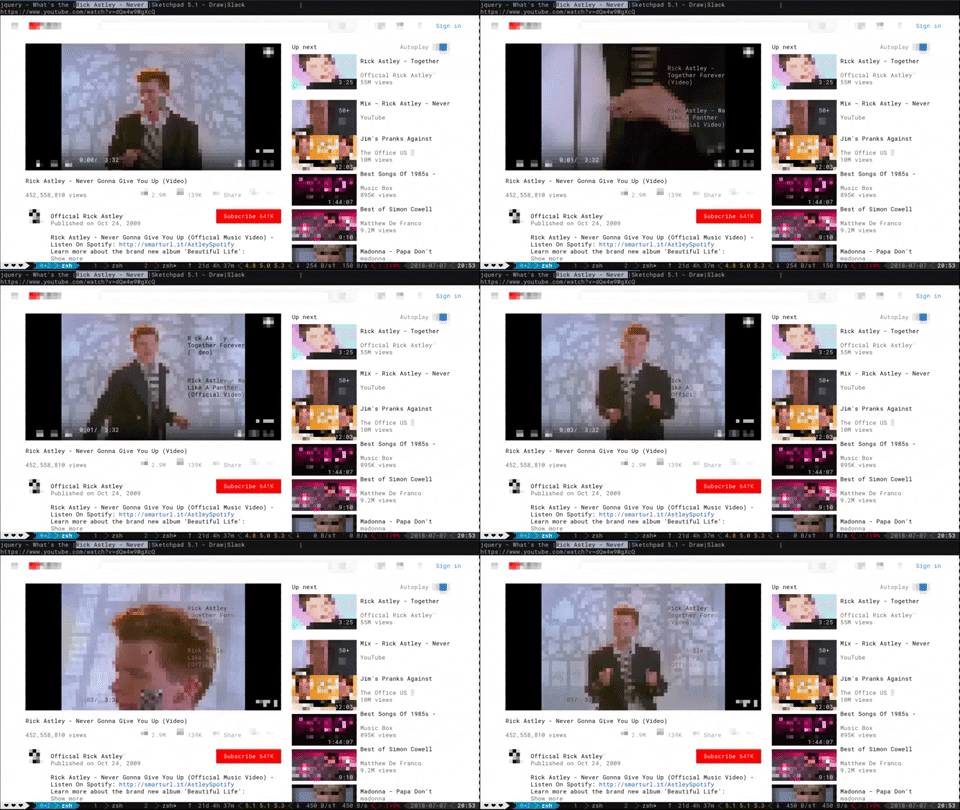
Что это такое?
 Browsh — это полностью современный текстовый браузер: он отображает настоящие веб-страницы и веб-приложения в виде чистого текста прямо в терминале, а в фоновом режиме всю работу выполняет headless Firefox.
Browsh — это полностью современный текстовый браузер: он отображает настоящие веб-страницы и веб-приложения в виде чистого текста прямо в терминале, а в фоновом режиме всю работу выполняет headless Firefox.То есть это как elinks или w3m, или что-то другое?Идея похожая, но классические текстовые браузеры не умеют в JS и современный HTML5. Browsh работает поверх настоящего браузера (headless Firefox), поэтому полноценно работают современные страницы и веб-приложения — просто на выходе получается текст.
Идея похожая, но классические текстовые браузеры не умеют в JS и современный HTML5. Browsh работает поверх настоящего браузера (headless Firefox), поэтому полноценно работают современные страницы и веб-приложения — просто на выходе получается текст.Как его запустить?Скачайте бинарник примерно на 11 МБ со страницы релизов (Firefox уже должен быть установлен на машине), либо вообще пропустите установку и возьмите Docker-образ на ~230 МБ: docker run --rm -it browsh/browsh
Скачайте бинарник примерно на 11 МБ со страницы релизов (Firefox уже должен быть установлен на машине), либо вообще пропустите установку и возьмите Docker-образ на ~230 МБ: docker run --rm -it browsh/browshОн умеет открываться и в обычном браузере — этот вариант по удобству такой же, как терминал?Пока нет: в README предупреждают, что браузерный клиент не имеет паритета функций с терминальным, так что полный опыт доступен именно в терминале.
Пока нет: в README предупреждают, что браузерный клиент не имеет паритета функций с терминальным, так что полный опыт доступен именно в терминале.Зачем вообще сидеть в интернете через терминал?В основном это люди с очень медленным интернетом: вы подключаетесь по SSH к серверу, Browsh скачивает там полные страницы, а по вашему соединению идёт только текст. Это ещё и разгружает ноутбук или слабую Raspberry Pi от работы браузера, который сажает батарею.
В основном это люди с очень медленным интернетом: вы подключаетесь по SSH к серверу, Browsh скачивает там полные страницы, а по вашему соединению идёт только текст. Это ещё и разгружает ноутбук или слабую Raspberry Pi от работы браузера, который сажает батарею.А можно работать через Mosh вместо обычного SSH?Да. Терминальный Browsh умеет использовать Mosh, чтобы ещё снизить трафик и держать сессию стабильной: после обрыва или смены сети соединение переподключается автоматически, а передаются только изменения экрана.
Да. Терминальный Browsh умеет использовать Mosh, чтобы ещё снизить трафик и держать сессию стабильной: после обрыва или смены сети соединение переподключается автоматически, а передаются только изменения экрана.Почему бы просто не использовать VNC при плохом соединении?Аргумент из самого README: VNC не справляется с очень плохим интернетом, а терминальному Browsh на клиентской стороне не нужно ничего, кроме SSH или Mosh. В придачу прожорливый по CPU браузер работает где-то в стороне, на сети от розетки.
Аргумент из самого README: VNC не справляется с очень плохим интернетом, а терминальному Browsh на клиентской стороне не нужно ничего, кроме SSH или Mosh. В придачу прожорливый по CPU браузер работает где-то в стороне, на сети от розетки.На чём Browsh устроен внутри?Из двух частей: веб-расширение для Firefox (JavaScript, собирается через npm и webpack), которое запускает нужный JS внутри страниц, чтобы Browsh мог их обрабатывать, и «интерфейсер» на Go, который запускается командой go run ./cmd/browsh --debug.
Из двух частей: веб-расширение для Firefox (JavaScript, собирается через npm и webpack), которое запускает нужный JS внутри страниц, чтобы Browsh мог их обрабатывать, и «интерфейсер» на Go, который запускается командой go run ./cmd/browsh --debug.What are similar projects?carbonyl, camofox-browser, xterm.js, hqtui, ArchiveBox, Surge, gotty, labtether
carbonyl, camofox-browser, xterm.js, hqtui, ArchiveBox, Surge, gotty, labtether