23.1K ·GitHub
What is this?
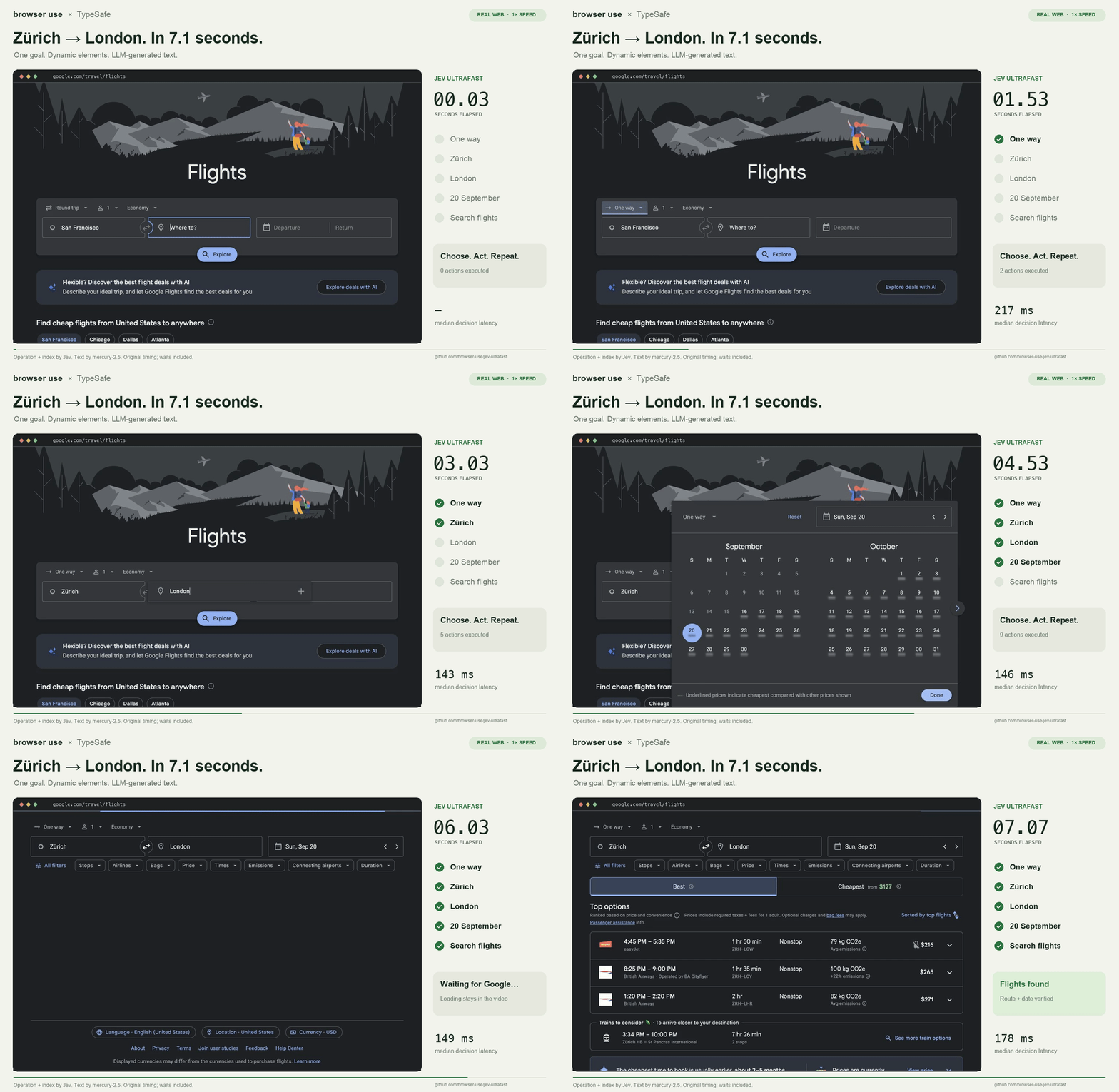
 A browser agent with a dynamic, indexed action space: give it one natural-language goal and it picks each operation and target element itself — for example, a Zuerich to London Google Flights search completed in about 7 seconds.
A browser agent with a dynamic, indexed action space: give it one natural-language goal and it picks each operation and target element itself — for example, a Zuerich to London Google Flights search completed in about 7 seconds.Is it a finished app, or a library I call from my own code?Both. A local demo inspector runs a full task at the click of a button and visualizes every decision, and the same policy can be driven from your own Python script with uv run.
Both. A local demo inspector runs a full task at the click of a button and visualizes every decision, and the same policy can be driven from your own Python script with uv run.How do I get it running?Install dependencies with uv sync (this also installs Browser Harness), open the demo and click Start demo → Run automatically, then allow remote debugging when Chrome prompts. If the connection drops, run uv run browser-harness --doctor.
Install dependencies with uv sync (this also installs Browser Harness), open the demo and click Start demo → Run automatically, then allow remote debugging when Chrome prompts. If the connection drops, run uv run browser-harness --doctor.Do I need a particular model or an API key?You need an OpenRouter key in TEXTMODELAPIKEY. The demo runs 'inception/mercury-2.5' with reasoning disabled, and Gemini, GLM and DeepSeek also work through the OpenAI-compatible text helper.
You need an OpenRouter key in TEXTMODELAPIKEY. The demo runs 'inception/mercury-2.5' with reasoning disabled, and Gemini, GLM and DeepSeek also work through the OpenAI-compatible text helper.Are there sites or page features it can't handle yet?It's an MVP: the DOM reader handles common HTML and ARIA controls, not the full accessible-name specification. Shadow roots, frames, canvas, file uploads, pop-up tabs, nested scrolling and arbitrary keyboard widgets are out of scope.
It's an MVP: the DOM reader handles common HTML and ARIA controls, not the full accessible-name specification. Shadow roots, frames, canvas, file uploads, pop-up tabs, nested scrolling and arbitrary keyboard widgets are out of scope.Does it drive my own Chrome, with my existing logins?Yes. Tabs the agent owns share your existing Chrome profile, connecting through Browser Harness with remote debugging that you allow in Chrome.
Yes. Tabs the agent owns share your existing Chrome profile, connecting through Browser Harness with remote debugging that you allow in Chrome.Which actions can the agent perform on a page?Eight operations: CLICK, TYPETEXT, SELECT, SCROLLUP, SCROLLDOWN, WAIT, DONE and BLOCKED. Operation and target are chosen together in one network round trip, and a small LLM generates text only when the operation is TYPETEXT.
Eight operations: CLICK, TYPETEXT, SELECT, SCROLLUP, SCROLLDOWN, WAIT, DONE and BLOCKED. Operation and target are chosen together in one network round trip, and a small LLM generates text only when the operation is TYPETEXT.Why is it faster than typical screenshot-based browser agents?One model request per decision cycle, structured DOM state instead of screenshots, one browser call per atomic snapshot, waits capped at roughly 200 ms, and only visible text sent to the model. Focus emulation keeps background tabs rendering so Chrome doesn't throttle them.
One model request per decision cycle, structured DOM state instead of screenshots, one browser call per atomic snapshot, waits capped at roughly 200 ms, and only visible text sent to the model. Focus emulation keeps background tabs rendering so Chrome doesn't throttle them.Is the 7-second demo video real and unedited?Yes — it plays at 1x with no opening hold, and timing starts after the initial page observation, so model calls, generated text, browser work and loading waits are all included. A fresh independent check verifies the route, date and visible flight options.
Yes — it plays at 1x with no opening hold, and timing starts after the initial page observation, so model calls, generated text, browser work and loading waits are all included. A fresh independent check verifies the route, date and visible flight options.Will it book or buy things on its own?No — the example flight task only performs the search, checks the actual route, date and results, and saves a trace; it does not select or book a flight. Even a DONE choice still requires independent outcome verification.
No — the example flight task only performs the search, checks the actual route, date and results, and saves a trace; it does not select or book a flight. Even a DONE choice still requires independent outcome verification.What are similar projects?SystemOneHarness, stagehand, BrowserKitten, scout, invisible_playwright_mcp, CUAWright, Agent-S, browser-use-pi
SystemOneHarness, stagehand, BrowserKitten, scout, invisible_playwright_mcp, CUAWright, Agent-S, browser-use-piWhich topics is it in?browser-agent, openrouter, chrome, browser-automation, openai-compatible, browser, benchmark, openai, performance, agent, automation, ai-agents
browser-agent, openrouter, chrome, browser-automation, openai-compatible, browser, benchmark, openai, performance, agent, automation, ai-agents