


ctop README

The project's README from github.com/bcicen/ctop. As one markdown file: README.md.

ctop

release homebrew macports scoop

Top-like interface for container metrics

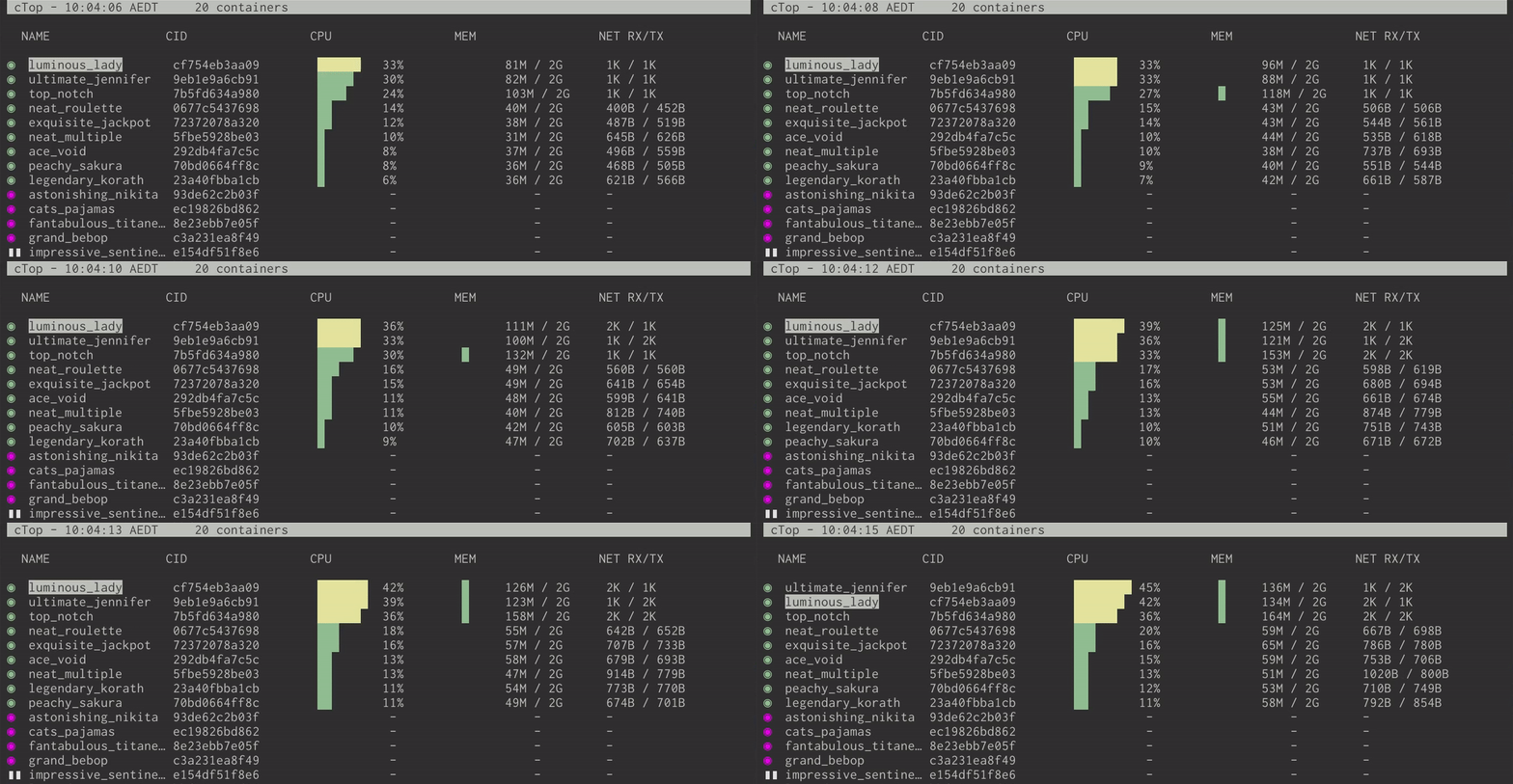
ctop provides a concise and condensed overview of real-time metrics for multiple containers:

ctop

as well as a single container view for inspecting a specific container.

ctop comes with built-in support for Docker and runC; connectors for other container and cluster systems are planned for future releases.

Install

Fetch the latest release for your platform:

Debian/Ubuntu

Maintained by a third party

sudo apt-get install ca-certificates curl gnupg lsb-release
curl -fsSL https://azlux.fr/repo.gpg.key | sudo gpg --dearmor -o /usr/share/keyrings/azlux-archive-keyring.gpg
echo \
  "deb [arch=$(dpkg --print-architecture) signed-by=/usr/share/keyrings/azlux-archive-keyring.gpg] http://packages.azlux.fr/debian \
  $(lsb_release -cs) main" | sudo tee /etc/apt/sources.list.d/azlux.list >/dev/null
sudo apt-get update
sudo apt-get install docker-ctop

Arch

sudo pacman -S ctop

ctop is also available for Arch in the AUR

Linux (Generic)

sudo wget https://github.com/bcicen/ctop/releases/download/v0.7.7/ctop-0.7.7-linux-amd64 -O /usr/local/bin/ctop
sudo chmod +x /usr/local/bin/ctop

OS X

brew install ctop

or

sudo port install ctop

or

sudo curl -Lo /usr/local/bin/ctop https://github.com/bcicen/ctop/releases/download/v0.7.7/ctop-0.7.7-darwin-amd64
sudo chmod +x /usr/local/bin/ctop

Windows

ctop is available in scoop:

scoop install ctop

Docker

docker run --rm -ti \
  --name=ctop \
  --volume /var/run/docker.sock:/var/run/docker.sock:ro \
  quay.io/vektorlab/ctop:latest

Building

Build steps can be found here.

Usage

ctop requires no arguments and uses Docker host variables by default. See connectors for further configuration options.

Config file

While running, use S to save the current filters, sort field, and other options to a default config path (~/.config/ctop/config on XDG systems, else ~/.ctop).

Config file values will be loaded and applied the next time ctop is started.

Options

Option Description
-a show active containers only
-f <string> set an initial filter string
-h display help dialog
-i invert default colors
-r reverse container sort order
-s select initial container sort field
-v output version information and exit

Keybindings

Key Action
<ENTER> Open container menu
a Toggle display of all (running and non-running) containers
f Filter displayed containers (esc to clear when open)
H Toggle ctop header
h Open help dialog
s Select container sort field
r Reverse container sort order
o Open single view
l View container logs (t to toggle timestamp when open)
e Exec Shell
c Configure columns
S Save current configuration to file
q Quit ctop

Alternatives

See Awesome Docker list for similar tools to work with Docker.

ctop (bcicen/ctop)

Searching Database…

17.8K ·GitHub
这是什么?ctop 是一个终端工具,能以类似 top 的方式实时显示所有运行中容器的指标概览,还提供单个容器的详细视图。
这是图形界面程序还是终端工具?它是一个终端用户界面(TUI)应用,需要在命令行中运行,不是图形界面(GUI)程序。
我该怎么安装和运行?获取适合你平台的预编译发布版二进制文件(Debian/Ubuntu、Arch AUR、通用 Linux 版、macOS 上通过 Homebrew/MacPorts、Windows 上通过 scoop,或 Docker),然后直接不带参数运行 ctop 即可。
我需要先安装 Docker 才能使用吗?需要。ctop 默认连接你的 Docker 主机,并内置支持 Docker 和 runC。
除了 Docker 和 runC,它还支持其他容器系统吗?暂时不支持。其他容器和集群系统的连接器只计划在未来版本中加入。
支持哪些平台?提供以下平台的二进制文件和安装包:Linux(Debian/Ubuntu、Arch、通用版)、macOS(Homebrew/MacPorts)和 Windows(scoop),另外还提供 Docker 镜像。
我该怎么设置 ctop 的显示方式?运行时按 'S' 键,可将当前的筛选条件、排序字段和其他显示选项保存到配置文件(XDG 系统上为 ~/.config/ctop/config,否则为 ~/.ctop),下次启动时会自动重新加载。
我能筛选或排序容器列表吗?可以。按 'f' 筛选显示的容器,按 's' 选择排序字段,按 'r' 反转排序顺序;命令行参数 -f 和 -s 也可以在启动时设置这些选项。
我能直接在 ctop 里操作容器吗?可以。按回车键会打开容器菜单,按 'l' 查看日志(可切换是否显示时间戳),按 'e' 可以在容器内打开 shell。
有没有单个容器的详细视图?有。按 'o' 可打开单个容器视图,详细查看某一个特定容器的指标。
What are similar projects?k9s, telegraf, sampler, witr, bottom, glances, lazydocker, nodelume
Creator
bcicen
Size
3.5 MB
Stars
17.8K
Age
9y
Commits · 90 Days