🧩 Browser extension: The Chrome Web Store's is for
Edge,
Brave,
Opera, Vivaldi and Helium too (how).
⭐ Like it? Give it a star. MDM has no ads and no marketing budget: stars are how people find it.
Windows 10 and 11 (x64, ARM64, 32-bit) · Linux (Ubuntu, Debian, Mint, Fedora, openSUSE, Arch and more; x86-64 and ARM64) · macOS (Apple Silicon and Intel, experimental)
86 languages · no ads, no trial, no sign-up
Same window you know. Your downloads finish sooner. And it costs nothing.
Mister Download Manager
IDM 6.42
Download a big file (1 GB)
1 second
5.5 seconds
Download a small file
instantly
3.1 seconds
Download over a shaky connection
1.6 seconds
5.4 seconds
Wait before a download starts
instantly
3.1 seconds
Price
Free, forever
Paid, after a 30-day trial
Ads, nag screens, sign-up
None
Registration needed
Open source
Yes (GPL)
No
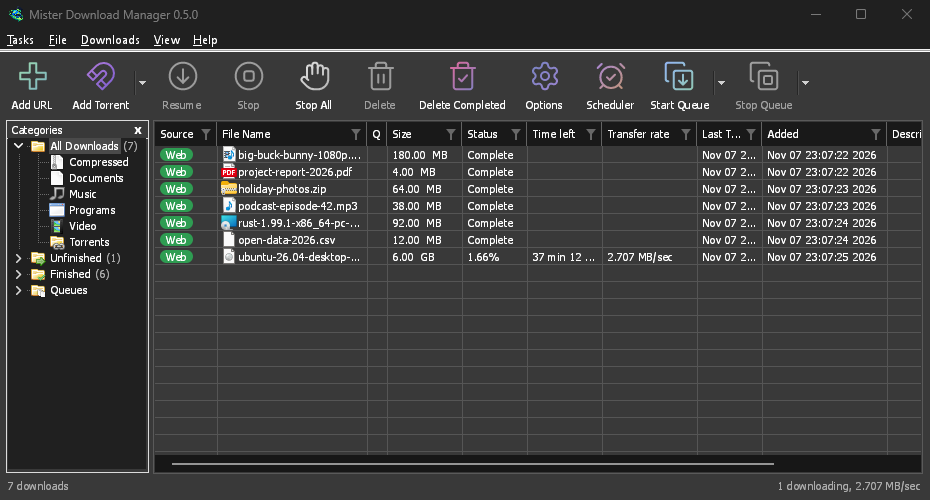
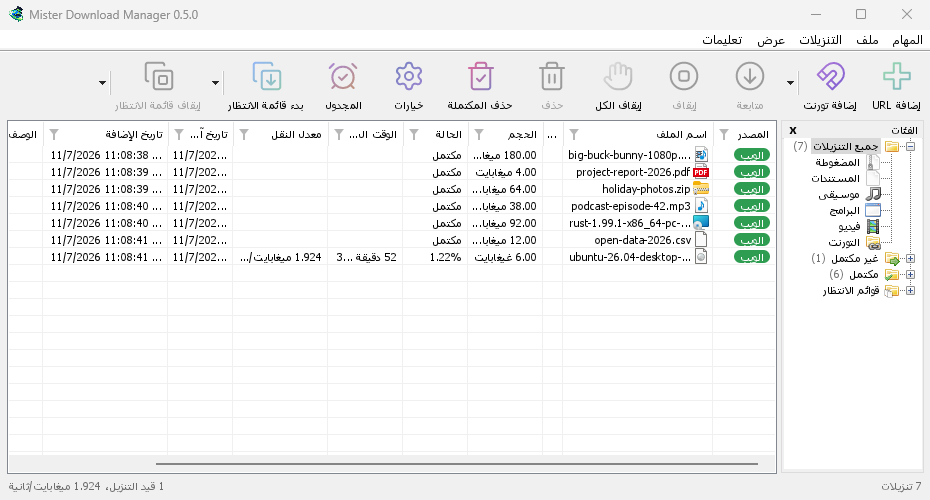
Nothing new to learn: the toolbar, the categories, the list of downloads, the progress window and
the browser button are where you expect them. Measured on the same computer, same files, both
programs at their default settings (how we measured).
The same three for 32-bit Windows 10. There, choose your own ffmpeg in Helpers for the best video qualities: none is built for it that MDM can check.
...-extension-chromium.zip
You want to add the browser extension by hand (Chrome, Edge, Brave, Opera, Vivaldi). From the stores is easier: Add to Chrome, Add to Firefox.
The ARM64 and 32-bit files come with every release after 0.5.2; Check for updates keeps each
copy on its own processor's files.
[!NOTE]
Windows may say "Windows protected your PC" the first time, because this early version isn't
code-signed yet. Click More info, then Run anyway.
Or with WinGet, Windows' package
manager: in a terminal, the first line installs MDM and the second updates it.
MDM runs on Linux too, tested on Ubuntu 24.04, Debian 12 and Fedora with GNOME, KDE Plasma, Xfce
and Cinnamon, on X11 and in Wayland sessions: the tray, dark mode, browser integration (Ubuntu's
Snap Firefox included) and the packages' installs. Not there yet: screen readers (Orca) don't
read its windows, and Flatpak browsers can't reach it (more).
Up to version 0.2.4, the files' names end in -experimental.
The same four for 64-bit ARM computers, from the release after 0.5.2 (built and tested on GitHub's ARM machines).
On a Mac? Be the first to try it
Fresh builds for macOS (Apple Silicon and Intel) are on the same download page, marked
-experimental: we haven't tried them on a Mac ourselves yet. Give them a go and
tell us how it went; you'll
help make them as solid as the Windows and Linux versions.
File
For
...-macos-arm64-experimental.dmg
Mac with Apple Silicon (M1 or later). Open it and drag MDM to Applications. The first time, right-click the app and choose Open.
...-macos-x86_64-experimental.dmg
Mac with an Intel processor, the same way.
🌍 In your language
Every language Windows 11 offers, 86 in all. MDM asks on its first start, and you can change
it any time in View → Language. Arabic, Hebrew, Persian, Urdu and Uyghur get a fully mirrored,
right-to-left window.
Screenshots
One click on YouTube: the Download video button appears over the video.
Any video on any page: drag the button where you like, it stays there.
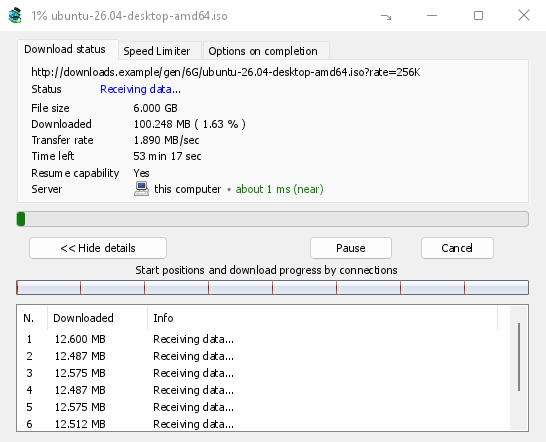
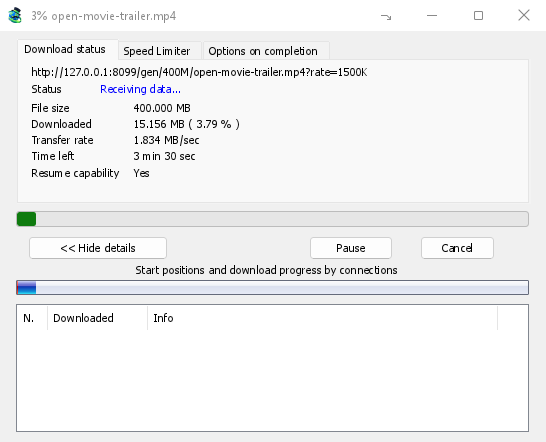
Watch it fly: every connection's share of the file, live speed and time left.
Dark mode that follows Windows.
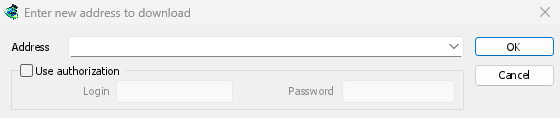
Add a download: paste a link, or let MDM catch it from your browser.
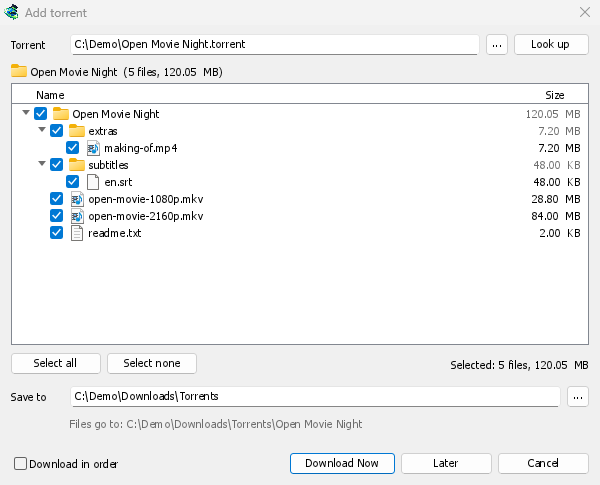
Torrents and magnet links: pick the files you want, skip the rest.
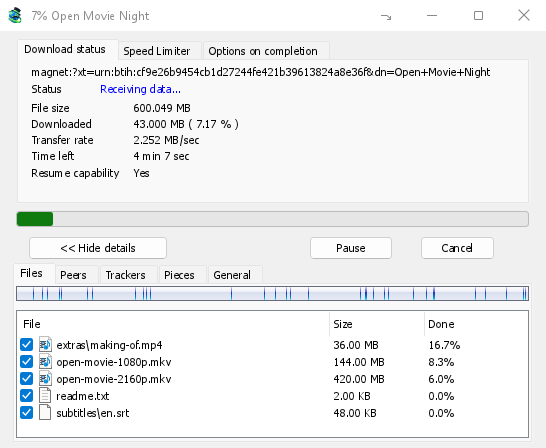
A torrent's progress: its files, peers, trackers and pieces, in tabs.
A video's progress: speed and time left while yt-dlp brings it in.
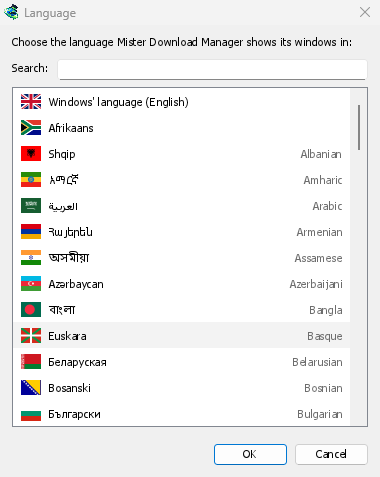
86 languages, chosen by flag on the first start.
Right to left for Arabic, Hebrew, Persian, Urdu and Uyghur.
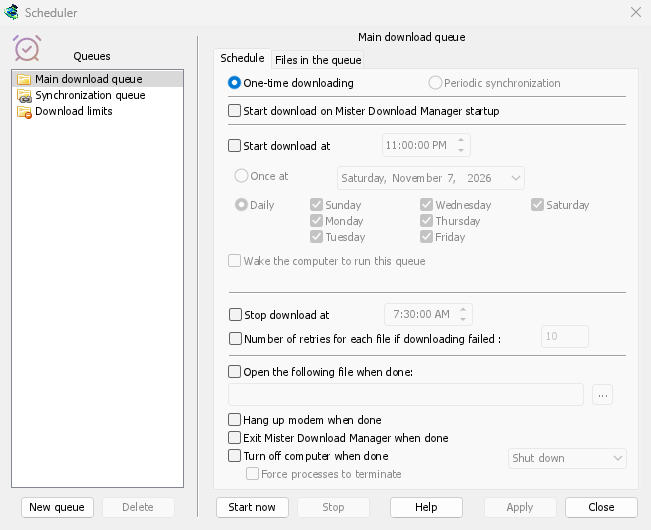
Download overnight: queues that start and stop on their own.
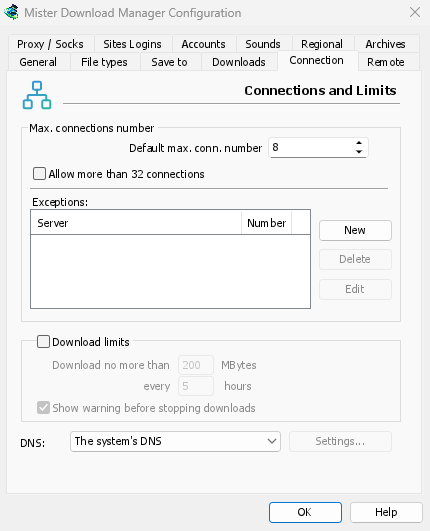
Options where you expect them, every control working.
What it does
Speeds up every download by fetching parts of the file at the same time, and keeps
re-balancing until the last byte.
Resumes after a crash, a restart or a dropped connection, without starting over.
Catches downloads from Firefox, Chrome, Edge, Brave, Opera, Vivaldi and Helium (the
extension is on Firefox Add-ons and the Chrome Web Store), and gives them back to the browser
when MDM isn't running.
Downloads videos from web pages (a button appears over the video; playlists, subtitles,
the sound alone), image galleries with gallery-dl, and torrents and magnet links
(sequential order, RSS feeds, sharing limits).
Many links at once: the Link grabber sorts them into packages and extracts the archives
(zip, 7z, rar) when they're in. It takes Click'n'Load from link sites, asking once per site. Debrid accounts (Real-Debrid, AllDebrid, Premiumize, TorBox, Mega-Debrid; experimental) download
file-host links through your own account.
Downloads overnight with queues and a scheduler that can wake the computer, then shuts it
down if you like.
Through your VPN only, if you want: hold every download to one network adapter, with a kill
switch, and choose an encrypted DNS. Each download shows its server's country.
From your phone, or on a server: control MDM from a phone on your home network, or run it
without a window on a NAS (Docker, Unraid) (how).
Works from scripts too: IDM's command-line switches, a command-line tool, and a local API for other programs (how).
Works with your AI assistant: an MCP server lets Claude, Cursor or VS Code list, add, pause and remove your downloads (set it up).
Leaves you some speed: limit one download or all of them, only while you're at the computer.
Day and dark mode, and themes: Classic, Native, High contrast, Metro, Adwaita, Breeze,
Luna, Aero and Aqua, or your own in a text file (how). Everything larger, up
to 200 %, with View → Interface size. 86 languages, and a portable version for USB sticks.
Works from the keyboard and with screen readers (Narrator, NVDA): every window, dialog and
menu (the keys).
No ads, no trial, no account. Free and open source.
Both programs downloaded the same files from the same local test server
(labserver), with the network trouble each scenario names: seven runs each,
both at their default settings. MDM finished first in all seven scenarios; every difference is
statistically significant (Mann-Whitney p < 0.001), and MDM used less CPU in every one.
On a server that allows only two connections, MDM used 2 and still finished first; IDM opened 480.
The full table, the machine and the raw data: docs/bench/run5/REPORT.md.
The harness is in tools/bench, so anyone can run it again.
Not a reverse-engineering project
MDM is an independent, clean-room program. It is a new implementation of a familiar way of
working, not a copy of anyone's software.
No one else's code or assets. It contains no code, binaries, artwork, icons, sounds or
text from Internet Download Manager, nor code from any other download manager. The app icon
was made for MDM with ChatGPT (OpenAI's image generation); the other icons come from openly
licensed sets (ATTRIBUTION.md).
Nothing taken apart. No IDM file was ever disassembled, decompiled, debugged, patched or
inspected below its user interface, and its licensing, trial and registration were never
touched or bypassed.
Learned as a user learns. What MDM does was learned from IDM's public documentation and
help pages, its public screenshots, and by using a licensed copy as a black box: downloading
test files from our own test server (labserver) and watching what reached
the network and the screen.
Built on public standards. The download engine follows the HTTP specifications (RFC 9110,
RFC 9112) and was designed, tested and measured independently. Its speed comes from its own
design, which the benchmark shows.
Not affiliated. MDM isn't affiliated with, endorsed by or connected to Tonec Inc.
"Internet Download Manager" and "IDM" are trademarks of their owner, named here only to
describe the layout people already know and to compare the two programs.
For developers
Build from source
Requires Rust stable 1.98 or later (the MSVC toolchain on Windows), and for the engine's
browser-like connection (BoringSSL, built from source): CMake, LLVM's libclang and, on Windows,
NASM (winget install Kitware.CMake LLVM.LLVM NASM.NASM; on Linux cmake and
libclang-dev; on macOS Xcode's command line tools and cmake).
cargo build -p mdm-app --no-default-features builds the app without it (a site that refuses MDM's
own connection then stays refused).
cargo build --release
cargo test
This makes misterdownloadmanager.exe (the app), misterdownloadmanager-cli.exe (headless
command line), misterdownloadmanager-mcp.exe (the MCP server for AI assistants) and
misterdownloadmanager-nmhost.exe (the browser host) in target\release\.
tools\installer\build.ps1 builds the installer and both zips into target\dist\ (needs
Inno Setup 6.3 or later), for x64; -Arch arm64 or
-Arch x86 for Windows on ARM or 32-bit Windows (after rustup target add aarch64-pc-windows-msvc or i686-pc-windows-msvc). tools/installer/build-linux.sh builds the
Linux files for the machine's own processor (x86-64 or ARM64). A vX.Y.Z tag does all of them
on GitHub Actions and publishes the release.
Browser integration from a build: register the native messaging host with
target\release\misterdownloadmanager-nmhost.exe --register (undo with --unregister), then in
chrome://extensions or edge://extensions turn on Developer mode, Load unpacked and pick
the extension/ folder (its ID is always oogbclbbninliongijffeeggalppliok).
Layout and tools
A Cargo workspace (edition 2024); docs/ARCHITECTURE.md explains how the
pieces fit.
An HTTP test server with fault injection, for tests and benchmarks
Tool
What it does
tools\dev\check-cross.ps1
Checks the code for Linux and macOS from Windows (with Zig as the C compiler)
node tools/extension/e2e.mjs
The browser extension in real Chrome, Brave, Edge and Firefox, headless: a link's download must reach MDM (or another MDM, a server); on Windows and Linux
python tools/i18n/extract.py
Lists every interface text in i18n/en.tsv (CI checks it matches the code)
python tools/i18n/translate.py
Translates what the catalogs lack (checks every row in code)
python tools/installer/languages.py
The installer's messages in every language
node tools/readme/build.mjs
This page's pictures, comparison table and flags, from the benchmark data
tools\lab\docs-shots.ps1
The screenshots, from a separate test instance (/show <window> opens each window), off the screen
python tools/shots/make.py
The help pages' pictures, from one list (tools/shots/shots.toml): shot, cropped, annotated, lossless WebP; make.py check keeps them in step
tools/lab/wsl/
A WSL2 machine that builds MDM for Linux in minutes and shoots its windows on a virtual screen (README)
tools\lab\progress-shots.ps1
The progress window of a video (yt-dlp) and of a torrent, from a swarm on this computer (cargo run -p mdm-torrent --example swarm)
python tools/website/build.py --serve
misterdownloadmanager.com into target/site (help pages from docs/, news from the CHANGELOG, FAQ and legal pages from website/content/), served on http://127.0.0.1:8765; GitHub Pages publishes it (pages.yml)
python tools/readme/social.py
The repository's social preview card (docs/images/social-preview.png)
MDM_FIT_AUDIT=<file>
Lists every text that doesn't fit its window or runs over another, for checking a translation
MDM_OFFSCREEN=1
Opens every window off the screen, without focus, tray icon or sound (screenshots and checks)
MDM_TEST_TRASH_DIR=<folder>
Tests only: archives deleted after extracting go into this folder, never into the real Recycle Bin or Trash
MDM_TEST_7ZIP=<program>|none
Tests only: the 7-Zip program to use for 7z and RAR archives, or none to act as if 7-Zip weren't installed
MDM_TEST_HATCHZIP=<program>|none
Tests only: the HatchZip program to use (extraction in place), or none to act as if HatchZip weren't installed
Status and helping out
MDM is young: the engine, the main window and the browser integration are solid on Windows and
Linux, and some corners are still "good enough for now".
Translations are machine-made. Rows marked #, machine in i18n/ wait for a
native speaker; fixing one is a one-line pull request (how). Malay's
menus, toolbar and download-list columns have been reviewed by a native speaker.
Not yet: code signing. The macOS builds are untested; on Linux, screen readers (Orca) and
Flatpak browsers aren't supported yet.
Bug reports are welcome in
Issues: Help → Report a problem
in the app fills in your version and system. Ideas are welcome in
Discussions. Pull requests are accepted under the same licence: start with CONTRIBUTING.md.
Made possible by these amazing humans
Everyone who sent a pull request, opened an issue or joined a conversation here: thank you. People
with pull requests first, then issues, then comments; the website
shows what each one did.
⭐ Star history
If MDM saves you time, a star is the quickest way to say so, and it helps the next person find
a free download manager. Star it on GitHub.
Support MDM
MDM is free and always will be. If it saves you time, you can support its creator on
GitHub Sponsors. It's optional: nothing in the app
changes or unlocks, and there is no paid edition.
Licence and credits
Copyright (c) 2026 Ahmed Nefzaoui. Mister Download Manager is free software under the
GNU General Public License, version 3 or (at your option) any later version.
Что это такое?Бесплатный менеджер загрузок с открытым исходным кодом, написанный на Rust. Это более быстрая альтернатива IDM. Он работает с обычными файлами, видео с веб-страниц, галереями изображений, торрентами и magnet-ссылками.
Это одно приложение или несколько инструментов?В основном это настольное приложение с окном. Кроме того, в комплект входят консольная утилита без графического интерфейса, MCP-сервер для ИИ-ассистентов и хост нативных сообщений для браузера.
Как всё запустить?На Windows запустите -setup.exe со страницы загрузки: он установит программу и подключит её к браузеру. В Linux используйте .deb, .rpm или AppImage. Сборки для macOS пока экспериментальные, в формате .dmg.
Нужно ли что-то установить заранее?Для обычного использования нет: установщики самодостаточны. Для сборки из исходного кода нужен Rust stable версии 1.98 или новее, а также CMake, libclang и NASM на Windows.
Есть ли известные ограничения или подводные камни при установке?Экранные читалки вроде Orca не читают её окна в Linux, а браузеры из Flatpak не могут с ней связаться. При первом запуске Windows может предупредить о неподписанном приложении, так как в этой ранней версии код пока не подписан.
На каких системах она работает?Windows 10 и 11, дистрибутивы Linux, такие как Ubuntu, Debian, Fedora и Arch, а также macOS. Сборки для macOS под Apple Silicon и Intel помечены как экспериментальные, и авторы их ещё не тестировали.
Нужна ли учётная запись или показывается ли реклама?Нет. В README сказано, что учётной записи, регистрации, пробного периода и рекламы нет. При желании загрузки можно также привязать к одному сетевому адаптеру VPN с функцией kill switch.
Перехватывает ли она загрузки из моего браузера?Да. Она перехватывает загрузки из Firefox, Chrome, Edge, Brave, Opera, Vivaldi и Helium, а когда MDM не запущен, возвращает их браузеру.
Может ли ИИ-ассистент управлять моими загрузками?Да. Её MCP-сервер позволяет Claude, Cursor или VS Code просматривать, добавлять, ставить на паузу и удалять ваши загрузки.
Есть ли поддержка дебрид-сервисов?Экспериментально. Такие аккаунты, как Real-Debrid, AllDebrid, Premiumize и TorBox, могут получать ссылки с файлообменников через ваш собственный аккаунт.






 Edge,
 Brave,
 Opera, Vivaldi and Helium too (
















































































 Бесплатный менеджер загрузок с открытым исходным кодом, написанный на Rust. Это более быстрая альтернатива IDM. Он работает с обычными файлами, видео с веб-страниц, галереями изображений, торрентами и magnet-ссылками.