

What is this?
 LCU extracts Codex's built-in computer-use runtime out of the ChatGPT desktop app and exposes it to any AI coding harness (Claude Code, Codex CLI, Pi), so an agent can click, type, read windows, and take screenshots on your machine without needing Codex authentication.
LCU extracts Codex's built-in computer-use runtime out of the ChatGPT desktop app and exposes it to any AI coding harness (Claude Code, Codex CLI, Pi), so an agent can click, type, read windows, and take screenshots on your machine without needing Codex authentication.Does LCU replace the ChatGPT desktop app, or does it still need it?It still needs it. The official ChatGPT desktop app must stay installed locally because it actually supplies the computer-use runtime and instructions; LCU just handles setup and wires that runtime into your harness.
It still needs it. The official ChatGPT desktop app must stay installed locally because it actually supplies the computer-use runtime and instructions; LCU just handles setup and wires that runtime into your harness.How do I install and set this up?Download the matching archive and its .sha256 file from the latest GitHub release for your platform (macOS Apple Silicon, Linux ARM64, or Linux x86-64), verify the checksum, extract it, and register LCU with your harness; on Claude Code you can instead install it through the plugin manager with two commands.
Download the matching archive and its .sha256 file from the latest GitHub release for your platform (macOS Apple Silicon, Linux ARM64, or Linux x86-64), verify the checksum, extract it, and register LCU with your harness; on Claude Code you can instead install it through the plugin manager with two commands.What do I need installed before running this?You need the official ChatGPT desktop app, Python 3.12+, and a supported harness (Pi, Codex CLI, or Claude Code) already set up; for Codex CLI you must update it first to get the required hook support.
You need the official ChatGPT desktop app, Python 3.12+, and a supported harness (Pi, Codex CLI, or Claude Code) already set up; for Codex CLI you must update it first to get the required hook support.Which platforms actually work right now?Only Linux ARM64/x86-64 with an active X11 desktop and D-Bus, and macOS on Apple Silicon with the signed ChatGPT app. Windows 11 is only a 'candidate', and Intel Macs, native Wayland, and musl Linux are unsupported.
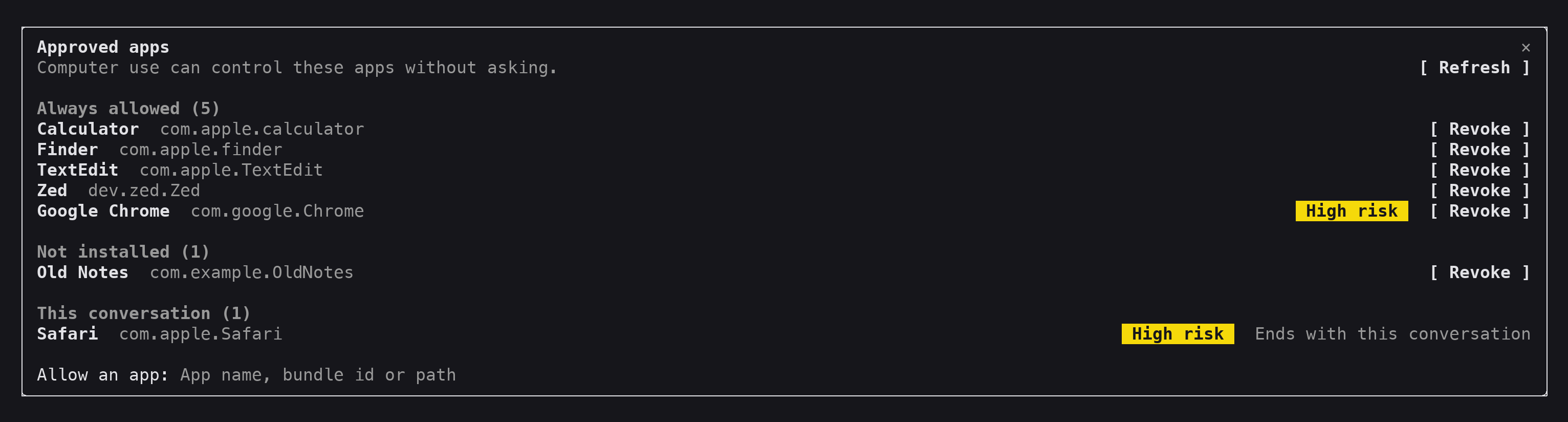
Only Linux ARM64/x86-64 with an active X11 desktop and D-Bus, and macOS on Apple Silicon with the signed ChatGPT app. Windows 11 is only a 'candidate', and Intel Macs, native Wayland, and musl Linux are unsupported.Who actually approves an agent touching an app on my machine?Only you. Approvals happen in a native pane the model cannot see, press, or fake, and you can later revoke access per app, which on macOS asks for Touch ID or your password.
Only you. Approvals happen in a native pane the model cannot see, press, or fake, and you can later revoke access per app, which on macOS asks for Touch ID or your password.Can an agent control my Chrome tabs too?Yes, once you enable the official Chrome extension in your profile. LCU can then read and control tabs, but every site still needs separate approval, and Claude Code's Chrome support is still experimental.
Yes, once you enable the official Chrome extension in your profile. LCU can then read and control tabs, but every site still needs separate approval, and Claude Code's Chrome support is still experimental.Can the agent record audio from my computer?Only if you pass --audio during setup. That just turns on the underlying ChatGPT runtime's own audio-recording API and approval flow; LCU doesn't add any audio-specific instructions itself.
Only if you pass --audio during setup. That just turns on the underlying ChatGPT runtime's own audio-recording API and approval flow; LCU doesn't add any audio-specific instructions itself.What can I do with LCU inside Pi specifically?Pi gets two slash commands: /lcu stop requests a Computer Use stop for a selected app (macOS only), and /lcu pick selects an app or browser target and appends it to your draft for you to review and submit.
Pi gets two slash commands: /lcu stop requests a Computer Use stop for a selected app (macOS only), and /lcu pick selects an app or browser target and appends it to your draft for you to review and submit.Why build LCU instead of just using Codex's computer use directly?Codex's computer-use runtime is normally locked to the Codex app and its own login; LCU decouples that runtime so other harnesses like Claude Code or Pi can use it without a Codex account.
Codex's computer-use runtime is normally locked to the Codex app and its own login; LCU decouples that runtime so other harnesses like Claude Code or Pi can use it without a Codex account.What are similar projects?pstack-claude, newsjack, hive, openrig, midscene, agent-desktop, awesome-chatgpt-zh, jev-browser-use
pstack-claude, newsjack, hive, openrig, midscene, agent-desktop, awesome-chatgpt-zh, jev-browser-useWhich topics is it in?permission, pi-agent, desktop-automation, x11, codex-cli, computer-use, chrome-extension, harness, accessibility, browser-automation, chatgpt, desktop
permission, pi-agent, desktop-automation, x11, codex-cli, computer-use, chrome-extension, harness, accessibility, browser-automation, chatgpt, desktop