Agent skill to reverse engineer a SaaS product through the browser into a knowledge base for rebuilding it: screens, rules, data model, design tokens and production barriers, without touching production data.
res (alextnetto/res)
Searching Database…
The project's README from github.com/alextnetto/res. As one markdown file: README.md.
Study a web product through the browser, document how it works, and hand off everything needed to rebuild and launch it, without touching production data.




Quick start · How RES works · What you get · Examples · Safety model · FAQ · Documentation
claude plugin marketplace add alextnetto/res
[!IMPORTANT] RES drives a real browser on accounts you control. Use it only on products you are allowed to study, read the safety model before the first run, and prefer a trial account in a separate browser profile.
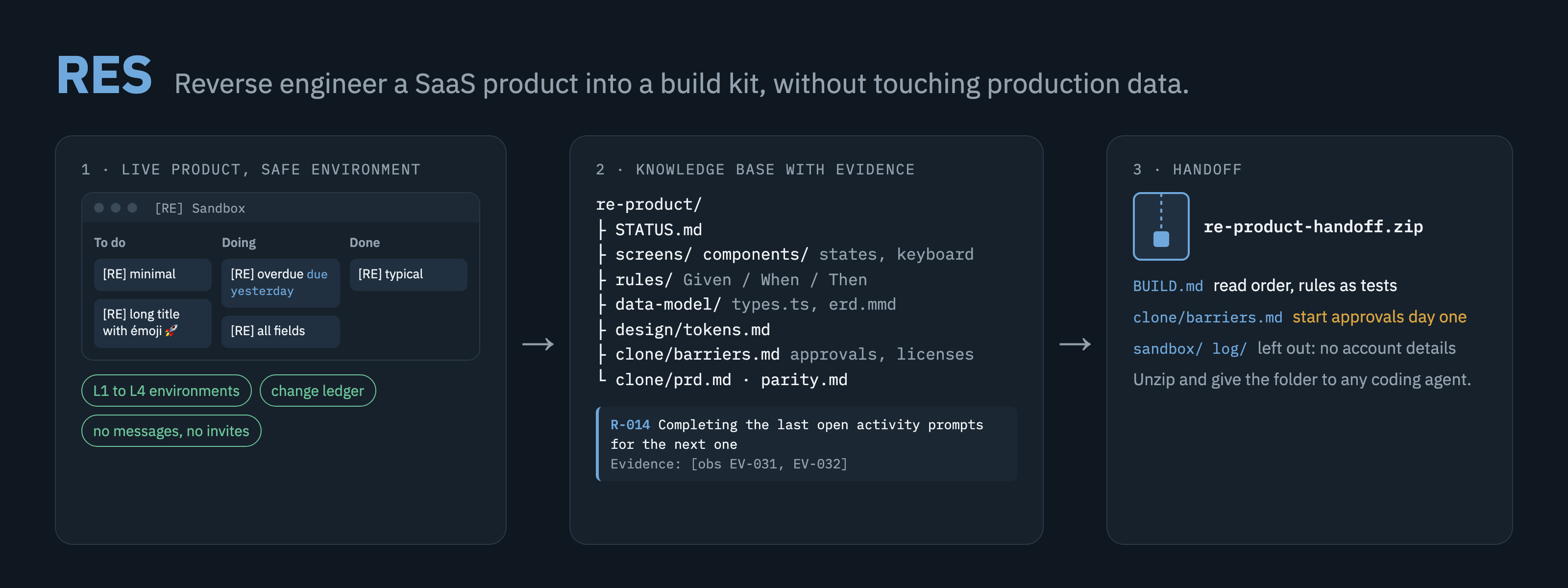
Want to rebuild a product your team relies on, or launch a competitor in your market? Ask your agent to study it with RES. The agent explores the product in a test environment, records every change it makes, and writes what it learns to files: screens and states, business rules with evidence, the data model, API shapes, design tokens, and what could stop the clone from launching, such as integrations that need approval, licenses and certifications.
At the end you get two files. REPORT.html is the report you read: one page that starts with the overview and the decisions you need to make, then walks through what the product does, every screen and rule, the data model and design, the build plan, and what to prepare before launch. The zip is for your coding agent: unzip it, give it the folder, and it starts from BUILD.md.
RES is one agent skill with plain Markdown templates and a few dependency-free Node.js scripts. It adds about 130 tokens to every session and about 4,600 when it runs (measured with claude plugin details).
In a terminal:
claude plugin marketplace add alextnetto/res
claude plugin install res@res
Inside a Claude Code session, the same commands are /plugin marketplace add alextnetto/res and /plugin install res@res. Start a new session afterwards.
For other agents that read skills from disk, copy the skill folder where your agent reads skills:
git clone https://github.com/alextnetto/res.git && mkdir -p ~/.claude/skills && cp -R res/skills/reverse-engineering-saas ~/.claude/skills/
You need Node.js 22 or later and an agent that can drive a browser and run JavaScript in the page: Claude in Chrome, Playwright MCP or Chrome DevTools MCP.
Create a trial account of the product with an email you own, log in to it in a separate Chrome profile, and connect your agent's browser tool to that profile (how). This is the safest setup: the agent cannot reach your production account even by mistake.
Without a trial account, the agent writes only if you ask it to test or to create a test environment, and then only inside a separate workspace or a sandbox container. Otherwise it only observes.
Study Pipedrive so my team can rebuild it for the Brazilian market.
Use the trial profile, and don't ask me anything until you're done.
Replace the product, the market and the scope with your own. The agent creates re-<product>/ in its working directory, works through the phases below, and sends you REPORT.html and re-<product>-handoff-<date>.zip when it finishes. To continue later, start a session in the same directory and say "Continue the Pipedrive study."
The scripts work without an agent, for example to inspect or repackage a knowledge base:
node skills/reverse-engineering-saas/scripts/init-kb.mjs --product "Acme CRM" --git
node skills/reverse-engineering-saas/scripts/check-kb.mjs re-acme-crm
node skills/reverse-engineering-saas/scripts/build-report.mjs re-acme-crm
node skills/reverse-engineering-saas/scripts/pack-kb.mjs re-acme-crm
Each script prints its options with --help.
claude plugin marketplace update res
claude plugin update res@res
flowchart LR
    A[Charter] --> B[Safe environment<br/>and preflight]
    B --> C[Public docs<br/>and barrier scan]
    C --> D[Map screens]
    D --> E[Deep dive<br/>one feature at a time]
    E -->|next feature| E
    E --> F[Synthesis:<br/>PRD, parity, barriers]
    F --> G[Close:<br/>report and zip]
| Phase | What happens |
|---|---|
| 1 Charter | Goal, scope, priorities and the clone's target market |
| 2 Environment | Pick the safest environment; check for automations, webhooks and integrations that could fire |
| 3 Recon | Public docs, API reference, pricing, integrations list and terms, read with web fetch; first barrier scan |
| 4 Map | Every screen and route; stack and design tokens |
| 5 Deep dive | One feature at a time: fixtures, states, rules, persistence, network, written to disk before the next feature |
| 6 Synthesis | Data model, design tokens, barriers, PRD, parity tests |
| 7 Close | Restore what changed, pass check-kb, send REPORT.html and the handoff zip |
The knowledge base on disk is the agent's only memory, so a study can span many sessions and survive context limits. Every statement carries its evidence: [obs] seen in the product, [net] captured on the network, [doc] from public documentation, [inf] an inference with an open question.
| Area | What the knowledge base contains | Where |
|---|---|---|
| Inventory | Feature tree, screen catalog with URL patterns, a coverage matrix that works as the queue | inventory/ |
| UX | Anatomy, states (empty, loading, error, no permission, plan-gated), interactions, keyboard, accessibility, microcopy | screens/, components/ |
| Behavior | Business rules as Given/When/Then with evidence, user flows, cross-cutting topics | rules/, flows/, topics/ |
| Data | Entities with fields, enums and relations, ER diagram, TypeScript types, permissions matrix | data-model/ |
| API | Endpoint templates per user action, with JSON shapes and no values | api/ |
| Design | Color, type, spacing, radius, shadow and motion tokens, mapped to the product's CSS variables | design/ |
| Production barriers | Integrations that need approval, licenses, certifications, distribution gatekeepers and moats, with severity, market weight, lead time and mitigation | clone/barriers.md |
| Build plan | Requirements, parity tests derived from the rules, what to copy, avoid and improve | clone/ |
| Report | REPORT.html: one self-contained page a person reads, with images embedded and every ID linked |
KB root |
| Handoff | BUILD.md, a brief for any coding agent: read order, rules as tests, what not to copy |
zip root |
A rule:
### R-014 Completing the last open activity prompts for the next one
- Given a deal with exactly one open activity
- When the user marks that activity done
- Then a "Schedule next activity" dialog opens; Cancel closes it and the deal shows a warning icon
- Evidence: [obs EV-031, EV-032]
A production barrier:
### BR-003 WhatsApp messages need Meta business verification
- Category: permissioned integration
- Blocks: F-014 (WhatsApp notifications)
- Gatekeeper: Meta, WhatsApp Business Platform
- Severity: blocks feature
- Market weight: required to sell
- Lead time and cost: [doc SRC-021]
- Mitigation: start verification in month one; launch with email notifications
- Evidence: [doc SRC-021]
Two end-to-end studies, run by Claude Code with Claude in Chrome without a person at the keyboard:
| Product | Environment | Result | Read |
|---|---|---|---|
| ClickUp: board, task view, custom fields | L2, a new free workspace | 55 rules, 19 components, 14 production barriers | Report · Knowledge base |
| Pipedrive: pipeline, deals, next-activity rule, won and lost | L3, a sandbox pipeline in a production account, removed at the end | 46 rules, 8 components, 15 production barriers | Report · Knowledge base |
Each folder is the unzipped handoff. Notes on trademarks and terms: examples/README.md.
| Level | Environment | What the agent may change |
|---|---|---|
| L1 | Trial account in a separate browser profile, created by you | Everything except outbound and irreversible actions |
| L2 | New, empty workspace under your login | Test data and configuration inside that workspace |
| L3 | One sandbox list, project or pipeline inside production | Test data inside the container only |
| L4 | Production, observe only | Nothing |
sandbox/ledger.csv. At the end it is restored, removed, or listed for you to resolve.STATUS.md and keeps working on the rest.The full procedures are in references/safety.md.
REA is an open-source reverse engineering toolkit for binaries, Android, Electron, network captures and websites. It answers what a product is built with; RES answers how it works for the user and what it takes to rebuild and launch it. We ran both on ClickUp: docs/comparison-with-rea.md.
Only inside a sandbox you allowed. Every change is recorded in a ledger and, at the end, restored, removed, or listed for you to resolve. Without permission to write, it only observes. Messages, invites, mentions of other people and billing actions are forbidden at every level.
No. The agent never types passwords or creates accounts. You log in, preferably to a trial account in a separate browser profile.
Any agent that reads skills from disk and can drive a browser and run JavaScript in the page. RES was written for Claude Code; the method was tested with Claude Code subagents and the page scripts in headless Chromium. Claude in Chrome, Playwright MCP and Chrome DevTools MCP are covered in references/tools.md.
Yes. Tell it not to ask you anything. It records what needs you under "Needs human" in STATUS.md, keeps working on the rest, and restores what it changed before it stops.
Ask for the handoff, or wait for the end of the study. The agent sends REPORT.html for people and a zip with the knowledge base and BUILD.md for coding agents. Account details (sandbox/, log/) stay out of the zip, except a copy of the change ledger without object IDs, locations or URLs.
Not well. It needs the DOM and the network. For binaries and Electron internals, use REA.
That depends on the product's terms and your jurisdiction. RES records the relevant terms clause, rebuilds from behavior instead of copying assets, and flags legal questions for counsel. It does not give legal advice.
Version 0.4.0. The method was tested with scenario runs on subagents, before and after each change to the skill, and the scripts with automated tests on Node.js 22 and 24. Two end-to-end studies on real products (ClickUp at L2, Pipedrive at L3) are in examples/. Version 0.3.0 fixes the gaps the Pipedrive study found; the ClickUp study's are tracked in an issue. Reports from real runs are welcome: open a study report.
Use RES only on accounts you own or are authorized to examine. Read the product's terms: many forbid reverse engineering or competing use, and that decision is yours. Rebuild from observed behavior; do not copy code, icons, illustrations, logos or long text. The barrier analysis is research, not legal advice.
See CONTRIBUTING.md. Security problems go through SECURITY.md.
Agent skill to reverse engineer a SaaS product through the browser into a knowledge base for rebuilding it: screens, rules, data model, design tokens and production barriers, without touching production data.