Let your AI agents use your Chrome, signed in as you, in background tabs. com · X: @AlexeyIndeev
agent-chrome-relay (aindeev/agent-chrome-relay)
Searching Database…
The project's README from github.com/aindeev/agent-chrome-relay. As one markdown file: README.md.







Lets your coding agents (Claude Code, Codex, Cursor, Paseo, pi) use your everyday Chrome, with your real logins, from the command line, in background tabs: nothing takes focus, nothing on your screen moves.
chrome-relay do "Invite the new teammate as an admin" --data "[email protected]" --until "text:Invitation sent" fills, clicks and checks every step, in about the time an agent spends on one
click. Moreopen, snapshot, click,
fill). More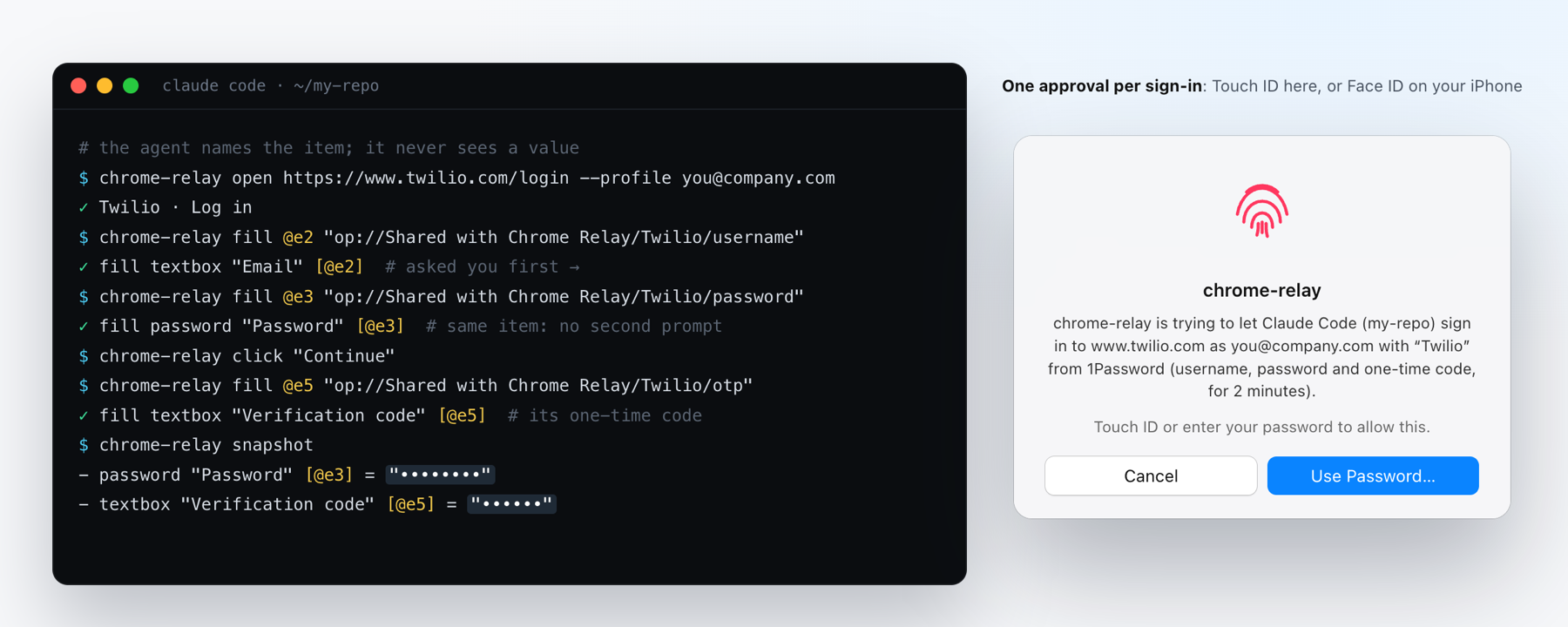
Status
The core is background tabs with your logins, chrome-relay do, Google sign-in hops and an audit trail.
Everything else is optional and off until you turn it on: 1Password, Secure Enclave passkeys, iPhone
approvals, and a TypeSafe key for the fastest decider. See What's optional. Nothing installs
the extension for you, and it only runs on Macs whose owner set it up.
chrome-relay open/click/fill/... ──unix socket /driver──┐
chrome-relay do ──────────────────unix socket /driver───┼──▶ relay (127.0.0.1:9333, LaunchAgent) ──ws──▶ Chrome Relay extension ──chrome.debugger──▶ agent tab
agent-browser (optional) ─────────ws (DevTools)─────────┘         ▲
   │                                                               └── reads the page and acts, in that agent's own tabs only
   └── do decides: saved flows → the agent's data → Jev or Haiku (Claude Code) → hand back to the agent
extension/, MV3, one per Chrome profile you load it in): opens each agent tab inactive
in a collapsed "Agents" tab group and runs DevTools commands in it via chrome.debugger. No remote-debugging
port, so Chrome never shows "Allow remote debugging?". Chrome does show "Chrome Relay started debugging this
browser" while agents work.chrome-relay: one Go program, built and signed on your own Mac (./build). As a background service
(chrome-relay serve) it is the relay: a DevTools endpoint per agent, where each agent sees and controls only
the tabs it opened and commands that could raise or focus the browser are swallowed. It is also the CLI
(setup, the connection URL, do, diagnostics, audit trail), and the optional 1Password vault and passkeys, whose
Secure Enclave and Touch ID code (internal/macos, Swift) is linked into the same signed binary when Xcode's
command line tools are installed.Fastest: paste this prompt into Claude Code, Codex or
Cursor in its auto mode (Claude Code: Shift+Tab, or claude --permission-mode auto; Codex:
--full-auto) and let your agent do it. You only load the extension and approve in 1Password. By hand:
Needs macOS, Google Chrome and Go 1.25+ (brew install go).
git clone https://github.com/aindeev/agent-chrome-relay
cd agent-chrome-relay
./build                    # compiles chrome-relay and signs it on this Mac (see below)
./chrome-relay setup       # secret, background service, identities, `chrome-relay` on PATH, Claude Code skill
Why you build it yourself: the binary is signed on your Mac, and macOS ties Chrome Relay's Keychain item to that signature, so only your own build can read it (see the 1Password section). The build uses the hardened runtime, so other programs can't attach a debugger to the relay or inject code into it. Two things make the build fuller, and neither is required:
| You have | ./build makes |
|
|---|---|---|
| Go only | the core: tabs, Google sign-in hops, audit trail | passkeys you keep in 1Password still work (1Password's prompt) |
+ Xcode's command line tools (xcode-select --install) |
the core plus 1Password and Secure Enclave passkeys | |
| + a code signing identity | the same, signed by you | without one it signs ad-hoc: macOS may ask once after each rebuild before Chrome Relay reads its own Keychain item |
Any Apple Development or Developer ID certificate is an identity (security find-identity -v -p codesigning
lists yours; a free one comes with an Apple ID in Xcode → Settings → Accounts → Manage Certificates). With
several, pick one with ./build --identity "<name>"; it's remembered. chrome-relay doctor says which build
you have.
Then, in each Chrome profile agents should use: install Chrome Relay from the Chrome Web
Store and pin it (puzzle-piece
icon → pin) so you see its badge. Check with chrome-relay doctor. Chrome keeps it up to date, and applies an
update once no agent tab is open.
Prefer your clone's own copy (to read every line that runs, or to change it)? Instead of the store's, never beside it:
open chrome://extensions, turn on Developer mode, Load unpacked, and pick the extension folder of your
clone. Both are the same code: the store's is ./package-extension of this folder.
After git pull: ./build && chrome-relay update (rebuilds, restarts the relay, reloads the extension in every
profile; the Web Store's copy checks the store instead).
To remove: chrome-relay uninstall, then remove the extension in each profile.
Claude Code: setup links the skill (skill/SKILL.md) into ~/.claude/skills/chrome-relay, so every
repo gets it. Codex, Cursor and others: point them at the same file, e.g. a line in your global
~/.codex/AGENTS.md: "For any browser step that needs my logins, follow
<path>/agent-chrome-relay/skill/SKILL.md." A repo's CLAUDE.md/AGENTS.md only needs a
one-line pointer to the skill.
chrome-relay doDriving a page one command at a time costs the agent a model round trip per click: the relay
answers in ~15 ms, the agent thinks for seconds. chrome-relay do lets the agent state the goal once, with the
values it already knows and how to tell it's done, and Chrome Relay carries it out in the agent's own tab:
chrome-relay do "Invite the new teammate as an admin" --url https://app.example.com/team/invite \
  --profile [email protected] --data "[email protected]" --data "Role=Admin" --until "text:Invitation sent"
Without --url it works in the tab the agent used last. Each step is the cheapest thing that works:
--until checks met is saved per site
(~/.chrome-relay/flows/, steps and data keys, never values); the same kind of goal there replays at browser
speed, with the new data. chrome-relay flows lists them.--data key that names a field (Email → "E-mail address") fills it, picks the
dropdown option or ticks the box, no model involved. Values can be op:// references: the relay types them
from 1Password as it does for a fill.pbpaste | chrome-relay decider jev), else Claude Haiku through your own Claude Code (--data values
(never op:// references or what they hold).--allow <verb> permits it), a covered
button, going in circles, leaving the site it started on, --until not met. "Done" is only trusted when
--until holds.Before every action the relay checks the element is still the one decided on, enabled, on screen and not covered (open shadow roots included); after it, it waits for the page to settle (events, not polling) and reads back what changed. That's what makes a step reliable without the agent looking again.
Why this way. The browser isn't the slow part: a command through the relay takes ~15–20 ms and a driven step
~10 ms, while real agents took a median 2.8 s between actions (p90 17 s), thinking. So do removes model round
trips rather than browser time. Measured in a real Chrome with Jev:
| Goal | How | Time |
|---|---|---|
| Fill and submit a 7-step order form | 3 fields from --data, 4 Jev decisions, the result checked |
2.5 s |
| The same goal, other data | replayed as a flow, no model | 1.2 s |
| Open a Wikipedia article through its search suggestions | 2 Jev decisions | 2.0 s |
Which decider. Next-action accuracy on 23 live steps / 150 Mind2Web steps, and the median time per decision from a Mac:
| Decider | Live | Mind2Web | Per decision |
|---|---|---|---|
| TypeSafe Jev 1.13 | 91% | 67% | 0.15 s |
| Claude Haiku through Claude Code | 96% | 65% | 1.3–1.6 s |
| Cloudflare Clef (27B), Workers AI | 83% | 67% | 0.53 s |
| Gemini 3.8 Flash | 96% | 82% | 1.9 s |
| Local models under 1B | 9–30% | 14–19% | 0.2–0.5 s |
Jev is the default when you have a key, Haiku through Claude Code otherwise; small local models aren't accurate enough yet. The method, caveats and the full table: the approach.
Which decider runs: chrome-relay decider (and doctor). Every step is in the audit trail as do click,
do fill (the field, never the text), with do start/do end around the run.
For the steps do hands back, or when an agent wants to look as it goes, chrome-relay drives the page one
command at a time. Each agent has its own session (CHROME_RELAY_SESSION=<name>; Claude Code, Codex and Paseo
sessions are told apart on their own), and only sees the tabs it opened.
chrome-relay open <url> [--profile <email>] [--new]   # the first open starts the session; --new: another tab
chrome-relay snapshot [--text] [--json]               # controls with refs (@e5), and with --text the page's text
chrome-relay click | dblclick | hover <target>        # <target>: @e5, a whole label ("Save", button:Save), or CSS
chrome-relay fill <target> <text>                     # replace a field's text; op:// references from 1Password
chrome-relay type | select | check | uncheck | upload | drag | press | scroll | back | reload
chrome-relay get text|value|html|attr|count|url|title  # and: is visible|enabled|checked, eval, wait, screenshot, pdf
chrome-relay console | errors | cookies | dialog accept|dismiss | tabs | tab <id> | cdp <Domain.method>
chrome-relay close [--all]
in-frame (js.stripe.com)), and list clickable elements without a role (a
<div> with a click handler), file fields behind styled buttons, and radios hidden behind their labels.Compared with agent-browser through the same relay, on 23 test
pages that report whether the action really happened (CHROME_RELAY_E2E=1 CHROME_RELAY_COMPARE=1 go test ./internal/cli -run TestCompareWithAgentBrowser): Chrome Relay's commands 23, agent-browser 21. agent-browser
missed a <div> used as a button and a link that is only an image. Speed in a real Chrome (background tabs, median of five,
a local page, four runs):
| Command | agent-browser | chrome-relay |
|---|---|---|
| open a page | 42–54 ms | 49–69 ms |
| snapshot | 16–22 ms | 15–20 ms |
| fill | 14–23 ms | 21–26 ms |
| click | 19–25 ms | 27–29 ms |
| read the page's text | 12–17 ms | 13–18 ms |
The few milliseconds on fill and click are the check before the action and the read of what changed. What
agent-browser has that these commands don't: recording network traffic, traces and video, page diffs and
downloads. To use it instead: agent-browser --cdp "$(chrome-relay url [email protected])" open <url> (the URL
carries this Mac's secret: keep it out of logs and chats), then agent-browser ... as usual.
Two checks on every agent connection:
~/.chrome-relay/token (mode 600) and embedded in the URL
that chrome-relay url prints.lsof, ps) and checks the markers those apps set in their child processes
(CLAUDECODE, CODEX_*, CURSOR_*, PASEO_AGENT_ID), then its parent processes.Connections that carry a browser Origin header (a web page) are refused even with the secret. Only Chrome
Relay's extension may connect as the extension: the Web Store's copy (its ID is the store's, which no other
extension can have) or this checkout's unpacked copy (for the unpacked one, Chrome derives the ID from its
folder; setup records it in ~/.chrome-relay/config.json). The relay checks the connection's Origin: chrome-extension://<id> (which pages cannot fake), and the connecting process must be Chrome. Trusting the store's
copy means trusting its releases: each is ./package-extension of a commit in this repo, and Google reviews it
before it ships. Load your clone's copy instead if you'd rather trust only code you pulled.
This keeps other local tools, web pages and accidents out. It is not a boundary against malware already running as you, which could read the secret and fake the markers.
Agents sign in on their own, so a task doesn't stop at a login page. When a site bounces through Google and the right account is already signed in, the extension clicks the account and Continue/Allow itself (page scripting, so it works even with 1Password's frame on the page). Otherwise the agent fills the login from the 1Password vaults you shared (below): username, password and 2-step code, including codes split over one box per digit. A code or link the site sends by email, it reads from your mail and types or opens itself, and it ticks "remember this device". Only when none of that works (no login in the vault, a passkey only 1Password holds) does it ask you, saying what it needs.
Which Google account a site uses comes from ~/.chrome-relay/identities.json (chrome-relay identities):
your Chrome profiles (filled in by setup), optional hand-set sites.rules, and sites.learned, which the
relay fills in after each successful hop. Default: the profile's own account.
Nothing below happens unless you set it up, and each part can be turned off again:
| Feature | Default | Turn on | Turn off |
|---|---|---|---|
| Background tabs, Google sign-in hops, audit trail | on | ./chrome-relay setup |
chrome-relay uninstall |
| Signing in with 1Password (passwords, 2-step codes), and saving the logins agents create | off | chrome-relay vault setup |
chrome-relay vault forget |
| Passkeys in agent tabs | on: 1Password's own prompt answers, or Chrome Relay's Secure Enclave passkeys if you have 1Password set up | chrome-relay passkeys on |
chrome-relay passkeys off |
| Approving on your iPhone (Face ID), when away from the Mac | off | chrome-relay phone pair |
chrome-relay phone forget |
| Notifications when an agent needs you (a passkey only you can approve in 1Password) | on once you allow them | chrome-relay notify test, then allow |
System Settings > Notifications > Chrome Relay |
| One approval for several passkey sign-ins | off (every signature asks) | chrome-relay passkeys reuse 120 (1–300 s) |
chrome-relay passkeys reuse off |
A fast decider for chrome-relay do (TypeSafe's Jev; page text of agent tabs then goes to TypeSafe) |
off; Haiku through your Claude Code if it's installed | pbpaste | chrome-relay decider jev |
chrome-relay decider jev forget |
The notifications come from Chrome Relay.app, a small app ./build makes and setup puts in ~/Applications
(it needs Xcode's command line tools). It exists because Chrome's own notifications are often switched off in
macOS, and the extension's toolbar badge only shows while the extension is pinned. Clicking one opens the tab
that needs you. A Focus (Do Not Disturb) hides them unless you let Chrome Relay through.
With passkeys off, agent tabs leave pages' WebAuthn alone (Chrome then refuses it in background tabs, as it would anyway). With no vault set up, the relay never talks to 1Password, prompts for nothing and stores no token.
Needs a build with Xcode's command line tools (see Setup).
Agents can sign in with logins from 1Password: passwords, 2-step codes (TOTP) and passkeys. They never see a value: they name an item, and the relay types the value into the page, only on that item's website.
chrome-relay vault setup     # asks which 1Password accounts, then makes a shared vault and a service account in each
chrome-relay vault           # what agents can see: vaults, titles, websites, usernames, what each item holds
Through 1Password service accounts. chrome-relay vault setup lists the 1Password accounts on this Mac and
asks which agents may use: one, several (say personal and work) or all. In each it creates a shared vault if
there isn't one ("Shared with Chrome Relay (personal)", "… (acme)": the names must differ, since agents name vaults
only by name), and a service account that can read and
write that vault only, using your 1Password CLI (1Password asks
you to approve once). Each token goes straight into this Mac's Keychain, never on screen. It tells you what it
made; see or revoke it on 1Password.com (Developer > Directory > Service Accounts). Then move or copy into those
vaults the logins agents may use. Service accounts work in the background and while you're away, with no
1Password prompts after setup. 1Password never lets a service account into a Private vault, which is why agents
get their own. One account without questions: vault setup <vault> --account <email>; a service account you made
yourself: --paste takes its token.
Agents fill a field with a secret reference and the relay types the real value:
chrome-relay fill @e2 "op://Shared with Chrome Relay/Twilio/username"
chrome-relay fill @e3 "op://Shared with Chrome Relay/Twilio/password"
chrome-relay fill @e7 "op://Shared with Chrome Relay/Twilio/otp"   # the current one-time code, from the item's TOTP secret
chrome-relay vault shows it, and asks you
when your request doesn't say which.chrome-relay vault approve sign-in|session|off, which asks you first. Decline anything you didn't expect.localhost), in the page itself or a frame of the page's own origin (Apple's sign-in form; the
page's script reaches into those anyway), never another site's frame, like 1Password's own filling. References to
any other vault are refused.?new (op://Shared with Chrome Relay/Acme/password?new&[email protected],
op://Shared with Chrome Relay/Acme/otp?new). Chrome Relay generates the password, or reads the 2-step setup key
from the page (its QR code or the key in text), saves it in 1Password, and types it, after you approve the save.
The agent never sees either. New logins are Login items tagged chrome-relay-saved; a 2-step key for a login of
yours goes into a separate item beside it, since Chrome Relay never changes your items.chrome-relay audit (item and
field names, never values).chrome-relay, and debuggers and DYLD_* injection are blocked. (The 1Password SDK compiles WebAssembly, the
one exception: allow-unsigned-executable-memory.)Where the service account tokens live. In your login Keychain (items Chrome Relay, one per account), in two layers:
chrome-relay reads the item. It creates the item itself, so macOS ties it to the
binary's signature: any other program that asks (security, a script, an agent) gets macOS's "… wants to
access 'Chrome Relay' in your keychain" dialog, and nothing unless you allow it. (Most command-line tools,
Claude Code's and Codex's own logins included, store theirs through Apple's security tool, which every
program on your Mac can run silently. Chrome Relay deliberately doesn't.)vault setup, no Touch ID for
the token ever); each sign-in is approved instead, as often as you chose. That choice is kept in the same
item, not in config.json, so nothing an agent can edit switches approvals off: change it with
chrome-relay vault approve session|sign-in|off, which asks you first.The relay talks to 1Password in-process (no op command, so the token never sits in another process's
environment), keeps the token in memory only while it runs, and is built with the hardened runtime, so no
debugger can attach to it. chrome-relay vault forget removes the item. One thing this can't change: an agent
can always use the relay as intended, filling a site's password into that site, where page script could read
it. So keep in the vault only accounts you're happy for agents to use, and give the service account an expiry.
navigator.credentials.create/get to the relay,
which acts as the authenticator (ES256, no attestation). The keys are made by the Mac's Secure Enclave and
never leave it: chrome-relay asks the chip to create a key or sign. Neither the relay, the vault nor the agent
ever holds a private key, and the chip's handle for a key stays in Chrome Relay's own Keychain item, so only
your chrome-relay, on this Mac, can use it.chrome-relay passkeys reuse 120 lets one approval cover that agent's passkey sign-ins for 2 minutes (up to 300 seconds; the prompt
says so; other agents still ask). Off by default.chrome-relay-passkey), in the vault that holds the site's login for that
username, so a work account's passkey stays in the work account. Chrome Relay never changes your own items:
the only items it edits are the ones it made.PASSKEY APPROVAL NEEDED so it can ask you. This works with no
vault set up at all.A 1Password Credit Card item pays at checkouts: chrome-relay fill @eN "op://<vault>/<card>/number" (also expiry,
expiry-month, expiry-year, cvc, name). A card has no website, so the relay decides where it goes: only into
the matching card field of the checkout page itself (https) or of a payment provider's frame in it (Stripe,
Braintree, Adyen, Checkout.com, Square, PayPal and a few more), never another site's frame. Every payment asks you,
naming the agent, the shop and the card's last four digits, whatever you chose for sign-ins; one approval covers
that card's fields on that site for two minutes. Card fields read back as filled, never their contents; after a card
fill the tab takes no screenshots until the page moves on; and the audit trail records only the last four.
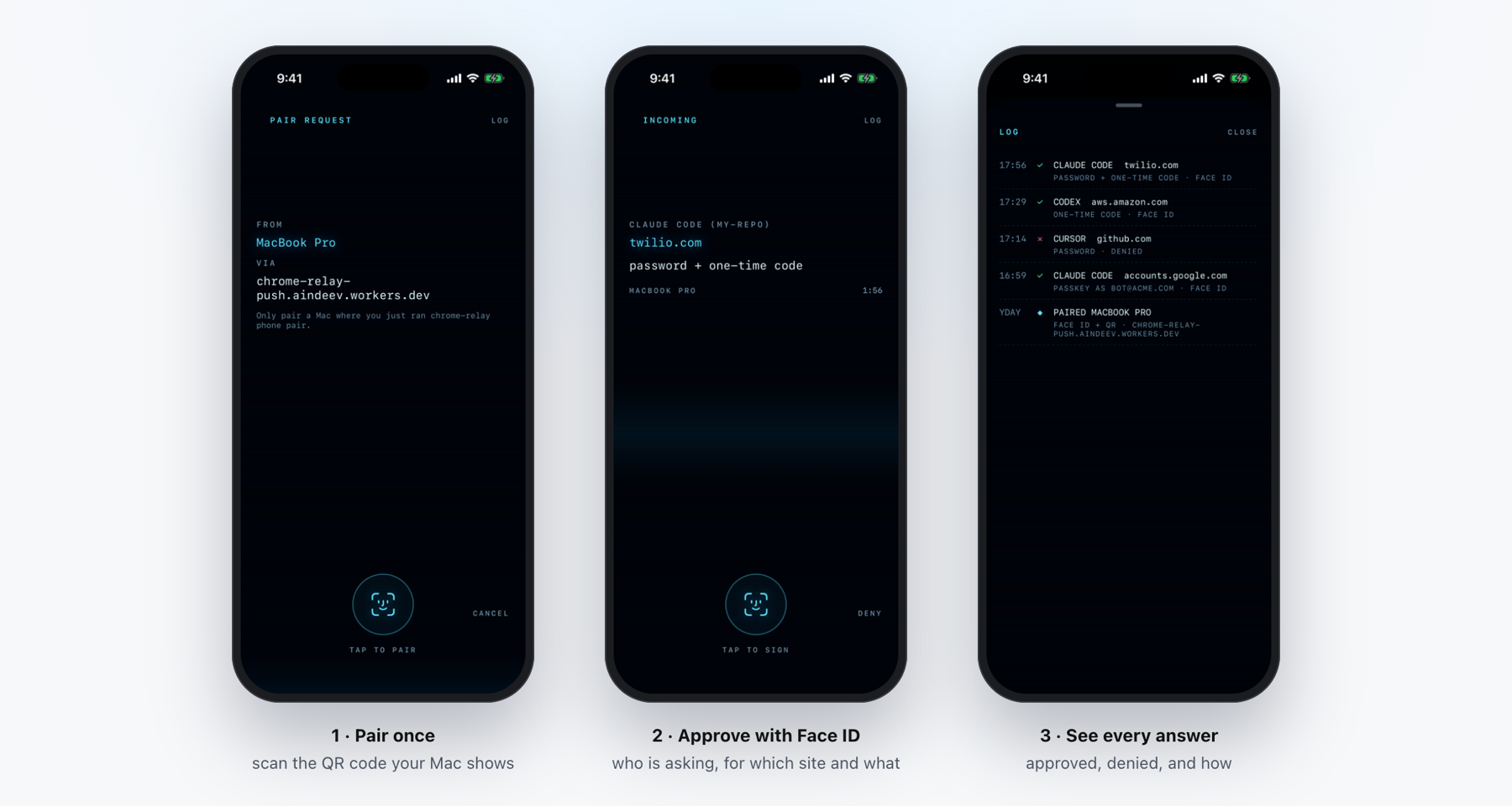
When you're away from the Mac, a paired iPhone can approve instead: chrome-relay phone pair (after Touch ID)
shows a QR code; scan it with the iPhone's Camera and open it in Chrome Relay Approve (join the beta on
TestFlight, or build it from ios/ with ./ios/build; ./ios/release
sends your own build to TestFlight). From then on every approval goes to Touch ID here and to the iPhone at once, and
the first answer wins. The iPhone shows the Mac, the agent and what it asks, and approves with Face ID: its key
for that lives in the iPhone's Secure Enclave, and the Mac checks the signature against the key it paired with,
so nothing in between can approve.
What sits between the Mac and the phone. One small relay (a Cloudflare Worker), for
two things the devices can't do directly. It carries the messages: neither device can accept a connection from the
other, so each posts sealed messages there and fetches the other's; the relay holds ciphertext for up to 12 hours
and can't open it. And it wakes the phone: only Apple can put a notification on a locked iPhone, and it accepts a
push for an app only when signed with that app's developer key, which the relay holds so that not every Mac has to;
it shows a fixed "An agent is waiting for your approval." The relay can't approve anything, and you can do
without it: chrome-relay phone pair --server takes any ntfy server, chrome-relay phone push --key … uses your own Apple key, and CHROME_RELAY_PUSH_RELAY=off turns the relay off. chrome-relay phone
shows what is in use.
Every agent action is recorded in ~/.chrome-relay/audit/YYYY-MM-DD.jsonl; read it with chrome-relay audit: who
connected (app, Claude/Paseo session id, working folder, CHROME_RELAY_SESSION or AGENT_BROWSER_SESSION), pages,
clicks with positions, special keys, the agent's own scripts, screenshots, uploads, popups, sign-in clicks and
blocked pages. Typed text is stored only as a character count, and URLs lose their query string.
target=_blank links open as new hidden tabs owned by the same agent; popup sign-in flows
that postMessage back to the opener and close themselves keep working. Message origins are the ones the relay
saw each tab load (never what the page claims), and targetOrigin is enforced. A safety net adopts any tab an agent
page opens anyway and hands focus back to the tab you were on.data-1p-ignore
(and the LastPass and Bitwarden equivalents), because Chrome drops an extension's debugger from a page that
contains another extension's frame (1Password's inline menu). If a frame gets in anyway, the agent's commands
wait while the extension re-attaches.Dev mode: try a branch beside your normal install. From a second checkout (e.g. a git worktree):
./build && ./chrome-relay setup --dev installs chrome-relay-dev-mode, with its own relay (port 9334, written to the
checkout's extension/relay.json), data folder ~/.chrome-relay-dev-mode, background service and Keychain
item; it leaves your agents' skill alone. Load that checkout's extension folder unpacked as a second Chrome
Relay (its tooltip says dev mode), and point agents at chrome-relay-dev-mode url <email>. Remove it with
chrome-relay-dev-mode uninstall.
go generate ./internal/macos            # the Swift Secure Enclave / Keychain / Touch ID layer (./build does this too)
CGO_LDFLAGS="-L$(xcrun --show-sdk-path)/usr/lib/swift -L$(dirname $(xcrun -f swiftc))/../lib/swift/macosx" \
  go test -race ./...                   # relay, CLI, 1Password fills, passkeys (in-memory 1Password and chip stand in)
CGO_ENABLED=0 go test ./...             # the core-only build (also what runs on Linux)
CHROME_RELAY_E2E=1 go test ./internal/cli -run TestDo   # `chrome-relay do` against real pages in a throwaway headless Chrome
                                        # (+ CHROME_RELAY_E2E_CLAUDE=1, or CHROME_RELAY_E2E_JEV=1 with TYPESAFE_API_KEY: real deciders)
node --test test/extension-*.test.mjs   # the extension's service worker
node --test test/push-relay.test.mjs    # the push relay (push-relay/)
Logs: chrome-relay logs (~/.chrome-relay/relay.log). Testing extension changes: edit extension/, then
chrome-relay update. CHROME_RELAY_HOME and CHROME_RELAY_PORT override the data folder and port.
Releasing the extension to the Chrome Web Store (unlisted, published by Alexey Indeev): raise version in
extension/manifest.json, ./package-extension, and upload the zip in the
developer dashboard (Chrome Relay → Package → Upload new package →
Submit for review). Installs update on their own a few hours after it's approved. The listing text, permission
justifications and images are in store/. Keep the extension's protocol compatible both ways: an install's
relay and its store extension are updated separately, and doctor only flags an extension newer than the relay.
Made by Alexey Indeev, co-founder and CTO of Spare. I write about building more with AI, whether you code or not, at The Leveraged Mind.
Questions, ideas or bugs: open an issue or reach out on X.
MIT. See LICENSE. Code adapted from other projects: THIRD-PARTY-NOTICES.md.
Let your AI agents use your Chrome, signed in as you, in background tabs. com · X: @AlexeyIndeev