Screenshots
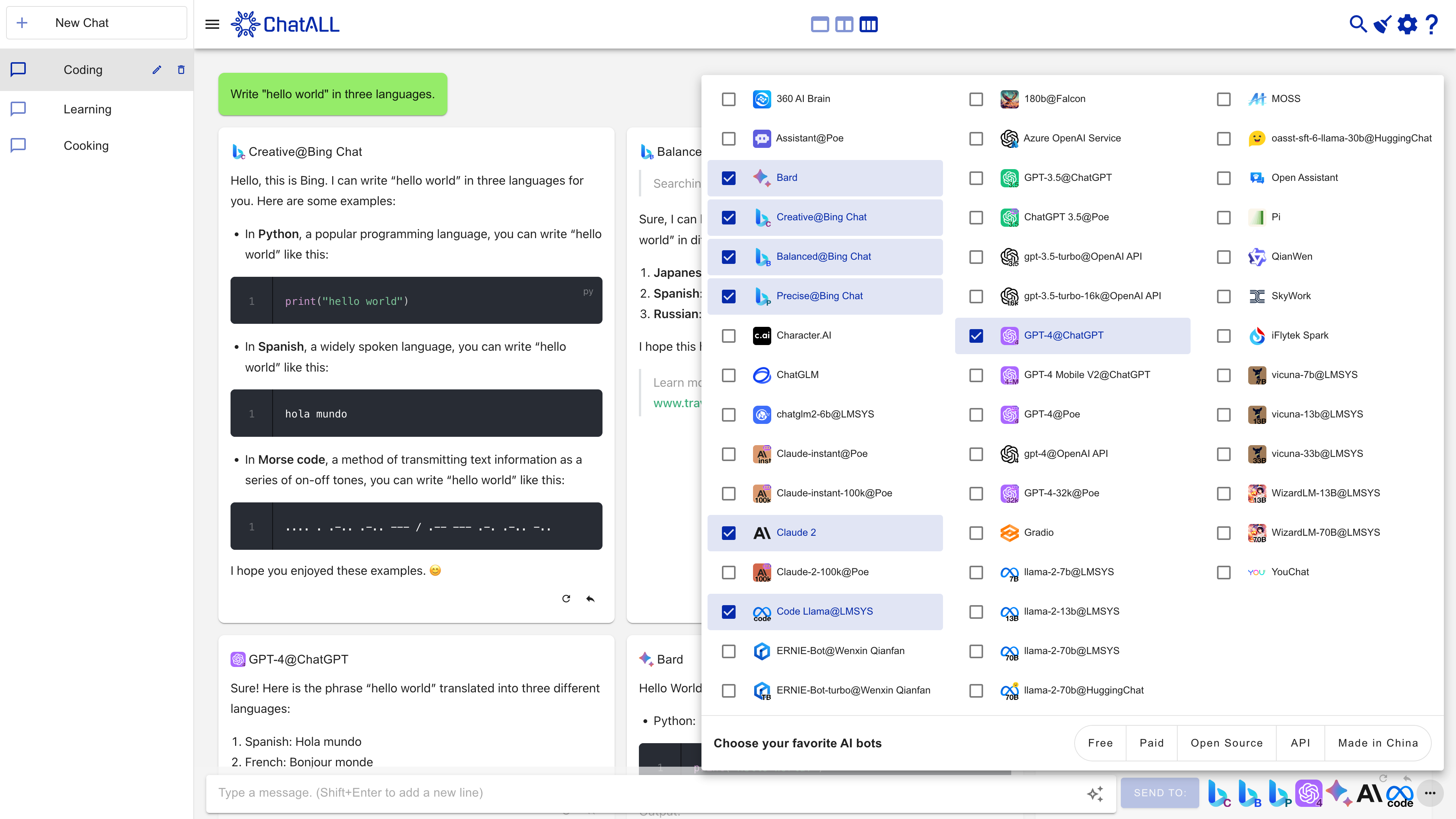
Features
Large Language Models (LLMs) based AI bots are amazing. However, their behavior can be random and different bots excel at different tasks. If you want the best experience, don't try them one by one. ChatALL (Chinese name: 齐叨) can send prompt to several AI bots concurrently, help you to discover the best results. All you need to do is download, install and ask.
Is this you?
Typical users of ChatALL are:
- 🤠Gurus of LLMs, who want to find the best answers or creations from LLMs.
- 🤓Researchers of LLMs, who want to intuitively compare the strengths and weaknesses of various LLMs in different fields.
- 😎Developers of LLM applications, who want to quickly debug prompts and find the best-performing foundation models.
Supported bots
More is coming. Upvote your favorite bots in these issues.
Note on Web-connected Bot Reliability
Web-connected AI bots (those marked with "Web Access") are inherently less reliable and frequently face stability issues, as service providers regularly update their web interfaces and security measures. These web-based connections rely on reverse engineering and are difficult to maintain, often breaking unexpectedly. For a dependable experience, we strongly recommend using bots that offer API access whenever possible.
Other features
- Quick-prompt mode: send the next prompt without waiting for the previous request to complete
- Save chat history locally, protect your privacy
- Highlight the response you like, delete the bad
- Enable/disable any bots at any time
- Switch between one, two, or three-column view
- Auto update to the latest version
- Dark mode (contributed by @tanchekwei)
- Short keys. Press Ctrl + / to know all of them (contributed by @tanchekwei)
- Multiple chats (contributed by @tanchekwei)
- Proxy setting (contributed by @msaong)
- Prompt management (contributed by @tanchekwei)
- Supports multiple languages (Chinese, English, German, French, Russian, Vietnamese, Korean, Japanese, Spanish, Italian)
- Supports Windows, macOS and Linux
Planned features:
You are welcome to contribute to these features.
- Deploy front-end to GitHub Pages
Privacy
All chat history, settings and login data are saved locally on your computer.
ChatALL collects anonymous usage data to help us improve the product. Including:
- Which AI bots are prompted and how long the prompt is. Not including the prompt content.
- How long the response is, and which response is deleted/highlighted. Not including the response content.
Prerequisites
ChatALL is a client, not a proxy. Therefore, you must:
- Have working accounts and/or API tokens for the bots.
- Have reliable network connections to the bots.
Download / Install
Download from https://github.com/ai-shifu/ChatALL/releases
On Windows
Just download the *-win.exe file and proceed with the setup.
On macOS
For Apple Silicon Mac (M1, M2 CPU), download the *-mac-arm64.dmg file.
For other Macs, download *-mac-x64.dmg file.
If you are using Homebrew, you can also install it with:
brew install --cask chatall
On Linux
Debian-based Distributions: Download the .deb file, double click it and install the software.
Arch-based Distributions: You can clone ChatALL from the AUR here. You can install it manually or using an AUR helper like yay or paru.
Other Distributions: Download the .AppImage file, make it executable, and enjoy the click-to-run experience. You can also use AppimageLauncher.
Troubleshooting
If you encounter any problems while using ChatALL, you can try the following methods to resolve them:
- Refresh - press Ctrl + R or ⌘ + R.
- Restart - exit ChatALL and run it again.
- Re-login - click the settings button in the upper right corner, then click the corresponding login/logout link to relogin the website.
- Create a new chat - click the
New Chat button and send prompt again.
If none of the above methods work, you can try resetting ChatALL. Note that this will delete all your settings and message history.
You can reset ChatALL by deleting the following directories:
- Windows:
C:\Users\<user>\AppData\Roaming\chatall\
- Linux:
/home/<user>/.config/chatall/
- macOS:
/Users/<user>/Library/Application Support/chatall/
If the problem persists, please submit an issue.
For developers
Contribute a Bot
The guide may help you.
Run
npm install
npm run electron:serve
Build
Build for your current platform:
npm run electron:build
Build for all platforms:
npm run electron:build -- -wml --x64 --arm64
Credits
Contributors
Others
- GPT-4 contributed much of the code
- ChatGPT, Copilot and Google provide many solutions (ranked in order)
- Inspired by ChatHub. Respect!
If you like this project, please consider:




 ChatALL(齐叨)是一款免费开源的桌面应用,可以把同一段提示词同时发给多个 AI 机器人——ChatGPT、Claude、Gemini、Kimi 等等——方便你并排对比各家回答,留下最好的那个。