Pi Web
中文文档 | 日本語 | Русский
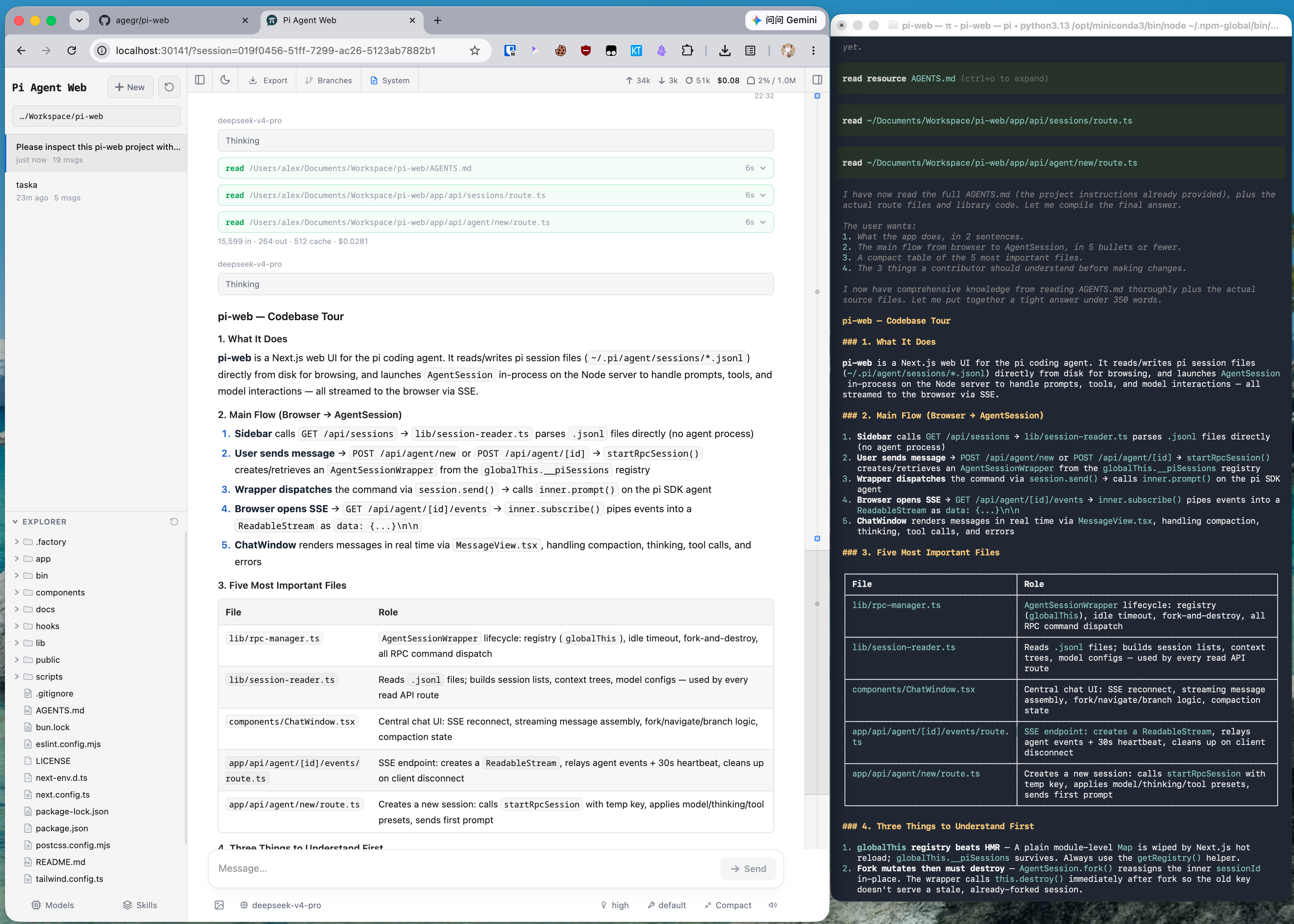
Local browser UI for the pi coding agent. Pi Web uses the same local configuration and session files as pi, so you can browse and resume conversations, run agent turns, configure models and resources, and inspect project files from a browser.
Features
- Session workspace: browse, resume, rename, export, and delete conversations grouped by project, with running state, context usage, cost, and compaction details.
- Two ways to branch: New session creates an independent session file from an earlier message; Edit from here creates a branch inside the current session.
- Project file tools: browse and upload files, inspect Git diffs, and preview source, Markdown, images, audio, PDFs, and DOCX files with automatic refresh.
- Git worktrees: switch checkouts from the sidebar while keeping sessions from the same repository grouped together.
- Web-based configuration: manage provider login and API keys, models, model tests, plugin packages, and skills without leaving Pi Web.
- English, Simplified Chinese, and Traditional Chinese UI: Pi Web follows the browser language initially and provides a language switcher in the top bar.
Quick Start
Pi Web requires Node.js 22.19.0 or newer. Check your version with node --version, then run:
npx @agegr/pi-web@latest
The CLI opens a browser after the server is ready. If it does not, open http://127.0.0.1:30141. Pi Web listens only on 127.0.0.1 by default.
If no model provider is configured yet, open the Models panel to sign in or add an API key.
To install the pi-web command globally:
npm install -g @agegr/pi-web@latest
pi-web
To update, stop the running process with Ctrl+C and run the same install command again. To uninstall, run npm uninstall -g @agegr/pi-web.
Configuration
For port and hostname, command-line options override the corresponding environment variables. Either --no-open or PI_WEB_NO_OPEN=1 disables automatic browser opening. Run pi-web --help (or -h) to print startup options and exit without starting the server. Unknown options exit with an error.
| Option or environment variable |
Purpose |
Default |
--help, -h |
Print startup options and exit |
— |
--port <port>, -p <port>, or PORT |
Server port |
30141 |
--hostname <host>, -H <host>, or PI_WEB_HOSTNAME |
Bind hostname |
127.0.0.1 |
--no-open or PI_WEB_NO_OPEN=1 |
Do not open a browser automatically |
Browser opens |
PI_WEB_SKIP_VERSION_CHECK=1 |
Disable Pi Web update checks |
Unset |
PI_WEB_ALLOWED_HOSTS |
Additional exact proxy or custom hostnames, comma-separated |
Unset |
PI_WEB_PASSWORD |
Enable browser password login; API clients may use Basic Auth with username pi |
Authentication disabled |
PI_WEB_IDLE_TIMEOUT_MS |
Session idle timeout in milliseconds, up to 2147483647; 0 disables idle shutdown; invalid or out-of-range values use the default |
600000 (10 min) |
For example:
pi-web --help
pi-web -p 8080 -H 0.0.0.0 --no-open
Remote Access
Binding to a non-loopback address exposes an agent that can execute high-privilege actions. On a trusted LAN, require a long random password:
PI_WEB_PASSWORD='a-long-random-password' pi-web --hostname 0.0.0.0
Password authentication does not encrypt the connection. Do not expose Pi Web over plain HTTP to the internet; use HTTPS through a trusted reverse proxy or a trusted VPN. If a reverse proxy sends an external hostname, add that exact name to PI_WEB_ALLOWED_HOSTS. This allow-list does not change the address Pi Web binds to.
HTTP Proxy
Server-side model and API requests honor the standard HTTP_PROXY, HTTPS_PROXY, and NO_PROXY environment variables.
On macOS or Linux:
HTTP_PROXY=http://127.0.0.1:7890 \
HTTPS_PROXY=http://127.0.0.1:7890 \
NO_PROXY=localhost,127.0.0.1 \
npx @agegr/pi-web@latest
On Windows PowerShell:
$env:HTTP_PROXY = "http://127.0.0.1:7890"
$env:HTTPS_PROXY = "http://127.0.0.1:7890"
$env:NO_PROXY = "localhost,127.0.0.1"
npx @agegr/pi-web@latest
Notes
- Agent data: Pi Web reads pi data from
~/.pi/agent by default, including session files under sessions/<encoded-cwd>/<timestamp>_<uuid>.jsonl. Set PI_CODING_AGENT_DIR to use another pi agent directory.
- Filesystem access: Pi Web must be able to read the agent data directory and the working directories recorded by its sessions. Run Pi Web in the same filesystem environment as pi when sharing existing sessions.
- Shared configuration: the Models panel uses pi's model, settings, and credential storage, so changes are visible to both interfaces.
- File access boundary: the file browser is limited to working directories selected in Pi Web and project or session roots it already knows about; it is not a general filesystem browser.
- Git worktrees: see Worktrees in Pi Web for switcher visibility, worktree creation, and removal behavior.
Electron wrappers and other downstream integrations can provide a session-row
context menu without patching SessionSidebar. Listen for the cancelable
pi-web:session-row-contextmenu browser event and call preventDefault()
synchronously when the integration will handle it:
window.addEventListener("pi-web:session-row-contextmenu", (event) => {
  event.preventDefault();
  const { id, path, cwd, name, clientX, clientY, refresh } = event.detail;

  void openSessionMenu({ id, path, cwd, name, clientX, clientY }).then((changed) => {
    if (changed) refresh();
  });
});
The detail object contains id, path, cwd, optional name, pointer
coordinates, and a refresh() callback for actions that change the session
list. If no listener cancels the extension event, Pi Web preserves the
browser's native context menu. This hook is browser-side and independent of
Pi agent extensions.
Extension Session Liveness
Server-side Pi extensions with detached work can prevent automatic idle
session eviction through the versioned global registry:
const liveness = globalThis[Symbol.for("@agegr/pi-web/session-liveness/v1")];
const release = liveness?.version === 1
  ? liveness.register({
      name: "my-extension",
      sessionId,
      sessionFile: sessionFile || undefined,
      isActive: () => detachedJobs.size > 0,
    })
  : () => {};
Register once per active extension session and call the returned idempotent
release function on session shutdown, replacement, or reload. isActive
must be synchronous, cheap, and scoped to the supplied exact session id or
file. Provider errors fail safe by preserving that session. This lease only
affects automatic idle eviction; explicit shutdown and Stop fallback cleanup
still take precedence.
Development
npm install
npm run dev
The development server runs at http://127.0.0.1:30141. Run the common checks with:
npm test
node_modules/.bin/tsc --noEmit
npm run lint
Do not run next build or npm run build during normal development. It writes to .next/ and can interfere with the development server; leave builds for release work.
Contributor guides: Internationalization and Release process.
Repository Layout
app/             Next.js UI and API routes
components/      React UI components
hooks/           Client state and interaction hooks
lib/             Session, agent, model, file, Git, and security logic
public/          Static assets and PWA files
bin/             npm CLI entrypoint and launch option parsing
docs/            Focused user and contributor guides
See AGENTS.md for the architecture notes and detailed file map.
License
MIT

 这是 pi 编程代理的本地浏览器界面:可以浏览和恢复对话、运行代理任务、配置模型、查看项目文件——使用的数据与 pi CLI 完全相同。