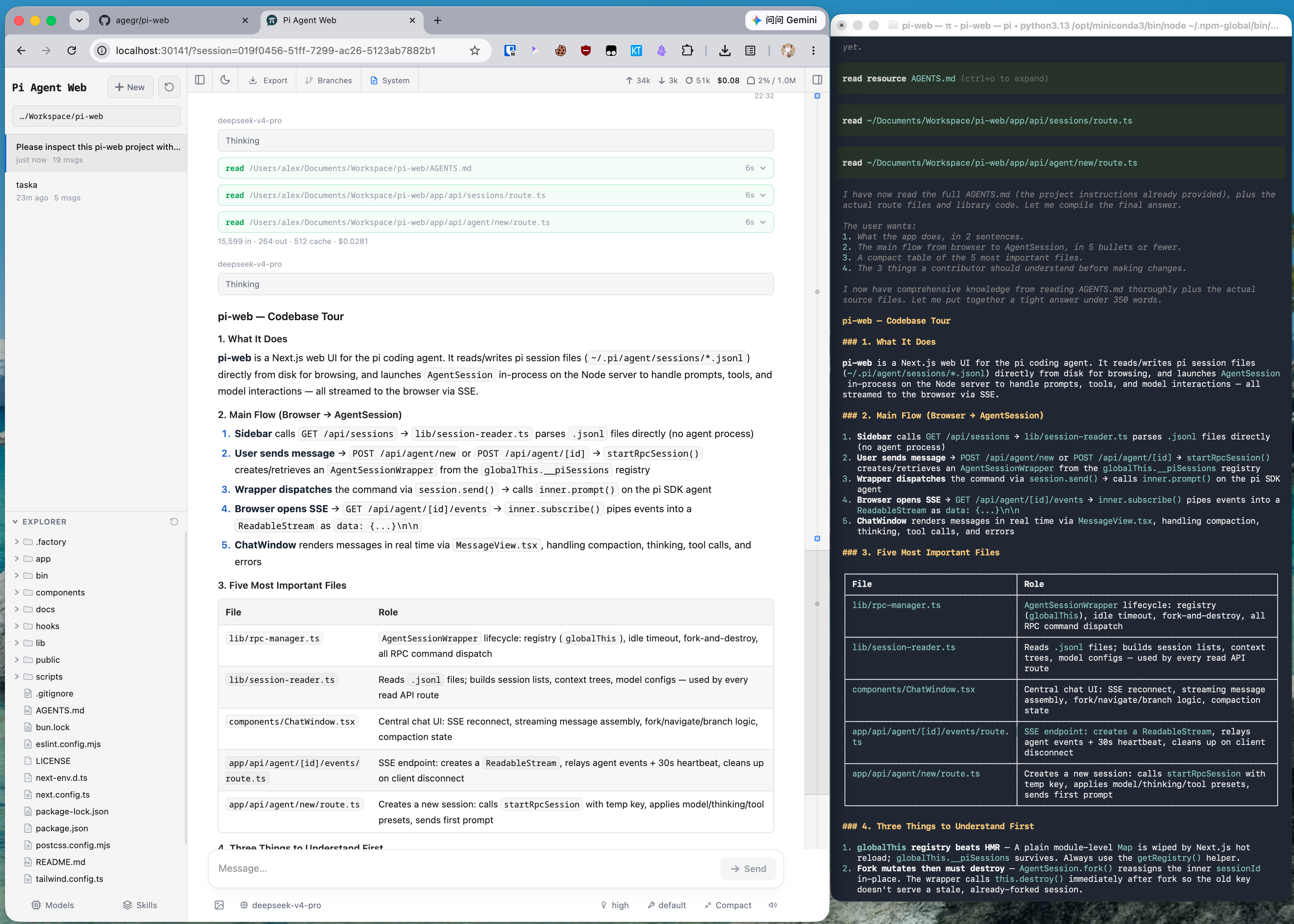
Что это такое?
 Локальный браузерный интерфейс для агента pi: можно просматривать и продолжать диалоги, запускать ходы агента, настраивать модели и просматривать файлы проекта — используются те же данные, что и в pi CLI.
Локальный браузерный интерфейс для агента pi: можно просматривать и продолжать диалоги, запускать ходы агента, настраивать модели и просматривать файлы проекта — используются те же данные, что и в pi CLI.Это десктопное приложение или работает в моём браузере?Оно запускается как небольшой локальный веб-сервер командой pi-web, а пользуетесь вы им через браузер. Интерфейс использует те же файлы настроек и сессий pi, поэтому CLI и этот UI всегда синхронизированы.
Оно запускается как небольшой локальный веб-сервер командой pi-web, а пользуетесь вы им через браузер. Интерфейс использует те же файлы настроек и сессий pi, поэтому CLI и этот UI всегда синхронизированы.Как его запустить?Установите глобально через npm install -g @agegr/pi-web и запустите pi-web — сервер поднимется на порту 30141 и сам откроет браузер. Чтобы обновить, просто повторите ту же команду установки.
Установите глобально через npm install -g @agegr/pi-web и запустите pi-web — сервер поднимется на порту 30141 и сам откроет браузер. Чтобы обновить, просто повторите ту же команду установки.Нужно ли что-то заранее установить, чтобы всё работало?Нужен Node.js 22.19.0 или новее. Если провайдер модели ещё не настроен, вы сможете войти в аккаунт или добавить API-ключ в панели Models внутри Pi Web.
Нужен Node.js 22.19.0 или новее. Если провайдер модели ещё не настроен, вы сможете войти в аккаунт или добавить API-ключ в панели Models внутри Pi Web.Можно ли открыть его с другого компьютера, или он строго локальный?По умолчанию он слушает только 127.0.0.1. Удалённый доступ возможен, но вход по паролю не шифрует трафик, поэтому в README советуют использовать HTTPS через обратный прокси или VPN и ни в коем случае не открывать его по обычному HTTP.
По умолчанию он слушает только 127.0.0.1. Удалённый доступ возможен, но вход по паролю не шифрует трафик, поэтому в README советуют использовать HTTPS через обратный прокси или VPN и ни в коем случае не открывать его по обычному HTTP.Где хранятся мои сессии и файлы проектов?Всё остаётся на вашем компьютере: данные pi читаются из ~/.pi/agent, а в браузере файлов видны только те рабочие каталоги, которые вы выбрали в Pi Web, — это не обзор всей файловой системы.
Всё остаётся на вашем компьютере: данные pi читаются из ~/.pi/agent, а в браузере файлов видны только те рабочие каталоги, которые вы выбрали в Pi Web, — это не обзор всей файловой системы.Что я могу делать с прошлыми диалогами?В рабочей области сессий можно просматривать, продолжать, переименовывать, экспортировать и удалять диалоги, сгруппированные по проектам; там же видно состояние запусков, использование контекста, стоимость и детали компакции. Ветвление доступно двумя способами: начать независимую сессию с более раннего сообщения или создать ветку внутри сессии через Edit from here.
В рабочей области сессий можно просматривать, продолжать, переименовывать, экспортировать и удалять диалоги, сгруппированные по проектам; там же видно состояние запусков, использование контекста, стоимость и детали компакции. Ветвление доступно двумя способами: начать независимую сессию с более раннего сообщения или создать ветку внутри сессии через Edit from here.А мои Git worktree он поддерживает?Да — переключаться между чекаутами можно прямо из боковой панели, при этом сессии одного репозитория остаются сгруппированными вместе, а диффы Git по файлам проекта можно просматривать.
Да — переключаться между чекаутами можно прямо из боковой панели, при этом сессии одного репозитория остаются сгруппированными вместе, а диффы Git по файлам проекта можно просматривать.Какие типы файлов он умеет показывать?Исходный код, Markdown, изображения, аудио, PDF и DOCX — с автоматическим обновлением. Файлы проекта также можно просматривать и загружать прямо из интерфейса.
Исходный код, Markdown, изображения, аудио, PDF и DOCX — с автоматическим обновлением. Файлы проекта также можно просматривать и загружать прямо из интерфейса.На каких языках доступен интерфейс?Английском, китайском упрощённом и китайском традиционном. При первом запуске берётся язык вашего браузера, а переключатель находится в верхней панели.
Английском, китайском упрощённом и китайском традиционном. При первом запуске берётся язык вашего браузера, а переключатель находится в верхней панели.What are similar projects?wicked-studio, control-center, multi-agent-discuss, wechat-miniapp-radar, codeburn, Resume-Matcher, html-anything, neko-master
wicked-studio, control-center, multi-agent-discuss, wechat-miniapp-radar, codeburn, Resume-Matcher, html-anything, neko-master