

lama README

The project's README from github.com/advimman/lama. As one markdown file: README.md.

🦙 LaMa: Resolution-robust Large Mask Inpainting with Fourier Convolutions

by Roman Suvorov, Elizaveta Logacheva, Anton Mashikhin, Anastasia Remizova, Arsenii Ashukha, Aleksei Silvestrov, Naejin Kong, Harshith Goka, Kiwoong Park, Victor Lempitsky.

🔥🔥🔥
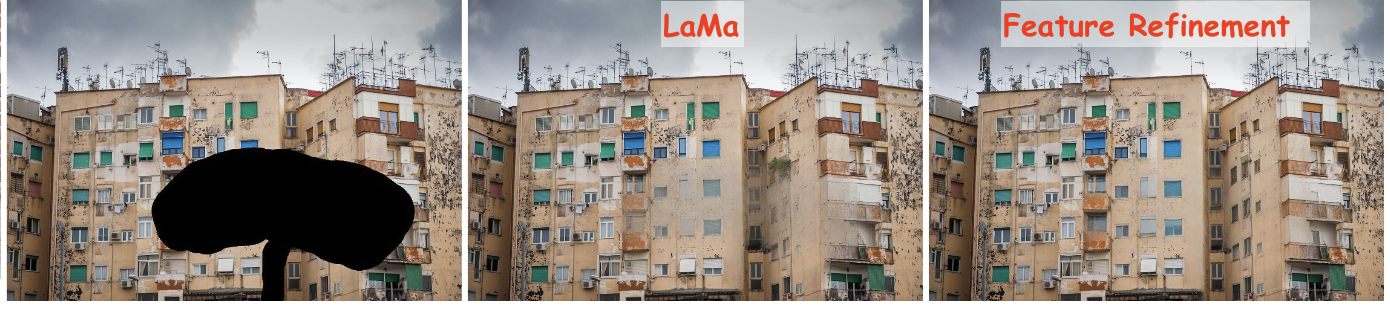
LaMa generalizes surprisingly well to much higher resolutions (~2k❗️) than it saw during training (256x256), and achieves the excellent performance even in challenging scenarios, e.g. completion of periodic structures.

[Project page] [arXiv] [Supplementary] [BibTeX] [Casual GAN Papers Summary]


Try out in Google Colab
All yandex dist links went bad, you can download the model from the https://drive.google.com/drive/folders/1B2x7eQDgecTL0oh3LSIBDGj0fTxs6Ips?usp=sharing

LaMa development

(Feel free to share your paper by creating an issue)

Non-official 3rd party apps:

(Feel free to share your app/implementation/demo by creating an issue)

Environment setup

❗️❗️❗️ All yandex dist links went bad, you can download the model from the google drive ❗️❗️❗️

Clone the repo: git clone https://github.com/advimman/lama.git

There are three options of an environment:

  1. Python virtualenv:

    virtualenv inpenv --python=/usr/bin/python3
    source inpenv/bin/activate
    pip install torch==1.8.0 torchvision==0.9.0
    
    cd lama
    pip install -r requirements.txt 
    
  2. Conda

    % Install conda for Linux, for other OS download miniconda at https://docs.conda.io/en/latest/miniconda.html
    wget https://repo.anaconda.com/miniconda/Miniconda3-latest-Linux-x86_64.sh
    bash Miniconda3-latest-Linux-x86_64.sh -b -p $HOME/miniconda
    $HOME/miniconda/bin/conda init bash
    
    cd lama
    conda env create -f conda_env.yml
    conda activate lama
    conda install pytorch torchvision torchaudio cudatoolkit=10.2 -c pytorch -y
    pip install pytorch-lightning==1.2.9
    
  3. Docker: No actions are needed 🎉.

Inference

Run

cd lama
export TORCH_HOME=$(pwd) && export PYTHONPATH=$(pwd)

1. Download pre-trained models

The best model (Places2, Places Challenge):

curl -LJO https://huggingface.co/smartywu/big-lama/resolve/main/big-lama.zip
unzip big-lama.zip

All models (Places & CelebA-HQ):

download [https://drive.google.com/drive/folders/1B2x7eQDgecTL0oh3LSIBDGj0fTxs6Ips?usp=drive_link]
unzip lama-models.zip

2. Prepare images and masks

Download test images:

unzip LaMa_test_images.zip
OR prepare your data: 1) Create masks named as `[images_name]_maskXXX[image_suffix]`, put images and masks in the same folder.
  • You can use the script for random masks generation.
  • Check the format of the files:
    image1_mask001.png
    image1.png
    image2_mask001.png
    image2.png
    
  1. Specify image_suffix, e.g. .png or .jpg or _input.jpg in configs/prediction/default.yaml.

3. Predict

On the host machine:

python3 bin/predict.py model.path=$(pwd)/big-lama indir=$(pwd)/LaMa_test_images outdir=$(pwd)/output

OR in the docker

The following command will pull the docker image from Docker Hub and execute the prediction script

bash docker/2_predict.sh $(pwd)/big-lama $(pwd)/LaMa_test_images $(pwd)/output device=cpu

Docker cuda:

bash docker/2_predict_with_gpu.sh $(pwd)/big-lama $(pwd)/LaMa_test_images $(pwd)/output

4. Predict with Refinement

On the host machine:

python3 bin/predict.py refine=True model.path=$(pwd)/big-lama indir=$(pwd)/LaMa_test_images outdir=$(pwd)/output

Train and Eval

Make sure you run:

cd lama
export TORCH_HOME=$(pwd) && export PYTHONPATH=$(pwd)

Then download models for perceptual loss:

mkdir -p ade20k/ade20k-resnet50dilated-ppm_deepsup/
wget -P ade20k/ade20k-resnet50dilated-ppm_deepsup/ http://sceneparsing.csail.mit.edu/model/pytorch/ade20k-resnet50dilated-ppm_deepsup/encoder_epoch_20.pth

Places

⚠️ NB: FID/SSIM/LPIPS metric values for Places that we see in LaMa paper are computed on 30000 images that we produce in evaluation section below. For more details on evaluation data check [Section 3. Dataset splits in Supplementary] ⚠️

On the host machine:

# Download data from http://places2.csail.mit.edu/download.html
# Places365-Standard: Train(105GB)/Test(19GB)/Val(2.1GB) from High-resolution images section
wget http://data.csail.mit.edu/places/places365/train_large_places365standard.tar
wget http://data.csail.mit.edu/places/places365/val_large.tar
wget http://data.csail.mit.edu/places/places365/test_large.tar

# Unpack train/test/val data and create .yaml config for it
bash fetch_data/places_standard_train_prepare.sh
bash fetch_data/places_standard_test_val_prepare.sh

# Sample images for test and viz at the end of epoch
bash fetch_data/places_standard_test_val_sample.sh
bash fetch_data/places_standard_test_val_gen_masks.sh

# Run training
python3 bin/train.py -cn lama-fourier location=places_standard

# To evaluate trained model and report metrics as in our paper
# we need to sample previously unseen 30k images and generate masks for them
bash fetch_data/places_standard_evaluation_prepare_data.sh

# Infer model on thick/thin/medium masks in 256 and 512 and run evaluation 
# like this:
python3 bin/predict.py \
model.path=$(pwd)/experiments/<user>_<date:time>_lama-fourier_/ \
indir=$(pwd)/places_standard_dataset/evaluation/random_thick_512/ \
outdir=$(pwd)/inference/random_thick_512 model.checkpoint=last.ckpt

python3 bin/evaluate_predicts.py \
$(pwd)/configs/eval2_gpu.yaml \
$(pwd)/places_standard_dataset/evaluation/random_thick_512/ \
$(pwd)/inference/random_thick_512 \
$(pwd)/inference/random_thick_512_metrics.csv

Docker: TODO

CelebA

On the host machine:

# Make shure you are in lama folder
cd lama
export TORCH_HOME=$(pwd) && export PYTHONPATH=$(pwd)

# Download CelebA-HQ dataset
# Download data256x256.zip from https://drive.google.com/drive/folders/11Vz0fqHS2rXDb5pprgTjpD7S2BAJhi1P

# unzip & split into train/test/visualization & create config for it
bash fetch_data/celebahq_dataset_prepare.sh

# generate masks for test and visual_test at the end of epoch
bash fetch_data/celebahq_gen_masks.sh

# Run training
python3 bin/train.py -cn lama-fourier-celeba data.batch_size=10

# Infer model on thick/thin/medium masks in 256 and run evaluation 
# like this:
python3 bin/predict.py \
model.path=$(pwd)/experiments/<user>_<date:time>_lama-fourier-celeba_/ \
indir=$(pwd)/celeba-hq-dataset/visual_test_256/random_thick_256/ \
outdir=$(pwd)/inference/celeba_random_thick_256 model.checkpoint=last.ckpt

Docker: TODO

Places Challenge

On the host machine:

# This script downloads multiple .tar files in parallel and unpacks them
# Places365-Challenge: Train(476GB) from High-resolution images (to train Big-Lama) 
bash places_challenge_train_download.sh

TODO: prepare
TODO: train 
TODO: eval
  

Docker: TODO

Create your data

Please check bash scripts for data preparation and mask generation from CelebaHQ section, if you stuck at one of the following steps.

On the host machine:

# Make shure you are in lama folder
cd lama
export TORCH_HOME=$(pwd) && export PYTHONPATH=$(pwd)

# You need to prepare following image folders:
$ ls my_dataset
train
val_source # 2000 or more images
visual_test_source # 100 or more images
eval_source # 2000 or more images

# LaMa generates random masks for the train data on the flight,
# but needs fixed masks for test and visual_test for consistency of evaluation.

# Suppose, we want to evaluate and pick best models 
# on 512x512 val dataset  with thick/thin/medium masks 
# And your images have .jpg extention:

python3 bin/gen_mask_dataset.py \
$(pwd)/configs/data_gen/random_<size>_512.yaml \ # thick, thin, medium
my_dataset/val_source/ \
my_dataset/val/random_<size>_512.yaml \# thick, thin, medium
--ext jpg

# So the mask generator will: 
# 1. resize and crop val images and save them as .png
# 2. generate masks

ls my_dataset/val/random_medium_512/
image1_crop000_mask000.png
image1_crop000.png
image2_crop000_mask000.png
image2_crop000.png
...

# Generate thick, thin, medium masks for visual_test folder:

python3 bin/gen_mask_dataset.py \
$(pwd)/configs/data_gen/random_<size>_512.yaml \  #thick, thin, medium
my_dataset/visual_test_source/ \
my_dataset/visual_test/random_<size>_512/ \ #thick, thin, medium
--ext jpg


ls my_dataset/visual_test/random_thick_512/
image1_crop000_mask000.png
image1_crop000.png
image2_crop000_mask000.png
image2_crop000.png
...

# Same process for eval_source image folder:

python3 bin/gen_mask_dataset.py \
$(pwd)/configs/data_gen/random_<size>_512.yaml \  #thick, thin, medium
my_dataset/eval_source/ \
my_dataset/eval/random_<size>_512/ \ #thick, thin, medium
--ext jpg


# Generate location config file which locate these folders:

touch my_dataset.yaml
echo "data_root_dir: $(pwd)/my_dataset/" >> my_dataset.yaml
echo "out_root_dir: $(pwd)/experiments/" >> my_dataset.yaml
echo "tb_dir: $(pwd)/tb_logs/" >> my_dataset.yaml
mv my_dataset.yaml ${PWD}/configs/training/location/


# Check data config for consistency with my_dataset folder structure:
$ cat ${PWD}/configs/training/data/abl-04-256-mh-dist
...
train:
  indir: ${location.data_root_dir}/train
  ...
val:
  indir: ${location.data_root_dir}/val
  img_suffix: .png
visual_test:
  indir: ${location.data_root_dir}/visual_test
  img_suffix: .png


# Run training
python3 bin/train.py -cn lama-fourier location=my_dataset data.batch_size=10

# Evaluation: LaMa training procedure picks best few models according to 
# scores on my_dataset/val/ 

# To evaluate one of your best models (i.e. at epoch=32) 
# on previously unseen my_dataset/eval do the following 
# for thin, thick and medium:

# infer:
python3 bin/predict.py \
model.path=$(pwd)/experiments/<user>_<date:time>_lama-fourier_/ \
indir=$(pwd)/my_dataset/eval/random_<size>_512/ \
outdir=$(pwd)/inference/my_dataset/random_<size>_512 \
model.checkpoint=epoch32.ckpt

# metrics calculation:
python3 bin/evaluate_predicts.py \
$(pwd)/configs/eval2_gpu.yaml \
$(pwd)/my_dataset/eval/random_<size>_512/ \
$(pwd)/inference/my_dataset/random_<size>_512 \
$(pwd)/inference/my_dataset/random_<size>_512_metrics.csv

OR in the docker:

TODO: train
TODO: eval

Hints

Generate different kinds of masks

The following command will execute a script that generates random masks.

bash docker/1_generate_masks_from_raw_images.sh \
    configs/data_gen/random_medium_512.yaml \
    /directory_with_input_images \
    /directory_where_to_store_images_and_masks \
    --ext png

The test data generation command stores images in the format, which is suitable for prediction.

The table below describes which configs we used to generate different test sets from the paper. Note that we do not fix a random seed, so the results will be slightly different each time.

Places 512x512 CelebA 256x256
Narrow random_thin_512.yaml random_thin_256.yaml
Medium random_medium_512.yaml random_medium_256.yaml
Wide random_thick_512.yaml random_thick_256.yaml

Feel free to change the config path (argument #1) to any other config in configs/data_gen or adjust config files themselves.

Override parameters in configs

Also you can override parameters in config like this:

python3 bin/train.py -cn <config> data.batch_size=10 run_title=my-title

Where .yaml file extension is omitted

Models options

Config names for models from paper (substitude into the training command):

* big-lama
* big-lama-regular
* lama-fourier
* lama-regular
* lama_small_train_masks

Which are seated in configs/training/folder

Training time & resources

TODO

Acknowledgments

Citation

If you found this code helpful, please consider citing:

@article{suvorov2021resolution,
  title={Resolution-robust Large Mask Inpainting with Fourier Convolutions},
  author={Suvorov, Roman and Logacheva, Elizaveta and Mashikhin, Anton and Remizova, Anastasia and Ashukha, Arsenii and Silvestrov, Aleksei and Kong, Naejin and Goka, Harshith and Park, Kiwoong and Lempitsky, Victor},
  journal={arXiv preprint arXiv:2109.07161},
  year={2021}
}

lama (advimman/lama)

Searching Database…

10.3K ·GitHub
Что это такое?LaMa — это модель ИИ для inpainting-восстановления изображений с исследовательским кодом: она удаляет ненужные объекты и заполняет крупные отсутствующие области на фотографиях с помощью свёрток на основе преобразования Фурье, оставаясь надёжной даже при высоких разрешениях. Это официальный код статьи с конференции WACV 2022.
Это готовое приложение или код, который нужно запускать самому?Это исследовательский код на PyTorch: вы управляете им из командной строки через скрипт predict.py — на самом компьютере или в Docker. В README также перечислены неофициальные сторонние приложения, построенные поверх этой модели, но это отдельные проекты.
Как запустить её на своих фотографиях?Склонируйте репозиторий, настройте одно из трёх окружений (виртуальное окружение Python, Conda или Docker — в Docker ничего делать не нужно), скачайте предобученную модель, например big-lama, затем запустите: python3 bin/predict.py model.path= indir= outdir= .
На чём обычно спотыкаются при запуске?Два момента: оригинальные ссылки на скачивание от Yandex уже не работают, поэтому берите чекпоинты по ссылке на Google Drive в README; и при генерации масок случайное зерно не фиксируется, поэтому результаты от запуска к запуску немного отличаются.
Я просто хочу стереть объект с фото — есть ли способ попроще, чем запускать весь этот код?Да: есть официальная демо-версия на Google Colab, а в README перечислены инструменты сообщества, построенные на модели, включая lama-cleaner (веб-инструмент для самостоятельного хостинга), простой pip-пакет, настольное приложение на PyQt5 и Telegram-бота @MagicEraserBot.
Как указать ей, какую часть изображения заполнять?К каждому изображению прикладывается файл маски: назовите его именем изображения с суффиксом _mask, положите оба файла в одну папку и укажите суффикс файлов (например, .png или .jpg) в configs/prediction/default.yaml. Также в комплекте есть скрипт, который может сгенерировать для вас случайные маски — толстые, тонкие или средней толщины.
Мои фотографии намного больше типичных данных для обучения — справится ли модель?Это главное заявление статьи: LaMa обучалась на изображениях 256x256, но обобщает на разрешения порядка 2k и продолжает хорошо работать на сложных случаях, например на периодических структурах.
Могу ли я обучить LaMa на своём наборе данных вместо Places или CelebA-HQ?Да. В README описывается работа с собственным набором: примерно 2000+ изображений для обучения, 100+ для визуальной проверки и 2000+ для оценки. Случайные маски генерируются на лету во время обучения, а для тестового и оценочного наборов нужны фиксированные маски, чтобы чекпоинты можно было честно сравнивать.
Какие предобученные модели можно скачать?big-lama — флагманский чекпоинт, обученный на Places2 для Places Challenge; в README также есть ссылки на все модели Places и CelebA-HQ, плюс конфигурации для обучения вариантов вроде big-lama-regular, lama-fourier и lama-regular.
Creator
advimman
Size
8.7 MB
Stars
10.3K
Updated
CommitFeb 05
Age
5y
Commits · 90 Days