
DSH Crew
A DeepSeek Harness plugin: dispatch work to DSH agents from Claude Code / Codex / Antigravity / Grok, without giving up the host's native subagent UI.
Native Progress UI • Tier Policy & Escalation • Dispatch Guardrails • Jobs Board • In-Host DSH Sessions • Vision & Image Gen (Native-First) • One-Click Install
npm: @zseven-w/dsh-crew · Current plugin release: 0.1.0-rc.4 · Tested with DSH 0.1.1-rc.1
English · 简体中文 · 繁體中文 · 日本語 · 한국어 · Français · Español · Deutsch · Português · Русский · हिन्दी · Türkçe · ไทย · Tiếng Việt · Bahasa Indonesia

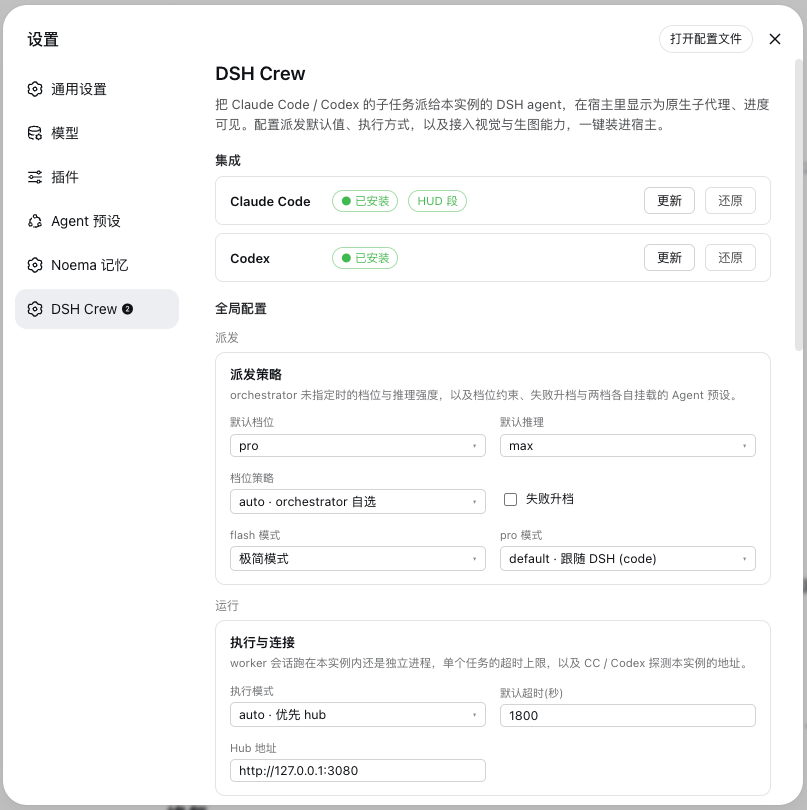
The DSH Crew settings page — host integrations, dispatch policy, execution and the multimodal bridge
Why DSH Crew
DSH Crew is a plugin for DeepSeek Harness (DSH) — an open-source agent harness. It makes DSH agents dispatchable from Claude Code, Codex, Antigravity and Grok: the orchestrator keeps its own model, the work runs on a real DSH agent with that harness's tools, sandbox, presets and session history, and the host still shows it as a native subagent with live progress.
What runs the work is a DSH agent, not a bare model call. Tiers (flash / pro) select how much capability that agent gets from the harness's configured roster — DeepSeek V4 Flash and V4 Pro today — so a change of model in DSH needs no change here.
🧵 Native Progress UI
Workers appear as regular subagents in Claude Code / Codex / Antigravity / Grok — dispatch count, running step, tool calls and token usage all show up in the host's own task panel, plus a claude-hud statusline segment: ⚙dsh 1▶pro 2m14s 21.7k/606 ✓3.
|
🎚️ Tier Policy and Escalation
flash for mechanical work, pro for reasoning, effort from off to max. tier_policy can clamp every dispatch to one tier at the tool layer, and escalate_on_failure retries a failed flash run once on pro — based on evidence, not on guessing difficulty up front.
|
🏛️ In-Host DSH Sessions
With the bundle installed in a DSH profile, each worker is a first-class DSH session: visible in the Web UI, grouped by working directory, mounted with the Agent preset you choose per tier. Without DSH running, dispatch falls back to a standalone DSH runtime, so CI and headless environments still work.
|
👁️ Vision and Image Generation
DSH's models are text-only. describe_image now prefers DeepSeek's own VL model (deepseek-v4-flash-vision-exp) whenever a key is available, then falls back to the CLIs you already have — Claude, Codex, Grok, Antigravity — or any OpenAI-compatible API you configure. generate_image borrows the same CLIs' brush. Pasted images stay visible in the conversation and reach the model as text.
|
🛡️ Dispatch Guardrails
Every dispatch is checked before anything spawns. Worker→worker nesting is capped at origin-chain depth 3 and cycles are refused; a second worker on a workspace another job already holds is refused with the holder's info — never silently queued. Refusals are readable errors: wait or re-scope, don't bypass.
|
📋 Jobs Board
The DSH Crew panel doubles as a jobs board: every worker job — running or finished — is listed with tier, effort, live progress and tokens, held workspaces show their holders, and a job that vanishes mid-flight (e.g. a hub restart) is surfaced as an orphan ghost instead of disappearing silently.
|
🔌 Custom Providers
Bring your own endpoint (Base URL + API key + models) or a local command template. Each provider has a connectivity test that checks reachability and auth, then makes one real vision call so you find out now, not mid-task.
|
📦 One-Click Install
The settings page installs and updates the Claude Code plugin, the Codex role files and the Antigravity / Grok agents, skills and commands for you — marketplace registration, permission allowlist, HUD wiring, absolute paths rendered for this machine — and restores them just as easily. Every settings file is backed up first.
|
How it works
Claude Code / Codex / Antigravity / Grok (orchestrator, keeps its own model)
  └─ ds-flash / ds-pro  ← native subagent shell (progress shows in the host's task UI)
       └─ MCP: dsh_run_worker(tier, effort, cwd, worker=)
            ├─ worker="agy"/"grok" → that external CLI runs the task (explicit opt-in)
            ├─ hub reachable → session inside DSH (visible in the Web UI, grouped by cwd)
            └─ otherwise     → dsh-jsonrpc-agent runtime (worker.cordis.yml)
                 └─ DeepSeek V4 Flash / Pro (DSH SDK, event stream → progress and token stats)
One run, two views
Dispatch fans out. Below, eighteen workers translate this README in parallel: the host counts them as its own subagents, while the harness runs them as real sessions.
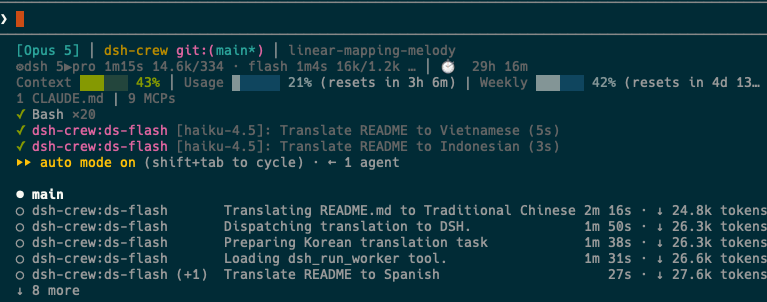
Claude Code sees dsh-crew workers as native subagents, with a statusline segment tracking running tiers, elapsed time and tokens.
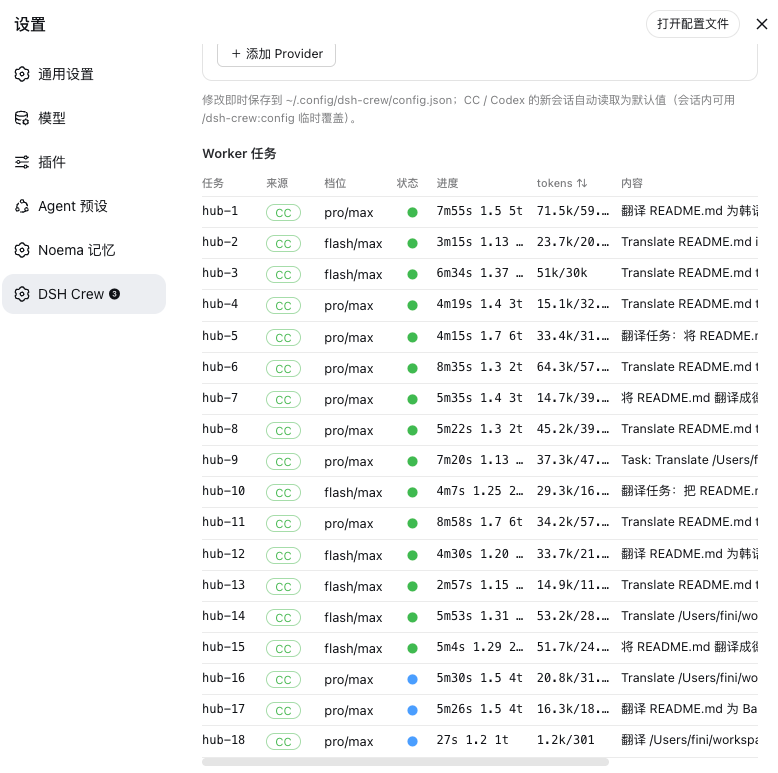
The DSH Crew panel sees the same run from the harness side: which host dispatched each job, its tier and effort, live progress and token usage.
The panel is also the jobs board: running and finished jobs stay listed with tier, progress and tokens, held workspaces name their holders, and a job that vanishes mid-flight (a hub restart) surfaces as an orphan ghost instead of disappearing silently.
Install
Install into a DSH profile from npm:
dsh plugin --profile web add @zseven-w/dsh-crew@latest
dsh web
Or, for local development straight from the source tree:
dsh plugin --profile web add link:/path/to/dsh-crew
dsh web
The link: protocol symlinks the profile dependency to this repository, so rebuilds are visible immediately.
In hub mode — the installation above — workers run inside the DSH instance and use the DeepSeek credentials it is already configured with. Nothing else to set up.
Only the standalone fallback needs a key of its own: dispatching from a host with no DSH instance running launches a worker runtime as a separate process. Obtain an API key from platform.deepseek.com and write it to ~/.config/dsh-crew/.env:
DEEPSEEK_API_KEY=sk-...
Verify
node scripts/smoke.mjs
The smoke test dispatches one cheap job through whichever path is available — the hub when a DSH instance is running, standalone otherwise — and prints which one it used. Within about ten seconds you should see smoke test passed — configuration OK. On failure the reason is printed, scoped to the path that was tested.
Then open Settings → DSH Crew and install the host integrations — Claude Code, Codex, Antigravity, Grok — with one click, or drive the same installer from the command line:
node src/install/cli.mjs claude   # Claude Code plugin: marketplace + permissions + HUD segment
node src/install/cli.mjs codex    # Codex agents + prompts
node src/install/cli.mjs agy      # Antigravity MCP config + agents + skills
node src/install/cli.mjs grok     # Grok MCP config + agents + commands
node src/install/cli.mjs all      # all four hosts at once
# uninstall symmetrically (uninstall-claude | uninstall-codex | uninstall-agy | uninstall-grok):
node src/install/cli.mjs uninstall-claude
Background and terminology
- DSH (DeepSeek Harness): DeepSeek's open-source agent harness, a code agent in Web UI form, similar to Claude Code but driving DeepSeek models.
- MCP (Model Context Protocol): Anthropic's AI tool integration protocol, enables LLMs to safely call external tools and data sources.
- Cordis bundle: DSH's plugin format; this project can run standalone as an MCP service or install into DSH Web as hub mode.
- tier: capability tier — which slot of DSH's configured model roster a worker gets.
flash is fast and cheap (simple tasks), pro reasons harder (complex problems). Today they map to DeepSeek V4 Flash and V4 Pro; swap models in DSH and nothing changes here.
- worker: the DSH agent doing the work — a full session with its own tools, sandbox and preset, not a bare model call.
- effort: reasoning strength,
off = no reasoning, high = high reasoning investment, max = maximum reasoning investment.
Claude Code
Installation
One-click installation (choose one):
- DSH settings page (when hub mode is installed): Settings → DSH Crew → "Install to Claude Code"
- Command line:
node src/install/cli.mjs all
Both do the same thing: register local marketplace (the repo itself, via .claude-plugin/marketplace.json) + claude plugin install + MCP tool permission allowlist + claude-hud worker status segment config (auto-backup settings.json before changes, idempotent). Restart the session after installation for changes to take effect.
Usage
- Directly in conversation, say "dispatch X to ds-flash" or "dispatch X to ds-pro", and subagent executes the task
- Dispatch count and real-time progress shown in Claude Code task UI
- HUD status line segment:
⚙dsh 1▶pro 2m14s 21.7k/606 ✓3 (current tier / elapsed time / token usage / completion count)
- For local development,
statusline/statusline.sh or statusline/worker-segment.sh can be independently integrated
- Long-running tasks: CC has timeout limits on MCP calls (
MCP_TOOL_TIMEOUT adjustable), long tasks can have orchestrator use dsh_spawn_worker + dsh_worker_result(wait_seconds) polling
- Local development and debugging:
claude --plugin-dir /path/to/dsh-crew to temporarily load
Session commands
These override the global defaults for the current session only, and are enforced at the tool layer rather than by prompting:
| Command |
What it does |
/dsh-crew:config |
Show or set this session's defaults: tier=flash|pro, effort=off|high|max, mode=auto|hub|standalone, timeout=<seconds>, policy=auto|flash-only|pro-only, escalate=true|false, reset |
/dsh-crew:on · /dsh-crew:off |
Turn dispatch for this session on or off (off is a hard switch: the tool refuses) |
/dsh-crew:status |
Live status of worker jobs: tier, progress, tokens, current tool |
/dsh-crew:playbook |
Dispatch best practices: choosing flash vs pro, self-contained briefs, parallelism, verifying results, guardrails |
Codex
Installation
Recommended to use the installer (auto-renders paths for this machine, copies the /dsh-config, /dsh-status and /dsh-playbook prompts):
node src/install/cli.mjs codex
Or manually copy (requires manual path modification after copying):
cp codex/agents/*.toml ~/.codex/agents/ # global or project-level .codex/agents/
Role files come pre-configured with:
- MCP server mounting configuration
default_tools_approval_mode = "approve" (required, otherwise tool calls are auto-cancelled in exec mode)tool_timeout_sec = 3600
Note: When manually copying, absolute paths in the args field must be updated to match actual installation location; the installer handles this automatically.
Usage
- In interactive TUI, select "spawn ds-pro to ..." to dispatch tasks; Active/Done panels show progress
codex exec mode can also directly call dsh_run_worker
Session commands
Three prompts are installed for Codex:
| Command |
What it does |
/dsh-config |
Show or set this session's defaults: tier=flash|pro, effort=off|high|max, mode=auto|hub|standalone, timeout=<seconds>, policy=auto|flash-only|pro-only, escalate=true|false, reset |
/dsh-status |
Live status of worker jobs: tier, progress, tokens, current tool |
/dsh-playbook |
Dispatch best practices: choosing flash vs pro, self-contained briefs, parallelism, verifying results, guardrails |
Antigravity (agy)
Installation
node src/install/cli.mjs agy
Registers the dsh-crew MCP server in ~/.gemini/config/mcp_config.json and installs the ds-flash / ds-pro agents plus the dsh-config, dsh-status and dsh-playbook skills into ~/.gemini/config/ (all files backed up first). Restart the session after installation.
Usage
- Pick
ds-flash or ds-pro as the agent to dispatch tasks
dsh_worker_config reads or overrides the session defaults
Session skills
| Skill |
What it does |
/dsh-config |
Show or set this session's defaults (tier / effort / mode / timeout / policy / escalation / reset) |
/dsh-status |
Live status of worker jobs: tier, progress, tokens, current tool |
/dsh-playbook |
Dispatch best practices: choosing flash vs pro, self-contained briefs, parallelism, verifying results, guardrails |
Caveats
- agy runs workers with full approval (
--dangerously-skip-permissions + accept-edits): agy 1.1.16 has no workspace-scoped permission mode, so a headless worker must auto-approve tool requests.
Uninstall: node src/install/cli.mjs uninstall-agy
Grok
Installation
node src/install/cli.mjs grok
Writes the [mcp_servers.dsh-crew] section into ~/.grok/config.toml and installs the ds-flash / ds-pro agents plus the /dsh-config, /dsh-status and /dsh-playbook commands into ~/.grok/ (all files backed up first).
Usage
- Pick
ds-flash or ds-pro as the agent to dispatch tasks
Session commands
| Command |
What it does |
/dsh-config |
Show or set this session's defaults (tier / effort / mode / timeout / policy / escalation / reset) |
/dsh-status |
Live status of worker jobs: tier, progress, tokens, current tool |
/dsh-playbook |
Dispatch best practices: choosing flash vs pro, self-contained briefs, parallelism, verifying results, guardrails |
Caveats
- By security design, grok does not start repo-level MCP servers in untrusted project directories (
grok mcp doctor reports "folder untrusted"); a global install is unaffected — change directory or pass --trust.
- grok workers run with
bypassPermissions (always-approve, as the grok docs recommend for headless automation); deny rules and hooks still apply.
Uninstall: node src/install/cli.mjs uninstall-grok
| Tool |
Description |
dsh_run_worker |
Blocking task dispatch (tier: flash/pro, effort: off/high/max, cwd, worker), waits for result |
dsh_spawn_worker |
Async dispatch, returns job id (for parallel fan-out); collect results with dsh_worker_result |
dsh_worker_status |
Real-time progress of all jobs (turn/step/current tool/token) + cwd advisory locks |
dsh_worker_result |
Fetch result, can specify wait_seconds to wait |
dsh_worker_cancel |
Cancel specified job, terminate its runtime process |
dsh_worker_config |
Read/set session defaults (tier, effort, mode, timeout, policy, escalation) and list worker_profiles |
Progress is simultaneously mirrored to ~/.config/dsh-crew/status.d/ (one shard file per writer, can be read by statusline / external monitoring).
Dispatch guardrails
Every dispatch is checked before anything spawns — refusals are readable errors, never silent queues:
- Origin chain: each dispatch appends a hop to the worker→worker origin chain. Nesting deeper than the cap (
origin_depth_limit, default 3) is refused, and so is any cycle (the same backend + cwd appearing twice) — the guard that stops recursive worker self-amplification.
- cwd advisory lock: one running worker per workspace. A second dispatch into a held workspace is refused with the holder's job id, backend and start time — wait for it to settle, cancel it with
dsh_worker_cancel, or pass allow_concurrent_cwd: true (read-only tasks only).
Dispatch playbook
How to dispatch well — flash vs pro, self-contained briefs, safe parallelism, verifying results, and the guardrails above — is bundled as a per-host playbook: /dsh-crew:playbook (Claude Code skill), /dsh-playbook (Codex prompt, Antigravity skill, Grok command).
Explicit CLI backends
worker="agy" / worker="grok" pins a dispatch to that external CLI (backend × model × effort) instead of the DSH tier logic. It is explicit opt-in — there is no default, so set it only when the user asks for that CLI. Caveats: grok refuses to start repo-local MCP servers in untrusted folders, and agy runs workers with full approval (no workspace-scoped permission mode).
Multimodal: vision and image generation
DeepSeek is a text-only model and does not support image input or generation. This plugin sources these capabilities externally through MCP tools:
Native vision first: when the vision provider is a built-in CLI (or explicitly native), describe_image first tries DeepSeek's own VL model deepseek-v4-flash-vision-exp (direct API call; key from DEEPSEEK_API_KEY or ~/.config/dsh-crew/.env). Any failure degrades gracefully to the CLI provider chain below, which is kept as the fallback. Image generation is untouched — the native model only ever looks at pictures.
| Tool |
Description |
describe_image |
Answer questions by viewing images (screenshots, designs, charts, etc.), results cached by provider + model + image + question |
generate_image |
Generate image from text description, save to specified absolute path; output is flat bitmap (requires OpenPencil for layer editing) |
Session image pasting: In DSH, switch model to DeepSeek (vision) ◉ to directly paste images. Images remain in session and display normally; the plugin appends transcribed text after them and strips images before sending—you see the image, the model reads the text. The transcription follows the same native-first ladder: DeepSeek's VL model when a key is available, then your configured CLI provider.
Configuration
In DSH settings page → DSH Crew → Multimodal (or directly edit ~/.config/dsh-crew/config.json):
Vision provider (image viewing):
native / deepseek-native (DeepSeek's own VL model — tried first automatically

 DSH Crew 是一个插件,让你把任务从 Claude Code、Codex、Antigravity 或 Grok 派发给真正的 DeepSeek Harness(DSH)agent,同时宿主仍把这次派发显示为带有实时进度的原生 subagent。