uCrop - Image Cropping Library for Android
This project aims to provide an ultimate and flexible image cropping experience. Made in Yalantis
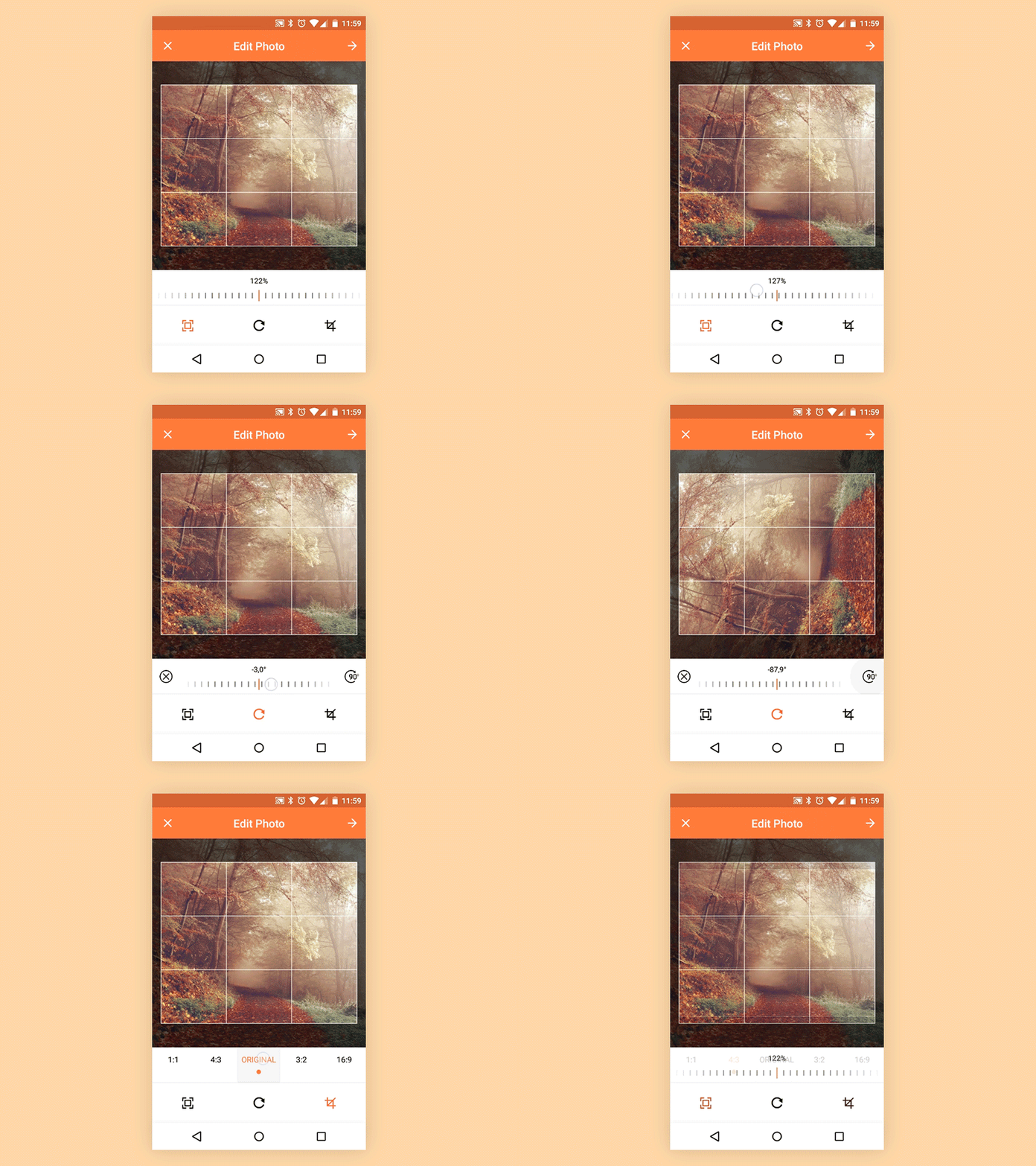
Usage
For a working implementation, please have a look at the Sample Project - sample

Include the library as a local library project.
allprojects {
   repositories {
      maven { url "https://jitpack.io" }
   }
}
implementation 'com.github.yalantis:ucrop:2.2.11' - lightweight general solution
implementation 'com.github.yalantis:ucrop:2.2.11-native' - get power of the native code to preserve image quality (+ about 1.5 MB to an apk size)
Add UCropActivity into your AndroidManifest.xml
<activity
    android:name="com.yalantis.ucrop.UCropActivity"
    android:screenOrientation="portrait"
    android:theme="@style/Theme.AppCompat.Light.NoActionBar"/>
Register a callback for the uCrop result.
private ActivityResultLauncher<Intent> activityResultLauncher =
        registerForActivityResult(new ActivityResultContracts.StartActivityForResult(), result -> {
            if (result.getResultCode() == RESULT_OK) {
                final Uri resultUri = UCrop.getOutput(result.getData());
            } else if (result.getResultCode() == UCrop.RESULT_ERROR) {
                final Throwable cropError = UCrop.getError(result.getData());
            }
        });
Create the uCrop configuration using the builder pattern.
UCrop.of(sourceUri, destinationUri)
    .withAspectRatio(16, 9)
    .withMaxResultSize(maxWidth, maxHeight)
    .start(context, activityResultLauncher);
You may want to add this to your PROGUARD config:
-dontwarn com.yalantis.ucrop**
-keep class com.yalantis.ucrop** { *; }
-keep interface com.yalantis.ucrop** { *; }
Customization
If you want to let your users choose crop ratio dynamically, just do not call withAspectRatio(x, y).
uCrop builder class has method withOptions(UCrop.Options options) which extends library configurations.
Currently, you can change:
- image compression format (e.g. PNG, JPEG), compression
- image compression quality [0 - 100]. PNG which is lossless, will ignore the quality setting.
- whether all gestures are enabled simultaneously
- maximum size for Bitmap that is decoded from source Uri and used within crop view. If you want to override the default behaviour.
- toggle whether to show crop frame/guidelines
- setup color/width/count of crop frame/rows/columns
- choose whether you want rectangle or oval(
options.setCircleDimmedLayer(true)) crop area
- the UI colors (Toolbar, StatusBar, active widget state)
- and more...
Compatibility
- Library - Android Lollipop 5.0+ (API 21) (Android ICS 4.0+ (API 14) for versions < 2.2.11)
- Sample - Android Lollipop 5.0+ (API 21)
- CPU - armeabi-v7a x86 x86_64 arm64-v8a (for versions >= 2.2.11)
Changelog
Version: 2.2.11
- Updated compileSdk and targetSdk to 36
- Added support for 16 KB page sizes
- Enabled edge-to-edge UI support
- And other improvements
Version: 2.2.10
Version: 2.2.9
- Update compileSdk and targetSdk versions up to 33
- Fixed #867
- Fixed #873
- And other improvements
Version: 2.2.8
- Merged pending pull requests with improvements and bugfixes
- Update compileSdk and targetSdk versions up to 31
- Add localizations
- Fixed #609
- Fixed #794
Version: 2.2.5
Version: 2.2.4
- AndroidX migration
- Redesign
- Several fixes including #550
Version: 2.2.3
- Several fixes including #445, #465 and more!
- Material design support
- uCrop fragment as child fragment
- Added the Italian language
Version: 2.2.2
- uCrop fragment added
- bugfix
Version: 2.2.1
Version: 2.2
Version: 2.1
- Fixes issue with EXIF data (images taken on front camera with Samsung devices mostly) #130 #111
- Added API to set custom set of aspect ratio options for the user. #131
- Added API to set all configs via UCrop.Options class. #126
- Added ABI x86_64 support. #105
Version: 2.0
- Native image crop (able to crop high-resolution images, e.g. 16MP & 32MP images on Nexus 5X).
- WebP compression format is not supported at the moment (choose JPEG or PNG).
- Now library copies EXIF data to cropped image (size and orientation are updated).
Version: 1.5
- Introduced "Freestyle" crop (you can resize crop rectangle by dragging it corners) #32
- Now image & crop view paddings are not associated #68
- Updated API
Version: 1.4
- Introduced HTTP(s) Uri support!
- Image is cropped in a background thread.
- Showing loader while Bitmap is processed (both loading and cropping).
- Several bug fixes.
- Couple new things to configure.
- Updated minSdkVersion to Android ICS 4.0 (no reason to support couple percents of old phones).
Version: 1.3
Image is loaded in a background thread. Better error-handling for image decoding.
Improved EXIF data support (rotation and mirror).
Small UI updates.
Couple new things to configure.
Sample updated with the possibility to choose custom aspect ratio.
Version: 1.2
- Updated core logic so an image corrects its position smoothly and obviously.
Version: 1.1
- UCrop builder was updated and now UCrop.Options class has even more values to setup.
Version: 1.0
Let us know!
We’d be really happy if you sent us links to your projects where you use our component. Just send an email to [email protected] And do let us know if you have any questions or suggestion regarding the library.
Apps using uCrop
License
Copyright 2017, Yalantis

Software doesn't collect, store or transfer data to Yalantis or third parties.
Emplacement of this Software is carried out locally at device.

Licensed under the Apache License, Version 2.0 (the "License");
you may not use this file except in compliance with the License.
You may obtain a copy of the License at

   http://www.apache.org/licenses/LICENSE-2.0

Unless required by applicable law or agreed to in writing, software
distributed under the License is distributed on an "AS IS" BASIS,
WITHOUT WARRANTIES OR CONDITIONS OF ANY KIND, either express or implied.
See the License for the specific language governing permissions and
limitations under the License.

 uCrop 是 Yalantis 开发的一个 Android 开源图片裁剪库,旨在为应用提供极致且灵活的照片裁剪体验。