
What is this?
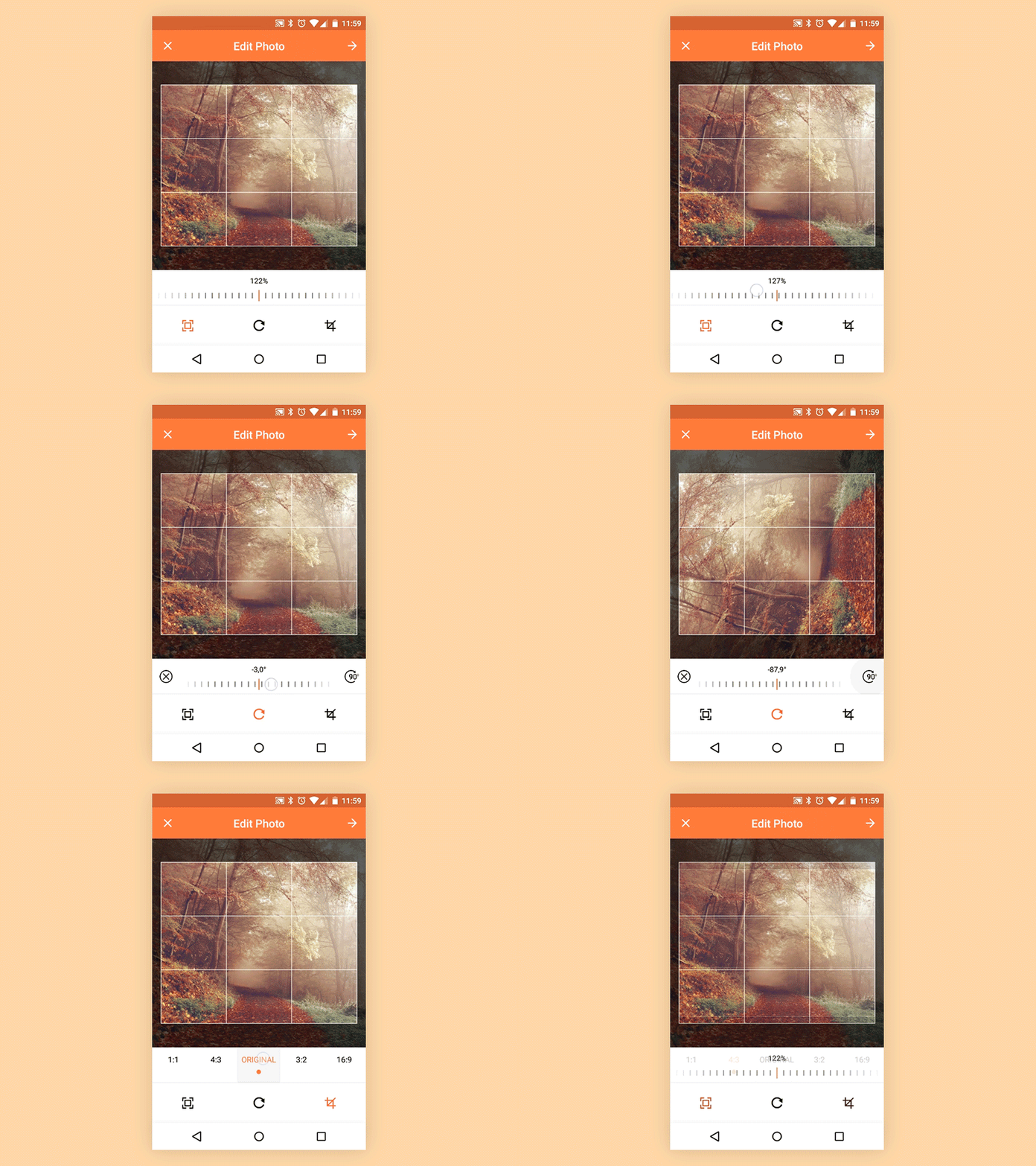
 uCrop is an open-source image cropping library for Android, made by Yalantis to give apps an ultimate and flexible photo cropping experience.
uCrop is an open-source image cropping library for Android, made by Yalantis to give apps an ultimate and flexible photo cropping experience.Is this a ready-made cropping app, or a library I embed in my own app?A library you embed in your Android app: you launch UCropActivity with a builder-style config and receive the result in a callback. Cropping runs in native code to preserve quality, adding about 1.5 MB to the APK.
A library you embed in your Android app: you launch UCropActivity with a builder-style config and receive the result in a callback. Cropping runs in native code to preserve quality, adding about 1.5 MB to the APK.How do I add it to my project?Four steps: include the library as a local library project, add UCropActivity to your AndroidManifest.xml, register a callback for the result, and configure it with the builder pattern. An optional ProGuard snippet is suggested too.
Four steps: include the library as a local library project, add UCropActivity to your AndroidManifest.xml, register a callback for the result, and configure it with the builder pattern. An optional ProGuard snippet is suggested too.Which Android versions does it run on?Current releases need Android Lollipop 5.0+ (API 21); versions up to 2.2.11 go back to Android ICS 4.0+ (API 14). Release 2.2.11 targets SDK 36 and adds 16 KB page size and edge-to-edge UI support.
Current releases need Android Lollipop 5.0+ (API 21); versions up to 2.2.11 go back to Android ICS 4.0+ (API 14). Release 2.2.11 targets SDK 36 and adds 16 KB page size and edge-to-edge UI support.What formats can the cropped image be saved in?JPEG or PNG only — WebP is not supported. JPEG quality is configurable from 0 to 100, while lossless PNG ignores the quality setting.
JPEG or PNG only — WebP is not supported. JPEG quality is configurable from 0 to 100, while lossless PNG ignores the quality setting.Do users' photos get sent anywhere when cropping?No — per the README, the software doesn't collect, store or transfer data to Yalantis or third parties; everything stays locally on the device.
No — per the README, the software doesn't collect, store or transfer data to Yalantis or third parties; everything stays locally on the device.Can I use it for free in a commercial app?Yes. uCrop is licensed under the Apache License 2.0, so it is free to use, including in commercial apps.
Yes. uCrop is licensed under the Apache License 2.0, so it is free to use, including in commercial apps.Do I have to lock users to a fixed aspect ratio?No — if you skip withAspectRatio(x, y), users pick the ratio themselves, and a 'Freestyle' mode lets them resize the crop rectangle by dragging its corners.
No — if you skip withAspectRatio(x, y), users pick the ratio themselves, and a 'Freestyle' mode lets them resize the crop rectangle by dragging its corners.What can I tweak in the crop screen?Via UCrop.Options: compression format and quality, simultaneous gestures, max decoded bitmap size, crop frame and guideline colors/width/counts, an oval crop area, and UI colors for the Toolbar, StatusBar and active controls.
Via UCrop.Options: compression format and quality, simultaneous gestures, max decoded bitmap size, crop frame and guideline colors/width/counts, an oval crop area, and UI colors for the Toolbar, StatusBar and active controls.Can I crop an image straight from a URL?Yes — since version 1.4 uCrop accepts HTTP(s) URIs, and both loading and cropping run in a background thread with a loader shown while the bitmap is processed.
Yes — since version 1.4 uCrop accepts HTTP(s) URIs, and both loading and cropping run in a background thread with a loader shown while the bitmap is processed.Can it crop big photos without losing quality?Yes — since version 2.0 the crop is done natively, handling high-resolution shots like 16MP and 32MP images, and EXIF data is copied to the cropped result.
Yes — since version 2.0 the crop is done natively, handling high-resolution shots like 16MP and 32MP images, and EXIF data is copied to the cropped result.What are similar projects?Android-Universal-Image-Loader, MaterialDrawer, SlidingMenu, CircleImageView, glide, MPAndroidChart, banner, fresco
Android-Universal-Image-Loader, MaterialDrawer, SlidingMenu, CircleImageView, glide, MPAndroidChart, banner, frescoWhich topics is it in?photo, android-library, image-editing, image, native, mobile-development, image-processing, ui-components, animation, developers, java, mobile
photo, android-library, image-editing, image, native, mobile-development, image-processing, ui-components, animation, developers, java, mobile