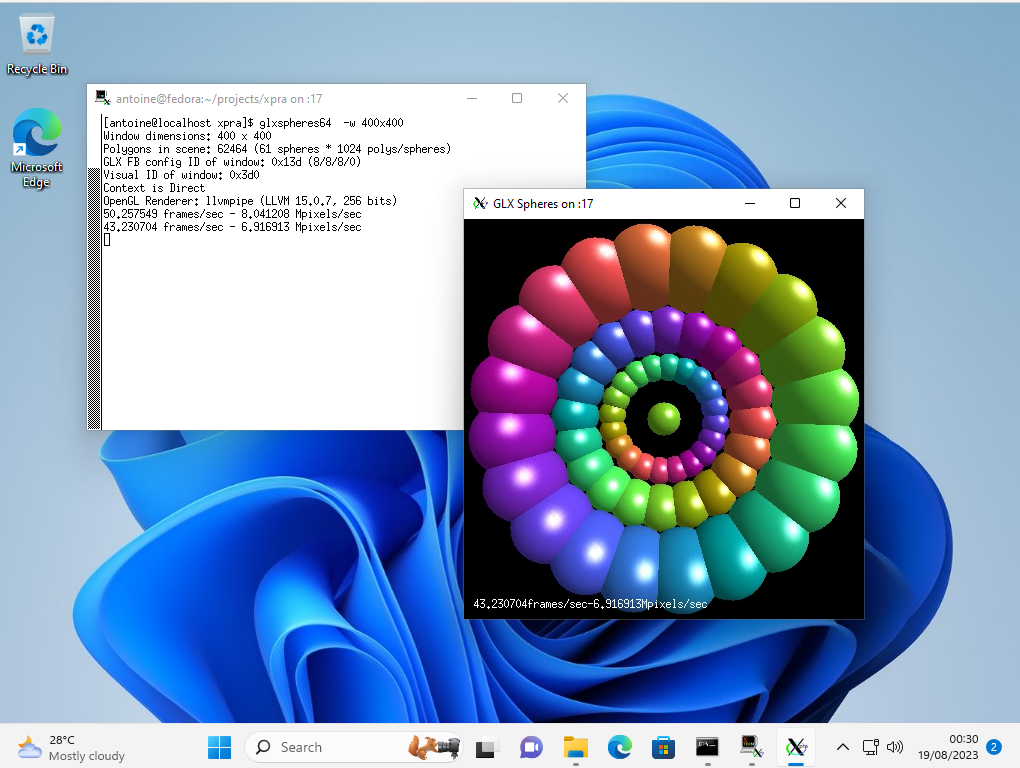
 (the windows may look like native windows, but they are running on a remote Linux server)
这是什么?
 Xpra 让你在远程主机上运行 X11 应用并在本地机器上显示,即使断开连接它们也会继续运行——本质上是 GUI 应用的「screen」。它还支持完整的远程桌面会话和屏幕共享,并内置 HTML5 网页客户端。
Xpra 让你在远程主机上运行 X11 应用并在本地机器上显示,即使断开连接它们也会继续运行——本质上是 GUI 应用的「screen」。它还支持完整的远程桌面会话和屏幕共享,并内置 HTML5 网页客户端。这是桌面应用、命令行工具,还是别的什么?Xpra 主要是一个命令行服务器/客户端工具,带有适用于 Windows、macOS 和 Linux 的原生图形客户端,外加服务器端的 HTML5 客户端,因此只靠浏览器也能连接。
Xpra 主要是一个命令行服务器/客户端工具,带有适用于 Windows、macOS 和 Linux 的原生图形客户端,外加服务器端的 HTML5 客户端,因此只靠浏览器也能连接。怎么让它跑起来?为你的操作系统安装官方签名软件包(Windows EXE/ZIP/MSI、x86_64/arm64 的 macOS DMG/PKG,或 Linux RPM/DEB),或从源码构建,然后用 xpra 启动会话并用客户端连接。
为你的操作系统安装官方签名软件包(Windows EXE/ZIP/MSI、x86_64/arm64 的 macOS DMG/PKG,或 Linux RPM/DEB),或从源码构建,然后用 xpra 启动会话并用客户端连接。两台机器都需要安装 Xpra 吗?通常是的,客户端和主机都要安装 Xpra;唯一的例外是通过内置 HTML5 客户端连接时,只有主机一侧需要 Xpra。
通常是的,客户端和主机都要安装 Xpra;唯一的例外是通过内置 HTML5 客户端连接时,只有主机一侧需要 Xpra。它需要稳定快速的网络连接才能好用吗?对网速没有特别要求——Xpra 的设计就是为了适应不同的网络状况,可以通过多种传输方式(SSL、SSH、websockets、RFB)在单个 TCP 端口上运行。
对网速没有特别要求——Xpra 的设计就是为了适应不同的网络状况,可以通过多种传输方式(SSL、SSH、websockets、RFB)在单个 TCP 端口上运行。远程连接是加密的吗?是的,Xpra 连接可以用加密加以保护,并可选择多种身份验证模块。
是的,Xpra 连接可以用加密加以保护,并可选择多种身份验证模块。无缝模式和影子模式有什么区别?无缝模式转发单个远程应用窗口,使其外观和行为都像本地窗口;影子模式则让你查看并操作整个已有的远程桌面会话,而不只是单个应用。
无缝模式转发单个远程应用窗口,使其外观和行为都像本地窗口;影子模式则让你查看并操作整个已有的远程桌面会话,而不只是单个应用。Xpra 还能转发哪些额外的桌面功能?它可以转发音频输入/输出、打印机、剪贴板、系统托盘、通知和摄像头,还能在客户端侧打开远程文档或 URL。
它可以转发音频输入/输出、打印机、剪贴板、系统托盘、通知和摄像头,还能在客户端侧打开远程文档或 URL。一个连接可以服务多个远程会话吗?可以,Xpra 的代理服务器可以中继或充当多个服务器会话的前端,会话还可以通过组播 DNS 在局域网内自动公告,便于发现。
可以,Xpra 的代理服务器可以中继或充当多个服务器会话的前端,会话还可以通过组播 DNS 在局域网内自动公告,便于发现。为什么它被称为「X 的 screen」?就像 Unix 的 'screen' 终端复用器能在你断开后让终端会话继续存活一样,Xpra 能让远程 X11 图形应用在你断开后继续运行并可重新连接。
就像 Unix 的 'screen' 终端复用器能在你断开后让终端会话继续存活一样,Xpra 能让远程 X11 图形应用在你断开后继续运行并可重新连接。What are similar projects?sshdesk, mRemoteNG, labtether, Termix, WindTerm, dsh-remote-web-gateway, tailcat, jumpserver
sshdesk, mRemoteNG, labtether, Termix, WindTerm, dsh-remote-web-gateway, tailcat, jumpserverWhich topics is it in?vnc, x11, remote-desktop, remote-access, gplv2, ssh, websocket, authentication, encryption, proxy, desktop, networking
vnc, x11, remote-desktop, remote-access, gplv2, ssh, websocket, authentication, encryption, proxy, desktop, networking