
易于使用的 Markdown 编辑器,为适配不同的应用场景而生










English | Demo
🔥 欢迎观摩我们的另一个开源项目 思源笔记
💡 简介
Vditor 是一款浏览器端的 Markdown 编辑器,支持所见即所得、即时渲染(类似 Typora)和分屏预览模式。它使用 TypeScript 实现,支持原生 JavaScript 以及 Vue、React、Angular 和 Svelte 等框架。
欢迎到 Vditor 官方讨论区了解更多。同时也欢迎关注 B3log 开源社区微信公众号 B3log开源:

🗺️ 背景
随着 Markdown 排版方式的普及,越来越多的应用开始集成 Markdown 编辑器。目前主流可集成的 Markdown 编辑器现状如下:
- 有的仅支持分屏预览,即编辑区和预览区分离
- 有的同时支持所见即所得和分屏预览,但所见即所得模式下不能完整支持 Markdown 语法排版
- 几乎没有类似 Typora 的即时渲染
而这三点恰好对应了三种应用场景:
- 分屏预览:适配传统的 Markdown 使用场景,适合大屏下编辑排版
- 所见即所得:对不熟悉 Markdown 的用户友好,熟悉 Markdown 的用户也可以无缝使用
- 即时渲染:理论上这是最为优雅的 Markdown 编辑方式,让熟悉 Markdown 的用户能够更专注于内容创作
所以,一个能够适配应用场景的 Markdown 编辑器至关重要,它需要考虑到:
- 传统 Markdown 用户的使用场景,提供分屏预览
- 富文本编辑用户的使用场景,提供所见即所得
- 高阶 Markdown 用户的使用场景,提供即时渲染
Vditor 在这些方面做了努力,希望能为现代化的通用 Markdown 编辑领域做出一些贡献。
✨ 特性
- 支持三种编辑模式:所见即所得(wysiwyg)、即时渲染(ir)、分屏预览(sv)
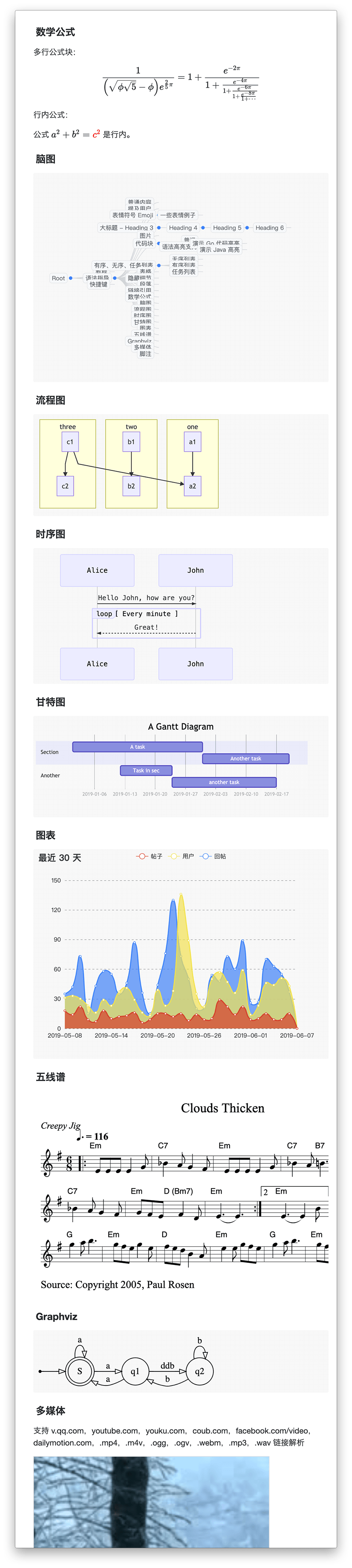
- 支持大纲、数学公式、脑图、图表、流程图、甘特图、时序图、数字波形图、五线谱、多媒体、语音阅读、标题锚点、代码高亮及复制、graphviz 渲染、plantumlUML图
- 导出、图片懒加载、任务列表、多平台预览、多主题切换、复制到微信公众号/知乎功能
- 实现 CommonMark 和 GFM 规范,可对 Markdown 进行格式化和语法树查看,并支持10+项配置
- 工具栏包含 36+ 项操作,除支持扩展外还可对每一项中的快捷键、提示、提示位置、图标、点击事件、类名、子工具栏进行自定义
- 表情/at/话题等自动补全扩展
- 可使用拖拽、剪切板粘贴上传,显示实时上传进度,支持 CORS 跨域上传
- 实时保存内容,防止意外丢失
- 录音支持,用户可直接发布语音
- 粘贴 HTML 自动转换为 Markdown,如粘贴中包含外链图片可通过指定接口上传到服务器
- 支持主窗口大小拖拽、字符计数
- 多主题支持,内置黑白绿三套主题
- 多语言支持,内置中、英、韩文本地化
- 支持主流浏览器,对移动端友好
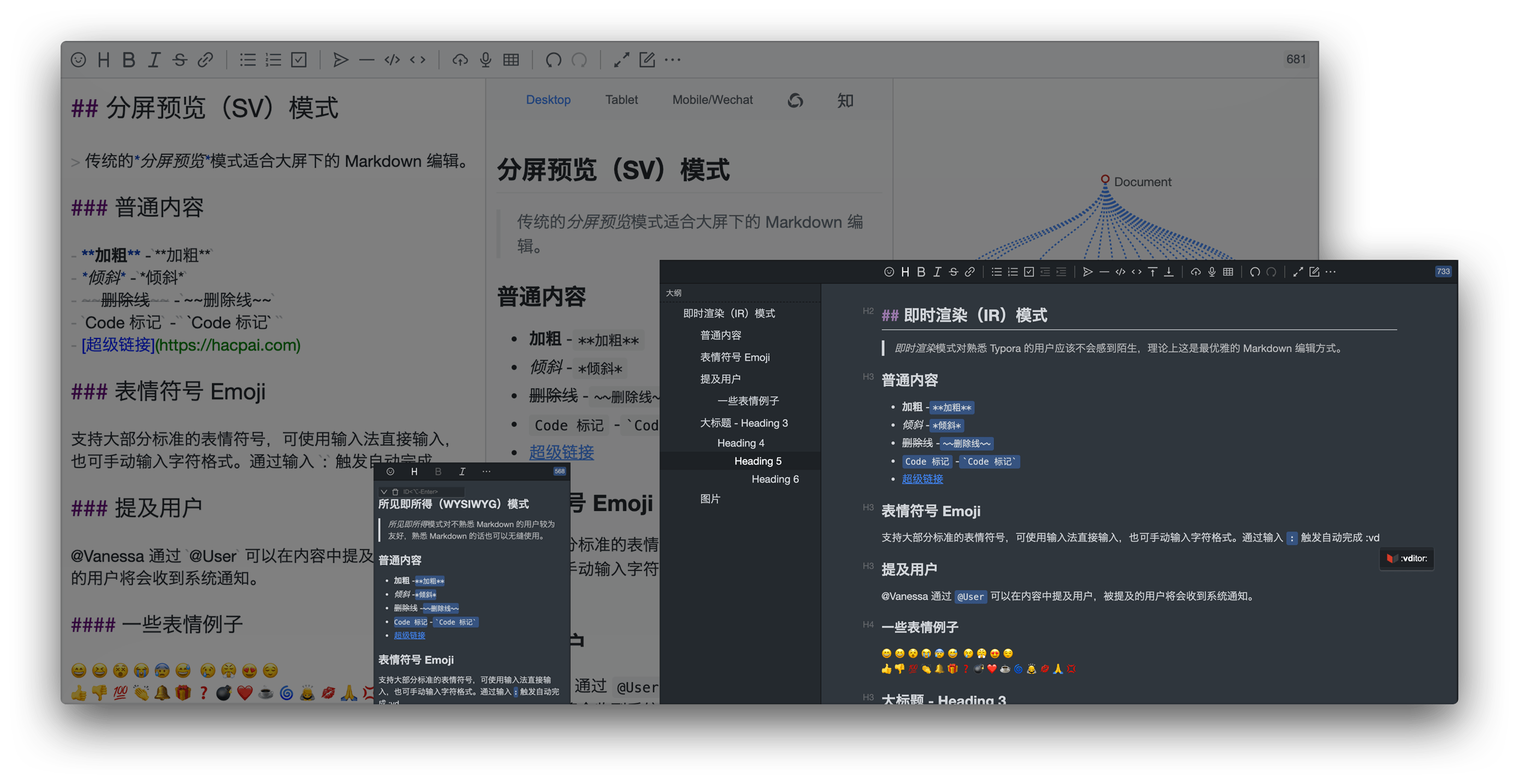
🔮 编辑模式
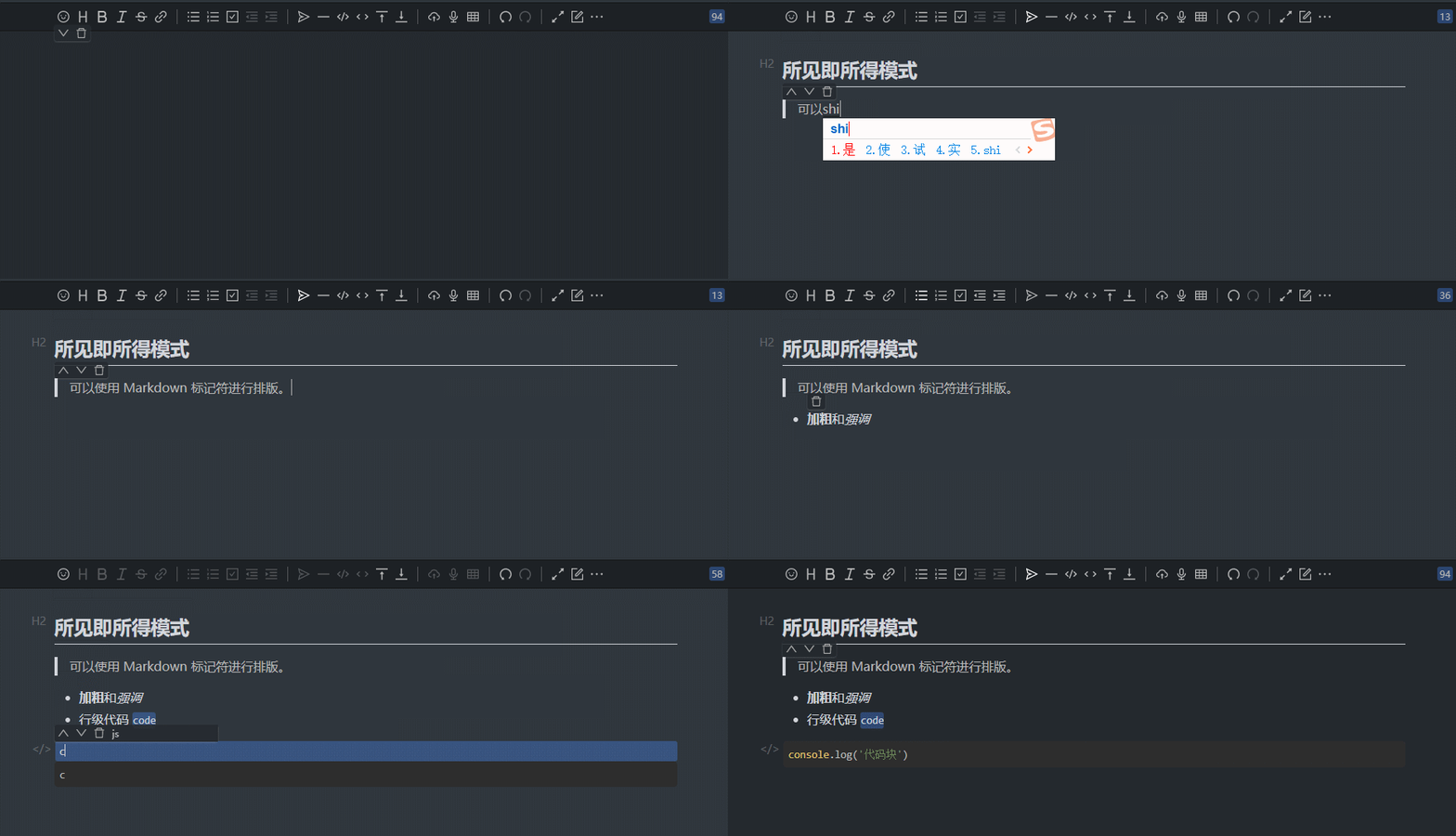
所见即所得(WYSIWYG)
所见即所得模式对不熟悉 Markdown 的用户较为友好,熟悉 Markdown 的话也可以无缝使用。
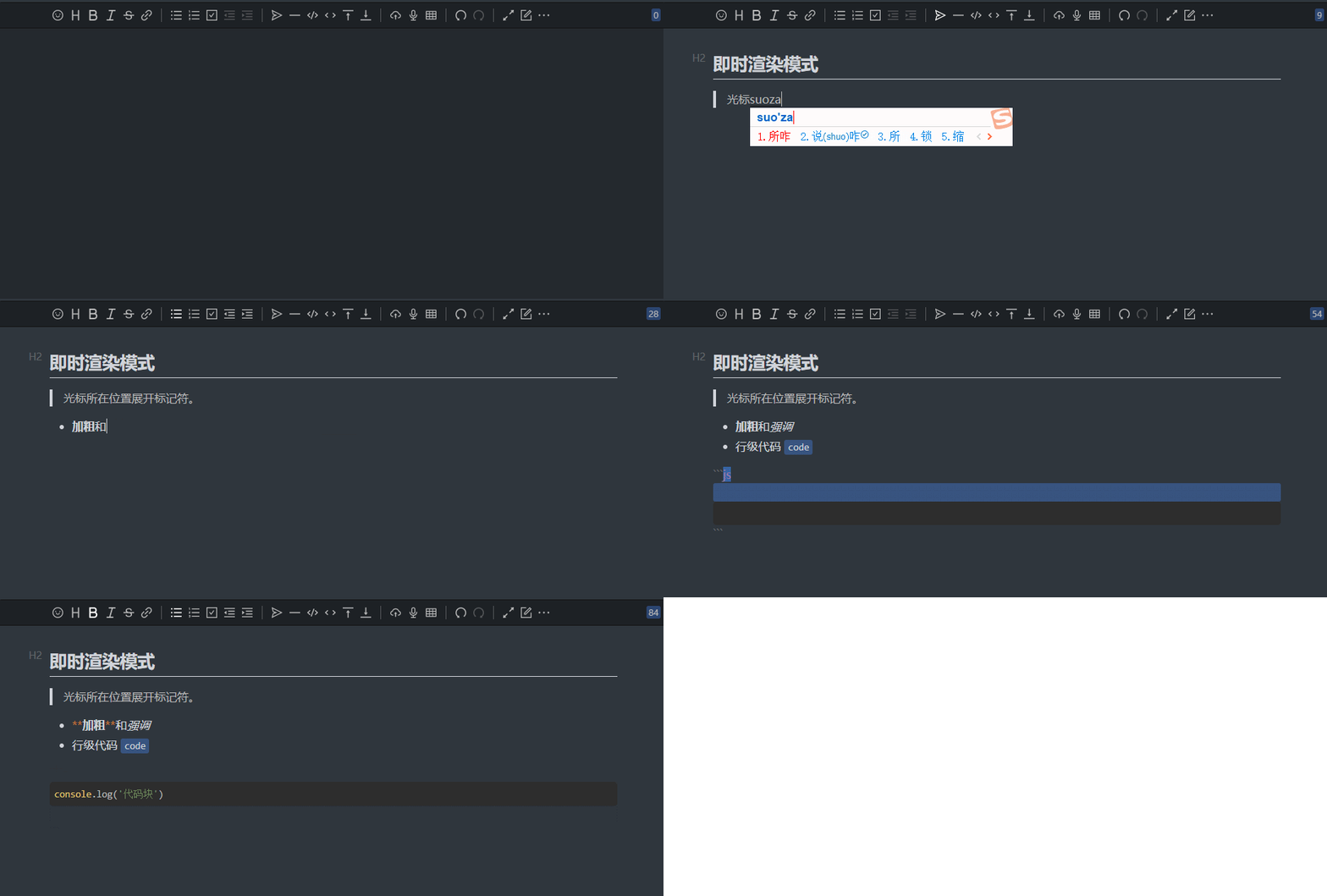
即时渲染(IR)
即时渲染模式对熟悉 Typora 的用户应该不会感到陌生,理论上这是最优雅的 Markdown 编辑方式。
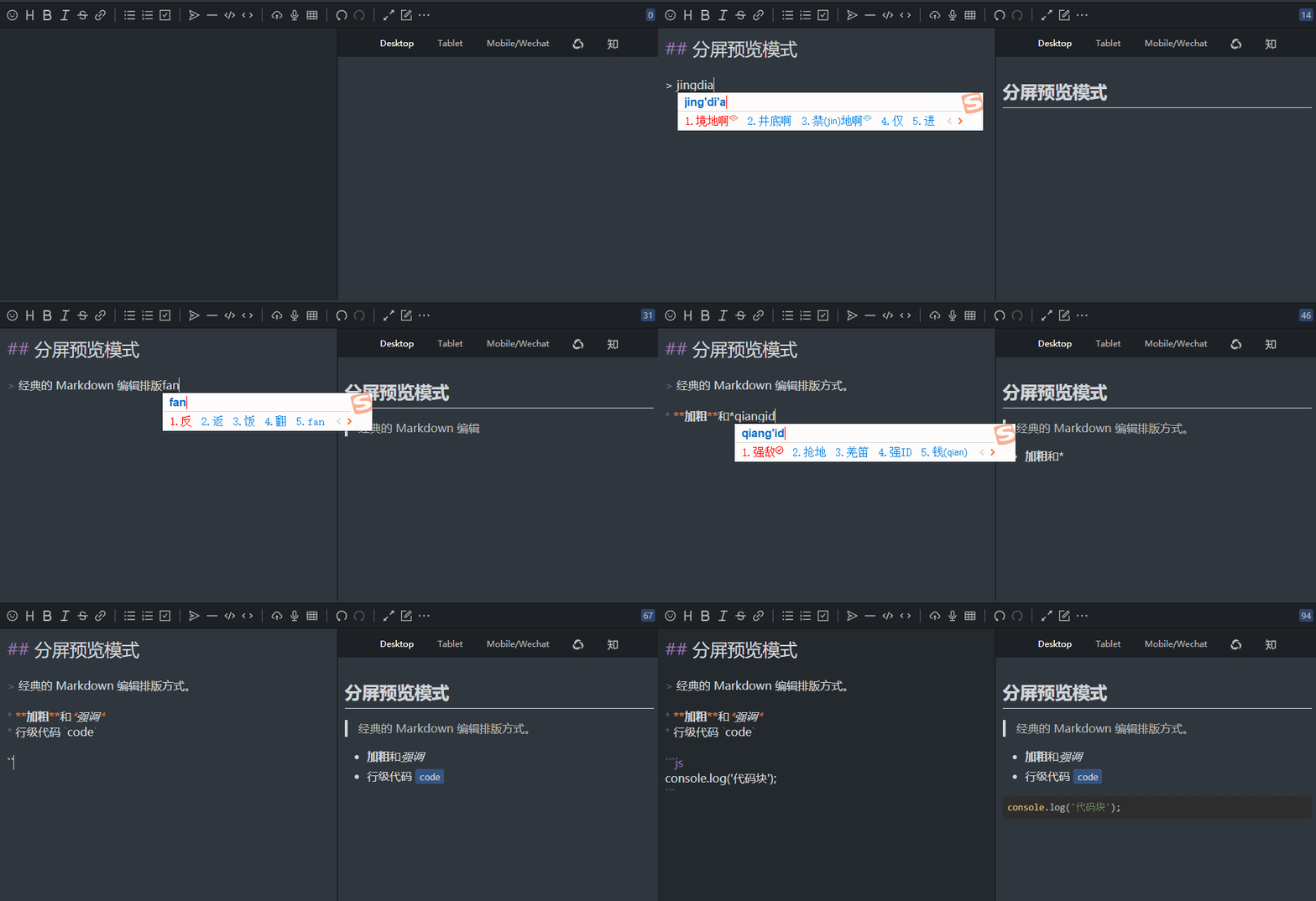
分屏预览(SV)
传统的分屏预览模式适合大屏下的 Markdown 编辑。
🍱 语法支持
- 所有 CommonMark 语法:分隔线、ATX 标题、Setext 标题、缩进代码块、围栏代码块、HTML 块、链接引用定义、段落、块引用、列表、反斜杠转义、HTML 实体、行级代码、强调、加粗、链接、图片、行级 HTML、硬换行、软换行和纯文本。
- 所有 GFM 语法:表格、任务列表项、删除线、自动链接、XSS 过滤
- 常用 Markdown 扩展语法:脚注、ToC、自定义标题 ID
- 图表语法
- 流程图、时序图、甘特图,通过 Mermaid 支持
- Graphviz
- 数字波形图,通过 WaveDrom 支持
- 折线图、饼图、脑图等,通过 ECharts 支持
- 五线谱:通过 abc.js 支持
- 数学公式:数学公式块、行级数学公式,通过 MathJax 和 KaTeX 支持
- YAML Front Matter
- 中文语境优化
- 中西文之间插入空格
- 术语拼写修正
- 中文后跟英文逗号句号等标点替换为中文对应标点
以上大部分特性可以通过开关配置是否启用,开发者可根据自己的应用场景选择搭配。
🗃 案例
- Sym 一款用 Java 实现的现代化社区(论坛/BBS/社交网络/博客)平台
- Solo & Pipe B3log 分布式社区的博客端节点,欢迎加入下一代社区网络
- Tditor 基于React、Vditor、Springboot,一款打造极致文字创作体验的在线Markdown编辑平台
- Arya 基于 Vue、Vditor,所构建的在线 Markdown 编辑器
- 更多案例
🛠️ 使用文档
CommonJS
npm install vditor --save
import Vditor from 'vditor'
import "~vditor/src/assets/less/index"

const vditor = new Vditor(id, {options...})
HTML script
- 在 HTML 中插入 CSS 和 JavaScript,可参考 demo
<!-- ⚠️生产环境请指定版本号,如 https://unpkg.com/[email protected]/dist... -->
<link rel="stylesheet" href="https://unpkg.com/vditor/dist/index.css" />
<script src="https://unpkg.com/vditor/dist/index.min.js"></script>
示例代码
主题
编辑器主题
编辑器所展现的外观。内置classic,dark 2 套主题。
- 编辑器初始化时可通过
options.theme 设置内置主题
- 初始化完成后可通过
setTheme 更新编辑器主题
- 可通过修改 index.less 中的变量对主题颜色进行定制
- 可参考现有结构和类名在原有基础上进行修改
内容主题
Markdown 输出的 HTML 所展现的外观。内置 ant-design, light,dark,wechat 4 套主题。支持内容主题扩展接口。
- 需在显示元素上添加
class="vditor-reset"
- 编辑器初始化时可通过
options.preview.theme 设置内置或自己开发的主题列表
- 内容渲染初始化时可通过
IPreviewOptions.theme 设置内置或自己开发的主题
- 初始化完成后可通过
setTheme 或 setContentTheme 更新内容主题
代码主题
代码块所展现的外观。内置 github 等 36 套主题。
- 编辑器初始化时可通过
options.preview.hljs 对代码块样式、行号、是否启用进行设置
- 内容渲染初始化时可通过
IPreviewOptions.hljs 对代码块样式、行号、是否启用进行设置
- 初始化完成后可通过
setTheme 或 setCodeTheme 更新代码主题
API
id
可填入元素 id 或元素自身 HTMLElement
⚠️:当填入元素自身的 HTMLElement 时需设置 options.cache.id 或将 options.cache.enable 设置为 false
options
|
说明 |
默认值 |
| i18n |
多语言,参见 ITips |
- |
| undoDelay |
历史记录间隔 |
- |
| after |
编辑器异步渲染完成后的回调方法 |
- |
| height |
编辑器总高度 |
'auto' |
| minHeight |
编辑区域最小高度 |
- |
| width |
编辑器总宽度,支持 % |
'auto' |
| placeholder |
输入区域为空时的提示 |
'' |
| lang |
语言种类:de_DE, en_US, es_ES, fr_FR, ja_JP, ko_KR, pt_BR, ru_RU, sv_SE, vi_VN, zh_CN, zh_TW |
'zh_CN' |
| input(value: string) |
输入后触发 |
- |
| focus(value: string) |
聚焦后触发 |
- |
| blur(value: string) |
失焦后触发 |
- |
| keydown(event: KeyboardEvent) |
按下后触发 |
- |
| esc(value: string) |
esc 按下后触发 |
- |
| ctrlEnter(value: string) |
⌘/ctrl+enter 按下后触发 |
- |
| select(value: string) |
编辑器中选中文字后触发 |
- |
| unSelect() |
编辑器中未选中文字后触发 |
- |
| tab |
tab 键操作字符串,支持 \t 及任意字符串 |
- |
| typewriterMode |
是否启用打字机模式 |
false |
| cdn |
配置自建 CDN 地址 |
https://unpkg.com/vditor@${VDITOR_VERSION} |
| mode |
可选模式:sv, ir, wysiwyg |
'ir' |
| debugger |
是否显示日志 |
false |
| value |
编辑器初始化值 |
'' |
| theme |
主题:classic, dark |
'classic' |
| icon |
图标风格:ant, material |
'ant' |
| customRenders: {language: string, render: (element: HTMLElement, vditor: IVditor) => void}[] |
自定义渲染器 |
[] |
| customWysiwygToolbar(type: TWYSISYGToolbar, element: HTMLElement): void |
对 wysiwyg 模式下的工具栏进行自定义 |
- |
| customWysiwygMobileToolbar(type: TWYSISYGToolbar, element: HTMLElement): void |
对移动端 wysiwyg 模式下的工具栏进行自定义,未添加菜单项时不显示入口 |
- |
- 工具栏,可使用 name 进行简写:
toolbar: ['emoji', 'br', 'bold', '|', 'line'] 。默认值参见 src/ts/util/Options.ts
- name 可枚举为:
emoji,headings,bold,italic,strike,|,line,quote,list,ordered-list,check ,outdent ,indent,code,inline-code,insert-after,insert-before ,undo,redo,upload,link,table,record,edit-mode,both,preview,fullscreen,outline,code-theme,content-theme,export, devtools,info,help,br
- 当
name 不在枚举中时,可以添加自定义按钮,格式如下:
new Vditor('vditor', {
  toolbar: [
    {
      hotkey: '⇧⌘S',
      name: 'sponsor',
      tipPosition: 's',
      tip: '成为赞助者',
      className: 'right',
      icon: '<svg t="1589994565028" class="icon" viewBox="0 0 1024 1024" version="1.1" xmlns="http://www.w3.org/2000/svg" p-id="2808" width="32" height="32"><path d="M506.6 423.6m-29.8 0a29.8 29.8 0 1 0 59.6 0 29.8 29.8 0 1 0-59.6 0Z" fill="#0F0F0F" p-id="2809"></path><path d="M717.8 114.5c-83.5 0-158.4 65.4-211.2 122-52.7-56.6-127.7-122-211.2-122-159.5 0-273.9 129.3-273.9 288.9C21.5 562.9 429.3 913 506.6 913s485.1-350.1 485.1-509.7c0.1-159.5-114.4-288.8-273.9-288.8z" fill="#FAFCFB" p-id="2810"></path><path d="M506.6 926c-22 0-61-20.1-116-59.6-51.5-37-109.9-86.4-164.6-139-65.4-63-217.5-220.6-217.5-324 0-81.4 28.6-157.1 80.6-213.1 53.2-57.2 126.4-88.8 206.3-88.8 40 0 81.8 14.1 124.2 41.9 28.1 18.4 56.6 42.8 86.9 74.2 30.3-31.5 58.9-55.8 86.9-74.2 42.5-27.8 84.3-41.9 124.2-41.9 79.9 0 153.2 31.5 206.3 88.8 52 56 80.6 131.7 80.6 213.1 0 103.4-152.1 261-217.5 324-54.6 52.6-113.1 102-164.6 139-54.8 39.5-93.8 59.6-115.8 59.6zM295.4 127.5c-72.6 0-139.1 28.6-187.3 80.4-47.5 51.2-73.7 120.6-73.7 195.4 0 64.8 78.3 178.9 209.6 305.3 53.8 51.8 111.2 100.3 161.7 136.6 56.1 40.4 88.9 54.8 100.9 54.8s44.7-14.4 100.9-54.8c50.5-36.3 108-84.9 161.7-136.6 131.2-126.4 209.6-240.5 209.6-305.3 0-74.9-26.2-144.2-73.7-195.4-48.2-51.9-114.7-80.4-187.3-80.4-61.8 0-127.8 38.5-201.7 117.9-2.5 2.6-5.9 4.1-9.5 4.1s-7.1-1.5-9.5-4.1C423.2 166 357.2 127.5 295.4 127.5z" fill="#141414" p-id="2811"></path><path d="M353.9 415.6m-33.8 0a33.8 33.8 0 1 0 67.6 0 33.8 33.8 0 1 0-67.6 0Z" fill="#0F0F0F" p-id="2812"></path><path d="M659.3 415.6m-33.8 0a33.8 33.8 0 1 0 67.6 0 33.8 33.8 0 1 0-67.6 0Z" fill="#0F0F0F" p-id="2813"></path><path d="M411.6 538.5c0 52.3 42.8 95 95 95 52.3 0 95-42.8 95-95v-31.7h-190v31.7z" fill="#5B5143" p-id="2814"></path><path d="M506.6 646.5c-59.6 0-108-48.5-108-108v-31.7c0-7.2 5.8-13 13-13h190.1c7.2 0 13 5.8 13 13v31.7c0 59.5-48.5 108-108.1 108z m-82-126.7v18.7c0 45.2 36.8 82 82 82s82-36.8 82-82v-18.7h-164z" fill="#141414" p-id="2815"></path><path d="M450.4 578.9a54.7 27.5 0 1 0 109.4 0 54.7 27.5 0 1 0-109.4 0Z" fill="#EA64F9" p-id="2816"></path><path d="M256 502.7a32.1 27.5 0 1 0 64.2 0 32.1 27.5 0 1 0-64.2 0Z" fill="#EFAFF9" p-id="2817"></path><path d="M703.3 502.7a32.1 27.5 0 1 0 64.2 0 32.1 27.5 0 1 0-64.2 0Z" fill="#EFAFF9" p-id="2818"></path></svg>',
      click () {alert('捐赠地址:https://ld246.com/sponsor')},
    }],
})
|
说明 |
默认值 |
| name |
唯一标示 |
- |
| icon |
svg 图标 |
- |
| tip |
提示 |
- |
| tipPosition |
提示位置:'n', 'ne', 'nw', 's', 'se', 'sw', 'w', 'e' |
- |
| hotkey |
快捷键,格式为⇧⌘/⌘/⌥⌘ |
- |
| suffix |
插入编辑器中的后缀 |
- |
| prefix |
插入编辑器中的前缀 |
- |
| click(event: Event, vditor: IVditor) |
自定义按钮点击时触发的事件 |
- |
| className |
样式名 |
'' |
| toolbar?: Array<options.toolbar> |
子菜单 |
- |
|
说明 |
默认值 |
| hide |
是否隐藏工具栏 |
false |
| pin |
是否固定工具栏 |
false |
options.counter
|
说明 |
默认值 |
| enable |
是否启用计数器 |
false |
| after(length: number, counter: options.counter): void |
字数统计回调 |
- |
| max |
允许输入的最大值 |
- |
| type |
统计类型:'markdown', 'text' |
'markdown' |
options.cache
|
说明 |
默认值 |
| enable |
是否使用 localStorage 进行缓存 |
true |
| id |
缓存 key,第一个参数为元素且启用缓存时必填 |
- |
| after(html: string): string |
缓存后的回调 |
- |
⚠️:仅支持 wysiwyg 模式
|
说明 |
默认值 |
| enable |
是否启用评论模式 |
false |
| add(id: string, text: string, commentsData: ICommentsData[]) |
添加评论回调 |
- |
| remove(ids: string[]) |
删除评论回调 |
- |
| scroll(top: number) |
滚动回调 |
- |
| adjustTop(commentsData: ICommentsData[]) |
文档修改时,适配评论高度 |
- |
options.preview
|
说明 |
默认值 |
| delay |
预览 debounce 毫秒间隔 |
1000 |
| maxWidth |
预览区域最大宽度 |
800 |
| mode |
显示模式:both, editor |
'both' |
| url |
md 解析请求 |
- |
| parse(element: HTMLElement) |
预览回调 |
- |
| transform(html: string): string |
渲染之前回调 |
- |
options.preview.hljs
|
说明 |
默认值 |
| defaultLang |
未指定语言时默认使用该语言 |
'' |
| enable |
是否启用代码高亮 |
true |
| style |
可选值参见Chroma |
github |
| lineNumber |
是否启用行号 |
false |
| langs |
自定义指定语言 |
CODE_LANGUAGES |
| renderMenu(code: HTMLElement, copy: HTMLElement) |
渲染菜单按钮 |
- |
options.preview.markdown
|
说明 |
默认值 |
| autoSpace |
自动空格 |
false |
| callout |
Callout 块 |
true |
| gfmAutoLink |
自动链接 |
true |
| fixTermTypo |
自动矫正术语 |
false |
| toc |
插入目录 |
false |
| footnotes |
脚注 |
true |
| codeBlockPreview |
wysiwyg 和 ir 模式下是否对代码块进行渲染 |
true |
| mathBlockPreview |
wysiwyg 和 ir 模式下是否对数学公式进行渲染 |
true |
| paragraphBeginningSpace |
段落开头空两个 |
false |
| sanitize |
是否启用过滤 XSS |
true |
| listStyle |
为列表添加 data-style 属性 |
false |
| linkBase |
链接相对路径前缀 |
'' |
| linkPrefix |
链接强制前缀 |
'' |
| mark |
启用 mark 标记 |
false |
| sup |
上标 |
false |
| sub |
下标 |
false |
options.preview.theme
|
说明 |
默认值 |
| current |
当前主题 |
"light" |
| list |
可选主题列表 |
{ "ant-design": "Ant Design", dark: "Dark", light: "Light", wechat: "WeChat" } |
| path |
主题样式地址 |
https://unpkg.com/vditor@${VDITOR_VERSION}/dist/css/content-theme |
options.preview.math
|
说明 |
默认值 |
| inlineDigit |
内联数学公式起始 $ 后是否允许数字 |
false |
| macros |
使用 MathJax 渲染时传入的宏定义 |
{} |
| engine |
数学公式渲染引擎:KaTeX, MathJax |
'KaTeX' |
| mathJaxOptions |
数学公式渲染引擎为 MathJax 时的参数 |
- |
options.preview.actions?: Array<IPreviewAction | IPreviewActionCustom>
默认值为 ["desktop", "tablet", "mobile", "mp-wechat", "zhihu"]。
可从默认值中挑选进行配置,也可使用以下字段进行自定制开发。
|
说明 |
默认值 |
| key |
按钮唯一标识,不能为空 |
- |
| text |
按钮文字 |
- |
| tooltip |
提示 |
- |
| className |
按钮类名 |
- |
| click(key: string) |
按钮点击回调事件 |
- |
|
说明 |
默认值 |
| enable |
是否启用多媒体渲染 |
true |
options.image
|
说明 |
默认值 |
| isPreview |
是否预览图片 |
true |
| preview(bom: Element) => void |
图片预览处理 |
- |
options.link
|
说明 |
默认值 |
| isOpen |
是否打开链接地址 |
true |
| click(bom: Element) => void |
点击链接事件 |
- |
options.hint
|
说明 |
默认值 |
| parse |
是否进行 md 解析 |
true |
| delay |
提示 debounce 毫秒间隔 |
200 |
| emoji |
默认表情,可从lute/emoji_map 中选取,也可自定义 |
{ '+1': '👍', '-1': '👎', 'heart': '❤️', 'cold_sweat': '😰' } |
| emojiTail |
常用表情提示 |
- |
| emojiPath |
表情图片地址 |
https://unpkg.com/vditor@${VDITOR_VERSION}/dist/images/emoji |
| extend: IHintExtend[] |
对 @/话题等关键字自动补全的扩展 |
[] |
interface IHintData {
  html: string;
  value: string;
}

interface IHintExtend {
    key: string;

    hint?(value: string): IHintData[] | Promise<IHintData[]>;
}
options.upload
- 文件上传的数据结构如下。后端返回的数据结构不一致时,可使用
format 进行转换。
// POST data
xhr.send(formData);  // formData = FormData.append("file[]", File)
// return data
{
 "msg": "",
 "code": 0,
 "data": {
 "errFiles": ['filename', 'filename2'],
 "succMap": {
   "filename3": "filepath3",
   "filename3": "filepath3"
   }
 }
}
- 为了防止站外图片失效,
linkToImgUrl 可将剪贴板中的站外图片地址传到服务器端进行保存处理,其数据结构如下:
// POST data
xhr.send(JSON.stringify({url: src})); // src 为站外图片地址
// return data
{
 msg: '',
 code: 0,
 data : {
   originalURL: '',
   url: ''
 }
}
success,format,error 不会同时触发,具体调用情况如下:
if (xhr.status === 200) {
    if (vditor.options.upload.success) {
        vditor.options.upload.success(editorElement, xhr.responseText);
    } else {
        let responseText = xhr.responseText;
        if (vditor.options.upload.format) {
            responseText = vditor.options.upload.format(files as File [], xhr.responseText);
        }
        genUploadedLabel(responseText, vditor);
    }
} else {
    if (vditor.options.upload.error) {
        vditor.options.upload.error(xhr.responseText);
    } else {
        vditor.tip.show(xhr.responseText);
    }
}
|
说明 |
默认值 |
| xhr |
上传时使用的 XMLHttpRequest |
- |
| url |
上传 url,为空则不会触发上传相关事件 |
'' |
| max |
上传文件最大 Byte |
10 * 1024 * 1024 |
| linkToImgUrl |
剪切板中包含图片地址时,使用此 url 重新上传 |
'' |
| linkToImgCallback(responseText: string) |
图片地址上传回调 |
- |
| linkToImgFormat(responseText: string): string |
对图片地址上传的返回值进行格式化 |
- |
| success(editor: HTMLPreElement, msg: string) |
上传成功回调 |
- |
| error(msg: string) |
上传失败回调 |
- |
| token |
CORS 上传验证,头为 X-Upload-Token |
- |
| withCredentials |
跨站点访问控制 |
false |
| headers |
请求头设置 |
- |
| filename(name: string): string |
文件名安全处理 |
name => name.replace(/\W/g, '') |
| accept |
文件上传类型,同input accept |
- |
| validate(files: File[]) => string | boolean |
校验,成功时返回 true 否则返回错误信息 |
- |
| handler(files: File[]) => string | null | Promise | Promise |
自定义上传,当发生错误时返回错误信息 |
- |
| format(files: File[], responseText: string): string |
对服务端返回的数据进行转换,以满足内置的数据结构 |
- |
| file(files: File[]): File[] | Promise<File[]> |
将上传的文件处理后再返回 |
- |
| cancel(files: File[]): void |
取消正在上传的文件 |
- |
| setHeaders(): { [key: string]: string } |
上传前使用返回值设置头 |
- |
| extraData: { [key: string]: string | Blob } |
为 FormData 添加额外的参数 |
- |
| multiple |
上传文件是否为多个 |
true |
| fieldName |
上传字段名称 |
'file[]' |
| renderLinkDest?(vditor: IVditor, node: ILuteNode, entering: boolean): [string, number] |
处理剪贴板中的图片地址 |
'' |
options.resize
|
说明 |
默认值 |
| enable |
是否支持大小拖拽 |
false |
| position |
拖拽栏位置:'top', 'bottom' |
'bottom' |
| after(height: number) |
拖拽结束的回调 |
- |
options.classes
|
说明 |
默认值 |
| preview |
预览元素上的 className |
'' |
options.fullscreen
options.outline
|
说明 |
默认值 |
| enable |
初始化是否展现大纲 |
false |
| position |
大纲位置:'left', 'right' |
'left' |
methods
|
说明 |
| exportJSON(markdown: string) |
根据 Markdown 获取对应 JSON |
| getValue() |
获取 Markdown 内容 |
| getHTML() |
获取 HTML 内容 |
| insertValue(value: string, render = true) |
在焦点处插入内容,并默认进行 Markdown 渲染 |
| focus() |
聚焦到编辑器 |
| blur() |
让编辑器失焦 |
| disabled() |
禁用编辑器 |
| enable() |
解除编辑器禁用 |
| getSelection(): string |
返回选中的字符串 |
| setValue(markdown: string, clearStack = false) |
设置编辑器内容且选中清空历史栈 |
| clearStack() |
清空撤销和重做记录栈 |
| renderPreview(value?: string) |
设置预览区域内容 |
| getCursorPosition():{top: number, left: number} |
获取焦点位置 |
| deleteValue() |
删除选中内容 |
| updateValue(value: string) |
更新选中内容 |
| isUploading() |
上传是否还在进行中 |
| clearCache() |
清除缓存 |
| disabledCache() |
禁用缓存 |
| enableCache() |
启用缓存 |
| html2md(value: string) |
HTML 转 md |
| tip(text: string, time: number) |
消息提示。time 为 0 将一直显示 |
| setPreviewMode(mode: "both" | "editor") |
设置预览模式 |

 Vditor is a browser-based Markdown editor that supports WYSIWYG (rich text), Instant Rendering (Typora-like), and Split View preview modes.