dsh-plugin-subscriptions 
English | 中文
Use your ChatGPT (Codex), Claude, Grok (X Premium), and GitHub Copilot subscriptions as LLM providers in DeepSeek Harness — no API keys. Codex and Grok log in via OAuth in the dsh web UI (Settings → Subscriptions), while Copilot uses the GitHub OAuth device flow; Claude imports credentials from an existing Claude Code session when there is one (macOS Keychain or ~/.claude/.credentials.json) and otherwise falls back to the same browser OAuth flow, so the Claude Code CLI is not required. Tokens live at ~/.dsh/plugins/subscriptions/auth.json (mode 0600) and refresh automatically.
Demo
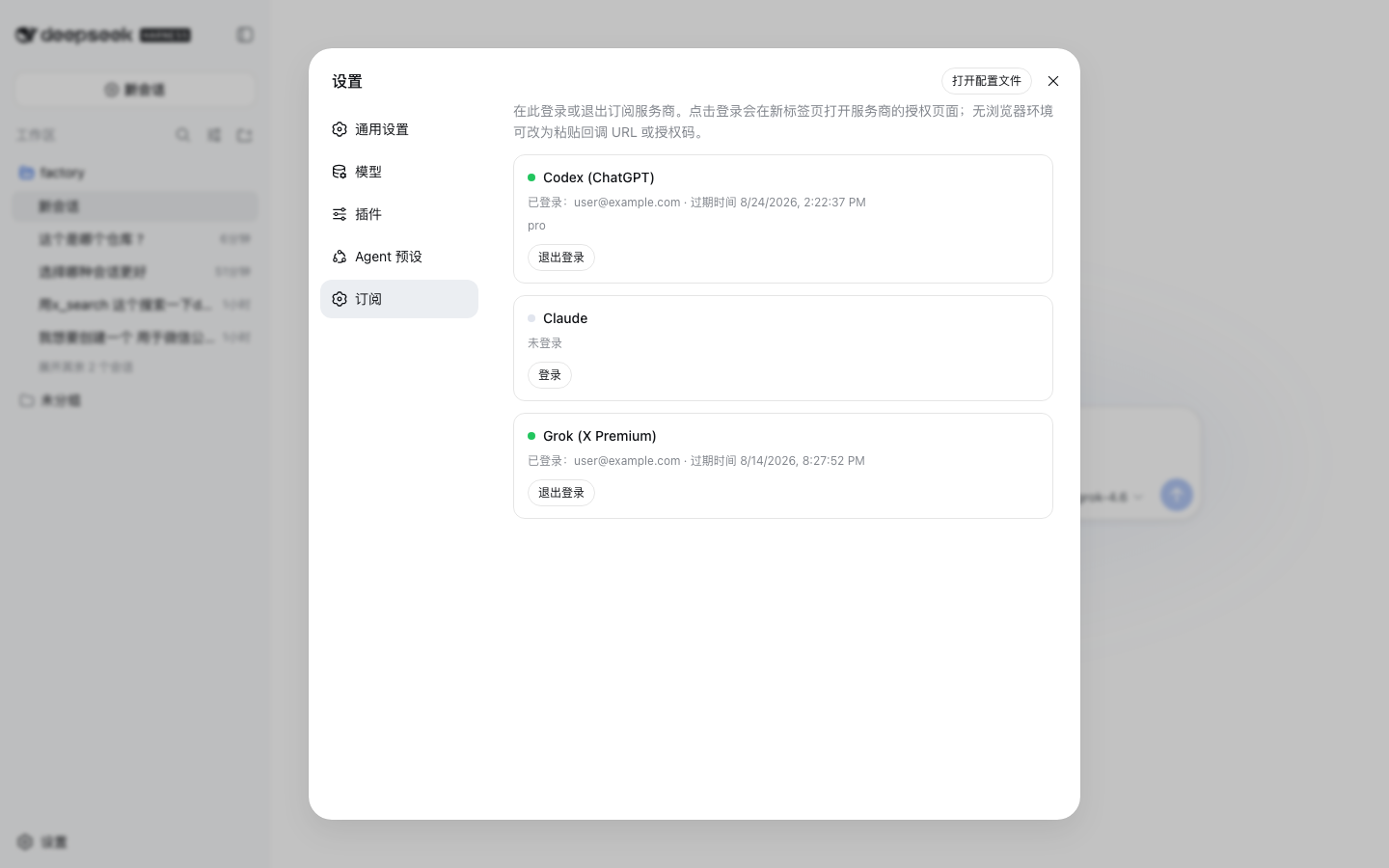
Settings → Subscriptions: per-provider login/logout, no API keys. Claude imports credentials from Claude Code when available and otherwise uses OAuth, as Codex and Grok always do (settings screenshots use demo accounts and catalog data):
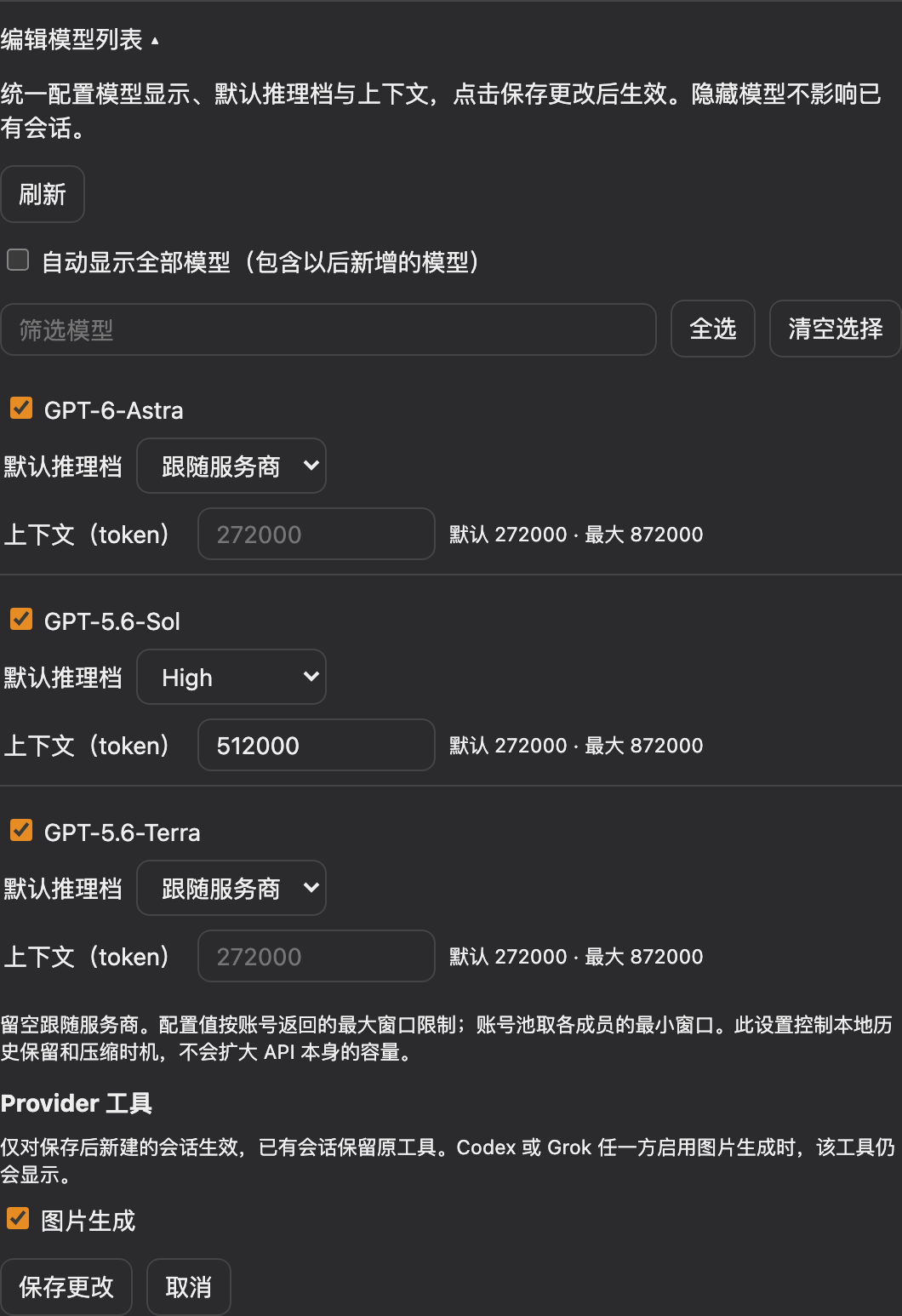
Configure visibility, default reasoning effort, and context together in Edit model list, with shared Save and Cancel actions:
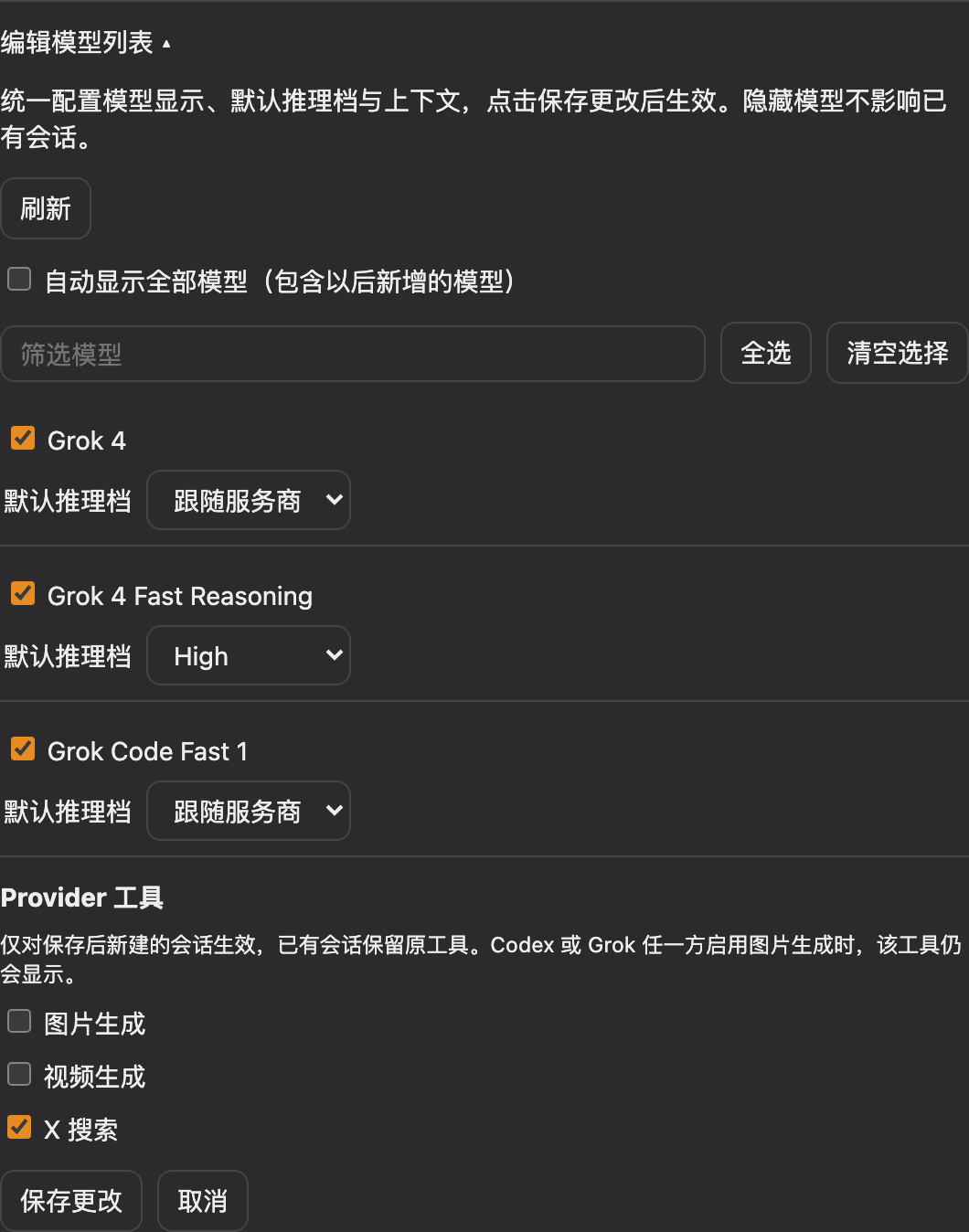
Configure image generation, video generation, and X search per provider. Tool switches apply only to sessions created after saving:
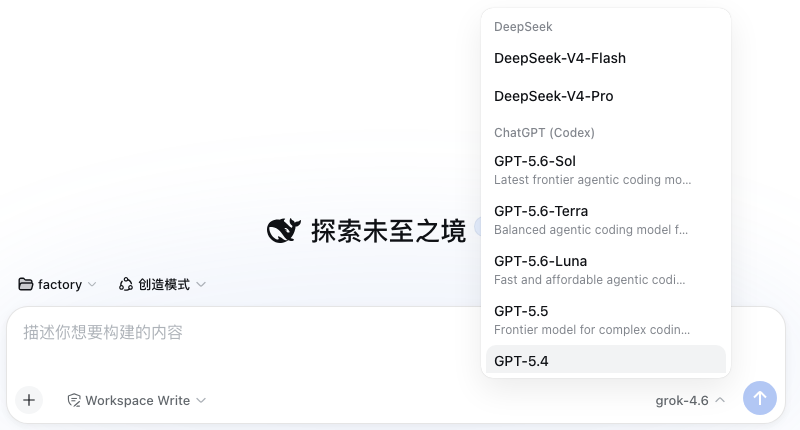
Logged-in providers join the session model picker with their live model catalogs:
Models that advertise reasoning levels get an Effort selector in the same menu — Codex models, Grok 4.6 / 4.5, and Copilot's reasoning models (levels and defaults come from each provider's live catalog, not a hardcoded list; Copilot's capabilities.supports.reasoning_effort array is sent as reasoning_effort on chat completions and reasoning.effort on the Responses wire). Models listing both Copilot endpoints (gpt-5.4, gpt-5-mini) normally speak chat completions but reroute to /responses when a request combines function tools with an effort — Copilot rejects that combination on the chat wire:
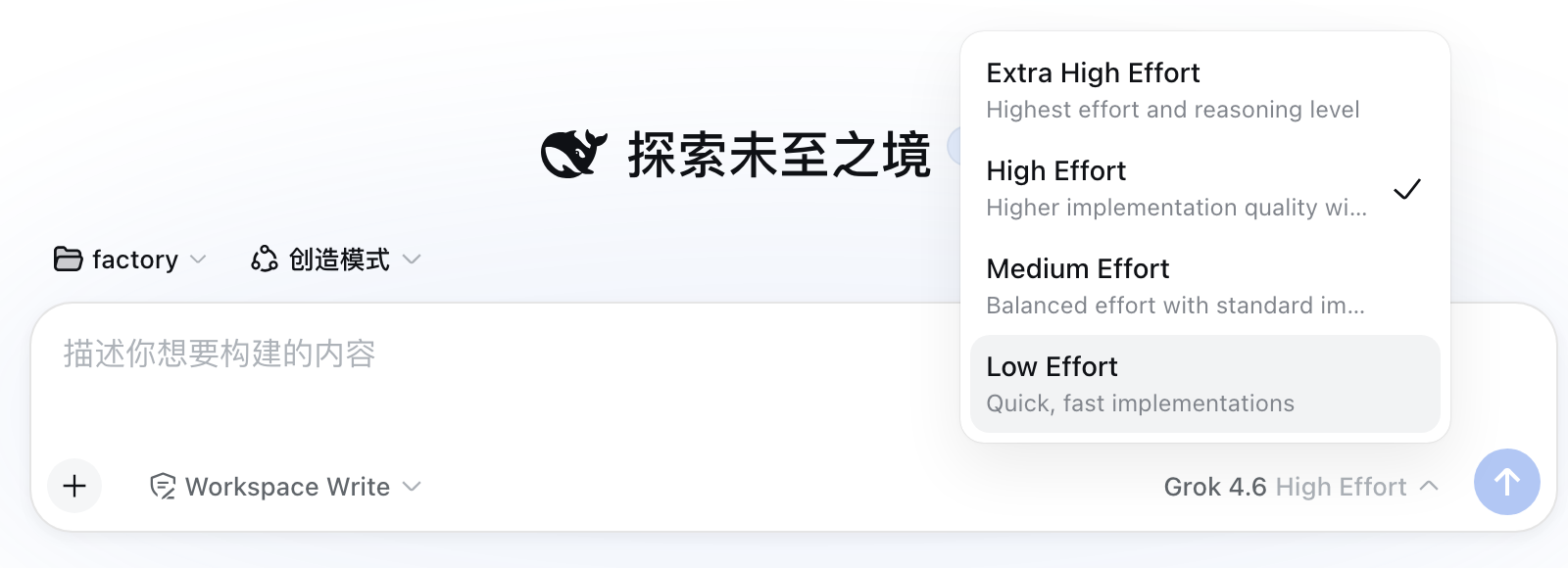
Codex models whose catalog advertises the fast tier (the codex CLI's fast mode) get a Speed toggle in the composer's tool row, next to the model selector — Standard or Fast (service_tier: priority), per session. The /fast slash command offers the same choice as a popup; it errors with an explanation when the current model has no fast tier.

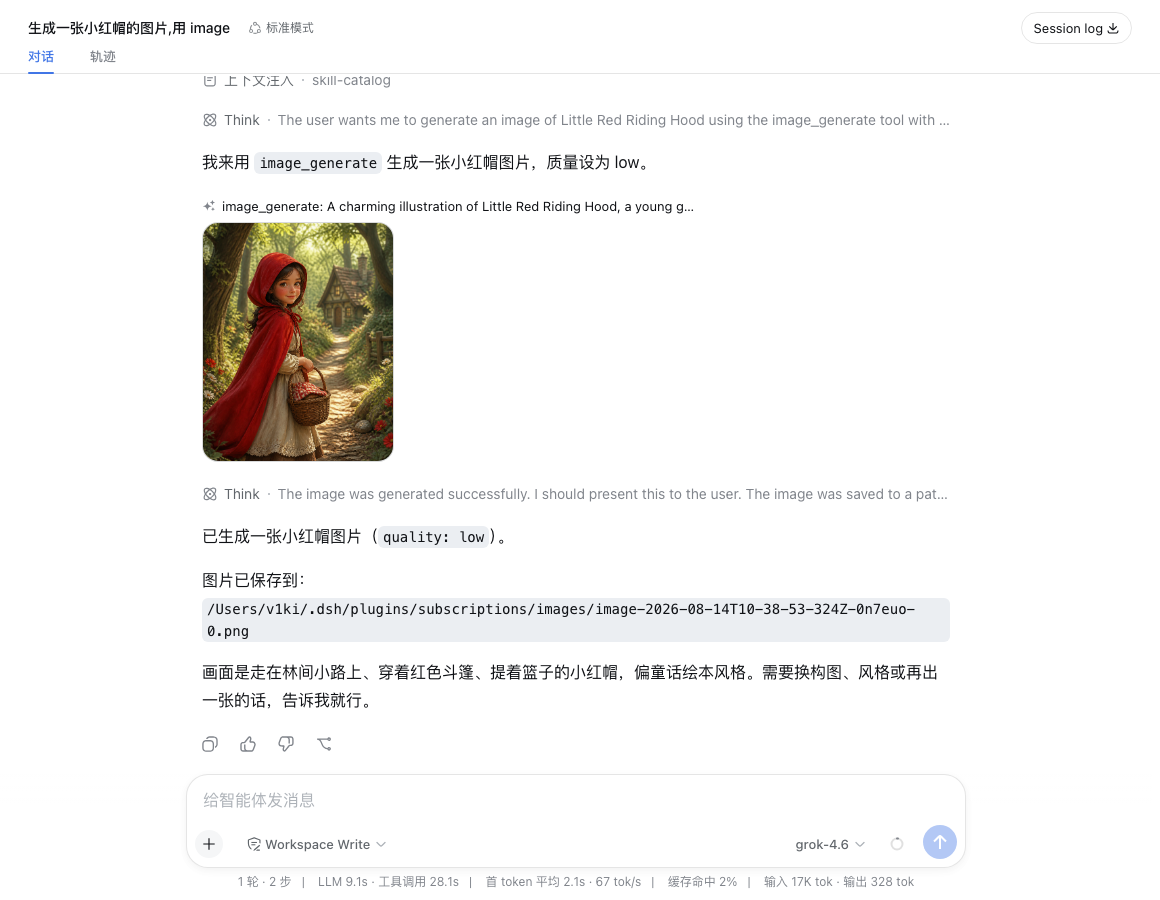
The image_generate tool renders its result inline in the conversation:
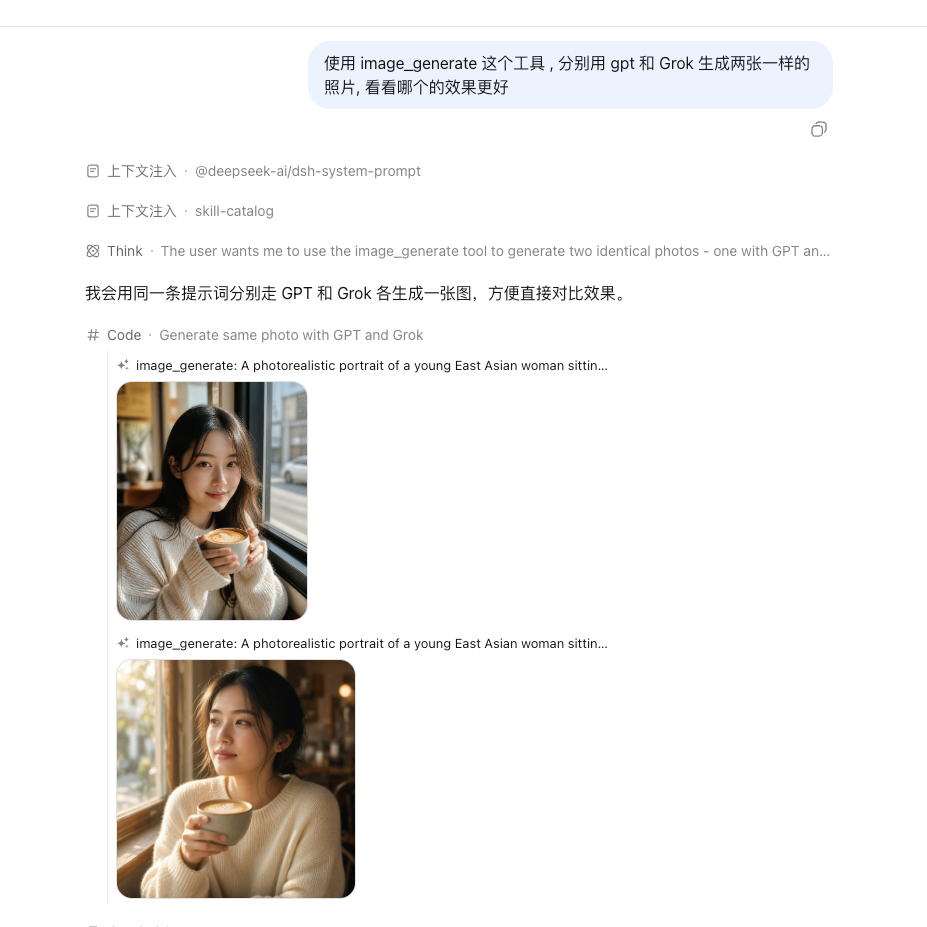
Its provider parameter picks the image backend — the same prompt through GPT (gpt-image-2, top) and Grok (grok-imagine-image-2.0, bottom):
The video_generate tool plays the generated clip inline:

Providers
| Route |
Subscription |
Models |
codex |
ChatGPT Plus/Pro |
live catalog from chatgpt.com/backend-api/codex/models |
claude |
Claude Pro/Max |
all models available in your subscription (Opus, Sonnet, Haiku, Fable — static catalog, updated with the plugin) |
grok |
X Premium (xAI) |
live catalog from api.x.ai/v1/models (chat models only); reasoning efforts from the Grok CLI catalog (cli-chat-proxy.grok.com/v1/models) |
copilot |
GitHub Copilot |
live catalog from api.githubcopilot.com/models (chat models on both wires, with per-model vision flags and reasoning efforts); login uses the OAuth device flow (enter the shown code at github.com/login/device) |
Only logged-in providers appear in the session model picker; the lists above refresh on login/logout. Vision-capable models declare ['text', 'image'] input modalities, and image content is translated to each provider's wire format.
Logged-in cards also show subscription usage — per rate-limit window (5-hour session, weekly, and per-model weekly where the plan has one) with the used percentage, a progress bar, and the reset time, plus a Refresh button. Codex usage comes from chatgpt.com/backend-api/wham/usage (also reports the plan), Claude usage from api.anthropic.com/api/oauth/usage, and Grok usage from the Grok Build CLI proxy's cli-chat-proxy.grok.com/v1/billing (the source of the CLI's /usage panel; reports the shared weekly pool and the subscription tier). Copilot exposes no usage endpoint, so its card shows no usage section.
Also included, registered when the matching provider is enabled:
x_search tool (Grok) — xAI's hosted X search, returning { answer, citations }.image_generate tool (ChatGPT or Grok) — gpt-image-2 via the Codex backend, or grok-imagine-image-2.0 via api.x.ai/v1/images/generations. The provider argument picks the preferred provider (gpt, the default, or grok); when the preferred one is logged out the other serves as fallback. Images are saved under ~/.dsh/plugins/subscriptions/images/ and the paths returned. The size/quality arguments map onto Grok's aspect_ratio/quality on the Grok path.video_generate tool (Grok) — grok-imagine-video-1.5 via api.x.ai/v1/videos (async submit + poll); MP4s are saved under ~/.dsh/plugins/subscriptions/videos/, the path returned, and the clip plays inline in the conversation. Supports duration (1–15 s), aspect ratio, resolution, and image-to-video via image_url.
image_generate also supports editing: the model passes optional referenceImages (1–5 complete DSH attachment references) to edit or use existing images as sources; omitting it keeps text-to-image generation. References can come from uploads, read_image, or previous generated images. Read local files with read_image first; paths are not attachment references. Copy references from the image reference text or structured tool results. Their order matches the prompt's image order. Edits save new files and return reusable references, including for subsequent edits with another provider.
Codex edits use /backend-api/codex/images/edits; Grok edits use /v1/images/edits. Existing provider preference, logged-out fallback, and session tool policy still apply. Empty arrays, duplicate or invalid references, and attachment-limit violations fail explicitly instead of generating a new image. Editing requires the DSH attachment service.
Image generation and editing share same-provider account scheduling: try the default account first, then prefer the successful account in that session. Explicit quota, authentication, or image-entitlement rejection tries the remaining accounts; a 401 gets at most one credential refresh and retry first. Image-only cooldowns honor provider reset times and clear on login/logout. Transport failures, timeouts, 5xx responses, and invalid requests do not automatically resend, avoiding duplicate images. Set pool.enabled: false or pool.autoAccounts: false (legacy autoFamilies is accepted) to use only the default account. Image scheduling does not use chat catalogs, chat quota scoring, families, or tiers.
Install
Refreshing model lists
In Settings → Subscriptions → provider → Edit model list, use Refresh to bypass the five-minute catalog cache and refresh the conversation model picker too. This is separate from refreshing subscription usage. If models.<provider> is explicitly configured with a non-empty list, that list still overrides discovery.
Codex catalog visibility depends on the client_version request parameter. By default the plugin reads the stable version from the official npm @openai/codex package's public metadata (no CLI installation or subscription credentials sent to npm). Successful lookups are cached in memory for six hours; failures retry after five minutes and retain the last successful version, or the verified 0.153.4 fallback on first use. The lookup has a 1.5-second deadline, shares in-flight work across accounts, and ignores prerelease or regressed versions. Manual model-list refresh also rechecks the version. An explicit plugin configuration field, codexClientVersion: '0.153.4', takes precedence and disables automatic lookup; restart DSH after changing it. Model availability remains account-dependent; see verification notes.
Installation commands
With the dsh CLI available, install from npm (prebuilt artifacts, no build permission needed):
dsh plugin --profile web add dsh-plugin-subscriptions
Or install the sources from GitHub:
dsh plugin --profile web add github:V1ki/dsh-plugin-subscriptions
pnpm will ask you to allow this package's build script on first install (git installs fetch sources, not built artifacts); add the printed key to the profile's pnpm-workspace.yaml:
allowBuilds:
  dsh-plugin-subscriptions: true
and re-run the add. Only grant this to packages you trust — it runs the package's code at install time.
From a local checkout instead:
git clone https://github.com/V1ki/dsh-plugin-subscriptions.git
cd dsh-plugin-subscriptions && pnpm install && pnpm build
dsh plugin --profile web add ./dsh-plugin-subscriptions
Headless-only usage without installing into a profile (log in via the web UI first — the token file is shared):
cp overlay.example.yml overlay.yml   # then edit the name: to this checkout's absolute lib/index.js path
dsh --profile headless --patch <checkout>/overlay.yml "your task"
Update
Installed from npm:
dsh plugin --profile web update --latest dsh-plugin-subscriptions
Installed from GitHub: re-run the same add github:V1ki/dsh-plugin-subscriptions command — it re-fetches the sources and rebuilds. A linked local checkout just needs git pull && pnpm build in the checkout.
Either way, restart dsh web afterwards so the new version loads.
Use
dsh web, open the printed URL.- Settings → Subscriptions: click Connect on a provider. For Claude, credentials are imported instantly if you have run
claude and logged in at least once; without them, Claude authorizes in the browser like the others. For Codex and Grok, authorize in the opened browser tab; Copilot shows a GitHub device code to enter at github.com/login/device; if a browser flow can't complete (headless host), expand the manual fallback and paste the callback URL or code.
- In any session, open the model picker (
/model) and choose a model under ChatGPT (Codex) / Claude (Subscription) / Grok (Subscription) / GitHub Copilot.
Not logged in? The provider stays out of the picker, and requests fail with MISSING_CREDENTIAL pointing at the Settings page; nothing else breaks.
Multiple accounts
Every provider accepts several accounts: once one is connected, the card grows an Add account button (Claude offers Browser authorization and Import Claude Code separately). Accounts are keyed by their identity (email / login) — re-logging the same account updates it in place, a different account appends. Browser authorization signs in whichever account the browser currently uses, so switch accounts there first (or use an incognito window with the manual code) to add a different one. The ★ default account serves the direct provider routes; pool routes use every account. A Claude account imported from Claude Code stays synced with the CLI's credential store; OAuth-added Claude accounts refresh standalone so several accounts never fight over the Keychain entry.
Edit visible models, context windows, and tools
Open Settings → Subscriptions → provider → Edit model list, search and select models, then Save changes. All discovered models are shown automatically by default. Selecting individual models, selecting all, or clearing the selection saves an explicit list; newly discovered models then stay hidden until selected. Enable automatic display again to restore discovery-driven visibility. Hidden models remain usable by existing sessions, and the editor retains the full catalog so they can be restored. Refreshing discovery preserves preferences; Cancel discards unsaved edits.
Codex models also accept a context budget in tokens; leave it blank to follow the provider. The plugin reads each account's context_window and max_context_window, caps the requested budget at that account's maximum, and uses the advertised default as the conservative ceiling when no maximum is provided. Account pools resolve each member separately and use the smallest window. This changes DSH's local history budget and compaction timing, without sending an API capacity override. Longer contexts can increase response latency.
The same editor controls Codex image generation and Grok image generation, video generation, and X search. Changes apply only to sessions created after saving; existing sessions retain their creation-time policy, including after restart. Image generation is shared: it disappears only when neither configured provider enables it, and execution never falls back to a provider disabled for that session. Claude and Copilot currently have no standalone subscription tools to configure.
Preferences and tool-policy history live in ~/.dsh/plugins/subscriptions/provider-settings.json (mode 0600), independently of the five-minute discovery cache. Existing non-empty models.<provider> configuration still defines the base catalog; visibility selections filter that catalog.
Reasoning defaults in the model editor
Default reasoning effort now lives in Edit model list, beside each model's visibility and context settings. Apply edits with Save changes, or discard unsaved edits with Cancel. Hidden models remain editable. Models without reasoning levels have no selector; Follow provider clears an override. Choices come from live capabilities, intersected across account-pool members. Custom pool aliases do not offer ineffective effort overrides.
Existing defaults continue to load from and save to ~/.dsh/plugins/subscriptions/model-defaults.json (mode 0600). If a save fails partway through, unfinished edits remain in the draft; the UI reports any defaults already saved and lets you retry.
Config
- id: llm-subscriptions
  name: dsh-plugin-subscriptions
  config:
    providers: [codex, claude]        # subset; default all four
    streamIdleTimeoutMs: 300000
    rateLimit:
      wait: true                       # wait out a closed rate-limit window (default)
      maxWaitMs: 21600000              # ceiling on one wait; 6 h, covers a 5-hour session window
    models:                            # override the discovered/built-in catalogs
      codex:
        - { id: gpt-5.6-sol, name: GPT-5.6 Sol, contextWindow: 272000, inputModalities: [text, image] }
      copilot:                         # manual entries disable Copilot catalog discovery
        - { id: gpt-5.6-sol, wire: responses }   # copilot only: force the upstream protocol
wire (copilot entries only) pins a model to chat-completions or responses. Manual
entries keep working without it — the field exists because a configured model the live
catalog does not know would otherwise default to /chat/completions, which
responses-only families (gpt-5.5/5.6, …) reject. Pinning chat-completions also opts
out of the tools+effort auto-reroute described above.
Model pools
When a provider has two or more logged-in accounts, the picker shows the union of every account's catalog (duplicates dropped). Pick claude-sonnet-5 under Claude (or gpt-5.4 under ChatGPT) as usual — there is no extra pool group and no new model id.
- Shared models. A model listed by ≥2 accounts failovers between them (sticky, quota-aware). Each account is discovered separately, so a Plus login is not asked to serve a Pro-only model.
- Account-only models. A model listed by only one account is sent to that account. It still appears in the picker even if that account is not the default.
- Explicit account lists (
families). Replace the auto member list for one catalog model (same provider only; cross-provider members are ignored). Pin account or omit it for the default.
- Tier extras (
tiers, optional). Extra picker rows with heterogeneous fallbacks, listed under the first member's provider. Not created automatically.
Selection is sticky per session (prompt caches survive) with two strategies: priority (first healthy member wins) and quota_aware (the default — each member is scored by its required burn rate, remaining quota / time until window reset, so a window about to reset with plenty left gets spent instead of wasted; the sticky member holds until a challenger out-scores it by switchMargin). Members past 95% on any usage window are gated out; failures fail over before the first stream chunk with cooldowns (retry-after, or the window's own disclosed reset when the provider sends one) — quota and rate-limit failures cool the whole account down (its quota is account-level; Claude's model-scoped lanes cool per member), transient server failures cool only the failing member. Copilot exposes no usage telemetry, so it scores zero and naturally serves as the fallback of last resort.
- id: llm-subscriptions
  name: dsh-plugin-subscriptions
  config:
    pool:
      enabled: true                   # default; needs ≥2 accounts of one provider
      strategy: quota_aware           # or priority
      switchMargin: 2                 # hysteresis factor for quota_aware
      autoAccounts: true              # pool each catalog model across that provider's accounts
      families:                       # explicit account list for one catalog model (same provider)
        claude-sonnet-5:
          - { provider: claude, model: claude-sonnet-5 }                   # default account
          - { provider: claude, account: [email protected], model: claude-sonnet-5 }
      tiers:                          # optional extra picker rows
        smart:
          - { provider: claude, model: claude-sonnet-5 }
          - { provider: codex, model: gpt-5.6-sol }
          - { provider: grok, model: grok-4.6 }
Waiting out a rate-limit window
A subscription plan is rate-limit shaped by design — a 5-hour session window, a weekly one, and on some plans a per-model weekly one — so a 429 is not a dead end: the window reopens at a time the provider discloses. Each route reads that reset off its own 429 and turns it into that account's pool cooldown (see Model pools above) instead of a fixed 5-minute guess.
Only a signal that names the window which actually rejected the request is read: Anthropic's anthropic-ratelimit-unified-reset, the seconds Codex puts on a usage_limit_reached rejection, the delay xAI names in the error body, or a plain retry-after. The per-bucket rollover s

 dsh-plugin-subscriptions 是一个 DeepSeek Harness(dsh)插件,让你在 dsh 里把已有的 ChatGPT(Codex)、Claude、Grok(X Premium)和 GitHub Copilot 订阅当作 LLM 提供方来用,不需要单独的 API 密钥。