What is Unleash?
Unleash is a powerful open-source solution for feature management. It streamlines your development workflow, accelerates software delivery, and empowers teams to control how and when they roll out new features to end users. With Unleash, you can deploy code to production in smaller, more manageable releases at your own pace.
Feature flags in Unleash let you test your code with real production data, reducing the risk of negatively impacting your users' experience. It also enables your team to work on multiple features simultaneously without the need for separate feature branches.
Unleash is the most popular open-source solution for feature flagging on GitHub. It supports 15 official client and server SDKs and over 15 community SDKs. You can even create your own SDK if you wish. Unleash is compatible with any language and framework.
Get started with Unleash
Set up Unleash
To get started with Unleash, you can either explore Unleash Enterprise with a free trial or get started locally with our open-source solution.
Unleash Enterprise
To start with Unleash Enterprise, request a free trial. This gives you access to a hosted instance with unlimited projects and environments and features such as role-based access control, change requests, single sign-on, and SCIM for automatic user provisioning.
Unleash Open Source
To set up Unleash locally, you'll need git and docker installed on your machine.
Execute the following commands:
git clone [email protected]:Unleash/unleash.git
cd unleash
docker compose up -d
Then point your browser to localhost:4242 and log in using:
- username:
admin
- password:
unleash4all
If you'd rather run the source code in this repo directly via Node.js, see the step-by-step instructions to get up and running in the contributing guide.
Connect your SDK
Find your preferred SDK in our list of official SDKs and import it into your project. Follow the setup guides for your specific SDK.
If you use the docker compose file from the previous step, here's the configuration details you'll need to get going:
- For frontend SDKs, use:
- URL:
http://localhost:4242/api/frontend/
clientKey: default:development.unleash-insecure-frontend-api-token
- For backend SDKs, use:
- Unleash API URL:
http://localhost:4242/api/
- API token:
default:development.unleash-insecure-api-token
If you use a different setup, your configuration details will most likely also be different.
Check a feature flag
Checking the state of a feature flag in your code is easy! The syntax will vary depending on your language, but all you need is a simple function call to check whether a flag is available. Here's how it might look in Java:
if (unleash.isEnabled("AwesomeFeature")) {
  // do new, flashy thing
} else {
  // do old, boring stuff
}
Try Unleash in the cloud
Want to explore Unleash without setting it up locally? Here are two easy ways to see it in action.
Live demo
Open a running Unleash environment in your browser with no signup or setup required. This shared demo instance includes the core functionality so you can quickly get a feel for how Unleash works.
→ Launch the live demo
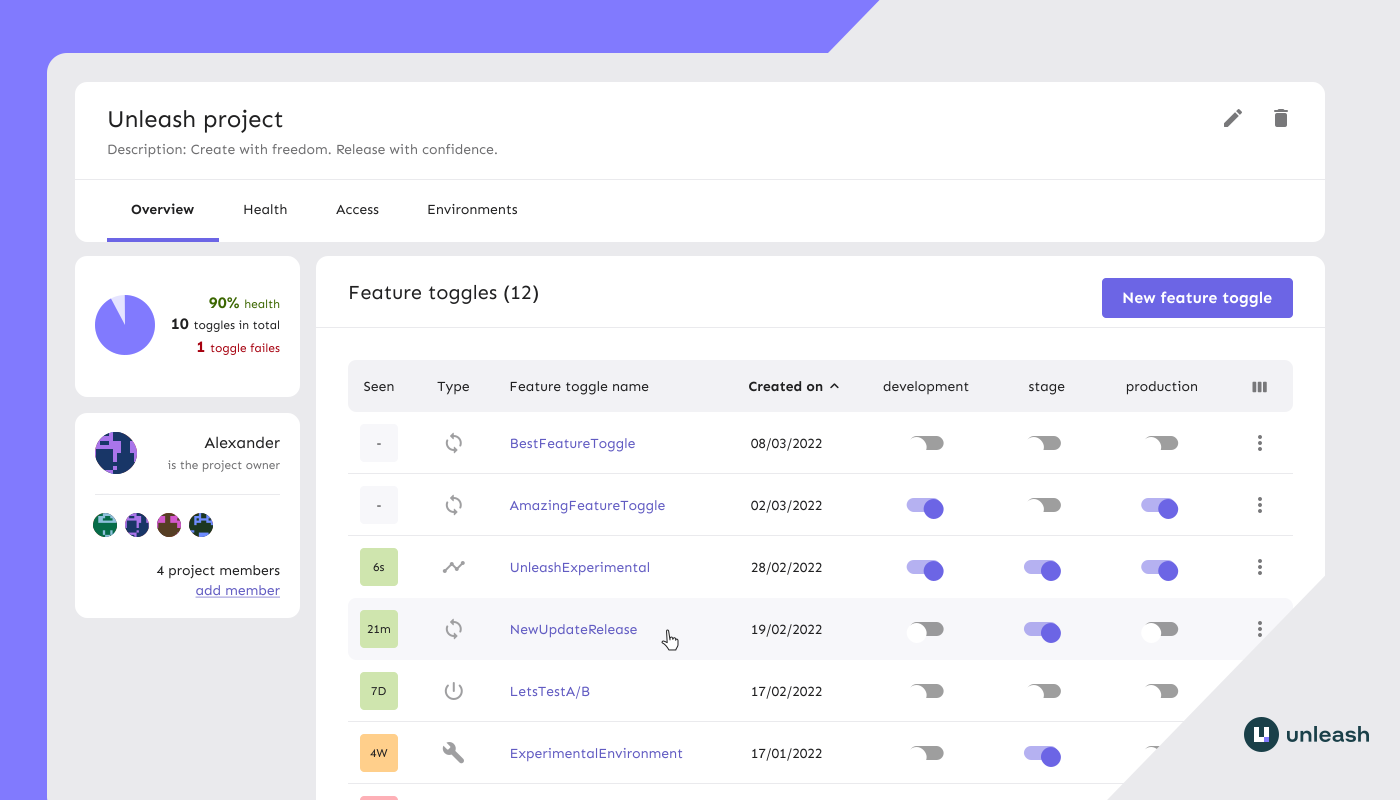
Free Enterprise trial
Get your own dedicated instance with a free 14-day cloud trial. This includes the full Unleash Enterprise feature set; ideal when evaluating Unleash for production use.
→ Start your free trial
Deploying to a production server
To self-host Unleash in a production environment, you need to deploy it to a persistent server.
We provide guides for deploying to services like Heroku and DigitalOcean:


For more advanced configurations options, check out our documentation on:
Community and help
We know that learning a new tool can be hard and time-consuming. We have a growing community that loves to help out. Please don't hesitate to reach out for help.

💬 Join Unleash on Slack if you want ask open questions about Unleash, feature toggling or discuss these topics in general.
💻 Create a GitHub issue if you have found a bug or have ideas on how to improve Unleash.
📚 Visit the documentation for more in-depth descriptions, how-to guides, and more.
📖 Learn more about the principles of building and scaling feature flag solutions.
Contribute to Unleash
Unleash is the largest open-source feature flag solution on GitHub. Building Unleash is a collaborative effort, and we owe a lot of gratitude to many smart and talented individuals. Building it together with the community ensures that we build a product that solves real problems for real people. We'd love to have your help too: Please feel free to open issues or provide pull requests.
Check out the CONTRIBUTING.md file for contribution guidelines and the Unleash developer guide for tips on environment setup, running the tests, and running Unleash from source. Before a pull request can be merged, contributors must read and agree to the Unleash Contributor License Agreement.
Contributors
Documentation
You can visit the Unleash documentation at https://docs.getunleash.io. As of 2 February 2026, the Unleash documentation source code lives in its own repository: Unleash/unleash-documentation.
Features our users love
Flexibility and adaptability
- Privacy by design (GDPR and Schrems II). End-user data never leaves your application.
- Audit logs
- Enforce OWASP's secure headers via the strict HTTPS-only mode
- Flexible hosting options: host it on premise or in the cloud (any cloud)
- Scale with Unleash Edge independently of the Unleash server to support any number of frontend clients without overloading your Unleash instance
Looking for more features?
If you're looking for one of the following features, please take a look at our Pro and Enterprise plans:
Architecture
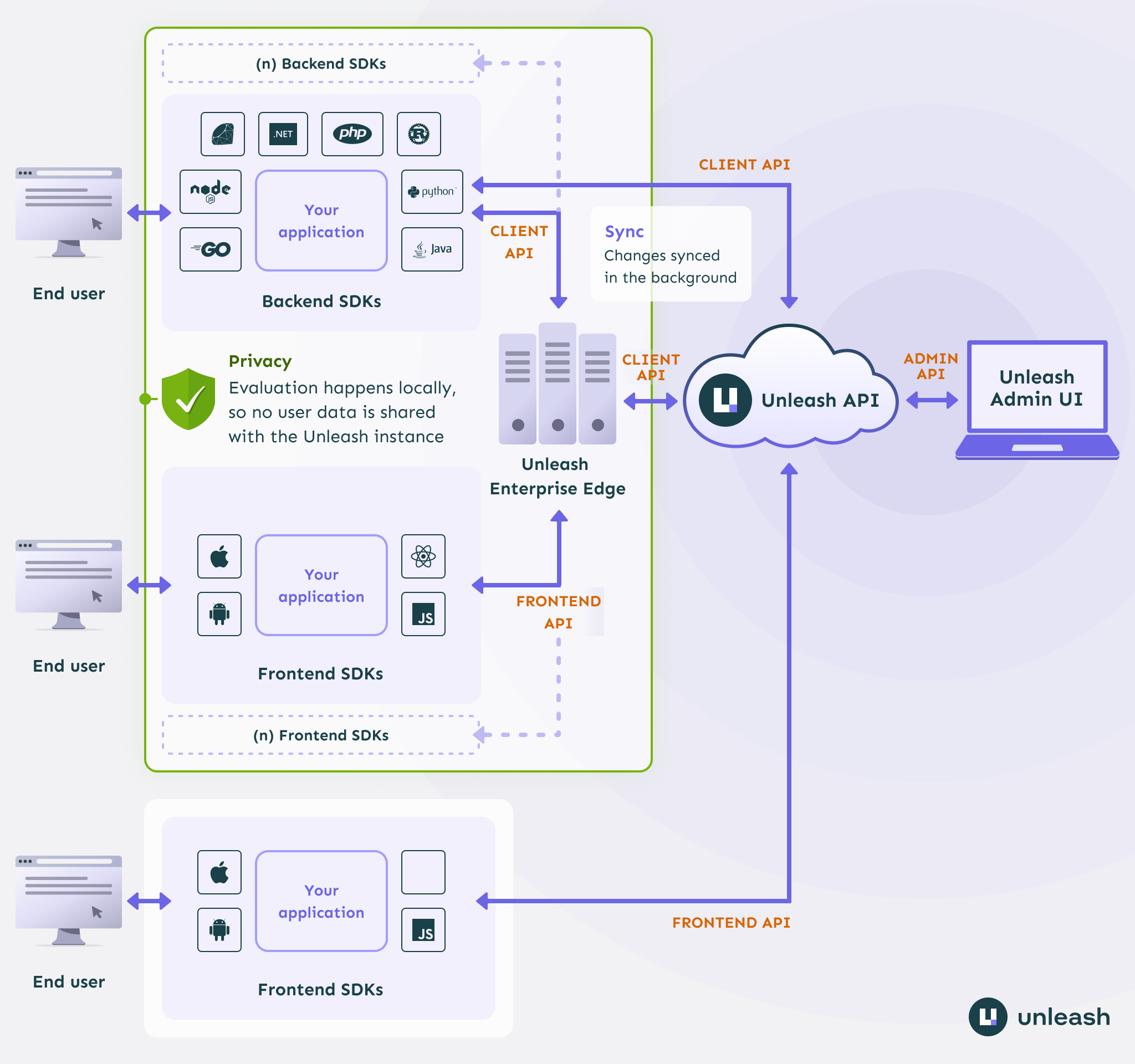
Read more in the system overview section of the Unleash documentation.
Unleash SDKs
To connect your application to Unleash you'll need to use a client SDK for your programming language.
Official backend SDKs:
Official frontend SDKs:
Community SDKs:
If none of the official SDKs fit your need, there's also a number of community-developed SDKs where you might find an implementation for your preferred language (such as Elixir, Dart, Clojure, and more).
Users of Unleash
Unleash is trusted by thousands of companies all over the world.
Proud Open-Source users: (send us a message if you want to add your logo here)
Migration guides
Unleash has evolved significantly over the past few years, and we know how hard it can be to keep software up to date. If you're using the current major version, upgrading shouldn't be an issue. If you're on a previous major version, check out the Unleash migration guide!
Want to know more about Unleash?
Videos and podcasts
Articles and more






 Unleash 是一个开源的功能管理平台,团队可以借助它开启或关闭功能、逐步放量发布新功能,并进行 A/B 测试,而无需重新部署代码。