















SuperAGI README

The project's README from github.com/TransformerOptimus/SuperAGI. As one markdown file: README.md.

SuperAGI logo SuperAGI logo

Open-source framework to build, manage and run useful Autonomous AI Agents

SuperAGI forks SuperAGI stars SuperAGI Commits

Follow SuperAGI

Follow _superAGI Join SuperAGI Discord Community

Connect with the Creator

Follow ishaanbhola

Share SuperAGI Repository

Follow _superAGI Share on Telegram Share on Reddit Buy Me A Coffee


What are we ?

A dev-first open source autonomous AI agent framework enabling developers to build, manage & run useful autonomous agents. You can run concurrent agents seamlessly, extend agent capabilities with tools. The agents efficiently perform a variety of tasks and continually improve their performance with each subsequent run.

💡 Features

🛠 Toolkits

Toolkits allow SuperAGI Agents to interact with external systems and third-party plugins.

Twitter Coding Tool Instagram Knowledge Search Email Jira File Manager Google Search Dall-E Github Web Interaction Duckduckgo Google Calendar Google Calendar Serp API Searx Web Scraper Notion Apollo

⚙️ Installation

You can install superAGI using one of the following three approaches.

☁️ SuperAGI cloud

To quickly start experimenting with agents without the hassle of setting up the system, try Superagi Cloud

  1. Visit Superagi Cloud and log in using your github account.

  2. In your account settings, go to "Model Providers" and add your API key.

You're all set! Start running your agents effortlessly.

🖥️ Local

  1. Open your terminal and clone the SuperAGI repository.
git clone https://github.com/TransformerOptimus/SuperAGI.git 
  1. Navigate to the cloned repository directory using the command:
cd SuperAGI
  1. Create a copy of config_template.yaml, and name it config.yaml.

  2. Ensure that Docker is installed on your system. You can download and install it from here.

  3. Once you have Docker Desktop running, run the following command in the SuperAGI directory:

    a. For regular usage:

    docker compose -f docker-compose.yaml up --build
    

    b. If you want to use SuperAGI with Local LLMs and have GPU, run the following command:

    docker compose -f docker-compose-gpu.yml up --build
    
  4. Open your web browser and navigate to http://localhost:3000 to access SuperAGI.

🌀 Digital Ocean


Deploy SuperAGI to DigitalOcean with one click.

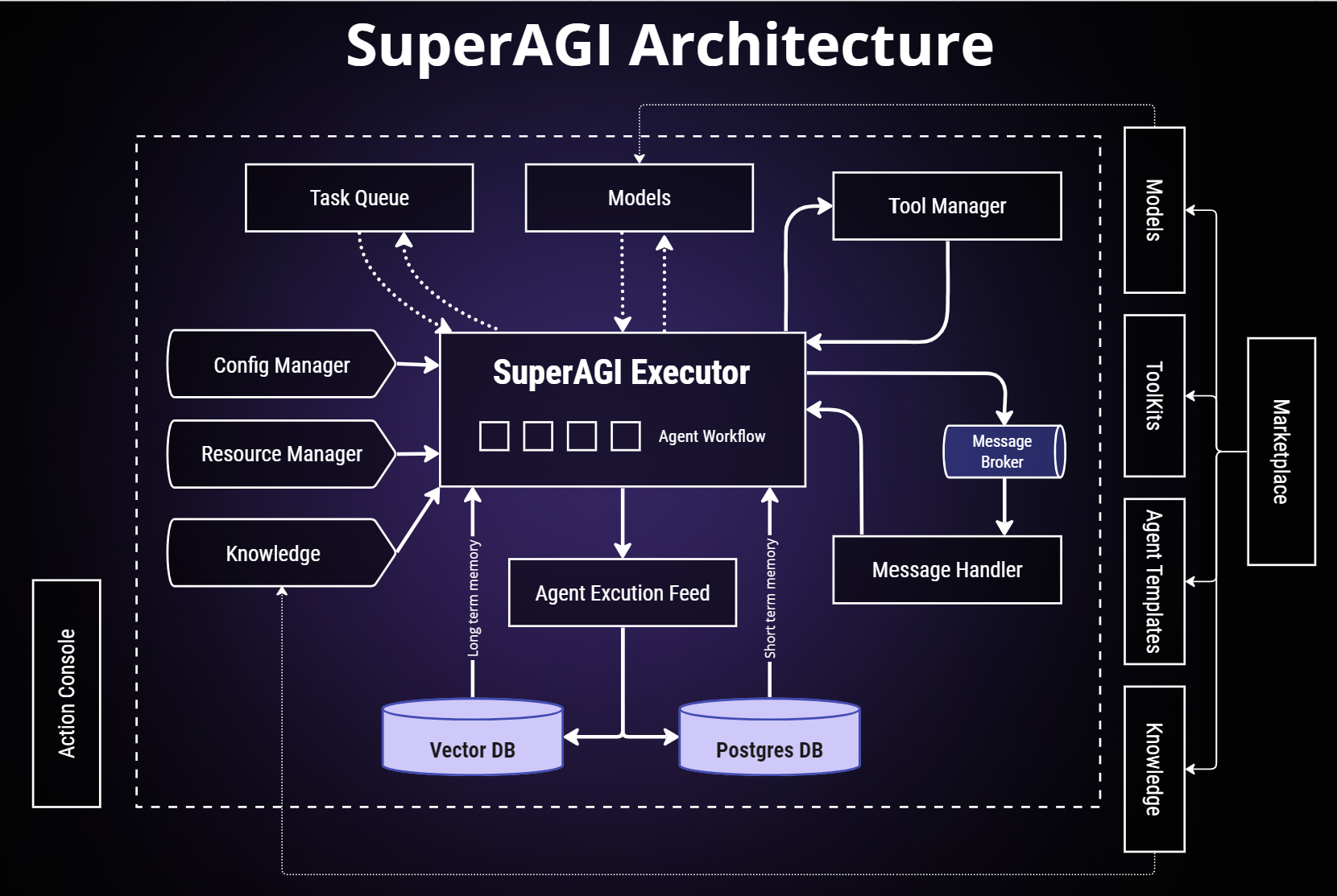
🌐 Architecture

SuperAGI Architecture

SuperAGI Architecture

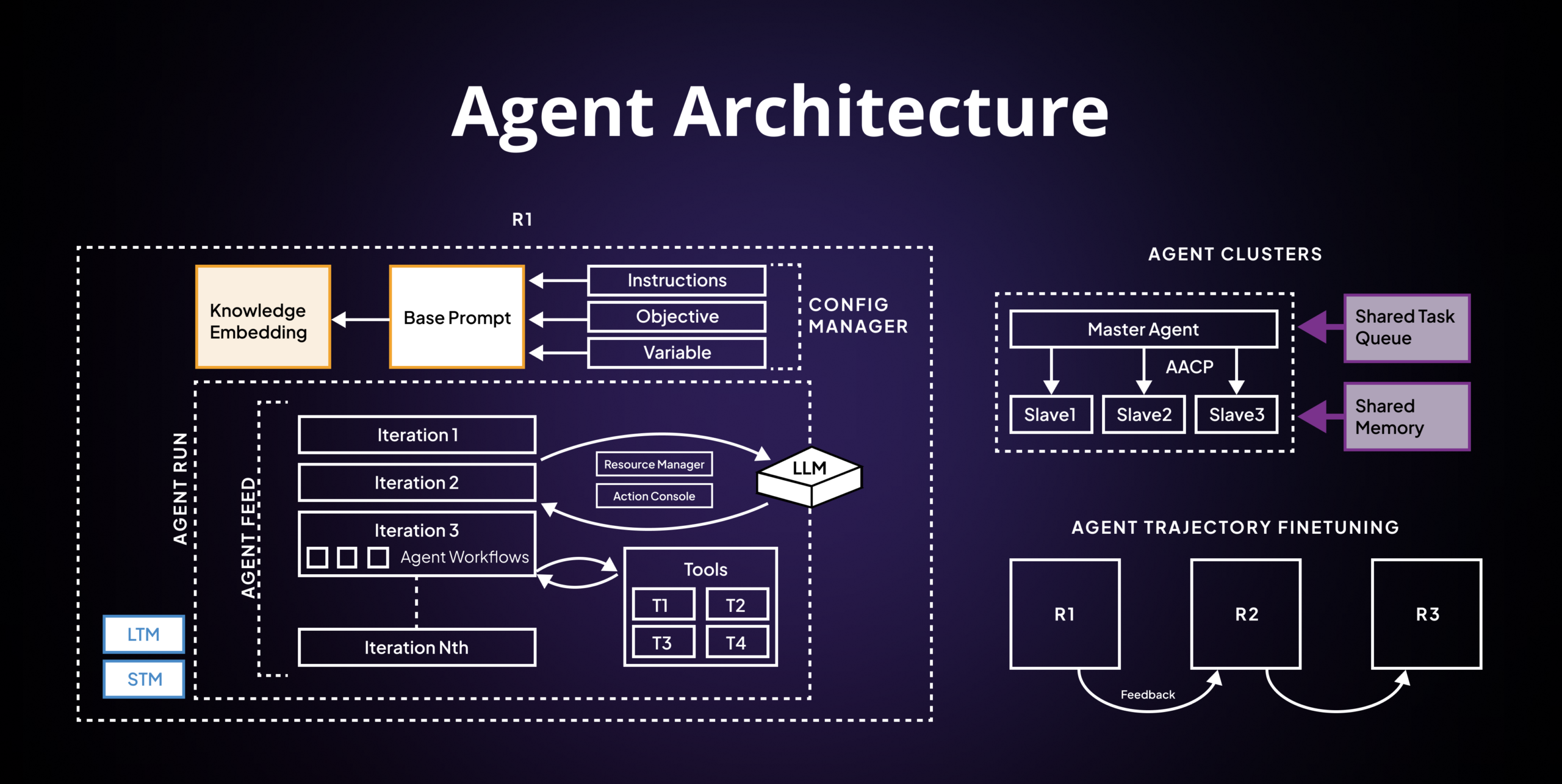
Agent Architecture

Agent Architecture

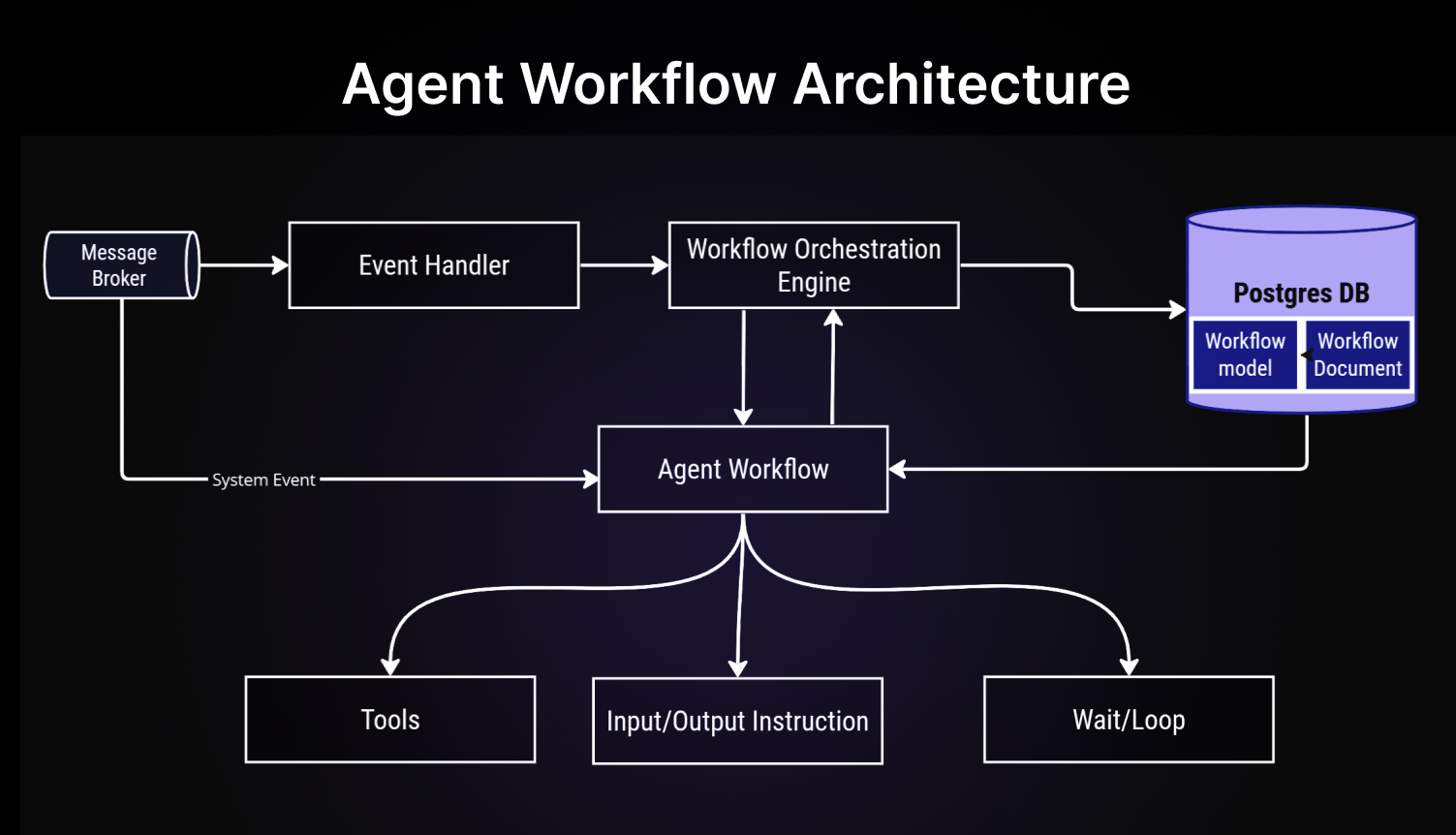
Agent Workflow Architecture

Agent Workflow Architecture

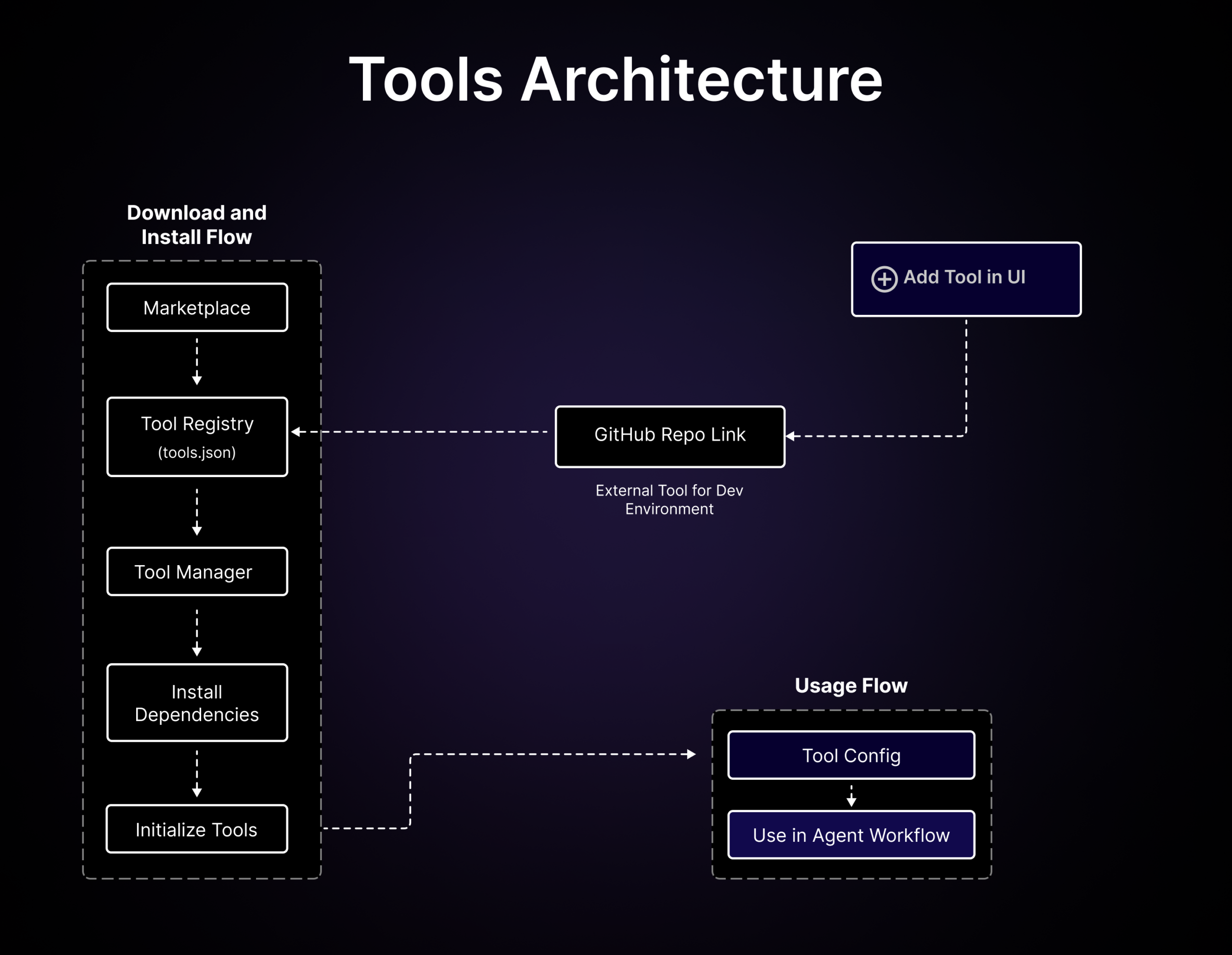
Tools Architecture

Tools Architecture

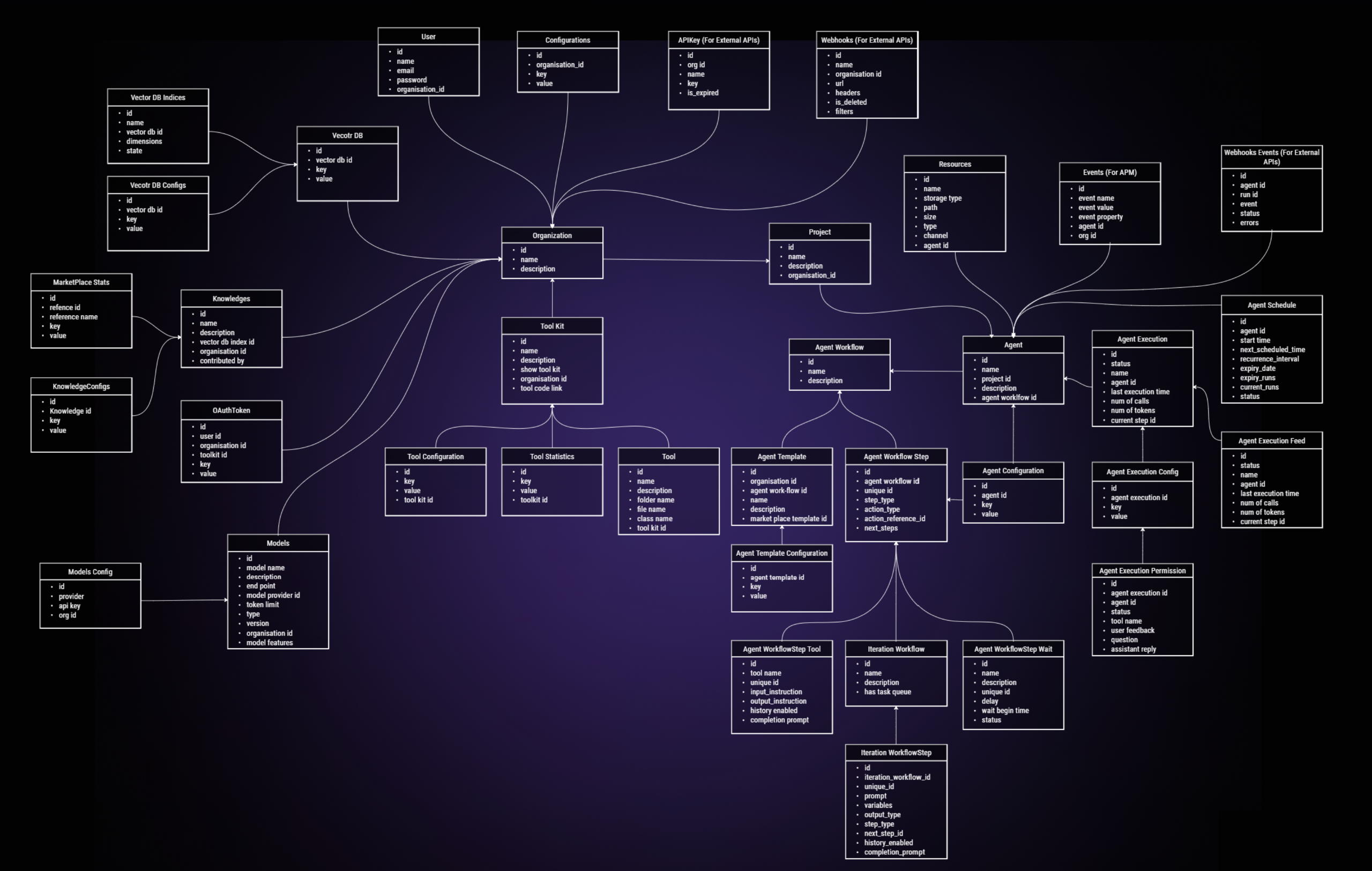
ER Diagram

ER Diagram

📚 Resources

📖 Need Help?

Join our Discord community for support and discussions.

Join us on Discord

If you have questions or encounter issues, please don't hesitate to create a new issue to get support.

💻 Contribution

We ❤️ our contributors. We’re committed to fostering an open, welcoming, and safe environment in the community.

If you'd like to contribute, start by reading our Contribution Guide.

We expect everyone participating in the community to abide by our Code of Conduct.

To get more idea on where we are heading, checkout our roadmap here.

Explore some good first issues to start contributing.

👩‍💻 Contributors

TransformerOptimus Cptsnowcrasher vectorcrow Akki-jain Autocop-AgentCOLONAYUSHluciferlinx101mukundans89Fluder-ParadynenborthynihirrTarraannneelayan7Arkajit-Dattaguangchen811juanfpo96iskandarrezajpenalbaepallasite99xutpuualexkreidlerhanhyalex123ps4vseltociear shaiss AdityaRajSingh1992 namansleeps2 sirajperson hsm207 unkn-wn DMTarmey Parth2506 platinaCoder anisha1607 jorgectf [![PaulRBerg](https://ima

SuperAGI (TransformerOptimus/SuperAGI)

Searching Database…

17.7K ·GitHub
这是什么?SuperAGI 是一个面向开发者的开源框架,用于构建、管理和运行自主 AI 智能体——也就是能够执行任务、并且每次运行都会不断改进的智能体。
它是我写代码时用的框架,还是直接运行的产品?它是一个 Python 框架,但自带图形界面:完成安装后,你可以在浏览器里管理和使用你的智能体,并通过工具包(toolkit)来扩展它们的功能。
怎么把它跑起来?最简单的方式:用 GitHub 账号登录 SuperAGI Cloud,然后在 Model Providers 里添加 API 密钥。本地方式:克隆仓库,把 configtemplate.yaml 复制为 config.yaml,启动 Docker 并运行 compose 命令,然后打开网页界面。
开始之前需要先装好什么?本地部署必须安装 Docker,而且需要在 Model Providers 设置里添加一个 LLM API 密钥。使用托管的 SuperAGI Cloud 则完全不需要 Docker——只要登录 GitHub 再填上你的密钥就行。
什么是工具包(toolkit)?工具包让 SuperAGI 的智能体能够与外部系统和第三方插件交互;你可以从市场(marketplace)里把工具包添加到自己的智能体工作流中。
智能体记得之前运行过的内容吗?记得——智能体的记忆存储功能可以保存记忆,让智能体不断学习和调整;项目方也表示,智能体会在每次后续运行中持续提升表现。
怎么控制 API 的花费?它对 token 用量做了优化——你可以控制 token 的消耗来有效管理成本;另外还有性能遥测,能看到智能体的运行情况,方便你进一步优化。
可以同时运行多个智能体吗?可以——你可以创建、生成并部署自主智能体,流畅地并发运行多个智能体;项目的目标是让智能体达到生产可用、可扩展的水平。
What are similar projects?ruflo, Raven, hive, brigade, DB-GPT, AgentGPT, bareloop, awesome-ai-agents
Size
62 MB
Stars
17.7K
Age
3y
Commits · 90 Days