


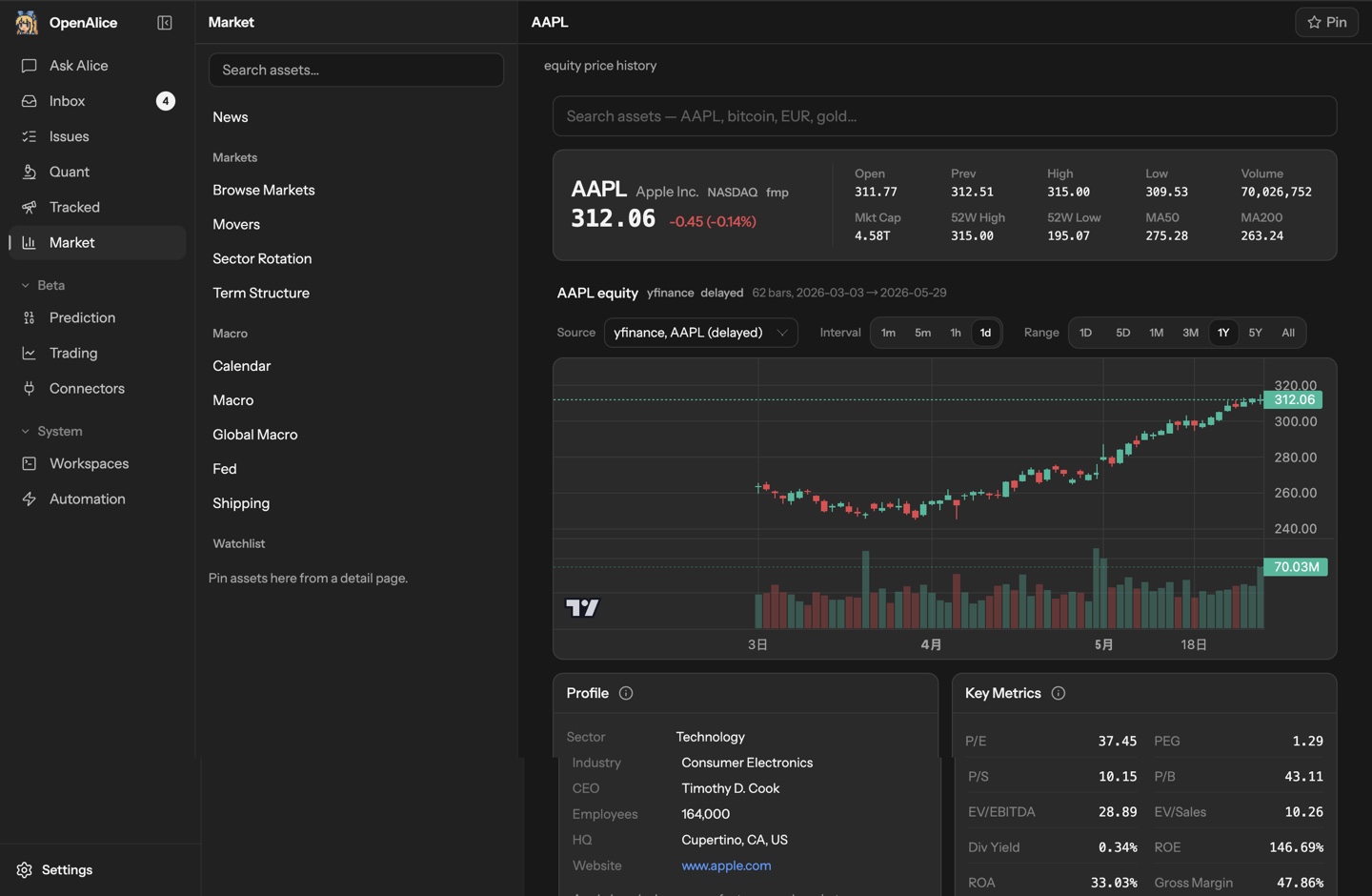








Что это такое?
 AI-оркестратор для трейдинга, рассчитанный на одного человека: он подключает уже знакомые вам кодинг-агентов к рыночным данным, рабочим пространствам для исследований, запланированным задачам и торговым счетам, охватывая весь путь — от исследований и построения гипотез до входа в позицию, её сопровождения и выхода.
AI-оркестратор для трейдинга, рассчитанный на одного человека: он подключает уже знакомые вам кодинг-агентов к рыночным данным, рабочим пространствам для исследований, запланированным задачам и торговым счетам, охватывая весь путь — от исследований и построения гипотез до входа в позицию, её сопровождения и выхода.Это десктоп-приложение, сервер или CLI-инструмент?И то, и другое, и третье: десктоп-приложение для macOS и Windows, поставляемое вместе с агентом Pi, а также CLI-установщик, remote quickstart и настройка через Docker — если вам удобнее работать в терминале или на сервере.
И то, и другое, и третье: десктоп-приложение для macOS и Windows, поставляемое вместе с агентом Pi, а также CLI-установщик, remote quickstart и настройка через Docker — если вам удобнее работать в терминале или на сервере.Как его запустить?Скачайте десктоп-приложение, подключите учётные данные модели или поддерживаемый способ входа и попробуйте первую задачу в Ask Alice — брокерский счёт для начала исследований не нужен.
Скачайте десктоп-приложение, подключите учётные данные модели или поддерживаемый способ входа и попробуйте первую задачу в Ask Alice — брокерский счёт для начала исследований не нужен.Каких AI-агентов можно к нему подключить?Агентов, которые у вас уже есть: Claude Code, Codex, OpenCode, Pi, Oh My Pi и другие, каждый со своими учётными данными модели или своим входом. Доступные рыночные данные зависят от настроенных вами провайдеров.
Агентов, которые у вас уже есть: Claude Code, Codex, OpenCode, Pi, Oh My Pi и другие, каждый со своими учётными данными модели или своим входом. Доступные рыночные данные зависят от настроенных вами провайдеров.Можно ли уже сейчас дать ему торговать реальными деньгами?Исполнение сделок пока в бете: начните с simulator, paper, demo или testnet-счётов. OpenAlice — экспериментальное ПО без каких-либо гарантий корректности, надёжности или прибыльности — используйте реальные средства, только если принимаете риски.
Исполнение сделок пока в бете: начните с simulator, paper, demo или testnet-счётов. OpenAlice — экспериментальное ПО без каких-либо гарантий корректности, надёжности или прибыльности — используйте реальные средства, только если принимаете риски.Где хранятся мои данные и доступ к счетам?По умолчанию всё работает локально: рабочие пространства — это Git-репозитории, которые можно изучать и бэкапить, состояние хранится в ~/.openalice, а брокерские учётные данные зашифрованы на диске — хотя выбранные вами агенты и провайдеры данных всё равно обращаются к своим сервисам.
По умолчанию всё работает локально: рабочие пространства — это Git-репозитории, которые можно изучать и бэкапить, состояние хранится в ~/.openalice, а брокерские учётные данные зашифрованы на диске — хотя выбранные вами агенты и провайдеры данных всё равно обращаются к своим сервисам.Есть ли что-то необычное в лицензии?AGPL-3.0, сильная copyleft-лицензия: изменённые версии, которые вы распространяете или запускаете как сетевой сервис, должны выходить на тех же условиях.
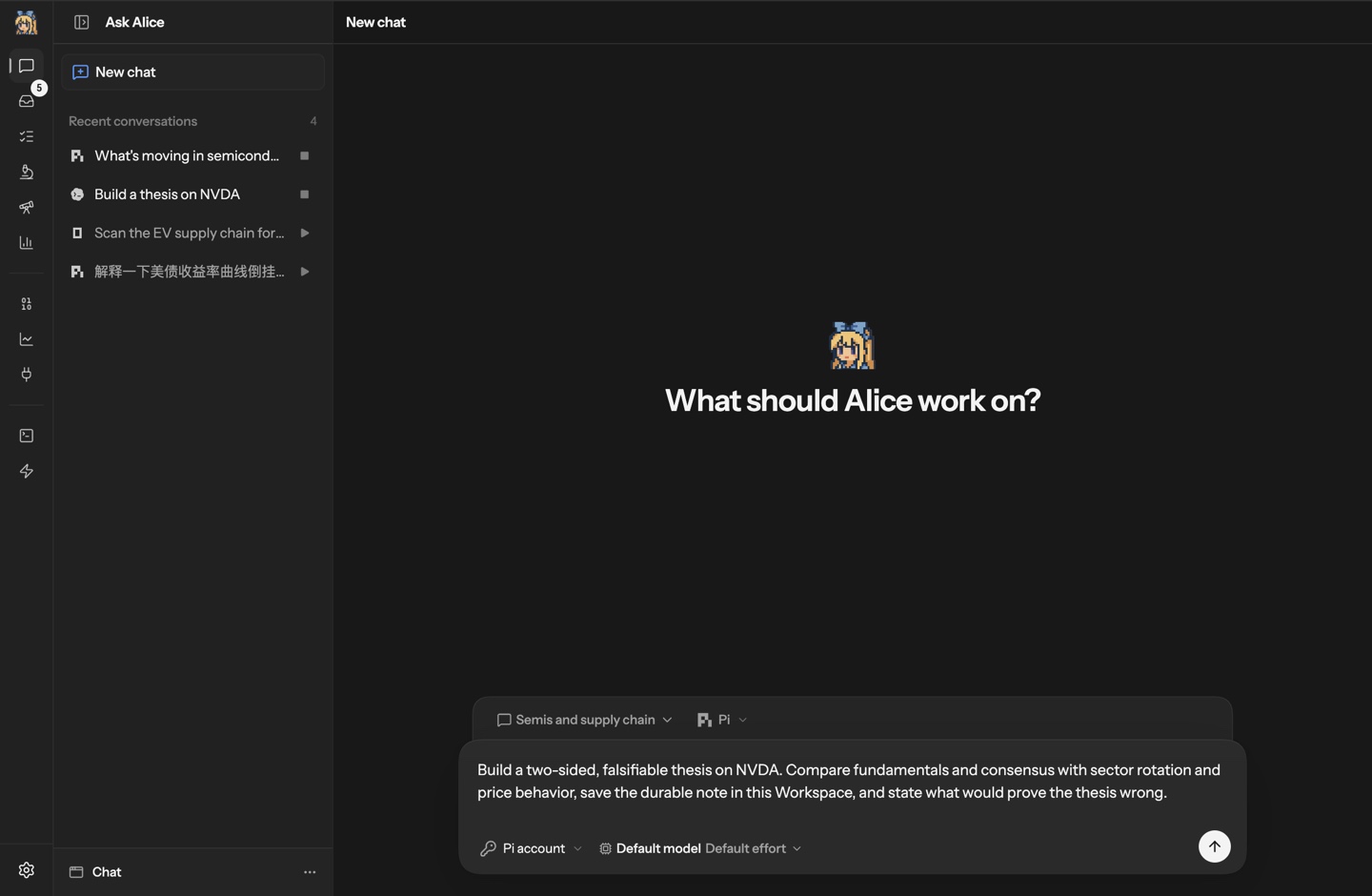
AGPL-3.0, сильная copyleft-лицензия: изменённые версии, которые вы распространяете или запускаете как сетевой сервис, должны выходить на тех же условиях.Как выглядит моя первая задача в нём?Попросите Alice построить гипотезу по NVDA: сравнить фундаментальные показатели с трендами сектора и поведением цены, сохранить исследование в рабочем пространстве и чётко сформулировать, что опровергло бы эту гипотезу. Затем можно продолжить обсуждение, превратить его в регулярный Issue или перенести в AutoQuant.
Попросите Alice построить гипотезу по NVDA: сравнить фундаментальные показатели с трендами сектора и поведением цены, сохранить исследование в рабочем пространстве и чётко сформулировать, что опровергло бы эту гипотезу. Затем можно продолжить обсуждение, превратить его в регулярный Issue или перенести в AutoQuant.Что такое Chat, AutoQuant и Auto Prediction?Переиспользуемые Workspaces для разных типов работы: Chat — для общих исследований, AutoQuant — для количественных проектов и экспериментов, Auto Prediction — для исследований рынков предсказаний. Каждая сохраняет переписку, файлы и историю Git между сессиями и имеет свой интерфейс Studio.
Переиспользуемые Workspaces для разных типов работы: Chat — для общих исследований, AutoQuant — для количественных проектов и экспериментов, Auto Prediction — для исследований рынков предсказаний. Каждая сохраняет переписку, файлы и историю Git между сессиями и имеет свой интерфейс Studio.Как агент на самом деле совершает сделку?Брокеры подключаются через Unified Trading Account, где можно просматривать позиции, ордера и состояние счёта. Со включённым AI-трейдингом агенты подготавливают предлагаемые операции и фиксируют свои обоснования, а вы проверяете и подтверждаете исполнение через Trading as Git.
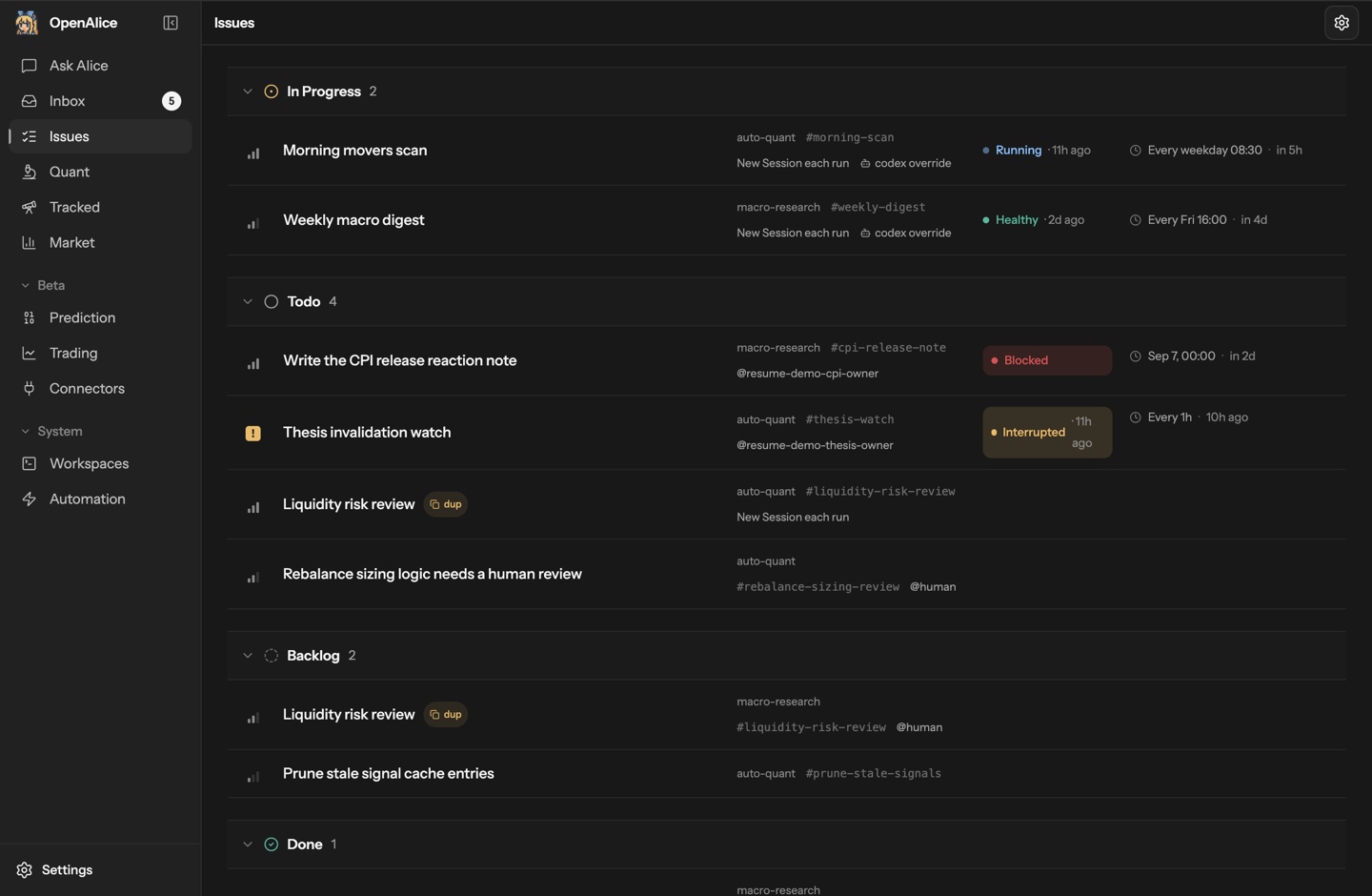
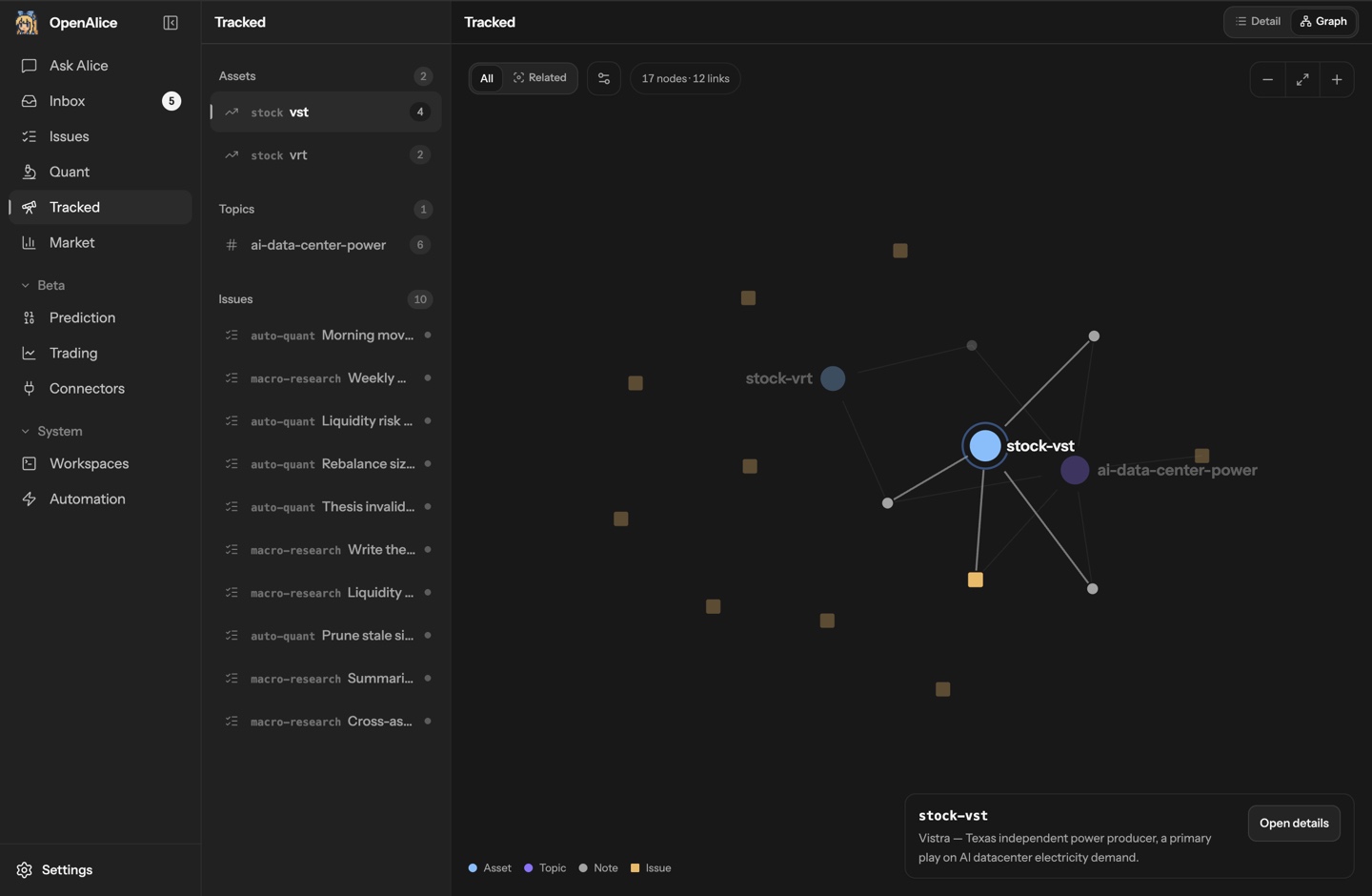
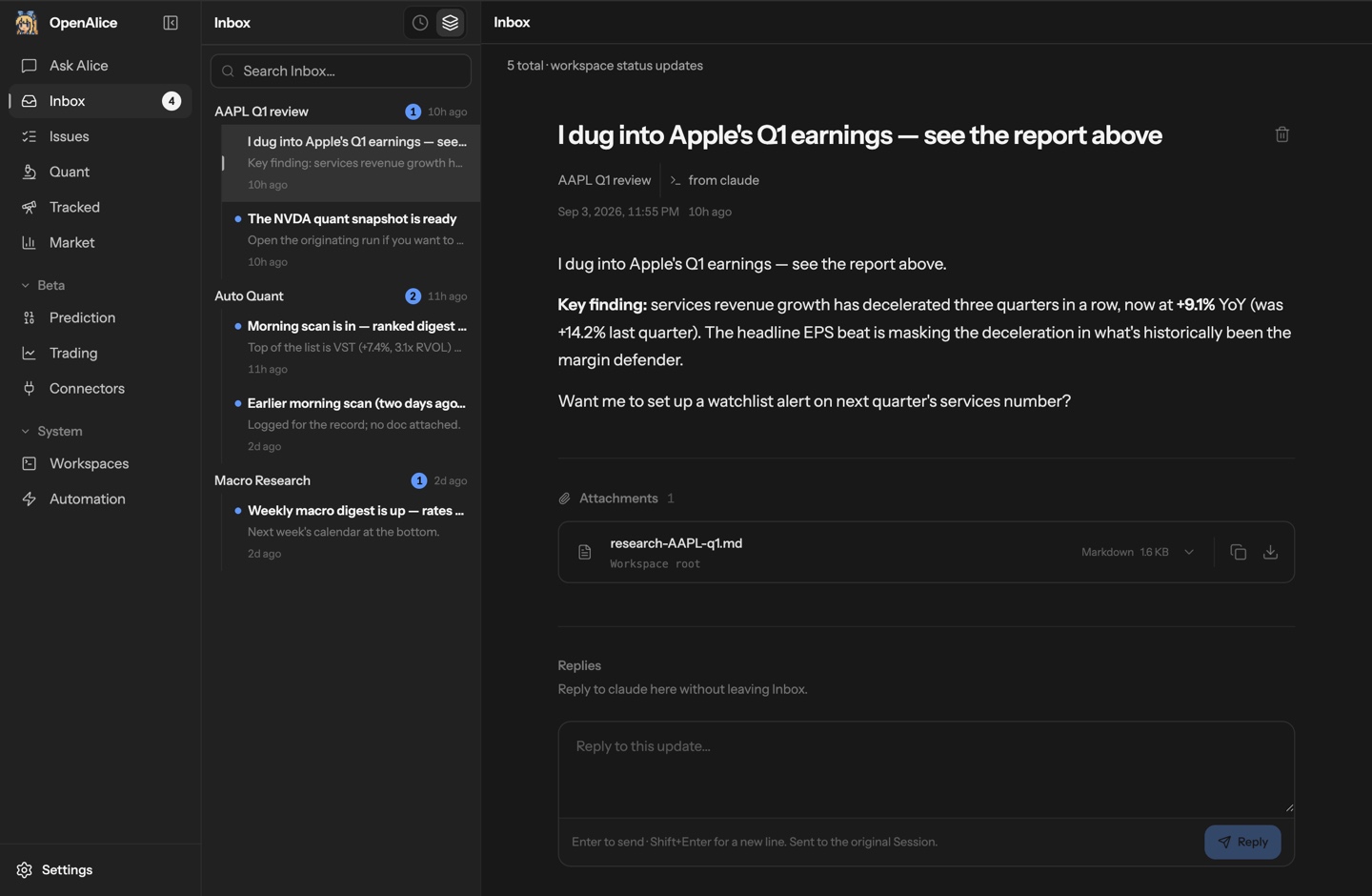
Брокеры подключаются через Unified Trading Account, где можно просматривать позиции, ордера и состояние счёта. Со включённым AI-трейдингом агенты подготавливают предлагаемые операции и фиксируют свои обоснования, а вы проверяете и подтверждаете исполнение через Trading as Git.Как он не даёт долгим идеям сойти с рельсов?Tracked привязывает исследования к активам и темам, а последующие шаги становятся запланированными Issue — утренний скан, еженедельный макрообзор, регулярная проверка гипотезы — выполняемыми агентом рабочего пространства с его контекстом. Результаты попадают в Inbox со ссылкой на сессию, в которой они были получены.
Tracked привязывает исследования к активам и темам, а последующие шаги становятся запланированными Issue — утренний скан, еженедельный макрообзор, регулярная проверка гипотезы — выполняемыми агентом рабочего пространства с его контекстом. Результаты попадают в Inbox со ссылкой на сессию, в которой они были получены.What are similar projects?astra-quant-agent, FQGate-agent, OpenTrade-Agent, emdash, nofx, freqtrade, gekko, hummingbot
astra-quant-agent, FQGate-agent, OpenTrade-Agent, emdash, nofx, freqtrade, gekko, hummingbotWhich topics is it in?quantitative-trading, market-data, trading-bot, trading, cryptocurrency, finance, orchestration, agpl, git, local-first, codex, privacy
quantitative-trading, market-data, trading-bot, trading, cryptocurrency, finance, orchestration, agpl, git, local-first, codex, privacy