






What is this?
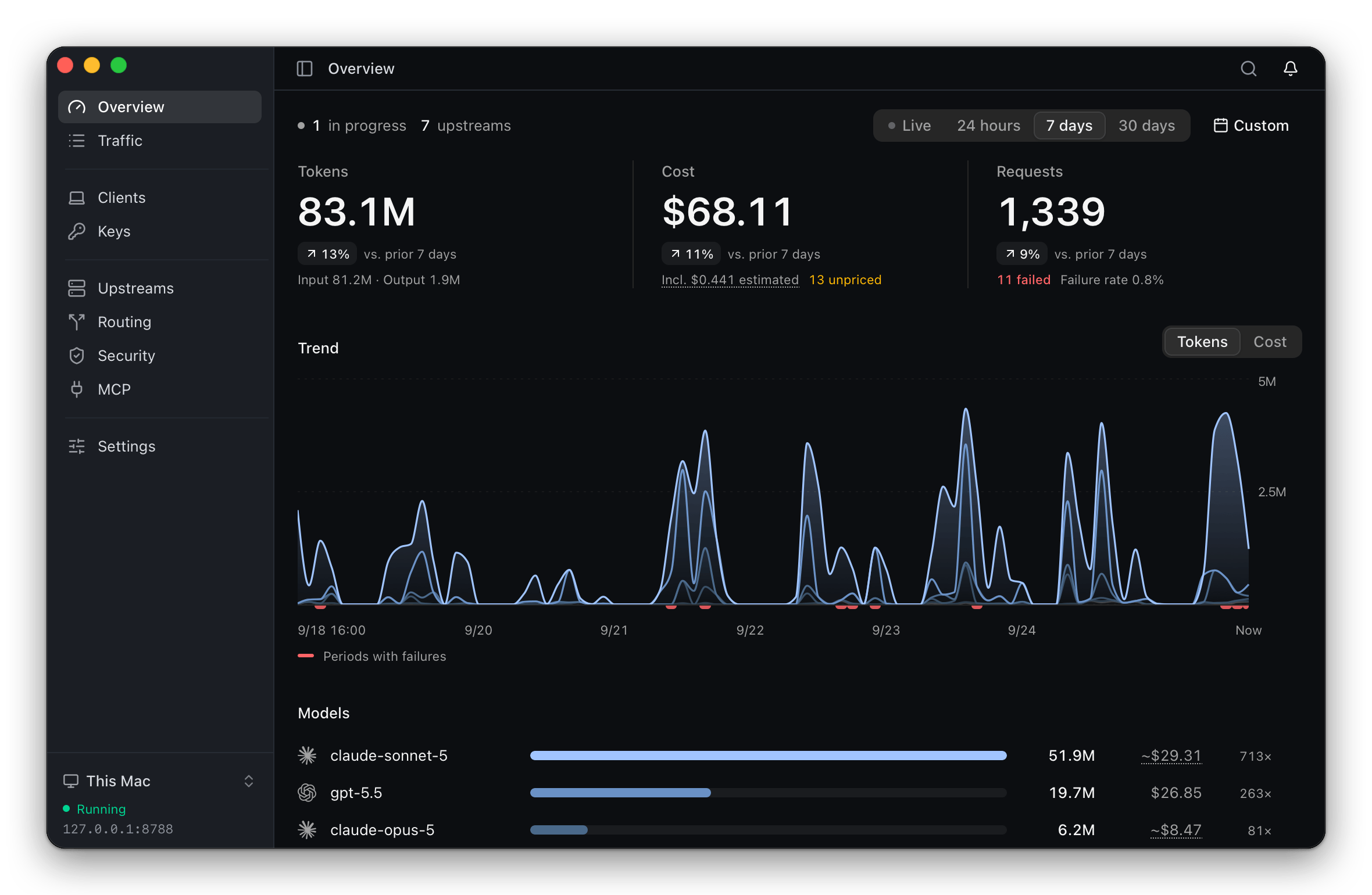
 ThinkWatch Lite is a local gateway that sits between AI coding clients (Claude Code, Codex, and others) and their upstream providers, letting you switch providers and models without reconfiguring each client, while tracking request cost and blocking malicious tool calls.
ThinkWatch Lite is a local gateway that sits between AI coding clients (Claude Code, Codex, and others) and their upstream providers, letting you switch providers and models without reconfiguring each client, while tracking request cost and blocking malicious tool calls.Is this a cloud service or does it run on my own machine?It's a desktop app with a system-tray icon; the gateway (ThinkWatch Core) ships bundled inside the app. The core can also be run remotely on a Linux server, with the app connecting to it over an encrypted control channel.
It's a desktop app with a system-tray icon; the gateway (ThinkWatch Core) ships bundled inside the app. The core can also be run remotely on a Linux server, with the app connecting to it over an encrypted control channel.How do I install it and connect my AI clients to it?Install via Homebrew cask on macOS, a Windows .exe installer, or a curl script/.AppImage on Linux. Supported clients like Claude Code, Codex, Zed, and Aider are then pointed at the gateway in one step, with the config change previewed and the original file backed up for easy restore.
Install via Homebrew cask on macOS, a Windows .exe installer, or a curl script/.AppImage on Linux. Supported clients like Claude Code, Codex, Zed, and Aider are then pointed at the gateway in one step, with the config change previewed and the original file backed up for easy restore.Do I still need my own provider API keys?Yes — you bring your own upstream accounts, whether API keys, Amazon Bedrock, ChatGPT, Z.ai, relays like OpenRouter, or local models, and the gateway converts between the Anthropic, OpenAI, and Gemini API formats as needed.
Yes — you bring your own upstream accounts, whether API keys, Amazon Bedrock, ChatGPT, Z.ai, relays like OpenRouter, or local models, and the gateway converts between the Anthropic, OpenAI, and Gemini API formats as needed.Is the installer ready to use right out of the box?Not entirely: the app isn't signed by Apple or Microsoft, so the first launch needs one extra manual step documented in the install guide; after that it updates itself (or via Homebrew if installed that way).
Not entirely: the app isn't signed by Apple or Microsoft, so the first launch needs one extra manual step documented in the install guide; after that it updates itself (or via Homebrew if installed that way).Does a relay ever see my real API keys?No — outbound redaction swaps API keys, private keys, JWTs, connection-string passwords, and other sensitive values for placeholders before a request leaves your machine, so the relay never holds the real credentials.
No — outbound redaction swaps API keys, private keys, JWTs, connection-string passwords, and other sensitive values for placeholders before a request leaves your machine, so the relay never holds the real credentials.What does the 'upstream check-up' feature do?It compares each upstream serving the same model against the others, flagging answers that name a different model, report input tokens well above or below the norm, or show low prompt-cache reads, with sample sizes included for context.
It compares each upstream serving the same model against the others, flagging answers that name a different model, report input tokens well above or below the norm, or show low prompt-cache reads, with sample sizes included for context.Can it scan my MCP servers and skills for risks?Yes, it lists the MCP servers of thirteen clients side by side, marking third-party servers, and scans client configuration, skills, hooks, and project instructions for hidden characters, prompt injection, dangerous commands, and overly broad permissions.
Yes, it lists the MCP servers of thirteen clients side by side, marking third-party servers, and scans client configuration, skills, hooks, and project instructions for hidden characters, prompt injection, dangerous commands, and overly broad permissions.Can I run the core on a remote server instead of locally?Yes, the gateway core can run on a Linux server while the desktop app on your laptop connects to it over an encrypted control channel.
Yes, the gateway core can run on a Linux server while the desktop app on your laptop connects to it over an encrypted control channel.Which AI clients are supported out of the box?Claude Code, Claude Desktop, Codex, opencode, Pi, oh-my-pi, Grok Build, Qwen Code, Hermes Agent, Zed, Aider, and DeepSeek Harness are configured automatically in one step; Cursor, Continue, and Antigravity CLI need manual setup following provided instructions.
Claude Code, Claude Desktop, Codex, opencode, Pi, oh-my-pi, Grok Build, Qwen Code, Hermes Agent, Zed, Aider, and DeepSeek Harness are configured automatically in one step; Cursor, Continue, and Antigravity CLI need manual setup following provided instructions.What are similar projects?casbin-gateway, bifrost, OmniRoute, 9router, opencodex, busbar, headroom, evenfire
casbin-gateway, bifrost, OmniRoute, 9router, opencodex, busbar, headroom, evenfireWhich topics is it in?usage-tracking, llm-observability, llm-proxy, prompt-injection, cost-tracking, ai-gateway, llm-gateway, token-usage, api-gateway, tauri, openai-compatible, model-context-protocol
usage-tracking, llm-observability, llm-proxy, prompt-injection, cost-tracking, ai-gateway, llm-gateway, token-usage, api-gateway, tauri, openai-compatible, model-context-protocol