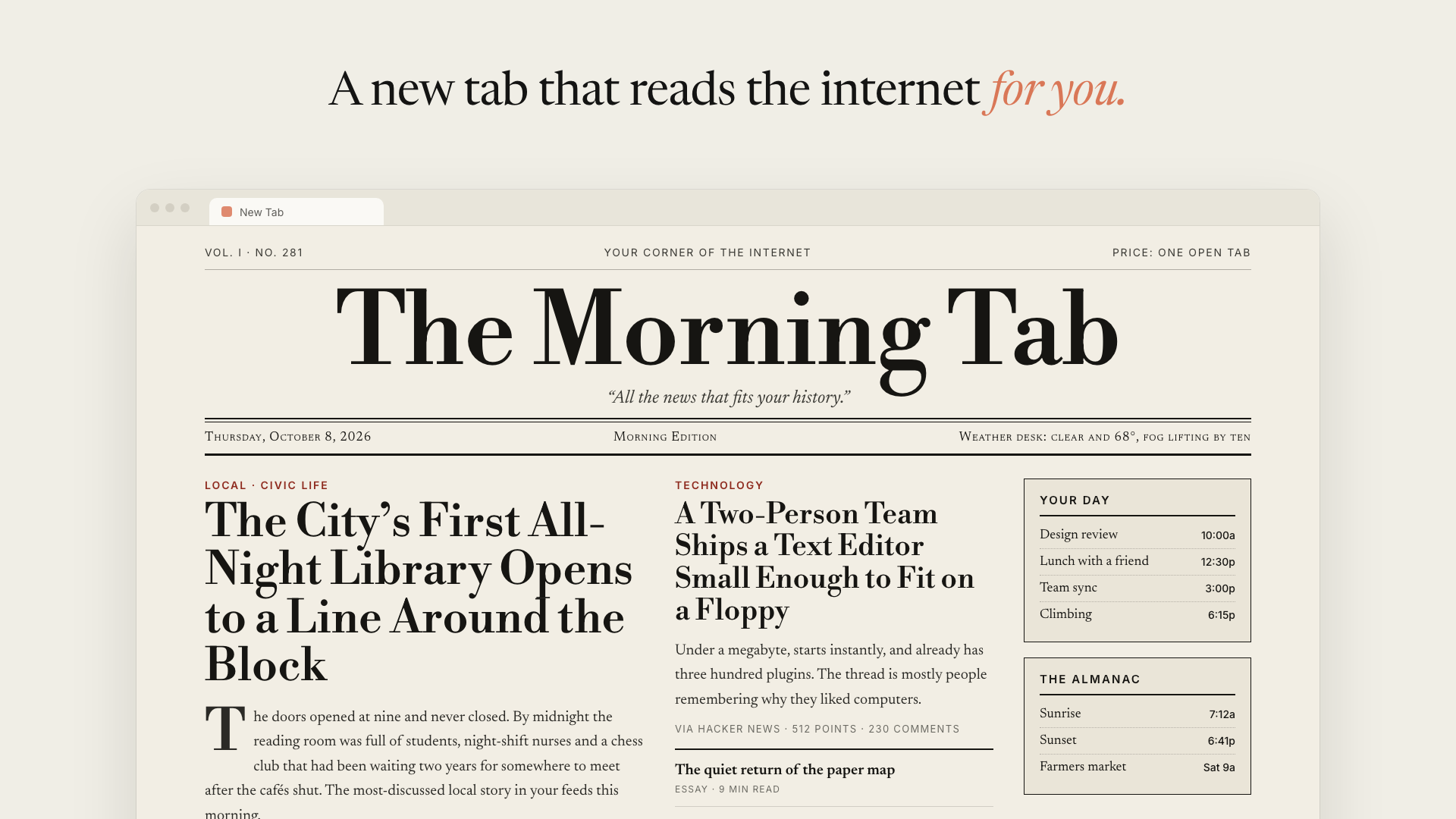
 Illustration. Your homepage is built from your own browsing, so its stories will be different.
Что это?
 AI Homepage — расширение для Chrome, которое заменяет вашу страницу новой вкладки на страницу, которую для вас пишет агент Claude, основываясь на сайтах из вашей же истории посещений.
AI Homepage — расширение для Chrome, которое заменяет вашу страницу новой вкладки на страницу, которую для вас пишет агент Claude, основываясь на сайтах из вашей же истории посещений.Это браузерное расширение для Chrome или то, что работает на сервере?Это браузерное расширение для Chromium, загружаемое локально; сессия агента работает из фонового воркера расширения, без какого-либо сервера посередине.
Это браузерное расширение для Chromium, загружаемое локально; сессия агента работает из фонового воркера расширения, без какого-либо сервера посередине.Как его установить и собрать первую домашнюю страницу?Выполните pnpm install и pnpm build, затем загрузите apps/extension/.output/chrome-mv3 как распакованное расширение через chrome://extensions с включённым режимом разработчика. На первой новой вкладке вставьте свой API-ключ Anthropic и нажмите «Build today's homepage».
Выполните pnpm install и pnpm build, затем загрузите apps/extension/.output/chrome-mv3 как распакованное расширение через chrome://extensions с включённым режимом разработчика. На первой новой вкладке вставьте свой API-ключ Anthropic и нажмите «Build today's homepage».Что нужно, прежде чем им пользоваться?Нужны Chrome или другой браузер на Chromium, Node.js 20+ (или сразу pnpm) и собственный API-ключ Anthropic.
Нужны Chrome или другой браузер на Chromium, Node.js 20+ (или сразу pnpm) и собственный API-ключ Anthropic.Это готово к публикации в Chrome Web Store?Нет, проект явно помечен как ранний и экспериментальный, рассчитанный на самостоятельный запуск; публикация в текущем виде позволила бы любому с доступом к профилю браузера прочитать ваш сохранённый API-ключ.
Нет, проект явно помечен как ранний и экспериментальный, рассчитанный на самостоятельный запуск; публикация в текущем виде позволила бы любому с доступом к профилю браузера прочитать ваш сохранённый API-ключ.Для кого это сделано?Для отдельных пользователей, готовых запускать собственное экспериментальное расширение со своим API-ключом, а пока не для распространения другим.
Для отдельных пользователей, готовых запускать собственное экспериментальное расширение со своим API-ключом, а пока не для распространения другим.Какая модель Claude собирает мою домашнюю страницу?Можно выбрать Claude Sonnet 5.5 (по умолчанию, лучший баланс), Claude Haiku 5.5 (самая быстрая и дешёвая) или Claude Opus 5.5 (самая тщательная, но самая дорогая). Выбор применяется со следующей сборки.
Можно выбрать Claude Sonnet 5.5 (по умолчанию, лучший баланс), Claude Haiku 5.5 (самая быстрая и дешёвая) или Claude Opus 5.5 (самая тщательная, но самая дорогая). Выбор применяется со следующей сборки.Можно изменить внешний вид домашней страницы?Да, в Settings можно написать свободные инструкции, описывающие и содержание, и вид (например, 'a quiet one-column digest' или 'green-on-black terminal'), и они имеют приоритет над дефолтами агента при каждой пересборке.
Да, в Settings можно написать свободные инструкции, описывающие и содержание, и вид (например, 'a quiet one-column digest' или 'green-on-black terminal'), и они имеют приоритет над дефолтами агента при каждой пересборке.Домашняя страница обновляется сама?Да, когда её возраст превышает заданный вами интервал (6, 12, 24 или 48 часов), она тихо пересобирается в фоне, но лишь после того, как вы хотя бы раз собрали её вручную.
Да, когда её возраст превышает заданный вами интервал (6, 12, 24 или 48 часов), она тихо пересобирается в фоне, но лишь после того, как вы хотя бы раз собрали её вручную.Как агент решает, какие страницы читать?Он ранжирует ваши самые посещаемые домены, открывает до 8 страниц под вашей учётной записью и пропускает поисковики, веб-почту, банки и маркетинговые страницы без авторизации; каждая ссылка в результате ведёт на страницу, которую он реально прочитал.
Он ранжирует ваши самые посещаемые домены, открывает до 8 страниц под вашей учётной записью и пропускает поисковики, веб-почту, банки и маркетинговые страницы без авторизации; каждая ссылка в результате ведёт на страницу, которую он реально прочитал.What are similar projects?BrowserKitten, voyager, mortiflix-oss, Thinking-Claude, integrity_baozi-, Endoplexity, openwhispr, crm
BrowserKitten, voyager, mortiflix-oss, Thinking-Claude, integrity_baozi-, Endoplexity, openwhispr, crmWhich topics is it in?anthropic-api, agent-sandbox, byok, chrome-extension, browser-extension, customization, anthropic, claude, ai-agent, productivity, agent, react
anthropic-api, agent-sandbox, byok, chrome-extension, browser-extension, customization, anthropic, claude, ai-agent, productivity, agent, react