Durable Actors
an open-source alternative to Cloudflare Durable Objects... with no vendor lock-in, memory limits, and observability built in.
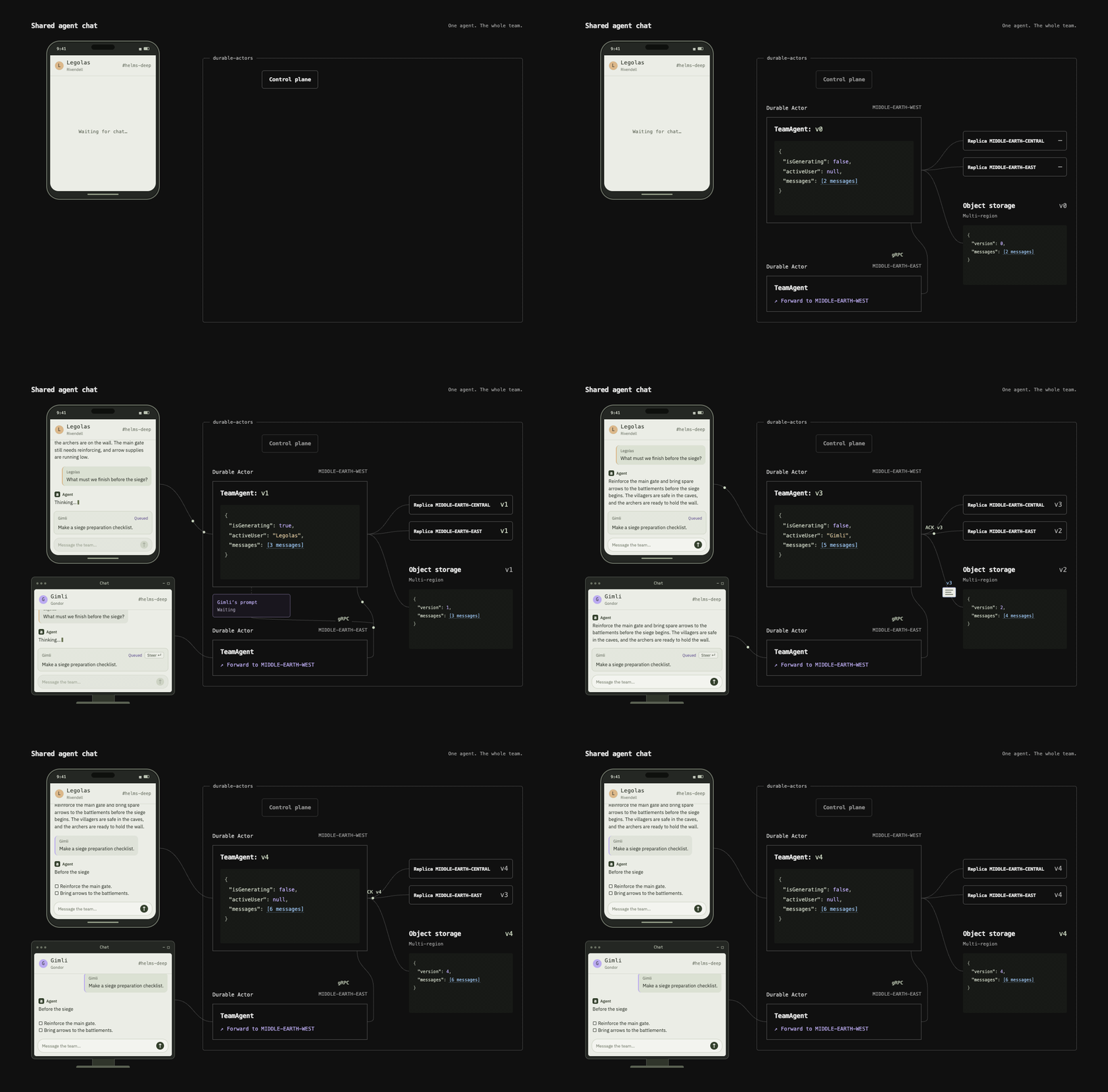
Durable Actors help you build real-time applications like chat systems (e.g. ChatGPT, Codex), collaboration tools (e.g. Notion), and agent swarms (e.g. Devin).
They provide stateful serverless functions, a foundational building block that abstracts away persistence, coordination, and infrastructure challenges in distributed systems.
Live demo · TypeScript documentation · Python documentation
How it works
- Define an actor, a class with durable state (i.e. data survives interruptions, errors, and restarts) and serialized execution (i.e. concurrent callers can update it safely).
For example:
- If you were building ChatGPT... a chat actor can store conversations that survive LLM flakiness and server crashes (durable state)
- If you were building Notion... a document actor can coordinate concurrent edits from several people and agents (serialized execution)
- Generate type-safe clients automatically with the Durable Actors SDK. For now, it supports Python and TypeScript.
- Develop locally with one command and later self-host the Durable Actors runtime on GCP.
Quickstart: Multiplayer AI Chat
1. Create your project
Install Bun 1.4.2+.
bunx durable-actors init my-actors
cd my-actors
bun install
bunx durable-actors dev # Run the server locally on your machine
2. Define an actor
Define and export actors in your actor project’s src/actors.ts, the default entrypoint loaded by durable-actors dev. The runtime loads actors on demand and persists fields marked @Persisted.
For example, a chat history actor:
import { openai } from "@ai-sdk/openai"
import { streamText } from "ai"
import { Actor, type ActorSocket, Interleave, Persisted } from "durable-actors"

type Message = { role: "user" | "assistant"; content: string }

export class ChatHistory extends Actor<null, string, Message[]> {
    @Persisted messages: Message[] = []

    async onConnect(socket: ActorSocket<null, Message[]>) {
        socket.send(this.messages)
    }

    @Interleave // Let other calls run during await, e.g. new connections while a reply streams.
    async onMessage(_socket: ActorSocket<null, Message[]>, text: string) {
        this.messages.push({ role: "user", content: text })
        const result = streamText({ model: openai("gpt-5-mini"), messages: [...this.messages] })
        const reply: Message = { role: "assistant", content: "" }
        this.messages.push(reply)
        this.broadcast(this.messages)
        for await (const chunk of result.textStream) {
            reply.content += chunk
            this.broadcast(this.messages)
        }
    }
}
3. Connect your backend
We make it super easy to integrate the actors into your existing tech stack. Just generate the client and you get a fully type safe contract to interact with.
bunx durable-actors generate
Create a WebSocket connection to one shared chat:
import express from "express"

import { actors } from "../generated/index.js"

export const app = express()

app.post("/api/chat/socket", async (_req, res) => {
    const grant = await actors.ChatHistory.prepareWebsocket({
        actorId: "lobby",
        metadata: null
    })
    res.set("Cache-Control", "no-store").json(grant)
})
4. Connect the frontend
import { useEffect, useRef, useState } from "react"
import { createRoot } from "react-dom/client"

import type { actors } from "../generated/index.js"

function Chat() {
    const socket = useRef<WebSocket>(null)
    const [messages, setMessages] = useState<actors.ChatHistory.Outgoing>([])

    useEffect(() => {
        let active = true
        async function connect() {
            const response = await fetch("/api/chat/socket", { method: "POST" })
            const { websocketUrl } = await response.json()
            if (!active) return
            socket.current = new WebSocket(websocketUrl)
            socket.current.onmessage = event => setMessages(JSON.parse(event.data))
        }
        void connect()
        return () => {
            active = false
            socket.current?.close()
        }
    }, [])

    function send(form: FormData) {
        const text = String(form.get("message")).trim()
        if (!text || socket.current?.readyState !== WebSocket.OPEN) return
        socket.current.send(JSON.stringify(text))
    }

    return (
        <main>
            <div role="log" aria-label="Messages">
                {messages.map((message, index) => (
                    <p key={index}><strong>{message.role}:</strong> {message.content}</p>
                ))}
            </div>
            <form action={send}>
                <input name="message" aria-label="Message" required />
                <button>Send</button>
            </form>
        </main>
    )
}

createRoot(document.getElementById("root")!).render(<Chat />)
For a complete app with error handling and retries, see the AI Chat example.
5. Monitor and debug
Durable Agents provides built-in observability features:

Examples
For complete sample applications, see AI Chat, Collaborative Documents, and Chatroom.
Bug reports, feature requests, documentation fixes, and code contributions are welcome. See the contributing guide for repository setup and checks, and follow our code of conduct.
Use GitHub Issues for bugs, ideas, and questions. Report vulnerabilities privately using our security policy.
Follow development and release notes on GitHub Releases.
License
MIT © 2026 Terse

 Durable Actors 是一个开源项目,相当于 Cloudflare Durable Objects 的替代方案,用来构建实时、多智能体协作的系统,比如聊天应用、协作工具和智能体集群,自带持久化状态和 WebSocket 支持。