

A fast JSON parser/generator for C++ with both SAX/DOM style API
Tencent is pleased to support the open source community by making RapidJSON available.
Copyright (C) 2015 THL A29 Limited, a Tencent company, and Milo Yip.
Build status
Introduction
RapidJSON is a JSON parser and generator for C++. It was inspired by RapidXml.
RapidJSON is small but complete. It supports both SAX and DOM style API. The SAX parser is only a half thousand lines of code.
RapidJSON is fast. Its performance can be comparable to strlen(). It also optionally supports SSE2/SSE4.2 for acceleration.
RapidJSON is self-contained and header-only. It does not depend on external libraries such as BOOST. It even does not depend on STL.
RapidJSON is memory-friendly. Each JSON value occupies exactly 16 bytes for most 32/64-bit machines (excluding text string). By default it uses a fast memory allocator, and the parser allocates memory compactly during parsing.
RapidJSON is Unicode-friendly. It supports UTF-8, UTF-16, UTF-32 (LE & BE), and their detection, validation and transcoding internally. For example, you can read a UTF-8 file and let RapidJSON transcode the JSON strings into UTF-16 in the DOM. It also supports surrogates and "\u0000" (null character).
More features can be read here.
JSON(JavaScript Object Notation) is a light-weight data exchange format. RapidJSON should be in full compliance with RFC7159/ECMA-404, with optional support of relaxed syntax. More information about JSON can be obtained at
Highlights in v1.1 (2016-8-25)
For other changes please refer to change log.
Compatibility
RapidJSON is cross-platform. Some platform/compiler combinations which have been tested are shown as follows.
- Visual C++ 2008/2010/2013 on Windows (32/64-bit)
- GNU C++ 3.8.x on Cygwin
- Clang 3.4 on Mac OS X (32/64-bit) and iOS
- Clang 3.4 on Android NDK
Users can build and run the unit tests on their platform/compiler.
Installation
RapidJSON is a header-only C++ library. Just copy the include/rapidjson folder to system or project's include path.
Alternatively, if you are using the vcpkg dependency manager you can download and install rapidjson with CMake integration in a single command:
RapidJSON uses following software as its dependencies:
- CMake as a general build tool
- (optional) Doxygen to build documentation
- (optional) googletest for unit and performance testing
To generate user documentation and run tests please proceed with the steps below:
- Execute
git submodule update --init to get the files of thirdparty submodules (google test).
- Create directory called
build in rapidjson source directory.
- Change to
build directory and run cmake .. command to configure your build. Windows users can do the same with cmake-gui application.
- On Windows, build the solution found in the build directory. On Linux, run
make from the build directory.
On successful build you will find compiled test and example binaries in bin
directory. The generated documentation will be available in doc/html
directory of the build tree. To run tests after finished build please run make test or ctest from your build tree. You can get detailed output using ctest -V command.
It is possible to install library system-wide by running make install command
from the build tree with administrative privileges. This will install all files
according to system preferences. Once RapidJSON is installed, it is possible
to use it from other CMake projects by adding find_package(RapidJSON) line to
your CMakeLists.txt.
Usage at a glance
This simple example parses a JSON string into a document (DOM), make a simple modification of the DOM, and finally stringify the DOM to a JSON string.
// rapidjson/example/simpledom/simpledom.cpp`
#include "rapidjson/document.h"
#include "rapidjson/writer.h"
#include "rapidjson/stringbuffer.h"
#include <iostream>

using namespace rapidjson;

int main() {
    // 1. Parse a JSON string into DOM.
    const char* json = "{\"project\":\"rapidjson\",\"stars\":10}";
    Document d;
    d.Parse(json);

    // 2. Modify it by DOM.
    Value& s = d["stars"];
    s.SetInt(s.GetInt() + 1);

    // 3. Stringify the DOM
    StringBuffer buffer;
    Writer<StringBuffer> writer(buffer);
    d.Accept(writer);

    // Output {"project":"rapidjson","stars":11}
    std::cout << buffer.GetString() << std::endl;
    return 0;
}
Note that this example did not handle potential errors.
The following diagram shows the process.
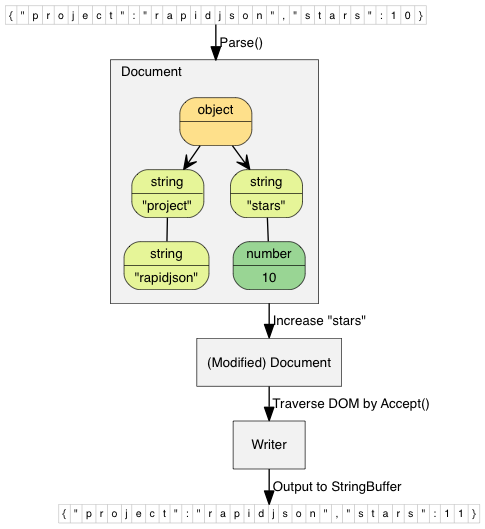
More examples are available:
DOM API
SAX API
- simplereader: Dumps all SAX events while parsing a JSON by
Reader.
- condense: A command line tool to rewrite a JSON, with all whitespaces removed.
- pretty: A command line tool to rewrite a JSON with indents and newlines by
PrettyWriter.
- capitalize: A command line tool to capitalize strings in JSON.
- messagereader: Parse a JSON message with SAX API.
- serialize: Serialize a C++ object into JSON with SAX API.
- jsonx: Implements a
JsonxWriter which stringify SAX events into JSONx (a kind of XML) format. The example is a command line tool which converts input JSON into JSONx format.
Schema
- schemavalidator : A command line tool to validate a JSON with a JSON schema.
Advanced
- prettyauto: A modified version of pretty to automatically handle JSON with any UTF encodings.
- parsebyparts: Implements an
AsyncDocumentParser which can parse JSON in parts, using C++11 thread.
- filterkey: A command line tool to remove all values with user-specified key.
- filterkeydom: Same tool as above, but it demonstrates how to use a generator to populate a
Document.
Contributing
RapidJSON welcomes contributions. When contributing, please follow the code below.
Issues
Feel free to submit issues and enhancement requests.
Please help us by providing minimal reproducible examples, because source code is easier to let other people understand what happens.
For crash problems on certain platforms, please bring stack dump content with the detail of the OS, compiler, etc.
Please try breakpoint debugging first, tell us what you found, see if we can start exploring based on more information been prepared.
Workflow
In general, we follow the "fork-and-pull" Git workflow.
- Fork the repo on GitHub
- Clone the project to your own machine
- Checkout a new branch on your fork, start developing on the branch
- Test the change before commit, Make sure the changes pass all the tests, including
unittest and preftest, please add test case for each new feature or bug-fix if needed.
- Commit changes to your own branch
- Push your work back up to your fork
- Submit a Pull request so that we can review your changes
NOTE: Be sure to merge the latest from "upstream" before making a pull request!
Copyright and Licensing
You can copy and paste the license summary from below.
Tencent is pleased to support the open source community by making RapidJSON available.

Copyright (C) 2015 THL A29 Limited, a Tencent company, and Milo Yip.

Licensed under the MIT License (the "License"); you may not use this file except
in compliance with the License. You may obtain a copy of the License at

http://opensource.org/licenses/MIT

Unless required by applicable law or agreed to in writing, software distributed
under the License is distributed on an "AS IS" BASIS, WITHOUT WARRANTIES OR
CONDITIONS OF ANY KIND, either express or implied. See the License for the
specific language governing permissions and limitations under the License.



 RapidJSON 是一个快速的 C++ JSON 解析和生成库,纯头文件实现,同时支持 SAX 和 DOM 风格的 API。