



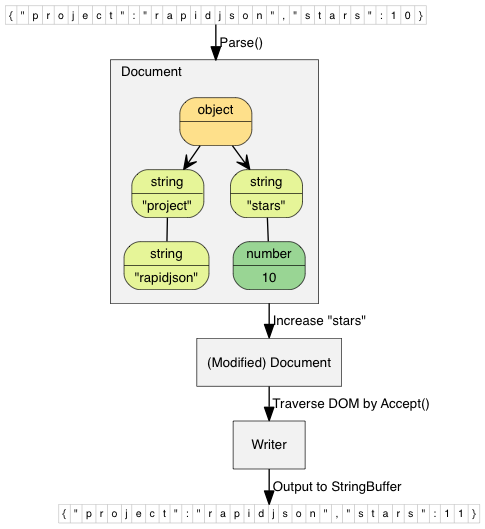
Что это такое?
 RapidJSON — быстрая библиотека для C++, которая только в заголовочных файлах и умеет разбирать и формировать JSON; поддерживает как SAX-, так и DOM-стиль API.
RapidJSON — быстрая библиотека для C++, которая только в заголовочных файлах и умеет разбирать и формировать JSON; поддерживает как SAX-, так и DOM-стиль API.Это фреймворк или библиотека?Это библиотека C++ только из заголовочных файлов, а не фреймворк: достаточно подключить её заголовки, никакой среды выполнения или отдельного бинарного файла для линковки не нужно.
Это библиотека C++ только из заголовочных файлов, а не фреймворк: достаточно подключить её заголовки, никакой среды выполнения или отдельного бинарного файла для линковки не нужно.Как добавить её в мой проект?Скопируйте папку include/rapidjson в путь включения заголовков вашего проекта или установите через vcpkg командой 'vcpkg install rapidjson', которая также даёт интеграцию с CMake.
Скопируйте папку include/rapidjson в путь включения заголовков вашего проекта или установите через vcpkg командой 'vcpkg install rapidjson', которая также даёт интеграцию с CMake.Нужны ли мне Boost или STL, чтобы её использовать?Нет, библиотека не зависит ни от Boost, ни даже от STL; CMake, Doxygen и googletest нужны только как необязательные зависимости для сборки документации и тестов.
Нет, библиотека не зависит ни от Boost, ни даже от STL; CMake, Doxygen и googletest нужны только как необязательные зависимости для сборки документации и тестов.Нужно ли собирать набор тестов, чтобы использовать библиотеку?Нет, сборка через CMake/make нужна только если вы хотите запускать модульные тесты или генерировать документацию; для использования самой библиотеки достаточно скопировать заголовки.
Нет, сборка через CMake/make нужна только если вы хотите запускать модульные тесты или генерировать документацию; для использования самой библиотеки достаточно скопировать заголовки.Какие платформы и компиляторы она поддерживает?Она кроссплатформенная: протестирована с Visual C++ 2008/2010/2013 на Windows, GNU C++ в Cygwin и Clang на Mac OS X, iOS и Android NDK.
Она кроссплатформенная: протестирована с Visual C++ 2008/2010/2013 на Windows, GNU C++ в Cygwin и Clang на Mac OS X, iOS и Android NDK.Почему её называют «быстрой» и насколько она быстрая?Производительность RapidJSON сопоставима с функцией strlen(), а для дополнительного ускорения она при желании использует инструкции SSE2/SSE4.2.
Производительность RapidJSON сопоставима с функцией strlen(), а для дополнительного ускорения она при желании использует инструкции SSE2/SSE4.2.Насколько эффективно она использует память?Каждое значение JSON занимает ровно 16 байт на большинстве 32- и 64-битных машин (без учёта самого текста строки), а парсер выделяет память компактно во время разбора, используя встроенный быстрый аллокатор.
Каждое значение JSON занимает ровно 16 байт на большинстве 32- и 64-битных машин (без учёта самого текста строки), а парсер выделяет память компактно во время разбора, используя встроенный быстрый аллокатор.Корректно ли она работает с Unicode?Да, поддерживаются UTF-8, UTF-16 и UTF-32 (как LE, так и BE), включая автоматическое определение, проверку и перекодирование, а также суррогатные пары и нулевые символы.
Да, поддерживаются UTF-8, UTF-16 и UTF-32 (как LE, так и BE), включая автоматическое определение, проверку и перекодирование, а также суррогатные пары и нулевые символы.Какие дополнительные возможности появились в v1.1?В версии 1.1 добавили поддержку JSON Pointer, проверку по JSON Schema, более мягкий синтаксис JSON (комментарии, завершающие запятые, NaN/Infinity) и перебор массивов и объектов в цикле for по диапазону из C++11.
В версии 1.1 добавили поддержку JSON Pointer, проверку по JSON Schema, более мягкий синтаксис JSON (комментарии, завершающие запятые, NaN/Infinity) и перебор массивов и объектов в цикле for по диапазону из C++11.