
astra-chatgpt-hyperframes README

The project's README from github.com/Tejashmakwana/astra-chatgpt-hyperframes. As one markdown file: README.md.

Rajmoni | Motion Designer (@Nexaabyraj) — original tweet

Astra still can't do motion design like me .

So Astra made this ChatGPT-themed response in Hyperframes. Here are the source, raw reference, assets, and render commands so you can inspect the process and reproduce the video yourself.

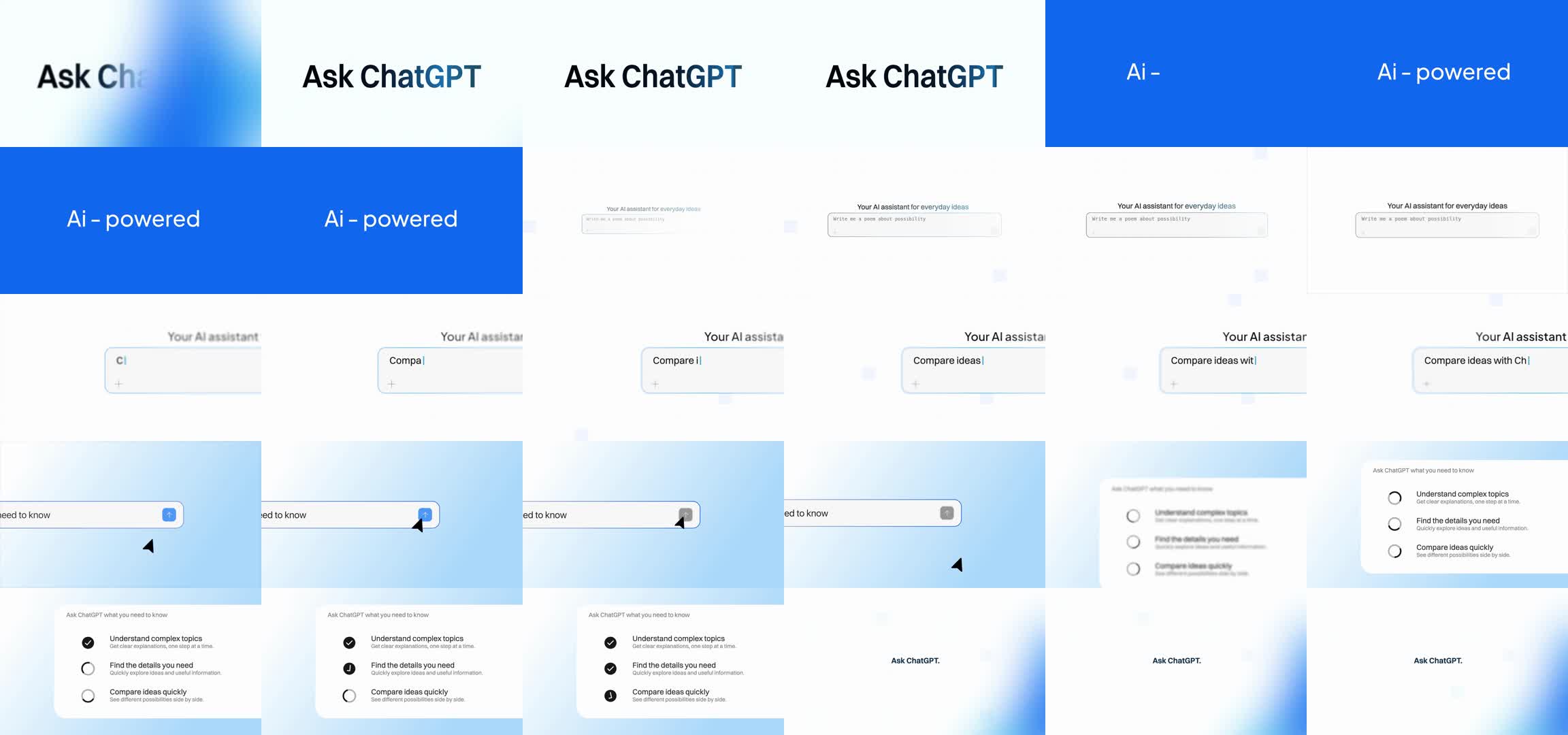
Credit and method: Rajmoni created the original motion design. This project adapts that supplied reference: 180 text-cleared source frames preserve its backgrounds and control animations, while JavaScript renders the replacement ChatGPT typography. The result is a reference-based adaptation, not original motion invented from scratch. The finished MP4 is a comparison artifact; the renderer does not play or transcode that file to produce its output.

Watch the included final video · Raw reference · Frame analysis · Verified reproduction

Scene contact sheet

Render it

Requires Node.js 22+ (tested with 25.5.0), FFmpeg/FFprobe with libx264, Chrome, and at least 1 GB free space. macOS, Linux and Windows can run Hyperframes. The delivered render was made on macOS; see the reproducibility notes below.

git clone https://github.com/Tejashmakwana/astra-chatgpt-hyperframes.git
cd astra-chatgpt-hyperframes
npm ci --ignore-scripts

Read Switzer's Fontshare license, then download the exact hashed font from its official CDN:

npm run setup -- --accept-font-license
npm run check
npm run render

The result is output/chatgpt-blue.mp4. Run npm run compare to compare its decoded frames against the included delivered video. A fresh install and render on the recorded macOS environment produced a byte-for-byte identical MP4, documented in the linked verification report. Rendering is local. No model API, API key, private prompts, or agent tooling is needed.

If Chrome is not installed, run npx hyperframes browser ensure first. An existing browser can be selected using HYPERFRAMES_BROWSER_PATH. Set FFmpeg and FFprobe on your system PATH. npm run preview opens the editable composition in Hyperframes Studio.

Render on GitHub

Fork this repository, open Actions → Render video → Run workflow, and accept the linked font license if you agree to its terms. Download chatgpt-blue-render from the finished run. The Linux workflow renders the same composition; use the reproducibility notes below when comparing exact pixels.

What runs

  1. Verify hashes of the 180 source plates, audio, raw reference and comparison video, plus the separately downloaded font.
  2. Run the HTML/canvas composition through Hyperframes 0.8.29, rendering 360 lossless PNG frames.
  3. Encode H.264 at 1920×1080, 24 fps with explicit BT.709 conversion.
  4. Copy the original AAC packets and verify the full decode, frame count and audio hash.

The 15-second video consists of two identical 7.5-second visual loops. The original audio continues to 15.061 seconds. Output validation is saved to output/verification.json.

Source map

File Purpose
index.html Hyperframes composition, dimensions and audio track
film.js Editable title, prompt and results typography; frame seeking
assets/tracks.js Per-frame positions measured from the reference
assets/plates/*.png Cleaned source backgrounds and controls
assets/reference.m4a Reference soundtrack, copied without re-encoding
reference/original.mp4 Supplied reference used to build the plates
scripts/build-reference-plates.py Inspectable plate cleanup and motion tracking
scripts/render.mjs Actual Hyperframes render and FFmpeg encode
examples/chatgpt-blue.mp4 Delivered comparison video; never used as render input

To regenerate the cleaned plates, install the optional Python dependencies and run:

python3 -m pip install -r requirements.txt
python3 scripts/build-reference-plates.py

The committed plates are the reproducible baseline. Regenerating them with different image-library versions may change PNG hashes; asset validation intentionally detects that.

Reproducibility and attribution

Dependencies and the font hash are pinned. The committed assets and timing reproduce this composition. Browser versions, operating-system font rasterization, the system monospace font in the initial prompt, and FFmpeg builds can change individual pixels or encoded bytes. This repository does not promise a byte-identical MP4 on every OS. The included comparison video and verification report let you check the result rather than relying on a claim.

Original motion/reference: Rajmoni / @Nexaabyraj, linked above. Switzer is by Jeremie Hornus / Indian Type Foundry, supplied through Fontshare. The font is downloaded separately and is not redistributed in this repository. ChatGPT/OpenAI names remain their respective owners' trademarks. This is an independent experiment, not an official OpenAI release or an endorsement by the reference designer.

The tweet quotation above is transcribed from the project brief and linked to its source. Media and source-derived plates retain their original owners' rights; attribution does not grant a new license to those assets. See THIRD_PARTY.md.

astra-chatgpt-hyperframes (Tejashmakwana/astra-chatgpt-hyperframes)

Searching Database…

这是什么?这是一支 ChatGPT 主题动态设计视频的可复现源项目,改编自动态设计师 Rajmoni(@Nexaabyraj)的原始参考作品,并用 Hyperframes 渲染。仓库附带原始素材、渲染脚本和验证报告,任何人都能重新构建出完全相同的 MP4。
这是可复用的工具,还是一次性的项目?它是针对单个视频的自包含可复现性案例研究,不是通用库:仓库打包了一个特定的 Hyperframes 合成(index.html、film.js、逐帧素材),专门用于重现一段参考动画。
我自己怎么渲染这个视频?装好依赖后运行 `npm run render`,它会通过 Chrome 驱动 Hyperframes 合成,生成 360 帧无损 PNG,再用 FFmpeg 编码为 output/chatgpt-blue.mp4。用 `npm run compare` 可以把结果与附带的成品视频做比对。
渲染前需要装好哪些东西?Node.js 22+(已用 25.5.0 测试)、带 libx264 的 FFmpeg/FFprobe、Chrome,以及至少 1 GB 可用磁盘空间。如果没装 Chrome,`npx hyperframes browser ensure` 会帮你装好;FFmpeg/FFprobe 必须在 PATH 中。
我的渲染结果会和原版逐字节一致吗?无法保证。浏览器版本、操作系统的字体光栅化和 FFmpeg 构建都可能让个别像素或编码字节产生偏差,所以该项目只承诺提供可校验的比对,而不是普遍成立的逐字节一致输出。
哪些操作系统能运行它?macOS、Linux 和 Windows 都能运行 Hyperframes 并渲染本项目;交付的参考渲染在 macOS 上完成,另有一个 GitHub Actions 工作流在 Linux 上执行同样的渲染。
渲染需要 OpenAI API 密钥或联网吗?不需要。渲染完全在本地进行,不涉及任何模型 API、API 密钥、提示词或智能体工具。
Hyperframes 是什么?Hyperframes 是一个 JavaScript HTML/canvas 渲染引擎(本项目用 0.8.29 版),负责逐帧合成动画,之后由 FFmpeg 编码成视频。
能不在本地安装任何东西就渲染吗?可以——fork 本仓库,打开 Actions -> Render video -> Run workflow,接受随附的 Fontshare 字体许可,然后从完成的运行中下载 chatgpt-blue-render 产物。
最终 15 秒的视频实际包含什么?两段相同的 7.5 秒视觉循环,以 1920x1080、24fps H.264 编码,原始 AAC 音轨不经重编码直接复制,延续到 15.061 秒。
为什么这不叫原创动态设计?180 张原始底稿保留了 Rajmoni 的原始背景和控制动画;只有 ChatGPT 的字形排版是用 JavaScript 新渲染的,因此它是改编作品,而不是从零发明的动态设计。
Size
21.4 MB
Stars
141
Updated
CommitSep 06
Age
1mo
Commits · 90 Days