What is this?
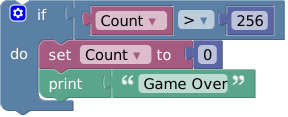
 Blockly is a library that adds a drag-and-drop visual code editor to web apps, using interlocking graphical blocks to represent variables, logical expressions, loops, and other code concepts instead of raw syntax.
Blockly is a library that adds a drag-and-drop visual code editor to web apps, using interlocking graphical blocks to represent variables, logical expressions, loops, and other code concepts instead of raw syntax.Is this a standalone app or a library I embed in my own site?It is a library you embed into your own web application; it is not a finished app by itself. You install it and integrate the editor into your project's UI.
It is a library you embed into your own web application; it is not a finished app by itself. You install it and integrate the editor into your project's UI.How do I add Blockly to a project?For a new project, bootstrap it with the create-package tool; for an existing project, install it via npm.
For a new project, bootstrap it with the create-package tool; for an existing project, install it via npm.Do I need Node and npm to work with this?Yes, Blockly is distributed and installed through npm, and the monorepo's scripts run via npx/nx, so a Node.js and npm setup is expected.
Yes, Blockly is distributed and installed through npm, and the monorepo's scripts run via npx/nx, so a Node.js and npm setup is expected.Is the API stable, or can things break between versions?Code on the main branch and unreleased APIs can change radically without warning; even released APIs are only considered stable after surviving two releases, and breaking changes bump the major version.
Code on the main branch and unreleased APIs can change radically without warning; even released APIs are only considered stable after surviving two releases, and breaking changes bump the major version.Who is this aimed at?Developers building educational or beginner-friendly coding tools who want to let users program with blocks instead of typed syntax, avoiding intimidation from a blank command line.
Developers building educational or beginner-friendly coding tools who want to let users program with blocks instead of typed syntax, avoiding intimidation from a blank command line.Is Blockly accessible to users who can't use drag-and-drop?Yes, despite being built around drag-and-drop, Blockly is fully usable with the keyboard alone and is accessible to screen reader users by default, with published Accessibility Conformance Reports in VPAT format against WCAG 2.2 Level AA.
Yes, despite being built around drag-and-drop, Blockly is fully usable with the keyboard alone and is accessible to screen reader users by default, with published Accessibility Conformance Reports in VPAT format against WCAG 2.2 Level AA.Can I extend Blockly with custom functionality?Yes, through plugins, which are self-contained pieces of code that can add fields, define themes, create custom renderers, and more; there is also a separate blockly-samples repo with example integrations.
Yes, through plugins, which are self-contained pieces of code that can add fields, define themes, create custom renderers, and more; there is also a separate blockly-samples repo with example integrations.Is there a way to try Blockly before integrating it?Yes, the developer site offers a live demo along with Getting Started articles and codelabs to learn the library before installing.
Yes, the developer site offers a live demo along with Getting Started articles and codelabs to learn the library before installing.Can I try unreleased features early?Yes, there is a beta channel published on npm for testing upcoming releases and not-yet-released APIs, though it may be less stable.
Yes, there is a beta channel published on npm for testing upcoming releases and not-yet-released APIs, though it may be less stable.Which topics is it in?visual-programming, accessibility, ui, framework, education, npm, frontend, apache-2.0, nodejs, library, typescript, javascript
visual-programming, accessibility, ui, framework, education, npm, frontend, apache-2.0, nodejs, library, typescript, javascript