


qwen-code README

The project's README from github.com/QwenLM/qwen-code. As one markdown file: README.md.

npm version License Node.js Version Downloads

QwenLM%2Fqwen-code | Trendshift

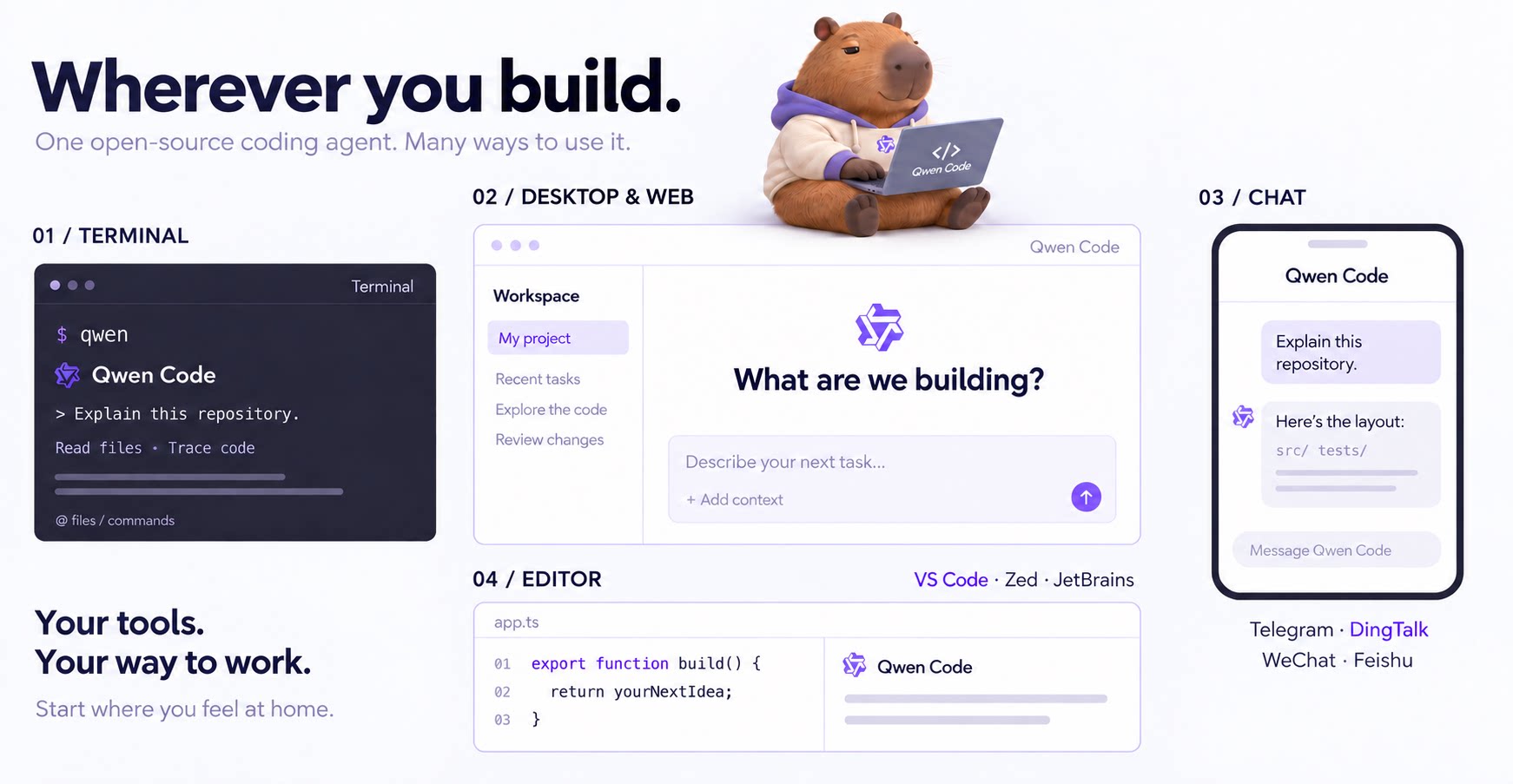
The open-source AI coding agent for your terminal, editor, desktop, browser, and chat.

中文 | Deutsch | français | 日本語 | Русский | Português (Brasil) | 한국어

Qwen Code in the terminal, desktop app, browser, editor, and chat, with VS Code, Zed, JetBrains, Telegram, DingTalk, WeChat, and Feishu integrations

Why Qwen Code?

[!TIP] Qwen Code is actively iterating on itself — using its own agent and models to file issues, submit PRs, review code, and run tests. Powered by the community, driven by AI.

Installation

Linux / macOS:

curl -fsSL https://qwen-code-assets.oss-cn-hangzhou.aliyuncs.com/installation/install-qwen-standalone.sh | bash

Windows:

irm https://qwen-code-assets.oss-cn-hangzhou.aliyuncs.com/installation/install-qwen-standalone.ps1 | iex

Restart your terminal after installation to ensure environment variables take effect.

NPM / Homebrew

NPM (requires Node.js 22+):

npm install -g @qwen-code/qwen-code@latest

Homebrew (macOS / Linux):

brew install qwen-code

Quick Start

Open a terminal in your project and start Qwen Code:

cd /path/to/your-project
qwen

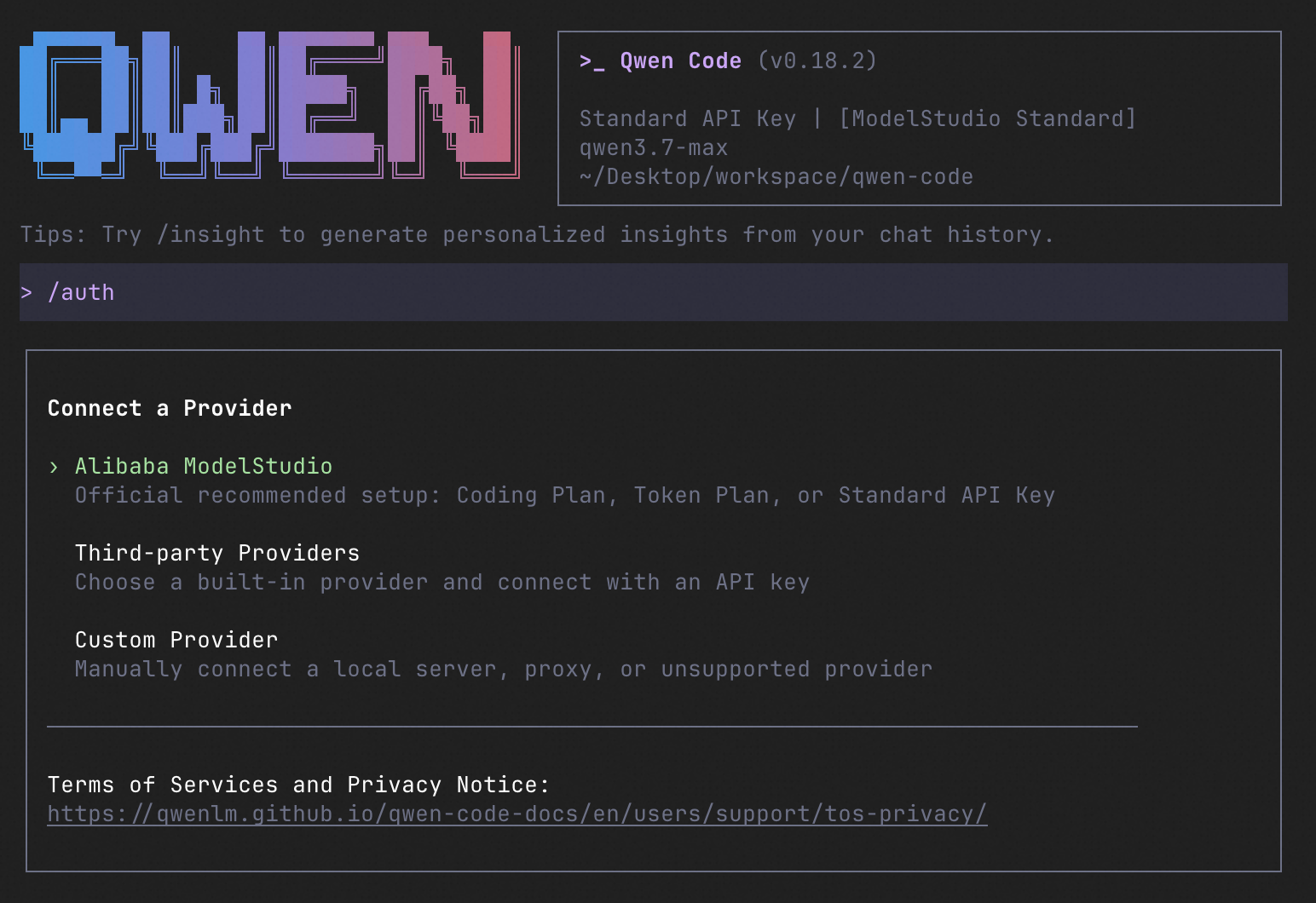
Inside the session, run /auth to configure your provider and API key. Then try:

Explain this repository and show me where to start.

See the Authentication Guide and Settings Reference for detailed setup.

See the terminal interface

Qwen Code terminal interface

How to Use Qwen Code

Choose the interface that fits your workflow:

Interface Get started
Terminal Run qwen in your project — see Quick Start.
Desktop Download Qwen Code Desktop for macOS, Windows, and Linux.
Web Run qwen serve --open to open the Web UI in your browser. (experimental)
Editor Set up VS Code, Zed, or JetBrains.
Chat Connect Telegram, DingTalk, WeChat, or Feishu, then run qwen channel start.

For automation and custom integrations:

SDK example (Python)
import asyncio

from qwen_code_sdk import is_sdk_result_message, query


async def main() -> None:
    result = query(
        "Summarize the repository layout.",
        {
            "cwd": "/path/to/project",
            "path_to_qwen_executable": "qwen",
        },
    )

    async for message in result:
        if is_sdk_result_message(message):
            print(message["result"])


asyncio.run(main())

Capabilities

If you know Claude Code, you already know Qwen Code — and then some. We've put significant effort into bringing Qwen Code to feature parity with Claude Code, improving both breadth and reliability across the board.

Feature Qwen Code Claude Code
SubAgents, Agent Teams, Dynamic Workflows ✓ ✓
Auto-Memory, Auto-Skills, Hooks ✓ ✓
Built-in Skills (/review, /batch, /loop, /bugfix…) ✓ ✓
MCP, Plan Mode, LSP Integration ✓ ✓
Auto Mode, Sandbox, Git Worktrees ✓ ✓
Computer Use (desktop automation) ✓ ✓
IDE Plugins (VS Code / JetBrains / Zed) ✓ ✓
SDK ✓ ✓
Headless Mode, Session Management ✓ ✓
Open-source — model and framework ✓ —
Multi-protocol (OpenAI / Anthropic / Gemini / Qwen + any provider) ✓ —
Agent Arena (multi-model head-to-head on same task) ✓ —
Daemon Mode — qwen serve (multi-client shared agent) ✓ —
IM Channels (Telegram / DingTalk / WeChat / Feishu) ✓ —

Qwen Code Evaluation

Evaluation Configuration

Configuration Value
Dataset princeton-nlp/SWE-bench_Verified, 500 cases
Runs 3 trials per version, 1,500 jobs per version; 7 Qwen Code versions
Model Qwen 3.7 Max
Sampling temperature=1, top_p=0.95
Thinking / Reasoning interleaved_thinking=true, thinking_type=adaptive, reasoning_effort=high
Context / Output Limits context_1m=true, model_context_length=1,000,000, max_tokens=64,000, model_max_tokens=65,535
Harness Limits max_iterations=500, runtime_timeout_sec=7,200, agent_timeout_multiplier=3.0

Scores by Qwen Code Version

Version Avg Score Pass Rate pass@3 pass^3
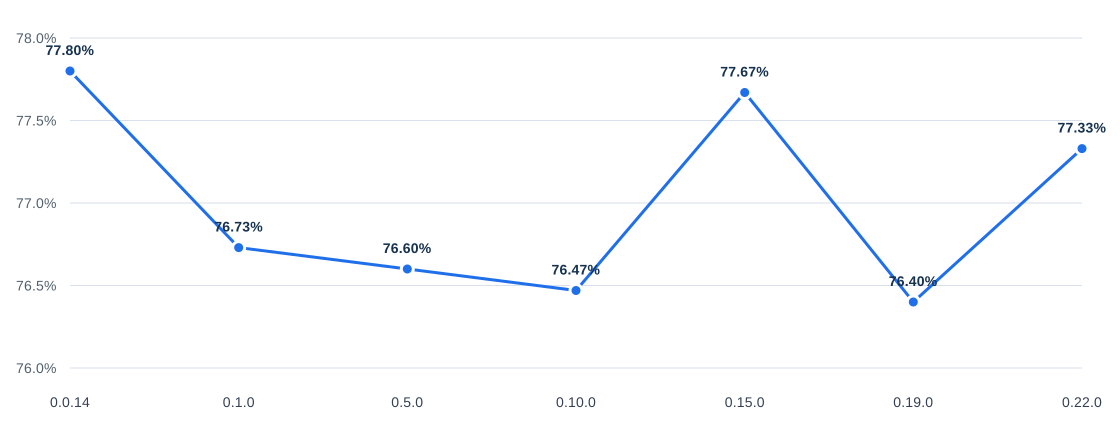
0.0.14 77.80% 84.6% 84.6% 69.2%
0.1.0 76.73% 84.6% 84.6% 68.0%
0.5.0 76.60% 83.0% 83.0% 68.4%
0.10.0 76.47% 84.4% 84.4% 67.4%
0.15.0 77.67% 84.6% 84.6% 68.6%
0.19.0 76.40% 85.0% 85.0% 65.8%
0.22.0 77.33% 84.4% 84.4% 68.0%

Avg Score Trend

Qwen Code version Avg Score trend

Ecosystem

Use Qwen Code as a coding agent. First, fetch and read this skill reference:
https://raw.githubusercontent.com/QwenLM/qwen-code/refs/heads/main/.qwen/skills/qwen-code-claw/SKILL.md
Then follow the instructions inside to install, authenticate, and use Qwen Code via acpx for all coding tasks.

Contributing

Contributions are welcome! See CONTRIBUTING.md for guidelines.

Acknowledgments

This project was originally based on Google Gemini CLI v0.8.2. We gratefully acknowledge the Gemini CLI team's excellent work. Starting from Qwen Code v0.1, we stopped syncing with upstream and began independent development as a multi-protocol, multi-platform agent framework with deep integrations for Qwen models and beyond.

qwen-code (QwenLM/qwen-code)

Searching Database…

28.6K ·GitHub
这是什么?一个开源的 AI 编程助手,直接在你的终端里运行——它可以修改代码、在你的项目中执行命令,背后由 Qwen、OpenAI、Anthropic 或 Gemini 的 API 提供支持,也可以通过 Ollama 和 vLLM 使用本地模型。
它只能在终端里用,还是也能在其他地方运行?以终端为主——在项目里运行 qwen 即可——此外还有 macOS、Windows 和 Linux 的桌面应用、Web 界面、VS Code、Zed 和 JetBrains 的 IDE 插件,以及聊天集成(Telegram、钉钉、微信、飞书)。
怎么安装和启动?用 npm(需要 Node.js 22+)、Homebrew 或安装脚本来安装——在 Windows 上,装完后要重启终端。然后在你的项目里运行 qwen,用 /auth 设置你的服务提供商和 API 密钥。
我必须用 Qwen 模型吗,还是可以接其他家的服务?没有任何厂商锁定:/auth 可以配置 Qwen、OpenAI、Anthropic 或 Gemini 的 API,任何第三方服务,或通过 Ollama、vLLM 使用本地模型——而且可以在运行时随时切换。
哪些功能还处于实验阶段或不太完善?Web 界面和 qwen serve 守护进程模式目前标记为实验性。在 Windows 上,安装后必须重启终端,环境变量才能生效。
我已经在用 Claude Code 了,它能给我什么 Claude Code 给不了的东西?它的目标是逐项对标 Claude Code 的功能——子代理、技能、MCP、计划模式、沙箱——并且额外提供开放模型和框架、多协议服务支持、Agent Arena、守护进程模式和即时通讯渠道。
它真的是完全开源的,还是只开源了个壳?完全开源:代码采用 Apache-2.0 协议,Qwen 模型也是开放的——框架和模型共同演进,没有厂商锁定。托管服务的 API 仍按各家服务商的标准收费。
它在 SWE-bench Verified 上表现怎么样?在全部 500 道 SWE-bench Verified 题目上测试了七个版本(使用 Qwen 3.7 Max),平均分稳定在 76–78% 区间,通过率为 83–85%(0.0.14 版本平均分 77.80%,通过率 84.6%)。
既然已经有 Gemini CLI 了,为什么还要做一个新的?它最初是从 Google Gemini CLI v0.8.2 分叉出来的,但从 v0.1 开始团队不再同步上游,转而独立发展为一个多协议、多平台的代理框架,并深度集成 Qwen。
作为 AI 代理,它开箱即用能做什么?自动记忆(Auto-Memory)、自动技能(Auto-Skills)、子代理(SubAgents)、代理团队(Agent Teams)、动态工作流、MCP、计划模式、LSP 集成、git worktree、沙箱,以及桌面自动化(computer use)——全部无需配置,README 里写的。
这个项目是用它自己开发出来的吗?是的——README 说 Qwen Code 在用它自己持续迭代:它自己的代理和模型会提交 issue、提交 PR、审查代码和跑测试,由社区驱动。
Creator
QwenLM
Size
1.3 GB
Stars
28.6K
Age
1y
Commits · 90 Days