[!WARNING]
This project is no longer maintained. As of September 2026 the repository is archived: no updates, bug fixes or support. It may stop working when the upstream services change. Feel free to fork.
NotebookLM Claude Code Skill
Let Claude Code chat directly with NotebookLM for source-grounded answers based exclusively on your uploaded documents




Use this skill to query your Google NotebookLM notebooks directly from Claude Code for source-grounded, citation-backed answers from Gemini. Browser automation, library management, persistent auth. Drastically reduced hallucinations - answers only from your uploaded documents.
Installation • Quick Start • Why NotebookLM • How It Works • MCP Alternative
⚠️ Important: Local Claude Code Only
This skill works ONLY with local Claude Code installations, NOT in the web UI.
The web UI runs skills in a sandbox without network access, which this skill requires for browser automation. You must use Claude Code locally on your machine.
The Problem
When you tell Claude Code to "search through my local documentation", here's what happens:
- Massive token consumption: Searching through documentation means reading multiple files repeatedly
- Inaccurate retrieval: Searches for keywords, misses context and connections between docs
- Hallucinations: When it can't find something, it invents plausible-sounding APIs
- Manual copy-paste: Switching between NotebookLM browser and your editor constantly
The Solution
This Claude Code Skill lets Claude Code chat directly with NotebookLM — Google's source-grounded knowledge base powered by Gemini 2.5 that provides intelligent, synthesized answers exclusively from your uploaded documents.
Your Task → Claude asks NotebookLM → Gemini synthesizes answer → Claude writes correct code
No more copy-paste dance: Claude asks questions directly and gets answers straight back in the CLI. It builds deep understanding through automatic follow-ups, getting specific implementation details, edge cases, and best practices.
Why NotebookLM, Not Local RAG?
| Approach |
Token Cost |
Setup Time |
Hallucinations |
Answer Quality |
| Feed docs to Claude |
🔴 Very high (multiple file reads) |
Instant |
Yes - fills gaps |
Variable retrieval |
| Web search |
🟡 Medium |
Instant |
High - unreliable sources |
Hit or miss |
| Local RAG |
🟡 Medium-High |
Hours (embeddings, chunking) |
Medium - retrieval gaps |
Depends on setup |
| NotebookLM Skill |
🟢 Minimal |
5 minutes |
Minimal - source-grounded only |
Expert synthesis |
What Makes NotebookLM Superior?
- Pre-processed by Gemini: Upload docs once, get instant expert knowledge
- Natural language Q&A: Not just retrieval — actual understanding and synthesis
- Multi-source correlation: Connects information across 50+ documents
- Citation-backed: Every answer includes source references
- No infrastructure: No vector DBs, embeddings, or chunking strategies needed
Installation
The simplest installation ever:
# 1. Create skills directory (if it doesn't exist)
mkdir -p ~/.claude/skills

# 2. Clone this repository
cd ~/.claude/skills
git clone https://github.com/PleasePrompto/notebooklm-skill notebooklm

# 3. That's it! Open Claude Code and say:
"What are my skills?"
When you first use the skill, it automatically:
- Creates an isolated Python environment (
.venv)
- Installs all dependencies including Google Chrome
- Sets up browser automation with Chrome (not Chromium) for maximum reliability
- Everything stays contained in the skill folder
Note: The setup uses real Chrome instead of Chromium for cross-platform reliability, consistent browser fingerprinting, and better anti-detection with Google services
Quick Start
1. Check your skills
Say in Claude Code:
"What skills do I have?"
Claude will list your available skills including NotebookLM.
2. Authenticate with Google (one-time)
"Set up NotebookLM authentication"
A Chrome window opens → log in with your Google account
3. Create your knowledge base
Go to notebooklm.google.com → Create notebook → Upload your docs:
- 📄 PDFs, Google Docs, markdown files
- 🔗 Websites, GitHub repos
- 🎥 YouTube videos
- 📚 Multiple sources per notebook
Share: ⚙️ Share → Anyone with link → Copy
4. Add to your library
Option A: Let Claude figure it out (Smart Add)
"Query this notebook about its content and add it to my library: [your-link]"
Claude will automatically query the notebook to discover its content, then add it with appropriate metadata.
Option B: Manual add
"Add this NotebookLM to my library: [your-link]"
Claude will ask for a name and topics, then save it for future use.
5. Start researching
"What does my React docs say about hooks?"
Claude automatically selects the right notebook and gets the answer directly from NotebookLM.
How It Works
This is a Claude Code Skill - a local folder containing instructions and scripts that Claude Code can use when needed. Unlike the MCP server version, this runs directly in Claude Code without needing a separate server.
Key Differences from MCP Server
| Feature |
This Skill |
MCP Server |
| Protocol |
Claude Skills |
Model Context Protocol |
| Installation |
Clone to ~/.claude/skills |
claude mcp add ... |
| Sessions |
Fresh browser each question |
Persistent chat sessions |
| Compatibility |
Claude Code only (local) |
Claude Code, Codex, Cursor, etc. |
| Language |
Python |
TypeScript |
| Distribution |
Git clone |
npm package |
Architecture
~/.claude/skills/notebooklm/
├── SKILL.md              # Instructions for Claude
├── scripts/              # Python automation scripts
│   ├── ask_question.py   # Query NotebookLM
│   ├── notebook_manager.py # Library management
│   └── auth_manager.py   # Google authentication
├── .venv/                # Isolated Python environment (auto-created)
└── data/                 # Local notebook library
When you mention NotebookLM or send a notebook URL, Claude:
- Loads the skill instructions
- Runs the appropriate Python script
- Opens a browser, asks your question
- Returns the answer directly to you
- Uses that knowledge to help with your task
Core Features
Source-Grounded Responses
NotebookLM significantly reduces hallucinations by answering exclusively from your uploaded documents. If information isn't available, it indicates uncertainty rather than inventing content.
Direct Integration
No copy-paste between browser and editor. Claude asks and receives answers programmatically.
Smart Library Management
Save NotebookLM links with tags and descriptions. Claude auto-selects the right notebook for your task.
Automatic Authentication
One-time Google login, then authentication persists across sessions.
Self-Contained
Everything runs in the skill folder with an isolated Python environment. No global installations.
Human-Like Automation
Uses realistic typing speeds and interaction patterns to avoid detection.
Common Commands
| What you say |
What happens |
| "Set up NotebookLM authentication" |
Opens Chrome for Google login |
| "Add [link] to my NotebookLM library" |
Saves notebook with metadata |
| "Show my NotebookLM notebooks" |
Lists all saved notebooks |
| "Ask my API docs about [topic]" |
Queries the relevant notebook |
| "Use the React notebook" |
Sets active notebook |
| "Clear NotebookLM data" |
Fresh start (keeps library) |
Real-World Examples
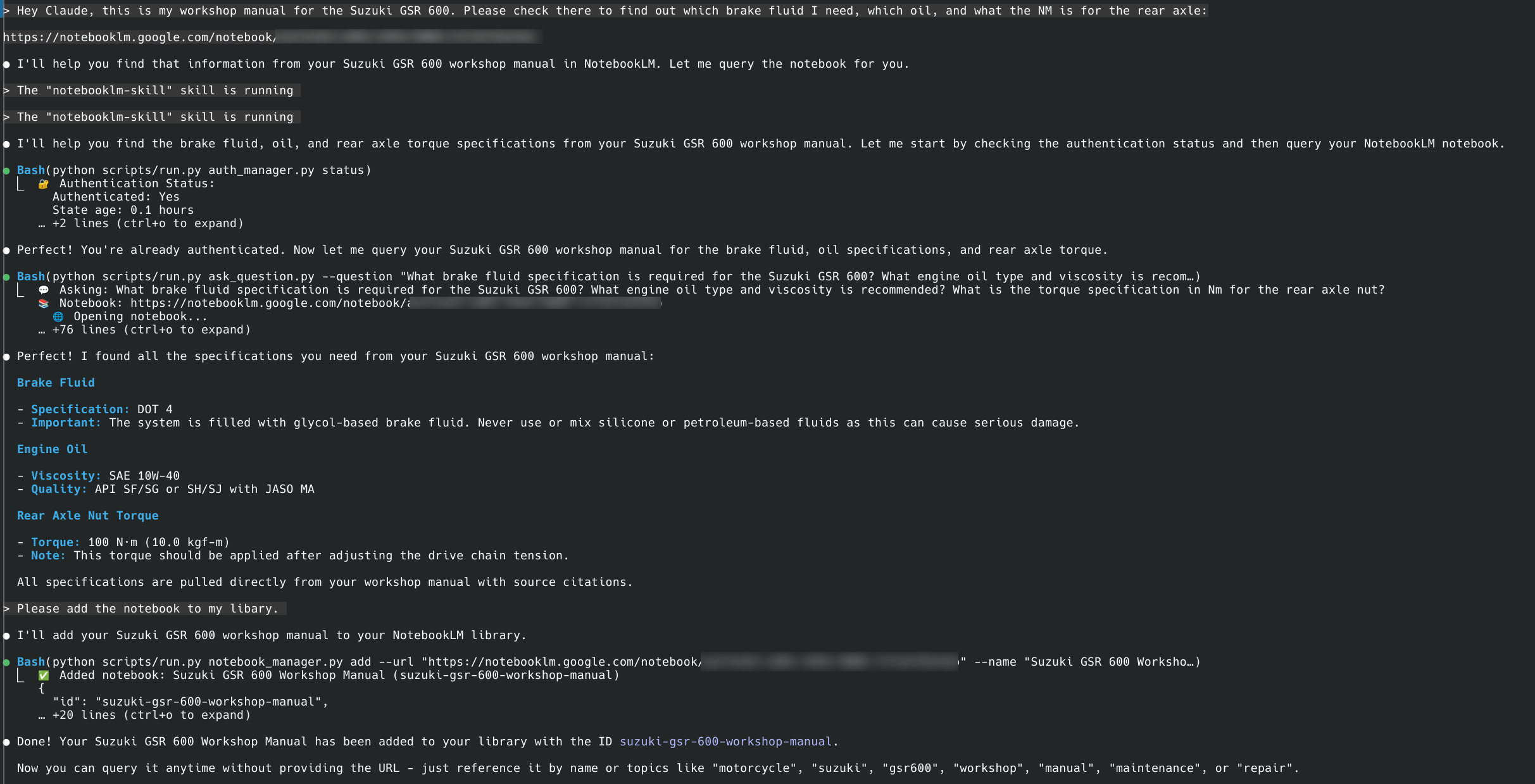
Example 1: Workshop Manual Query
User asks: "Check my Suzuki GSR 600 workshop manual for brake fluid type, engine oil specs, and rear axle torque."
Claude automatically:
- Authenticates with NotebookLM
- Asks comprehensive questions about each specification
- Follows up when prompted "Is that ALL you need to know?"
- Provides accurate specifications: DOT 4 brake fluid, SAE 10W-40 oil, 100 N·m rear axle torque
Example 2: Building Without Hallucinations
You: "I need to build an n8n workflow for Gmail spam filtering. Use my n8n notebook."
Claude's internal process:
→ Loads NotebookLM skill
→ Activates n8n notebook
→ Asks comprehensive questions with follow-ups
→ Synthesizes complete answer from multiple queries
Result: Working workflow on first try, no debugging hallucinated APIs.
Technical Details
Core Technology
- Patchright: Browser automation library (Playwright-based)
- Python: Implementation language for this skill
- Stealth techniques: Human-like typing and interaction patterns
Note: The MCP server uses the same Patchright library but via TypeScript/npm ecosystem.
Dependencies
- patchright==1.55.2: Browser automation
- python-dotenv==1.0.0: Environment configuration
- Automatically installed in
.venv on first use
Data Storage
All data is stored locally within the skill directory:
~/.claude/skills/notebooklm/data/
├── library.json       - Your notebook library with metadata
├── auth_info.json     - Authentication status info
└── browser_state/     - Browser cookies and session data
Important Security Note:
- The
data/ directory contains sensitive authentication data and personal notebooks
- It's automatically excluded from git via
.gitignore
- NEVER manually commit or share the contents of the
data/ directory
Session Model
Unlike the MCP server, this skill uses a stateless model:
- Each question opens a fresh browser
- Asks the question, gets the answer
- Adds a follow-up prompt to encourage Claude to ask more questions
- Closes the browser immediately
This means:
- No persistent chat context
- Each question is independent
- But your notebook library persists
- Follow-up mechanism: Each answer includes "Is that ALL you need to know?" to prompt Claude to ask comprehensive follow-ups
For multi-step research, Claude automatically asks follow-up questions when needed.
Limitations
Skill-Specific
- Local Claude Code only - Does not work in web UI (sandbox restrictions)
- No session persistence - Each question is independent
- No follow-up context - Can't reference "the previous answer"
NotebookLM
- Rate limits - Free tier has daily query limits
- Manual upload - You must upload docs to NotebookLM first
- Share requirement - Notebooks must be shared publicly
FAQ
Why doesn't this work in the Claude web UI?
The web UI runs skills in a sandbox without network access. Browser automation requires network access to reach NotebookLM.
How is this different from the MCP server?
This is a simpler, Python-based implementation that runs directly as a Claude Skill. The MCP server is more feature-rich with persistent sessions and works with multiple tools (Codex, Cursor, etc.).
Can I use both this skill and the MCP server?
Yes! They serve different purposes. Use the skill for quick Claude Code integration, use the MCP server for persistent sessions and multi-tool support.
What if Chrome crashes?
Run: "Clear NotebookLM browser data" and try again.
Is my Google account secure?
Chrome runs locally on your machine. Your credentials never leave your computer. Use a dedicated Google account if you're concerned.
Troubleshooting
Skill not found
# Make sure it's in the right location
ls ~/.claude/skills/notebooklm/
# Should show: SKILL.md, scripts/, etc.
Authentication issues
Say: "Reset NotebookLM authentication"
Browser crashes
Say: "Clear NotebookLM browser data"
Dependencies issues
# Manual reinstall if needed
cd ~/.claude/skills/notebooklm
rm -rf .venv
python -m venv .venv
source .venv/bin/activate  # or .venv\Scripts\activate on Windows
pip install -r requirements.txt
Disclaimer
This tool automates browser interactions with NotebookLM to make your workflow more efficient. However, a few friendly reminders:
About browser automation:
While I've built in humanization features (realistic typing speeds, natural delays, mouse movements) to make the automation behave more naturally, I can't guarantee Google won't detect or flag automated usage. I recommend using a dedicated Google account for automation rather than your primary account—think of it like web scraping: probably fine, but better safe than sorry!
About CLI tools and AI agents:
CLI tools like Claude Code, Codex, and similar AI-powered assistants are incredibly powerful, but they can make mistakes. Please use them with care and awareness:
- Always review changes before committing or deploying
- Test in safe environments first
- Keep backups of important work
- Remember: AI agents are assistants, not infallible oracles
I built this tool for myself because I was tired of the copy-paste dance between NotebookLM and my editor. I'm sharing it in the hope it helps others too, but I can't take responsibility for any issues, data loss, or account problems that might occur. Use at your own discretion and judgment.
That said, if you run into problems or have questions, feel free to open an issue on GitHub. I'm happy to help troubleshoot!
Credits
This skill is inspired by my NotebookLM MCP Server and provides an alternative implementation as a Claude Code Skill:
- Both use Patchright for browser automation (TypeScript for MCP, Python for Skill)
- Skill version runs directly in Claude Code without MCP protocol
- Stateless design optimized for skill architecture
If you need:
- Persistent sessions → Use the MCP Server
- Multiple tool support (Codex, Cursor) → Use the MCP Server
- Quick Claude Code integration → Use this skill
The Bottom Line
Without this skill: NotebookLM in browser → Copy answer → Paste in Claude → Copy next question → Back to browser...
With this skill: Claude researches directly → Gets answers instantly → Writes correct code
Stop the copy-paste dance. Start getting accurate, grounded answers directly in Claude Code.
# Get started in 30 seconds
cd ~/.claude/skills
git clone https://github.com/PleasePrompto/notebooklm-skill notebooklm
# Open Claude Code: "What are my skills?"
Built as a Claude Code Skill adaptation of my NotebookLM MCP Server
For source-grounded, document-based research directly in Claude Code

 这是一个 Claude Code 技能,让 Claude Code 能直接与你的 Google NotebookLM 笔记本对话。它只基于你上传的文档,由 Gemini 给出有来源依据、带引用的回答。