If you’re looking for a hosted desktop recording API, consider checking out Recall.ai, an API that records Zoom, Google Meet, Microsoft Teams, in-person meetings, and more.
Natively — AI Interview Copilot & Meeting Assistant
The best free alternative to Cluely, Final Round AI, LockedIn AI, and Interview Coder. Same UI as Cluely. More features. $0 for personal/non-commercial use. Source available. No data breaches. Now with the most advanced stealth of any tool we compare, Visual Answers that draw the system design for you, and an interface built to feel native on your Mac.
Sponsored by Sidrune AI
We recommend Sidrune AI: one API for GPT, Claude, and other leading AI models. Get $3 in API credit through Natively. Sidrune is built into Natively as a provider, so you can pick it in Settings › AI Providers.
Competitors charge $20–$149/month, store your data on their servers, and one already breached 83,000 users. Natively costs $0, runs locally, and has never had a data breach. Your keys, your models, your machine.
Requires macOS 12+ (Apple Silicon & Intel) or Windows 10/11
Upgrades arrive through Natively's own updater; brew upgrade --cask --greedy natively forces one via Homebrew.
👥 40,000+ Users · 🔥 1,000+ DAU · 💸 $0 vs $149/mo rivals · ⚡ <500ms latency · 🛡️ 0 data breaches
The Free-for-Personal-Use, Source-Available Cluely Clone
Natively started as a pixel-perfect recreation of Cluely's interface — then kept going. If you've used Cluely, you already know how to use Natively. Same overlay, same workflow, same shortcuts. Except it's free for personal, educational, research, and non-commercial use, source-available, runs locally, supports any LLM, and has never breached a single user's data.
Looking for a free personal-use Cluely alternative? A source-available Cluely clone? You found it.
What Users Are Saying
"Natively is significantly faster than Cluely when it comes to response time and screen analysis. The latency is practically non-existent." — Premium User
"Just wanted to say thanks! Natively helped me completely crack the first two rounds of my Software Engineering interviews. The responses were incredibly fast and accurate." — Private Email Feedback
"Used the free version of Natively for my interviews and just landed a massive summer internship. It took all the stress out of the live coding and behavioral rounds!" — Private Email Feedback
Why Natively?
While other tools act as simple API wrappers, Natively is a complete, native intelligence system designed specifically for high-stakes meetings and interviews.
Native Audio Capture (<500ms): Built with Rust and Zero-Copy ABI transfers, bypassing generic web-audio limitations for ultra-low latency.
Local Whisper STT (On-Device): 100% on-device speech-to-text using optimized ONNX models (Moonshine-tiny, Moonshine-base, Whisper-large-v3-turbo, distil-large-v3, Parakeet CTC 0.6B, and Parakeet TDT 0.6B v3 for 25 languages). Uses hardware acceleration (CoreML/Metal GPU on Apple Silicon, DirectML on Windows, quantized int8 on CPU) with zero cloud fees or data exposure.
Apple Speech STT (On-Device): On macOS 26, Natively can transcribe through Apple's SpeechAnalyzer and SpeechTranscriber without an API key or sending audio to a speech provider.
Dual-Channel Intelligence: Distinct pipelines for system audio (what they say) and your microphone (what you dictate) ensuring perfect transcription without room noise.
The Most Advanced Stealth We Compare: Hidden from screen shares, the Dock and the taskbar, disguised in the process list, with tooltips, dialogs and notifications kept out of the share too. Hardened release after release, and best-effort like any stealth.
Auto Answer (Beta): Answers appear on their own the moment the other person finishes a question — Natively decides whether an answer is actually wanted and stays silent when it isn't. Off by default.
Visual Answers: System designs, flows and charts, drawn live inside the answer, in any mode.
Phone Mirror 2.0: Follow the meeting from your phone, with the live transcript, answers as they stream in, and photos sent back to the desktop.
Notepad: Type your own notes while Natively listens, run recipes like "What did I miss" or "List my todos", and Ask questions that read the whole meeting.
Your Own Overlay Buttons: Describe a button in plain sentences and Natively turns it into an overlay action beside the built-in ones.
Connectors and Share Links: Send notes to Gmail, Slack, Notion, Zapier, webhooks and your CRM, share a meeting as a link, and get a follow-up email written in your own style.
Modes Manager (9 Built-in Personas): Toggle between General, Technical Interview, Looking for Work, Sales, Recruiting, Team Meet, Lecture, Seminar (strict file-grounded Q&A), and Call Center — each with its own system prompt and meeting-note template. Build your own on top.
Browser Companion (Chrome): Press ⌘/Ctrl+Y to pull the page you're looking at — a job description, a coding problem, documentation — straight into your next answer.
Custom Context & Notes: A dedicated free-form notes area to paste instructions, crib sheets, or credentials (up to 8,000 characters), automatically injected into real-time LLM prompts.
Rolling Context: We don't just transcribe; we maintain a "memory window" of the conversation for smarter answers.
Local RAG Memory: We embed your meetings locally using SQLite vector search so you can ask, "What did John say about the API last week?"
Embeddings and Rerankers, Your Choice: Gemini, OpenAI, Voyage AI, Jina AI or local models decide what your search finds.
Reference Files: Deeply integrate PDFs, DOCX, and TXT files as real-time context.
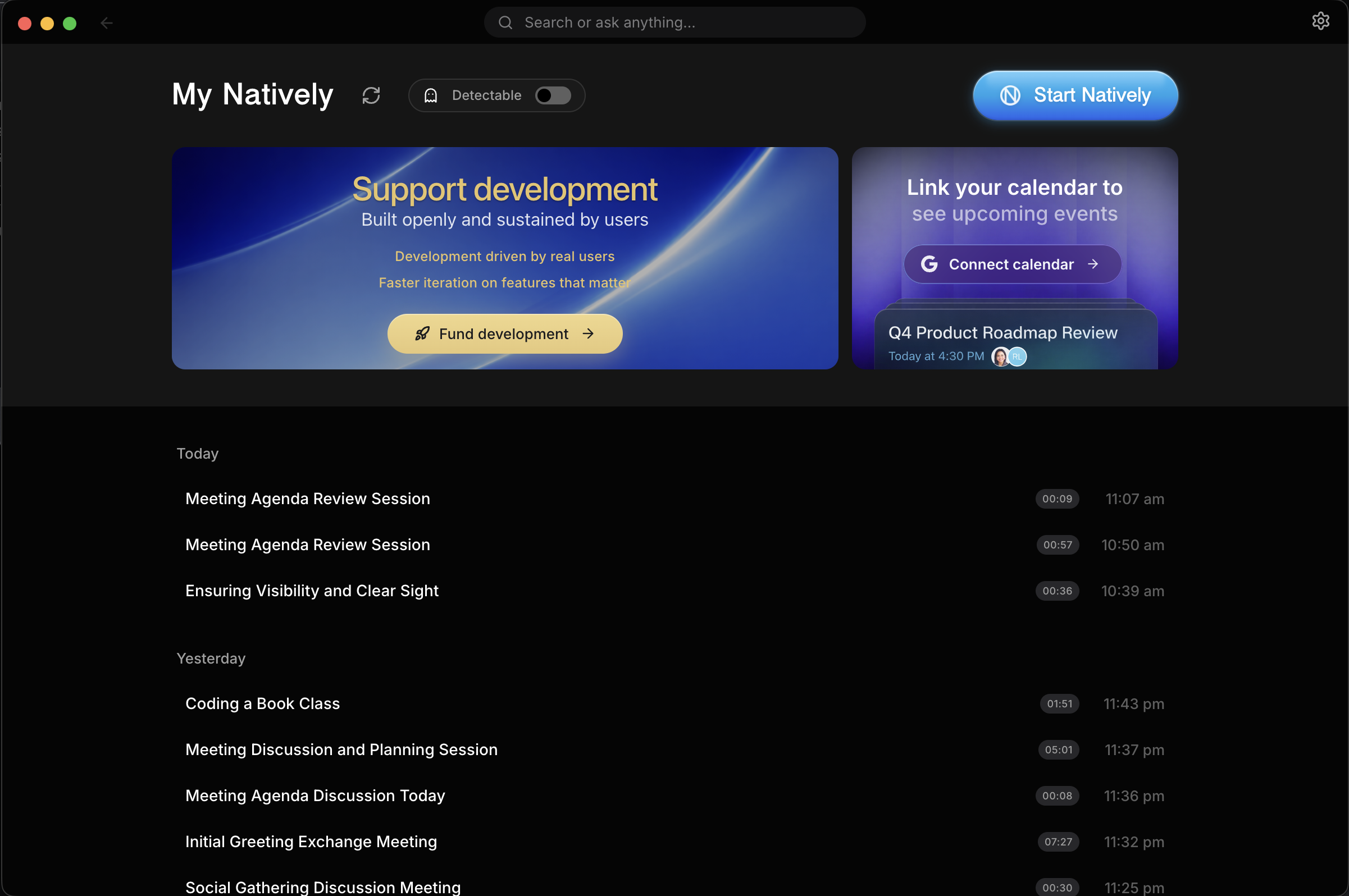
Rich Dashboard: A full UI to manage, search, and export your history—not just a floating window.
Fully Offline Capable: Don't trust the cloud? Run Natively 100% offline using local Ollama models and local Whisper STT.
4 things you should know before choosing an interview AI
Cluely had a data breach in mid-2025 that exposed 83,000 users' personal info, transcripts, and screenshots. Natively keeps your transcripts, screenshots and keys on your machine and has never had a breach.
Final Round AI costs $149/month and its taskbar icon is visible to proctoring software. Natively is free for personal/non-commercial use, source-available, and includes its full stealth feature set at no cost.
LockedIn AI charges $55 to $70 a month and locks you into their cloud LLM with no local option. Natively lets you use any model (GPT, Claude, Gemini, Llama) or go fully offline with Ollama.
Interview Coder is a paid tool for the coding round only. Natively disguises its process on macOS and Windows, keeps tooltips, dialogs and notifications out of screen shares, covers behavioral and system design rounds too, and is free for personal use.
⭐ Star this repo — it matters
Every star pushes Natively higher in GitHub search, helping developers and job seekers find a free, private alternative instead of paying $149/month for tools that store their data on someone else's server.
Demo
This demo shows a complete live meeting scenario:
Real-time transcription as the meeting happens
Rolling context awareness across multiple speakers
Screenshot analysis of shared slides
Instant generation of what to say next
Follow-up questions and concise responses
All happening live, without recording or post-processing
The Stealthiest Free Interview Copilot: Why Natively Leads in 3.0
With 2.9, Natively stopped being "the free Cluely clone" and became the tool to beat. 3.0 adds a notepad and the tools that carry your notes out of the meeting. Five things set it apart from Interview Coder, Cluely, Final Round AI and LockedIn AI.
1. The most advanced stealth of any tool we compare
Other tools hide a window. Natively hides the whole app, at every layer a screen share, a task switcher or a process list can see:
Invisible in screen shares and recordings. Every Natively window is marked private, so Google Meet, Teams, QuickTime and Zoom (with window filtering) leave it out.
Nothing it opens leaks. Tooltips, dialogs, dropdowns, file pickers and notifications are separate windows, and an overlay that forgets them shows up in the share. In Undetectable mode Natively keeps every one of them out.
No Dock icon, no taskbar button, no tray icon while Undetectable mode is on.
Process Disguise on macOS and Windows. Have the app present itself as Terminal, System Settings or Activity Monitor in the process list, the Dock and the taskbar.
Type without losing focus (Windows). Stealth typing sends your keys to the overlay while your call keeps focus, and Protect Natively shortcuts stops a shortcut from also typing into the app underneath.
Quiet on the network. Third-party analytics and crash reporting switch off for as long as Undetectable mode is on.
Interview Coder built its name on process-level hiding. Natively disguises its process on both macOS and Windows, adds everything above, covers the whole interview instead of only the coding round, and is free for personal use.
Stealth is best-effort, not a guarantee. Dedicated proctoring software (Pearson VUE, ProctorU, Respondus Lockdown Browser) is a different category, and a phone camera sees everything. See Is stealth mode actually undetectable?
2. Visual Answers: the system design round, drawn for you
Ask for a system design, a flow or a chart and Natively draws it live inside the answer, while the explanation is still being written.
Flowcharts, sequence diagrams, ER diagrams, state machines, swimlanes, trees and timelines
Charts built from the numbers in the conversation, and back to a table when you ask
"Draw what we discussed" turns the last ten minutes of the meeting into a diagram
Works in all nine modes, and understands requests in English, Spanish, Russian, Chinese and Japanese
A wall of text explains an architecture. A diagram shows that you understand it.
3. An interface built to feel native
Natively is designed to feel like it belongs on your Mac, and the same design runs on Windows:
Liquid Glass controls across Settings, the overlay and meeting notes
Motion with a purpose: cards and popups open with a genie motion, panels fold instead of jumping, and answers stream in word by word
A first run that teaches itself: a welcome screen and a three-step tour where you try the real shortcuts
Light and dark themes, a new startup splash, and a model picker that lists models by provider
In our opinion it is the best-looking and smoothest app in the category. Try it for five minutes and judge for yourself.
4. New in 3.0: notes that keep up and leave the meeting with you
Natively 3.0 adds a notepad and the tools that carry your notes out of the meeting:
Notepad: type your own notes while Natively listens, with a live transcript beside them. Recipes such as "What did I miss", "Write tldr" and "List my todos" run from a chip or from "/" in Ask, and Ask reads the whole meeting once it ends.
Your own overlay buttons: describe a button in plain sentences (what it does, what to read, how the answer looks) and it joins the overlay beside Recap and Follow-up questions. Pick the five buttons the overlay shows.
Connectors: Gmail, Slack, Notion, Zapier, webhooks, HubSpot, Salesforce, Attio, Affinity and Pipedrive, with browser sign-in and auto-send rules, plus a local MCP server for your own tools. Notes go from your computer to the service, never through our servers.
Share notes as a link: one link to a meeting's notes and transcript.
Follow-ups in your style: a compose sheet writes the follow-up email in your tone when you click, set per mode.
5. Free where the others charge
Final Round AI is $149 a month. LockedIn AI is $55 to $70 a month. Cluely starts at $20 a month and sells screen-share invisibility as a separate, higher-priced tier. Interview Coder is paid. Natively is free for personal use with your own keys, and every stealth feature above is included.
Full Comparison: Natively vs Cluely vs Final Round AI vs LockedIn AI vs Interview Coder
Feature
Natively
Cluely
Pluely
LockedIn AI
Final Round AI
Price
✅ Free (BYOK)
⚠️ $20/mo
✅ Free
❌ $55–70/mo
❌ $149/mo
Source license
Personal-use source license
❌
✅
❌
❌
Local data / private
✅ Yes
❌ Cloud servers
✅ Yes
❌ Cloud servers
❌ Cloud servers
Any LLM (BYOK)
✅ Yes
❌ Vendor-locked
⚠️ Limited
❌ Vendor-locked
❌ Vendor-locked
Local AI (Ollama)
✅ Yes
❌
❌
❌
❌
Local Whisper (On-Device)
✅ Yes
❌
❌
❌
❌
Real-time <500ms
✅ Yes
⚠️ 5–90s lag
✅ Yes
✅ ~116ms
⚠️ Slowest
Dual audio channels
✅ System + Mic
❌ Single stream
❌
❌
❌
Local RAG memory
✅ SQLite + sqlite-vec
❌
❌
❌
❌
Meeting history
✅ Full dashboard
⚠️ Limited
❌
❌
⚠️ Limited
Screenshot OCR
✅ Yes
⚠️ Limited
❌
✅ Yes
⚠️ Limited
Stealth mode
✅ Undetectable mode, free
⚠️ Paid tier
❌
❌
❌ Visible to proctors
Process Disguise
✅ Terminal, Settings, etc
❌
❌
❌
❌
Resume & context
✅ Pro
❌
❌
✅ Yes
✅ Yes
Custom Personas/Modes
✅ Pro
✅ Yes
❌
❌
⚠️ Limited
Custom Context & Notes
✅ Pro
❌
❌
❌
❌
Multi-Key API Pools
✅ Yes
❌
❌
❌
❌
Profile Intel Router
✅ Yes
❌
❌
❌
❌
Eager Code Expansion
✅ Yes
❌
❌
❌
❌
Live Follow-Up Resolver
✅ Yes
❌
❌
❌
❌
Real-Time Latency Trace
✅ Yes
❌
❌
❌
❌
Phone Mirror 2.0
✅ Yes
❌
❌
❌
❌
Auto-Calendar Sync
✅ Yes
❌
❌
❌
❌
Smart Task Sync
✅ Yes
❌
❌
❌
❌
Speaker Diarization
✅ Yes
❌
❌
❌
❌
Room Speakers (shared mic)
✅ Yes
❌
❌
❌
❌
Notepad + Recipes
✅ Yes
⚠️ AI notes
❌
❌
❌
Your Own Overlay Buttons
✅ Plain sentences
❌
❌
❌
❌
Connectors (Gmail, Slack, Notion, CRMs)
✅ 11 + webhooks
⚠️ Slack, Notion
❌
❌
❌
Local MCP Server
✅ Yes
❌
❌
❌
❌
Hands-Free Auto Answer
✅ Beta
❌
❌
❌
❌
Browser Page Capture
✅ Chrome extension
❌
❌
❌
❌
JD Role Insight
✅ Pro
❌
❌
⚠️ Limited
⚠️ Limited
9 Built-in Modes
✅ Yes
⚠️ Limited
❌
❌
⚠️ Limited
Codex CLI Integration
✅ Yes
❌
❌
❌
❌
Offline SLM Mode
✅ Yes
❌
❌
❌
❌
Stateful Intelligence OS
✅ Yes
❌
❌
❌
❌
Hindsight LTM Vector DB
✅ Yes
❌
❌
❌
❌
Regional STT Relay
✅ Yes
❌
❌
❌
❌
Data breach history
✅ None
❌ 83k users exposed
✅ None
✅ None
✅ None
Legend: ✅ Full support · ⚠️ Partial or limited · ❌ Not available
Why Natively wins
vs Cluely — breached 83,000 users
The UI is intentionally familiar — if you've used Cluely, there's zero learning curve.
Cluely's mid-2025 data breach exposed personal information, full interview transcripts, and screenshots of 83,000 users. Every word spoken during an interview was stored on their servers — and then leaked. They charge $20/month for this privilege.
By default, Natively stores your transcripts, API keys and screenshots on your local machine, and they never leave it when you use your own keys. The app reports feature-usage statistics that never contain what you say, see or type, and you can switch them off. The codebase is source-available under the Natively Personal Use Source License v1.0 and auditable. Zero breaches. That is the only acceptable standard for a tool that listens to your interviews.
Unlike Cluely's rigid interface, Natively also gives you complete control over the AI: Custom Persona Modes (Tech, Sales, Recruiting) to strictly format behavior, and Reference Files capabilities to upload PDFs so the AI knows exactly the context of the job or meeting before it starts.
Cluely also sells its screen-share invisibility as a separate, higher-priced tier. In Natively, Undetectable mode is part of the free app.
vs LockedIn AI — $70/month for cloud lock-in
LockedIn AI is the most expensive tool in the category at $55–70/month. It locks you into a single cloud LLM with no option for local inference. Every transcript and response passes through their servers.
Natively supports every major model (Gemini, GPT, Claude, Groq) via bring-your-own-key, and offers 100% offline mode through Ollama. You pay only for the API tokens you actually use — or pay nothing at all by running Llama 3 locally. No subscription, no vendor lock-in.
vs Final Round AI — $149/month and visible to proctors
Final Round AI is the most expensive option at $149/month, optimized for pre-interview prep and mock interviews but with the slowest live latency in the category. Critically, its taskbar icon is visible to proctoring software, making it detectable during monitored interviews.
Natively delivers <500ms end-to-end latency using Rust-based native audio capture with Zero-Copy ABI Transfers. Its Undetectable mode hides the app from screen shares, the Dock and the taskbar, disguises its processes, and has been hardened release after release.
vs Pluely — lightweight but limited
Pluely is a solid lightweight alternative (~10MB, Tauri-based) and it has Linux support, which Natively does not yet offer. Credit where it is due.
But Pluely is a basic overlay. It has no local RAG, no meeting history, no dual audio channels, and no dashboard. Natively is a complete intelligence system: it remembers your past meetings via local vector search, separates system audio from your microphone, and gives you a full management dashboard with export to Markdown, JSON, and Text.
vs Interview Coder: Matching Stealth, More Features, Completely Free
Interview Coder is a paid tool focused on the coding round, and process-level hiding is its selling point. Natively disguises its process on macOS and Windows too, then adds what a whole interview needs, for free:
Natively
Interview Coder
Price
✅ Free (BYOK)
❌ Paid
Source license
Personal-use source license
❌
Works on LeetCode / HackerRank
✅
✅
Screenshot + OCR analysis
✅
✅
Real-time overlay
✅
✅
Process-level disguise
✅ macOS + Windows
✅
Local AI / offline mode
✅ Ollama
❌
Behavioral interview support
✅
❌
System design support
✅
❌
Meeting history & RAG
✅
❌
Meeting notepad & connectors
✅
❌
Any LLM (BYOK)
✅
❌ Locked
Data stored locally
✅
❌ Cloud
Natively covers the full interview loop, not just the coding round: behavioral answers drawn from your résumé, system designs drawn live with Visual Answers, and notes when the call ends.
vs Parakeet AI — Memory and History vs Stateless Overlay
Parakeet AI offers basic live meeting assistance but has no persistent memory, no meeting history, and no local vector search. Natively remembers your past meetings via local RAG, lets you ask questions across all your history, and gives you a full dashboard to manage, export, and search everything. Furthermore, Natively includes Custom Persona Modes allowing the AI to structure notes and behave optimally for specific flavors of conversations, instead of relying on Parakeet's one-size-fits-all model.
Where we're not there yet
No Linux support — we are actively looking for maintainers to help bring Natively to Linux
API key setup overhead — you need to bring your own API keys (or install Ollama), which adds initial setup friction compared to all-in-one cloud tools
No built-in mock interview mode — Final Round AI has dedicated mock interview practice; Natively focuses on live, real-time assistance
Free AI Coding Interview Assistant — Undetectable on LeetCode, HackerRank & CoderPad
Natively works as a free, undetectable AI coding interview assistant for standard online assessments. It captures your screen, analyzes the problem, and gives you real-time hints, solutions, and explanations — all through an invisible overlay that doesn't interfere with your coding environment.
Works undetected on:
LeetCode (including LeetCode contests)
HackerRank
CoderPad
Codility
HackerEarth
Karat
Any browser-based coding environment
How it works:
Screenshot the problem with a single shortcut
Natively OCRs the question and sends it to your chosen AI (GPT, Claude, Gemini, or local Ollama)
Response appears in the invisible overlay — never on screen share
⚠️ Important: Natively is not designed to bypass dedicated proctoring software like Pearson VUE, ProctorU, or Respondus Lockdown Browser. These run at the OS level and are a different category entirely. For standard online coding assessments without dedicated proctoring software, Natively's stealth mode is built to stay out of sight, on a best-effort basis.
Natively API (Hosted Tier)
Stop managing four separate services. One key. Zero configuration.
Are you managing separate accounts for your AI reasoning, live transcription, fast inference, and web search? Juggling multiple API keys, rate limits, and invoices across completely different categories of tools is unnecessary overhead. Natively API replaces all of those categories with one flat subscription.
Under the hood, Natively API connects you to the absolute best models for the optimal user experience:
Backend AI Models: Claude, OpenAI, Gemini, and Groq.
Premium STT Models: Google Chirp 2/3, ElevenLabs Scribe v2, and Deepgram Nova-3.
4 Categories → 1 Key
Your current unbundled stack:
AI Intelligence (GPT/Claude/Gemini): per-token billing and usage anxiety
Lightning-Fast Inference (Groq/Llama): strict rate limits to monitor
Real-Time Transcription (Deepgram/Google STT): separate key + quota
Web Search & Research (Tavily/Perplexity): yet another subscription
Replaced by Natively API:
AI chat, transcription & web search — all included
One flat subscription. Zero surprise bills. Starts at $8/mo.
Single key. Zero rotation. Zero configuration.
API Plan Comparison
Feature
Standard ($8/mo)
Pro ($15/mo)
Max ($25/mo)
Ultra ($35/mo)
All-in-One Cloud AI Access
✅ Yes
✅ Yes
✅ Yes
✅ Yes
Real-Time Transcription
✅ Yes
✅ Yes
✅ Yes
✅ Yes
Included Natively Pro Desktop App
❌ No
✅ Yes
✅ Yes
✅ Yes
Premium Support
❌ No
✅ Yes
✅ Yes
✅ Yes
Higher Monthly Quotas
❌ No
✅ Yes
✅ Yes
✅ Yes
Don't start the long way. Skip the 20-minute manual setup. One Natively subscription skips all of it — AI, transcription, and web search are ready immediately.
Natively Pro
While Natively is free for personal, educational, research, and non-commercial use, we also offer a Pro Edition (available as Lifetime or Yearly subscriptions) designed specifically for power users and job seekers. Purchasing a Pro license gives you an edge in the job market, all while directly supporting the continued development of Natively.
Free vs Pro Feature Comparison
Feature
Natively Free
Natively Pro
Bring Your Own Key (BYOK) Models
✅
✅
Local AI Support (Ollama)
✅
✅
Local Whisper STT (On-Device)
✅
✅
Real-Time Speech-to-Text (<500ms)
✅
✅
Multi-Key API Pools & Key Rotation
✅
✅
Profile Intelligence Router (v3)
✅
✅
Auto Answer (Beta)
✅
✅
Browser Companion & Page Capture (Chrome)
✅
✅
9 Built-in Modes (incl. Seminar, Call Center)
✅
✅
Skills — Upload & Manage Custom Personas
✅
✅
Meeting Notes with Follow-Up Email Draft
✅
✅
Phone Mirror 2.0
✅
✅
Notepad with Recipes & Live Transcript
✅
✅
Your Own Overlay Buttons
✅
✅
Connectors (Gmail, Slack, Notion, CRMs, MCP)
✅
✅
Share Notes as a Link
✅
✅
Follow-Up Emails in Your Style
✅
✅
Room Speakers (People Sharing One Mic)
✅
✅
Calendar Sync (Google Calendar)
✅
✅
Visual Answers (Live Diagrams & Charts)
✅
✅
Eager Code UI Expansion
✅
✅
Live Follow-Up Resolver
✅
✅
Real-Time Latency Tracing
✅
✅
Two New Meeting UI Styles (Liquid Glass/Modern)
✅
✅
Live Contextual Assistant
✅
✅
Screenshot & Slide OCR Analysis
✅
✅
Undetectable & Stealth Modes
✅
✅
Meeting Dashboard & Offline RAG History
✅
✅
Stateful "Intelligence OS"
✅
✅
Hindsight Long-Term Memory (LTM)
❌
✅
Job Description (JD) & Resume Context Awareness
❌
✅
Automated Company Research & Dossiers
❌
✅
Role Insight — JD Requirement Coverage Scoring
❌
✅
Live Salary & Offer Negotiation Copilot
❌
✅
Custom Persona Modes (Sales, Tech, etc.)
❌
✅
Custom Context & Notes
❌
✅
Reference Files (PDF/DOCX/TXT upload)
❌
✅
Speaker Diarization
❌
✅
Priority Feature Access & Support
❌
✅
What's New in v3.0.0 (Latest Release)
Four weeks of work since v2.9.2. A notepad for every meeting, overlay buttons you write yourself, Connectors, notes you can share as a link, and follow-up emails in your own style.
New
Feature
What it does
Notepad
Type your own notes while Natively listens. Recipes like What did I miss, Write tldr and List my todos run from chips or "/" in Ask, a live transcript sits beside your notes, and Ask reads the whole meeting once it ends.
Your own overlay buttons
Describe a button in plain sentences and Natively turns it into an overlay action beside the built-in ones. Pick the five buttons the overlay shows in Settings → Overlay.
Connectors
Send notes to Gmail, Slack, Notion, Zapier, webhooks, HubSpot, Salesforce, Attio, Affinity and Pipedrive, with browser sign-in and auto-send rules, plus a local MCP server and API. In Settings → Connectors.
Share notes as a link
One link to a meeting's notes and transcript, from the meeting's Share menu.
Follow-ups in your style
A compose sheet in the meeting header writes the follow-up email in your tone when you click, for older meetings too. Set the style per mode in Modes Manager.
Knows your meeting app
Reads Zoom and Teams for the meeting ID, the people on the call and whether you are muted, and follows the microphone the meeting app uses.
Room speakers
Tells apart people sharing one microphone in the transcript and notes, on Natively, Deepgram and Soniox speech.
Live model catalogue
Each provider's model list is fetched live, so new models show up without an app update.
More speech options
Qwen realtime speech, Indian languages, and Parakeet v2 for English. On Apple Silicon Macs with macOS 14 or later, Parakeet runs on the Neural Engine.
Images in the overlay
Paste or drop images into the overlay, and screenshots and page captures are remembered across hotkeys, quick actions and typed chat.
Improved
Stealth typing edits like a text field. Ctrl/Cmd+V, A, C, X and word-by-word delete work in the overlay and the notes window.
Lavender is the new Default overlay style in light and dark, and the click-through button opens into a pill with its exit hotkey.
Capture. ⌘/Ctrl+Y keeps HackerRank's statement and formulas, and a refused screenshot answer is retried with the page cropped.
Reference files. Thirty or more PDFs index in batches and resume where they stopped, and Spanish searches match accented text.
Long meetings keep their whole transcript, and typed chat can search the web when you ask it to.
Settings. New Overlay and Connectors tabs, and Skills folded into Intelligence.
Fixed
Windows system audio. Capture that never started, went silent or played on another device works, and antivirus HTTPS scanning no longer blocks connections.
Transcription. Meetings with no words transcribed, local models on a fresh machine, and Soniox going deaf after a silent start are fixed.
Groq speech no longer bills far more than you used.
Codex. Answers the backend holds back are no longer cut off, and the default model works with a ChatGPT account.
Windows. Copy buttons work in the overlay, and the launcher no longer goes see-through after the splash.
Platform
The app is called Natively again in Activity Monitor and Task Manager. 2.9.2's system process names are gone, and the data folder moves back by itself. Process Disguise still presents the app as Terminal, System Settings or Activity Monitor.
Source maps are no longer shipped, so the download is smaller.
Natively is a desktop AI assistant for live situations:
Meetings
Interviews
Presentations
Classes
Professional conversations
It provides:
Live answers
Rolling conversational context
Screenshot and document understanding
Real-time speech-to-text
Instant suggestions for what to say next
All while remaining invisible, fast, and privacy-first.
Privacy & Security (Core Design Principle)
Source-available under the Natively Personal Use Source License v1.0
Bring Your Own Keys (BYOK)
Local AI option (Ollama)
All data stored locally
Feature-usage statistics that never contain what you say, see or type, with a switch to turn them off (see PRIVACY.md)
No hidden uploads
You explicitly control:
What runs locally
What uses cloud AI
Which providers are enabled
Installation (Developers & Contributors)
[!NOTE]
macOS Users (Both Apple Silicon & Intel Macs supported):
"Unidentified Developer": If you see this, Right-click the app > Select Open > Click Open.
"App is Damaged": If you see this, run the command in Terminal based on your download:
For .zip downloads:
xattr -cr /Applications/Natively.app
For .dmg downloads:
Open Terminal and run:
xattr -cr ~/Downloads/Natively-2.0.2-arm64.dmg # Or your specific filename
Install the natively.dmg
Open Terminal and run: xattr -cr /Applications/Natively.app
Prerequisites
Node.js (v22.13+ required)
Git
Rust (required for native audio capture)
Xcode 26+ with the macOS 26 SDK (required only to build the Apple Speech helper or package Natively for macOS)
AI Credentials & Speech Providers
Natively is 100% free to use with your own keys. Connect any speech provider and any LLM. No subscriptions, no markups, no hidden fees. All keys are stored locally.
Speech-to-Text Providers
Apple Speech (No API Key) - On-device transcription on macOS 26+
Local models (No API Key) - Whisper, Moonshine and Parakeet on your device, including Parakeet TDT for 25 languages and Parakeet v2 for English, which runs on the Neural Engine on Apple Silicon Macs with macOS 14+
Soniox (API Key) - Ultra-fast, highly accurate streaming STT (recommended)
NVIDIA Riva / NIM (API Key) - Nine streaming models, including multilingual Nemotron and Parakeet
Apple Speech requires a Mac running macOS 26 or later. Select Apple Speech in Audio settings and choose a recognition language. On first use, macOS may download the corresponding speech asset from Apple; the initial startup can therefore take longer and requires a network connection. Once the asset is installed, transcription runs on the device. Language availability is determined by macOS.
AI Engine Support (Bring Your Own Key)
Connect Natively to any leading model or local inference engine.
Provider
Best For
Gemini 3.1 / 3.8 Series
Recommended (and the default): 2M-token context & low cost.
NVIDIA-hosted open models, plus Riva streaming speech.
LiteLLM Gateway
Route through your own proxy with a built-in model picker.
Google Antigravity
Sign in with your Google account instead of pasting a key.
OpenRouter / Sidrune
Hosted gateways to many models.
9Router / AgentRouter
More gateways, alongside LiteLLM.
Ollama / LocalAI
100% Offline & Private (No API keys needed).
OpenAI-Compatible
Connect to any custom endpoint (vLLM, LM Studio, etc.)
Note: You only need ONE speech provider to get started. Use Apple Speech for on-device transcription on macOS 26+, or Google STT, Groq, or Deepgram for fast cloud transcription.
To Use Google Speech-to-Text (Optional)
Your credentials:
Never leave your machine
Are not logged, proxied, or stored remotely
Are used only locally by the app
What You Need:
Google Cloud account
Billing enabled
Speech-to-Text API enabled
Service Account JSON key
Setup Summary:
Create or select a Google Cloud project
Enable Speech-to-Text API
Create a Service Account
Assign role: roles/speech.client
Generate and download a JSON key
Point Natively to the JSON file in settings
Development Setup
Clone the Repository
git clone https://github.com/Natively-AI-assistant/natively-cluely-ai-assistant.git
cd natively-cluely-ai-assistant
Install Dependencies
npm install
Build Native Audio Module (Rust)
npm run build:native
Build Apple Speech Helper (macOS Only)
Regular development and non-macOS builds do not require the helper. To use Apple Speech while developing on macOS, build it explicitly for the current target architecture:
npm run build:apple-speech -- --arch arm64
Use x64 for Intel or universal to combine both architectures. This command requires Xcode 26+ with the macOS 26 SDK. Production macOS packaging builds the matching helper automatically.
Environment Variables
Create a .env file:
# Cloud AI
GEMINI_API_KEY=your_key
GROQ_API_KEY=your_key
OPENAI_API_KEY=your_key
CLAUDE_API_KEY=your_key
GOOGLE_APPLICATION_CREDENTIALS=/absolute/path/to/service-account.json

# Speech Providers (Optional - only one needed)
DEEPGRAM_API_KEY=your_key
ELEVENLABS_API_KEY=your_key
AZURE_SPEECH_KEY=your_key
AZURE_SPEECH_REGION=eastus
IBM_WATSON_API_KEY=your_key
IBM_WATSON_REGION=us-south

# Local AI (Ollama)
USE_OLLAMA=true
OLLAMA_MODEL=llama3.2
OLLAMA_URL=http://localhost:11434

# Default Model Configuration
DEFAULT_MODEL=gemini-3.1-flash-lite-preview
Run (Development)
npm start
Build (Production)
npm run dist
This runs: Vite build → TypeScript compile → native module build → electron-builder
AI Providers
Custom (BYO Endpoint): Paste any cURL command to use OpenRouter, DeepSeek, or private endpoints.
Ollama (Local): Zero-setup detection of local models (Llama 3, Mistral, Gemma).
Dynamic Model Selection: Preferred models (OpenAI, Anthropic, Google) now automatically appear across the app.
NVIDIA NIM: NVIDIA-hosted models for both text and streaming speech-to-text.
LiteLLM: Point Natively at your own gateway, with a model picker and configurable default.
Google Gemini: First-class support for the Gemini 3.1 and 3.8 series, the default models.
OpenAI: GPT-5.4 and o3 series support with optimized system prompts.
Anthropic: Claude 4.6 series support with corrected max_tokens.
Groq: Ultra-fast text inference with Qwen 3.8, and screenshot analysis using Llama 4 Scout.
Google Antigravity: Sign in with your Google account to use Gemini models without an API key.
Gateways: OpenRouter, Sidrune (formerly Fluxion), 9Router and AgentRouter are supported as providers.
Codex: Uses your codex login session, with GPT-6 Astra and GPT-5.6 Sol as built-in models.
Background Model: A second, faster model for Auto Answer, quick decisions and Fast Response Mode.
Provider fallback: When your model fails or stalls, Natively retries it, moves to your next provider, and tells you which one answered.
Reads images: An Auto, On or Off setting per model decides which ones receive screenshots.
Key Features
Invisible Desktop Assistant
Always-on-top translucent overlay
Instantly hide/show with shortcuts
Restoring with Toggle Visibility (Cmd+B / Ctrl+B by default) brings Natively to the display under the mouse pointer. It centers when changing displays and keeps its previous position on the same display, adjusting the window to fit the usable area. Screenshot and automatic restores keep their existing placement.
Works across all applications
Real-time Interview Copilot & Coding Help
Real-time speech-to-text (<500ms latency)
Fast Response Mode: Quicker text responses from your Background Model, or from the fastest available provider.
Multilingual Support: Choose from various response languages, and set speech recognition matching specific accents and dialects.
Anti-Chatbot / Human Persona System: Refined system prompts and negative constraints ensure responses are concise, conversational, and indistinguishable from a real candidate (no robotic preambles or lectures).
Context-aware Memory (RAG) for Past Meetings
Instant answers as questions are asked
Interim/Final Bridging: Manual transcript finalization and interim bridging during recordings for higher accuracy.
Smart Recap & Summaries: Instant meeting minutes and executive summaries.
TinyPrompts™ Engine: Specialized prompt architecture for local SLMs (4B-8B params), ensuring instruction following and reasoning parity with cloud models on local hardware.
Dynamic Note Templates: AI automatically generates structured meeting notes based on your active persona mode (e.g., Tech Interview follow-ups vs Sales action items).
Auto Answer (Beta) — Hands-Free Responses
Natively can answer without being asked. When the other person finishes a question, an LLM judge decides whether it is genuinely a question aimed at you — and either answers it or stays silent.
No prompt, no button. Nothing to dismiss and nothing to click; the answer is simply there.
Knows when to stay quiet. Rhetorical asides, questions aimed at someone else, and restatements of something already answered are ignored.
Speaker-aware. It reads speaker labels and splits the conversation by voice, so your own thinking-out-loud doesn't trigger an answer.
Off by default. Turn it on in Settings → General.
Visual Answers: Diagrams and Charts in the Answer
Ask for a picture and the answer draws one, live.
System designs, flows and timelines, drawn while the answer is written
Charts from numbers, and "show the chart as a table" turns one back into a table
Drawings for every mode: flowcharts, sequence diagrams, ER diagrams, state machines, swimlanes and trees
"Draw what we discussed" reads the last ten minutes of the meeting transcript
Five languages: requests are understood in English, Spanish, Russian, Chinese and Japanese
Browser Companion — Capture What You're Reading
A Chrome extension that hands the page you're on to Natively.
⌘/Ctrl+Y pulls the current page into your next answer — job descriptions, coding problems, documentation, dashboards
One-click permissions for every site, instead of approving them one at a time
Automatic context recognises coding pages, job descriptions and developer docs and captures them without being asked
Secrets are stripped from captured page content before it ever reaches a model
Falls back to a screenshot, with a visible notice, when a page can't be read
Invisible overlay never appears on screen share or recordings
Multiple screenshot support for multi-part problems
Reads images: each model has an Auto, On or Off setting for screenshots, and your selected model reads your screenshot first when it can
Smart fallback to another vision model if the first one fails
Premium Profile Intelligence
Profile Intelligence Router (v3): Categorizes each question into a domain (Coding, System Design, Behavioral, Negotiation) and picks its source deliberately — your résumé, an uploaded document, the live conversation, or general knowledge — rather than blending them.
Role Insight: Paste a job description and see every requirement extracted, assessed against your profile, and scored for coverage before the interview starts.
Answer-Type Constraints & Follow-Up Resolver: Contextually tracks conversations to answer subsequent queries, and enforces precise layout constraints (such as short, conversational, bulleted, or code-only responses).
Custom Persona Modes: Seamlessly switch between built-in personas (Technical Interview, Sales, Recruiting) or create your own custom modes tailored to any conversation.
Reference Files & Custom Context: Upload PDFs, DOCX files, or type custom instructions to give the AI real-time context on your specific situation.
Job Description & Resume Context: Natively understands your background and the role you're applying for to provide highly tailored, context-aware answers.
Company Research: Get instant intelligence and dossiers on the company you are interviewing with.
Negotiation Assistance: Real-time guidance and strategy during offer and salary negotiations.
Evidence Validator & Live Deadlines: Real-time validation of factual claims and interactive deadline alert tracker during live assessments.
PI Latency Tracer: Built-in granular latency profiling mapping exact time spent during the routing and LLM inference loop.
Skills — Custom AI Personas
Create local SKILL.md files to give the AI specialized instructions for any task. Skills are invoked directly from the overlay chat:
Type / or $ to open a live skill picker — filtered autocomplete with arrow-key navigation, just like Claude Code's slash commands
Or type /skill-name directly to activate a skill inline
Built-in: Humanize AI Text — strips AI writing patterns and makes output sound human
Upload from the app: drop in a SKILL.md file or a whole skill folder and preview what it does before it installs — no manual file copying
Delete from the app: remove any skill you installed, straight from the same panel
Or add one by hand: a SKILL.md with YAML frontmatter name: and description: in ~/Library/Application Support/natively/skills/<folder>/
Contextual Actions
What should I answer?
Shorten response
Recap conversation
Suggest follow-up questions
Manual or voice-triggered prompts
Your own buttons: describe a button in plain sentences (what it does, what to read, how the answer looks) and Natively turns it into an overlay action. Up to four of your own, and you pick the five buttons the overlay shows, in Settings → Overlay.
Images: paste or drop an image into the overlay, and screenshots and page captures stay in context across hotkeys, quick actions and typed chat.
Seamless Integrations & Sync
Phone Mirror 2.0: Follow the meeting from your phone, with the live transcript, answers as they stream in, and photos sent back to the desktop. Set it up in Settings → Companion.
Calendar Sync: Connect Google Calendar and each meeting is linked to its event, notes name the people who spoke, and a follow-up email is drafted when you ask.
Connectors: Send notes to Gmail, Slack, Notion, Zapier, webhooks, HubSpot, Salesforce, Attio, Affinity and Pipedrive, with browser sign-in and auto-send rules. A local MCP server and API let your own tools read your meetings. Notes go from your computer to the service, never through our servers. In Settings → Connectors.
Share Notes as a Link: Send anyone a link to a meeting's notes and transcript, from the meeting's Share menu.
Knows Your Meeting App: Reads Zoom and Teams for the meeting ID, the people on the call and whether you are muted, and follows the microphone the meeting app uses.
Live Model Catalogue: Each provider's model list is fetched live, so new models show up without an app update.
Smart Task Export: Send extracted action items directly to Jira, Linear, or Asana.
Speaker Diarization: Real-time speaker identification tags individual speakers by name automatically.
Room Speakers: People sharing one microphone are told apart in the transcript and notes, on Natively, Deepgram and Soniox speech.
Codex CLI: Execute terminal tasks, manage workspace files, and run sandboxed code via native Codex integration.
Dual-Channel Audio Intelligence
Natively understands that listening to a meeting and talking to an AI are different tasks. We treat them separately:
System Audio (The Meeting): Captures high-fidelity audio directly from your OS (fully supported on both macOS and Windows). It "hears" what your colleagues are saying without interference from your room noise.
Sample Rate Auto-Detection: Dynamically detects and syncs true hardware sample rates (e.g., automatically handling 48kHz audio interfaces or external microphones without distortion or downsampling artifacts).
Two-Stage Silence Processing: Combines adaptive RMS thresholds with WebRTC Machine Learning VAD to reject typing and fan noise.
Microphone Input (Your Voice): A dedicated channel for your voice commands and dictation. Toggle it instantly to ask Natively a private question without muting your meeting software.
Apple Speech (macOS 26+): Processes both channels through Apple's on-device speech framework, with automatic sample-rate conversion and no speech API key.
Spotlight Search & Customization
Global activation shortcut (Cmd+K / Ctrl+K)
Custom Key Bindings: Customize global shortcuts for easier control.
Instant answer overlay
Upcoming meeting readiness
Local RAG & Long-Term Memory
Full Offline RAG: With a local embedding model, all vector embeddings and retrieval happen on your device (SQLite + sqlite-vec).
Embeddings and Rerankers: Pick Gemini, OpenAI, Voyage AI or Jina AI, or stay on local models. In Settings → Retrieval.
Semantic Search: innovative "Smart Scope" detects if you are asking about the current meeting or a past one.
Sliding-Window RAG: 50-token semantic overlap to prevent context loss across chunk boundaries.
Epoch Summarization: Smarter transcript memory management instead of hard truncation — no more losing early meeting context.
Global Knowledge: Ask questions across all your past meetings ("What did we decide about the API last month?").
Automatic Indexing: Meetings are automatically chunked, embedded, and indexed in the background.
Advanced Privacy & Stealth
Undetectable Mode: Instantly hide from dock/taskbar with visually locked selector to prevent state mismatches.
Cross-Window State Sync: Real-time state synchronization across Settings, Launcher, and Overlay windows.
Process Disguise (Masquerading): Instantly change the app to look like Terminal, System Settings, Activity Monitor, or other harmless utilities to completely evade detection during screen sharing.
Security Hardening: API keys are scrubbed from memory on app quit and credentials manager overwrites key data before disposal.
API Rate Limiting: Token-bucket algorithm (burst/refill) to prevent 429 errors on free-tier providers.
Local-Only Processing: All data stays on your machine.
Meeting Intelligence Dashboard
Natively includes a powerful, local-first meeting management system to review, search, and manage your entire conversation history.
Notepad: Type your own notes during the meeting with a live transcript beside them. Recipes such as "What did I miss", "Write tldr" and "List my todos" run from a chip or from "/" in Ask, and Ask reads the whole meeting once it ends.
Meeting Archives: Access full transcripts of every past meeting, searchable by keywords or dates.
Adaptive Meeting Notes: Summaries shaped by the mode you were in, titled from the finished summary rather than the first line of the transcript, and scaled in length to the meeting.
Follow-Ups in Your Style: A button in the meeting header opens a compose sheet, and the follow-up email is written in your tone when you click, for older meetings too. Set the style per mode in Modes Manager.
Share as a Link: Copy, File and Link sit in one Share menu, and Link copies a shareable page of the notes and transcript at once.
Editable Speaker Labels: Rename speakers once and have it apply across the transcript and notes.
Smart Export: One-click export of transcripts and AI summaries to Markdown, JSON, or Text—perfect for pasting into Notion, Obsidian, or Slack.
Usage Statistics: Track your token usage and API costs in real-time. Know exactly how much you are spending on Gemini, OpenAI, or Claude.
Audio Separation: Distinct controls for System Audio (what they say) vs. Microphone (what you dictate).
Session Management: Rename, organize, or delete past sessions to keep your workspace clean.
Roadmap
timeline
    title Natively Product Roadmap
    section Recently Completed
        Personas : ✅ 9 Built-in Modes & Templates
        Auto Answer : ✅ Hands-Free Answering (Beta)
        Browser : ✅ Chrome Companion Extension
        Notes : ✅ Rebuilt Meeting Notes
        Trial : ✅ 10-Minute Free Trial
        Visual Answers : ✅ Live Diagrams & Charts
        Phone : ✅ Phone Mirror 2.0
        Calendar : ✅ Calendar Sync
        Notepad : ✅ Notepad with Recipes
        Buttons : ✅ Your Own Overlay Buttons
        Connectors : ✅ Connectors and MCP Server
        Sharing : ✅ Share Notes as a Link
    section Short-term (1-3 mos)
        Tokens : Integration POC
    section Medium-term (3-6 mos)
        Personas : Persona library expansion
        System Design : Advanced diagram types
        Tokens : Community features
        Platform : Mobile app development
    section Long-term (6+ mos)
        Collaboration : Collaborative features
        Ecosystem : Plugin ecosystem
        Platform : Multi-language support
For detailed feature descriptions, see our full ROADMAP.md.
Use Cases
Academic & Learning
Live Assistance: Get explanations for complex lecture topics in real-time.
Translation: Instant language translation during international classes.
Problem Solving: Immediate help with coding or mathematical problems.
Professional Meetings
Interview Support: Context-aware prompts to help you navigate technical questions.
Sales & Client Calls: Real-time clarification of technical specs or previous discussion points.
Meeting Summaries: Automatically extract action items and core decisions.
Development & Technical Work
Code Insight: Explain unfamiliar blocks of code or logic on your screen.
Debugging: Context-aware assistance for resolving logs or terminal errors.
Architecture: Guidance on system design and integration patterns.
Architecture Overview
Natively processes audio, screen context, and user input locally, maintains a rolling context window, and sends only the required prompt data to the selected AI provider (local or cloud).
No raw audio, screenshots, or transcripts are stored or transmitted unless explicitly enabled by the user.
Technical Details
Tech Stack
React 19, Vite 7, TypeScript 7, TailwindCSS
Electron 43
Rust (native audio with Zero-Copy ABI Transfers via napi::Buffer — enabling continuous audio capture without V8 garbage collection pressure, achieving significantly lower latency and CPU usage than typical Electron-based competitors)
Swift (Apple's on-device speech framework on macOS 26+)
SQLite (local storage with sqlite-vec)
Supported Models
Gemini 3.1 / 3.8 Series (default: Gemini 3.1 Flash Lite and Gemini 3.8 Flash)
You are allowed to view, fork, modify, and run this code for personal, educational, research, and non-commercial use.
You are not allowed to use this codebase, forks, modified versions, or substantially similar derivative works for SaaS, resale, paid tools, subscriptions, client work, commercial products, startup products, agency work, or any other profit-oriented use without written permission from Natively AI Private Limited.
Public forks must clearly state that they are based on Natively, originally developed by Natively AI Private Limited.
Note: This project is available for sponsorships, ads, or partnerships – perfect for companies in the AI, productivity, or developer tools space.
Star this repo if Natively helps you succeed in meetings, interviews, or presentations!
FAQ
Is Natively really free?
Yes for personal, educational, research, and non-commercial use. Natively is source-available under a personal-use source license. You only pay for what you use by bringing your own API keys (Gemini, OpenAI, Anthropic, etc.), or use it 100% free by connecting to a local Ollama instance. Commercial use requires a separate written license.
Does Natively work with Zoom, Teams, and Google Meet?
Yes. Natively uses a Rust-based system audio capture that works universally across any desktop application, including Zoom, Microsoft Teams, Google Meet, Slack, and Discord.
Is my data safe?
Natively is built on Privacy-by-Design. By default, all transcripts, vector embeddings (Local RAG), and keys are stored locally on your machine. The app reports which features are used and how often, linked to your install and to your trial or account if you have one, and never what you say, see or type. You can turn this off under Advanced in Settings → General; see PRIVACY.md.
Can I use it for technical interviews?
Natively is a powerful assistant for any professional situation. However, users are responsible for complying with their company policies and interview guidelines.
How do I use local models?
Simply install Ollama, run a model (e.g., ollama run llama3), and Natively will automatically detect it. Enable "Ollama" in the AI Providers settings to switch to offline mode.
What is Auto Answer, and is it on by default?
Auto Answer (Beta) responds without you asking. When the other person finishes a question, Natively judges whether it's genuinely aimed at you and either answers or stays silent — rhetorical asides and questions meant for someone else are ignored. It is off by default; enable it in Settings → General.
Do I need the browser extension?
No — it's optional. It adds one thing: pressing ⌘/Ctrl+Y hands the page you're currently reading to Natively, so a job description, a coding problem, or a page of documentation becomes context for your next answer. Without it, screenshot OCR still covers anything on screen.
How does Natively compare to Cluely?
Cluely is a $20/month cloud-based tool that stores all data on their servers. In mid-2025, Cluely suffered a data breach that exposed personal information, transcripts, and screenshots of 83,000 users. Natively is free for personal/non-commercial use, source-available, and stores everything locally. It supports any LLM (not just one vendor), offers local AI via Ollama, and has battle-tested stealth mode. Natively has never had a data breach because there is no server to breach.
Is stealth mode actually undetectable?
In the meeting apps we test, yes. Natively hides from the dock, disguises process names as harmless system utilities (Terminal, Activity Monitor, System Settings), and syncs state across all windows. It has been hardened across five major releases and tested against screen share detection in Zoom, Teams, and Google Meet. This is best-effort, not guaranteed: on macOS 15.4+ Apple can let modern capture tools see it anyway, and a phone camera always can.
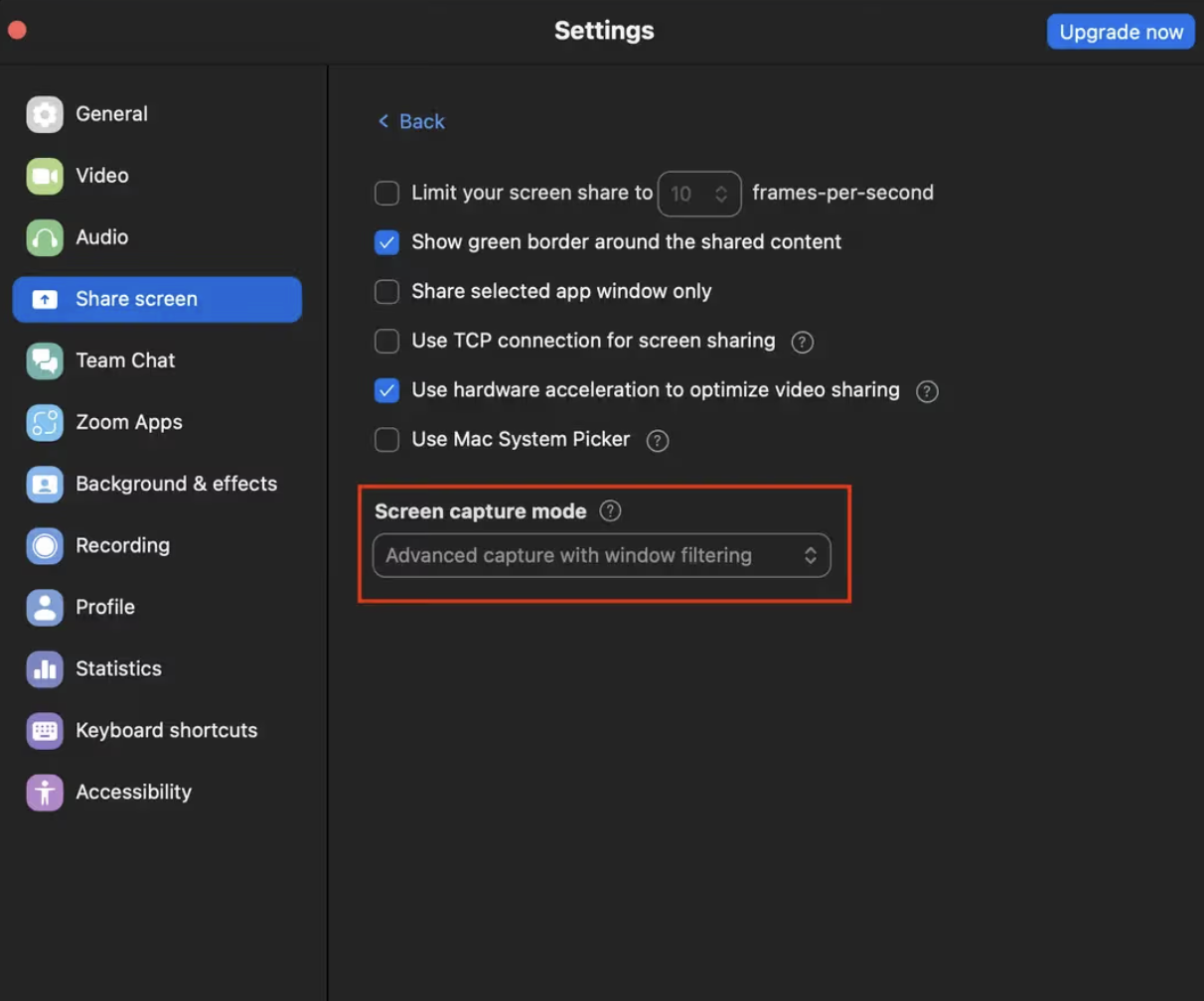
Zoom shows my overlay in screen share — how do I fix it?
Google Meet, Teams, and QuickTime hide Natively automatically — nothing to configure. Zoom is the one exception: whether it respects Natively's "don't capture me" flag depends on one setting.
Go to Zoom → Settings → Share Screen → Advanced → Screen capture mode and choose "Advanced capture with window filtering."
The "...with window filtering" modes tell Zoom to leave out windows that mark themselves as private, which is exactly what Natively does. "Advanced capture without window filtering" grabs the raw screen and will show Natively, so avoid it.
Does Natively work on LeetCode and HackerRank?
Yes. Natively's screenshot + OCR captures any visible coding problem and returns a full solution through the invisible overlay. It works on LeetCode, HackerRank, CoderPad, Codility, HackerEarth, Karat, and any browser-based coding environment.
Is Natively detectable during coding interviews?
For standard online assessments (LeetCode, HackerRank, CoderPad, etc.), Natively is built not to be seen: Process Disguise can present it as Terminal, System Settings or Activity Monitor, and the overlay stays out of screen recordings and screen shares. Stealth is best-effort, not guaranteed, and it is not designed to bypass dedicated proctoring software like Pearson VUE, ProctorU, or Respondus Lockdown Browser, which operate at the OS level.
Is Natively a free alternative to Interview Coder?
Yes. Natively covers what Interview Coder is known for (screenshot OCR, real-time coding help, an invisible overlay and a process-level disguise) and adds behavioral interview support, Visual Answers for system design, local RAG memory, and any-LLM BYOK. Free for personal use.
Is Natively stealthier than Interview Coder?
Natively disguises its process on macOS and Windows, as Interview Coder does, and puts more layers around it: tooltips, dialogs, dropdowns and notifications are kept out of screen shares, there is no Dock, taskbar or tray icon in Undetectable mode, and third-party analytics switch off while it is on. Interview Coder is paid; Natively includes all of this free for personal use. No tool can honestly promise to be undetectable, and we don't.
Can Natively draw system design diagrams during an interview?
Yes. Visual Answers draws system designs, flowcharts, sequence diagrams, ER diagrams and charts live inside the answer. Ask in any of the nine modes, by voice or by typing, in English, Spanish, Russian, Chinese or Japanese.
What is the best free alternative to Cluely, Interview Coder and Final Round AI?
Natively is free for personal use with your own API keys, stores your data on your machine, works with any LLM or fully offline with Ollama, and includes its full stealth feature set, Visual Answers and meeting notes at no cost.
Alternatives Natively Replaces
Natively is a free-for-personal-use, source-available alternative to:
Tool
What Natively replaces
Cluely
Real-time AI meeting copilot — without the $20/mo fee or data breach risk
Final Round AI
Live AI interview copilot — without the $149/mo fee or proctor-visible taskbar icon
LockedIn AI
Real-time interview assistant — without cloud lock-in or $70/mo
Interview Coder
AI coding interview helper, with matching process-level stealth, Visual Answers and the full interview loop, for free
Parakeet AI
Live meeting assistant — with local RAG memory and full history dashboard
Metaview
Automated meeting notes — source-available and locally stored
Otter.ai
Transcription and meeting summaries — without cloud storage
Fireflies.ai
Meeting recorder and AI notetaker — fully local storage
Teal
Job search and interview assistant — fully local and free
Natively — Free open-source AI meeting assistant, interview copilot, and note taker. The best alternative to Cluely, Otter, Granola, Final Round AI, Fireflies, and Interview Coder. Real-time transcription, AI meeting notes, lecture recording, local RAG, BYOK, and stealth mode.