Auto Ontology
Agents can retrieve documents and query databases, but reliability gates agentic analytics: a revenue metric answered faster is worth nothing if the number is wrong. Agents need a context layer that tells them where data lives, what it means, whether to use it, how to use it, where it came from, and what is similar. NVIDIA Auto Ontology is an open library that builds that layer from enterprise metadata, reconciles definitions across systems, and exposes it to any agent harness through MCP, CLI, and API. It complements the semantic models customers already own.
It enables developers to:
- Discover: generate enterprise ontologies from metadata; connect existing ontologies and semantic models; build AI-ready knowledge graphs.
- Ground: give agents trusted business meaning for metrics, entities, and relationships; reconcile inconsistent definitions across systems.
- Validate: check generated queries against certified definitions and lineage; return provenance with every answer.
- Expose: serve context to any agent harness through MCP, CLI, and API.
Learn: fold certified corrections and usage back into the ontology, so shared context improves with every question.
Benchmarks
To run a text-to-SQL benchmark such as BIRD, refer to the
ontology SQL evaluation repository.
Licensing & contributions. Auto Ontology is distributed under the
Apache License 2.0. Third-party open-source components
bundled, linked, or otherwise used by this project are listed in
THIRD_PARTY_NOTICES.md. This project
is currently not accepting external contributions.
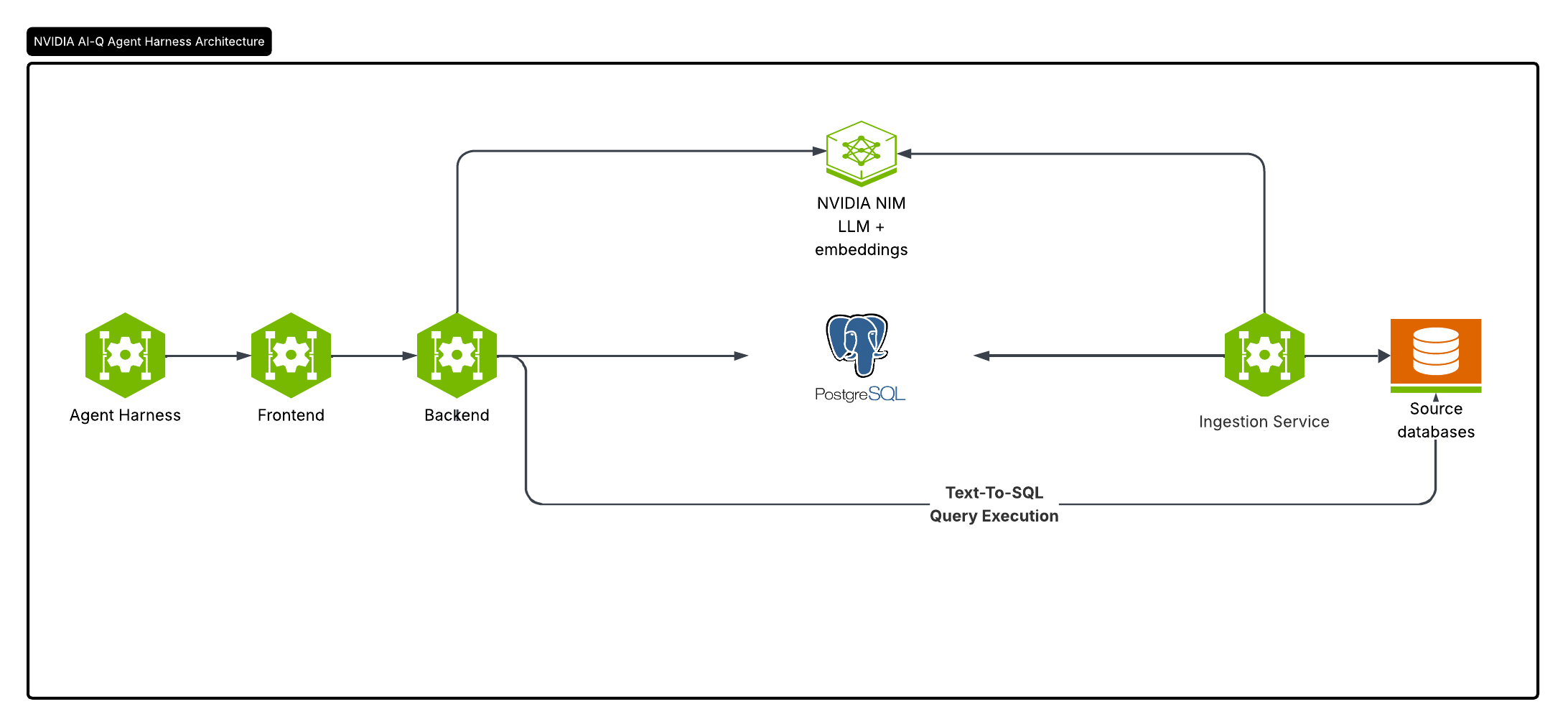
Key Features
- Natural-language querying of structured data — questions are translated to
SQL and executed against connected databases, powered by NVIDIA NIM.
- Semantic catalog / ontology layer over relational sources, stored in
Postgres alongside the catalog it describes.
- Authentication & RBAC —using Better Auth.
- Web UI for chat, analysis, data catalog, analytics, and settings.
- Flexible deployment — Helm chart for Kubernetes or Docker Compose for a
local stack.
Software Components
| Component |
Technology |
Role |
Default port |
| Frontend |
Next.js 16 (React 19, TypeScript, Tailwind CSS 4), Better Auth, Prisma |
Web UI, authentication, API gateway |
3000 |
| Backend |
FastAPI (Python 3.12+), LangChain |
Chat / NL-to-SQL, catalog, datasource APIs |
3001 |
| Ingestion worker |
FastAPI (Python 3.12+) |
Ingests tabular data and writes embeddings |
3002 |
| Postgres + pgvector |
Relational Database |
App metadata, the catalog and ontology, vector store |
5432 |
| HashiCorp Vault |
Optional |
Secure storage of connection credentials |
— |
NVIDIA NIM
Auto Ontology uses NVIDIA NIM endpoints for inference — either the hosted
NVIDIA API catalog (integrate.api.nvidia.com) or
self-hosted NIMs. The defaults in .env.example are:
- LLM:
nvidia/nemotron-3-nano-30b-a3b
- Embeddings:
nvidia/nemotron-3-embed-1b
- Reranking:
nvidia/llama-nemotron-rerank-vl-1b-v2
The endpoints and models are configured via the DEFAULT_MODELS_ENDPOINT, DEFAULT_MODELS_MODEL,
EMBED_ENDPOINT, and EMBED_MODEL environment variables and require a
DEFAULT_MODELS_API_KEY.
Model triplets
Each model role is configured by a triplet of environment variables —
<PREFIX>_ENDPOINT (URL), <PREFIX>_API_KEY, and <PREFIX>_MODEL:
| Prefix |
Role |
DEFAULT_MODELS |
Shared default; every field below falls back to it. |
REASONING |
Main chat / NL-to-SQL model. |
NON_REASONING |
Lighter model used for entity extraction. |
EMBED |
Text-embedding model (must match between ingest and query). |
RERANK |
Reranker used by the retrieval flow. |
You can set a full triplet, only some of its fields, or none at all — any field
left unset falls back to the matching DEFAULT_MODELS_<FIELD>. So the simplest
setup is to fill in DEFAULT_MODELS_* and override per-triplet fields only where
they differ (e.g. EMBED_MODEL, NON_REASONING_MODEL). *_API_KEY also falls
back to the legacy NVIDIA_API_KEY for backward compatibility.
Deployment
Prerequisites
- Docker with Docker Compose v2 (e.g. Docker Desktop on macOS/Windows,
Docker Engine on Linux) for the local stack. For Kubernetes deployments see
DEPLOYMENT.md.
- An NVIDIA API key (
nvapi-...) for NVIDIA NIM (chat and ingestion) from
the NVIDIA API catalog at https://build.nvidia.com.
- Connection details for the source database(s) you want to query
(Databricks, Postgres, Snowflake, or DuckDB).
Installation
Kubernetes
To deploy Auto Ontology on a Kubernetes cluster, see DEPLOYMENT.md.
Local (Docker Compose)
Clone the repository:
git clone <repo-url> auto_ontology && cd auto_ontology
Create your environment file (.env) from the template and fill in the values
(Postgres credentials, DEFAULT_MODELS_API_KEY, CONNECTION_STRINGS, etc.).
See .env.example for the full list of variables:
cp .env.example .env
# edit .env
Note:
AUTH_SECRET and APP_URL are required — without them every page
fails with a Better Auth "default secret" error.POSTGRES_PORT only changes the host-side port mapping (set it if
5432 is already taken on your machine); containers always reach Postgres
on the internal network port.
Build the images and start the stack:
docker compose up -d --build
This builds the backend (auto_ontology) and frontend (auto-ontology-frontend) images, brings
up Postgres and pgAdmin, runs the one-shot frontend-migrate job to
sync the database schema, and starts the app (backend, ingestion service,
and frontend).
Open the UI at http://localhost:3000 (the backend API is on :3001,
pgAdmin on :5050).
Troubleshooting: if the UI loads without the left navigation panel
(or otherwise looks broken after a restart), your browser is holding a
stale session cookie — this happens when AUTH_SECRET changes or the
database is reset. Clear the site data for localhost:3000 (or delete
the better-auth.session_token cookie) and sign in again.
Connections Management
Auto Ontology resolves the source databases it connects to from two sources:
Added through the UI — connections created from within the app. With this
option the connection credentials are stored in plaintext in Postgres unless
Vault is configured:
- Without Vault: the full connection object (including the password) is
JSON-serialized and stored, unencrypted, on the catalog's database row.
- With Vault: the credentials are written to Vault, keyed by the database
name, and the catalog row stores no credentials (the database name is the
lookup key — there is no separate reference field).
Vault is enabled only when all of VAULT_ADDR, VAULT_NAMESPACE,
VAULT_ROLE_ID, and VAULT_SECRET_ID are set (VAULT_AUTH_MOUNT and
VAULT_KV_MOUNT are optional overrides). It is off by default; a partial
configuration is ignored with a warning and falls back to plaintext storage.
CONNECTION_STRINGS environment variable — a comma-separated list of
connection strings supplied at deploy time (e.g. the Helm
--set connectionStrings=<CONNECTION-STRINGS> flag). This is a fallback: it
is used only when there are no UI-added connections.
Authentication
Auto Ontology Supports SSO for authentication.
The Redirect URI should be configured in the IdP as: APP_URL/api/auth/sso/callback
API tokens (scripting)
A browser signs in and gets a session cookie, which a script cannot obtain. For
scripts, notebooks, and scheduled jobs, mint an API token instead:
- Open the user menu (top right) → API Tokens → New token.
- Name it, optionally pick an expiry (default: never), and copy the token.
Auto Ontology stores only a SHA-256 hash of it, so it is shown exactly once. Losing it
means minting a new one.
Send it as x-api-key on any /api/... call — Authorization: Bearer <token>
works too:
curl -H "x-api-key: $AUTO_ONTOLOGY_API_TOKEN" https://auto_ontology.example.com/api/terms
import os
import requests

session = requests.Session()
session.headers["x-api-key"] = os.environ["AUTO_ONTOLOGY_API_TOKEN"]

terms = session.get("https://auto_ontology.example.com/api/terms").json()

answer = session.post(
    "https://auto_ontology.example.com/api/chat/completions",
    json={"question": "How many orders shipped last week?"},
).json()
Things worth knowing:
- A token acts as its owner. It carries no permissions of its own — every
call is authorized against the owner's role, exactly as it would be in the
browser. A viewer's token cannot do admin things.
- The whole API surface accepts it. Authentication is resolved in one place
(
frontend/auth/resolve-user.ts) for every route, so any endpoint in
docs/openapi/auto-ontology-api.json that is not
withPublic works with a token.
- Revocation is immediate. Delete the token in the UI, or delete/ban the
owning user, and the next request with it gets a 401.
- Tokens cannot manage tokens. Creating and revoking requires a signed-in
session, so a leaked token cannot issue itself successors.
Agent API conversations
Public clients call the authenticated Next.js gateway at
POST /api/chat/completions. The response is an SSE stream containing step,
result, or error events, followed by [DONE].
conversation_id is optional:
- Omit it for a stateless, one-shot request.
- Supply a client-generated UUID to create or continue a conversation.
- Reuse the same UUID for every turn in the thread. Wait for
[DONE] before
sending the next turn; overlapping requests for one conversation return
409 Conversation in progress.
{
  "question": "What about last month?",
  "conversation_id": "d61d8aa3-d496-4fa7-97ce-4f831c162e7f"
}
For conversational requests, FastAPI loads up to the five most recent completed
turns (bounded to 12,000 characters) and rewrites contextual input such as
“What about August?” into a standalone question before running the existing
text-to-SQL graph. Independent questions are passed through unchanged. Internal
agent thoughts, chart payloads, errors, and raw SQL result sets are not reused as
context.
Conversation history is scoped to the authenticated Auto Ontology user. Browser and
service callers should use the Next.js gateway, which resolves the user and
forwards the internal x-auto-ontology-user-id header to FastAPI. The FastAPI port is a
trusted internal service boundary: it must not be exposed publicly because that
header is not independently verified by FastAPI. A direct FastAPI request
without conversation_id remains stateless; a direct request with
conversation_id requires the trusted identity header.
The web UI manages the UUID automatically. An API-created conversation can be
opened in the UI at /chat?focus=<conversation_id> when it belongs to the
signed-in user.
Agent skills
Coding agents: start at AGENTS.md. Skills live in
skills/ (nvidia-ontology-setup, nvidia-ontology-management, nvidia-ontology-query).
Maintainers keep using CLAUDE.md.
MCP server
Agent harnesses such as Cursor and Claude Desktop can query your data through
Auto Ontology's MCP server. See
mcp/ to run it and docs/mcp.md for the details.
License
Auto Ontology is licensed under the Apache License, Version 2.0.
SPDX identifier: Apache-2.0.
Each NVIDIA-authored source file in this repository carries an SPDX header
of the form:
SPDX-FileCopyrightText: Copyright (c) 2024-2026, NVIDIA CORPORATION & AFFILIATES.
All rights reserved.
SPDX-License-Identifier: Apache-2.0
Third-party open-source components used by Auto Ontology are enumerated, with their
upstream licenses and project URLs, in
THIRD_PARTY_NOTICES.md. Components added by the
container images are listed separately in
CONTAINER_THIRD_PARTY_NOTICES.md.
Notice and Disclaimer
NOTICE AND DISCLAIMER: This software automatically retrieves, accesses or
interacts with external materials. Those retrieved materials are not
distributed with this software and are governed solely by separate terms,
conditions and licenses. You are solely responsible for finding, reviewing and
complying with all applicable terms, conditions, and licenses, and for
verifying the security, integrity and suitability of any retrieved materials
for your specific use case. This software is provided "AS IS", without warranty
of any kind. The author makes no representations or warranties regarding any
retrieved materials, and assumes no liability for any losses, damages,
liabilities or legal consequences from your use or inability to use this
software or any retrieved materials. Use this software and the retrieved
materials at your own risk.
External materials Auto Ontology interacts with at run time:
| Material |
When |
Terms |
NVIDIA-hosted model APIs (build.nvidia.com, integrate.api.nvidia.com) for LLM, embedding, and reranking |
Chat, ingestion, and semantic compilation, with the default model configuration |
Terms of the NVIDIA API catalog and of each model |
Any other OpenAI-compatible model endpoint you configure (*_ENDPOINT / *_MODEL) |
Same |
Terms of that provider and model |
| KumoRFM predictive-query service |
Only when KUMO_RFM_API_KEY is set |
Kumo's terms |
| Your source databases |
Ingestion, profiling, and query execution |
Your agreements for those systems |
Contributing
This project is currently not accepting contributions. Issues, pull
requests, and patches submitted from outside the Auto Ontology maintainer team will
not be reviewed or merged. Security-relevant reports should follow the
process described in SECURITY.md. Maintainer workflow is in
CONTRIBUTING.md.

 Auto Ontology is an open-source Python framework from NVIDIA that builds a semantic, graph-based ontology layer over enterprise data (metadata, definitions, lineage) and exposes it to LLM agents via MCP, CLI, and API so natural-language questions turn into verified, provenance-backed SQL answers.