








What is this?
 Manim is a community-maintained Python framework for creating precise mathematical animations programmatically — the engine behind 3Blue1Brown-style explanatory math videos.
Manim is a community-maintained Python framework for creating precise mathematical animations programmatically — the engine behind 3Blue1Brown-style explanatory math videos.Do I use it as a Python library, or is it a separate app?Both, effectively: it is a Python library you write animation code with, plus a command-line tool — you describe a Scene in Python and render it to a video file from your terminal.
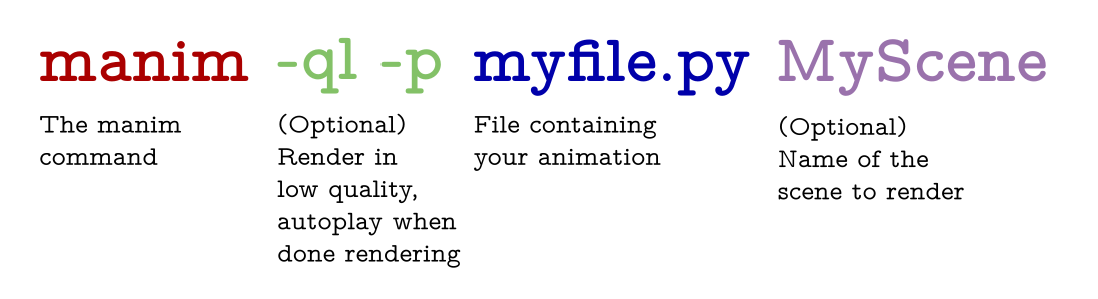
Both, effectively: it is a Python library you write animation code with, plus a command-line tool — you describe a Scene in Python and render it to a video file from your terminal.How do I create and render my first animation?Write a Scene class in a file like example.py, then run manim from the terminal with the -p flag to auto-play the result and -ql for a fast low-quality render; your native video player pops up when rendering finishes.
Write a Scene class in a file like example.py, then run manim from the terminal with the -p flag to auto-play the result and -ql for a fast low-quality render; your native video player pops up when rendering finishes.Do I need to install anything else on my system first?Yes — Manim requires a few dependencies that must be installed beforehand, with per-OS instructions in the documentation. If you would rather not install anything yet, you can try it in the online Jupyter environment.
Yes — Manim requires a few dependencies that must be installed beforehand, with per-OS instructions in the documentation. If you would rather not install anything yet, you can try it in the online Jupyter environment.Is it free, and can I use it in my own projects?Yes — the software is double-licensed under the MIT license, held by 3blue1brown LLC and the Manim Community Developers, so it is free to use, modify, and ship, including commercially.
Yes — the software is double-licensed under the MIT license, held by 3blue1brown LLC and the Manim Community Developers, so it is free to use, modify, and ship, including commercially.Where can I see what Manim animations actually look like?The README points to the official gallery with more advanced examples, and the repository itself contains a few simple example scenes. The classic reference is 3Blue1Brown's YouTube videos, made with the original version this fork comes from.
The README points to the official gallery with more advanced examples, and the repository itself contains a few simple example scenes. The classic reference is 3Blue1Brown's YouTube videos, made with the original version this fork comes from.Why should researchers cite Manim?The maintainers ask that Manim be cited when it supports research, arguing that research becomes more valuable when it is communicated effectively. The easiest way is the 'cite this repository' button on GitHub, which generates a citation in your preferred format and integrates with citation managers.
The maintainers ask that Manim be cited when it supports research, arguing that research becomes more valuable when it is communicated effectively. The easiest way is the 'cite this repository' button on GitHub, which generates a citation in your preferred format and integrates with citation managers.What are similar projects?manim, Gource, math-as-code, mlcourse.ai, git-sim, fframes, videos, engine
manim, Gource, math-as-code, mlcourse.ai, git-sim, fframes, videos, engineWhich topics is it in?explainer-video, animations, math, educational, jupyter, mathematics, computer-graphics, rendering, visualization, graphics, cli-tool, video
explainer-video, animations, math, educational, jupyter, mathematics, computer-graphics, rendering, visualization, graphics, cli-tool, video