Zero README

The project's README from github.com/Mail-0/Zero. As one markdown file: README.md.

Zero Logo

Zero

An Open-Source Gmail Alternative for the Future of Email

What is Zero?

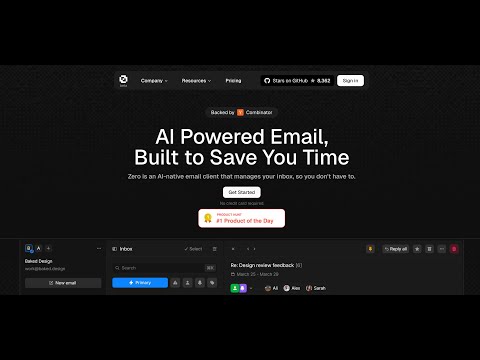
Zero is an open-source AI email solution that gives users the power to self-host their own email app while also integrating external services like Gmail and other email providers. Our goal is to modernize and improve emails through AI agents to truly modernize emails.

Why Zero?

Most email services today are either closed-source, data-hungry, or too complex to self-host. 0.email is different:

Tech Stack

Zero is built with modern and reliable technologies:

Getting Started

Video Tutorial

Watch this helpful video tutorial on how to set up Zero locally:

Zero Setup Tutorial

Prerequisites

Required Versions:

Before running the application, you'll need to set up services and configure environment variables. For more details on environment variables, see the Environment Variables section.

Setup Options

You can set up Zero in two ways:

Standard Setup (Recommended)

Quick Start Guide

  1. Clone and Install

    # Clone the repository
    git clone https://github.com/Mail-0/Zero.git
    cd Zero
    
    # Install dependencies
    pnpm install
    
    # Start database locally
    pnpm docker:db:up
    
  2. Set Up Environment

    • Run pnpm nizzy env to setup your environment variables
    • Run pnpm nizzy sync to sync your environment variables and types
    • Start the database with the provided docker compose setup: pnpm docker:db:up
    • Initialize the database: pnpm db:push
  3. Start the App

    pnpm dev
    
  4. Open in Browser

    Visit http://localhost:3000

Devcontainer Setup

Quick Start guide

  1. Clone and Install

    # Clone the repository
    git clone https://github.com/Mail-0/Zero.git
    cd Zero
    

    Then open the code in devcontainer and install the dependencies:

    pnpm install
    
    # Start the database locally
    pnpm docker:db:up
    
  2. Set Up Environment

    • Run pnpm nizzy env to setup your environment variables
    • Run pnpm nizzy sync to sync your environment variables and types
    • Start the database with the provided docker compose setup: pnpm docker:db:up
    • Initialize the database: pnpm db:push
  3. Start The App

    pnpm dev
    

    Visit http://localhost:3000

Environment Setup

  1. Better Auth Setup

    • Open the .env file and change the BETTER_AUTH_SECRET to a random string. (Use openssl rand -hex 32 to generate a 32 character string)

      BETTER_AUTH_SECRET=your_secret_key
      
  2. Google OAuth Setup (Required for Gmail integration)

    • Go to Google Cloud Console

    • Create a new project

    • Add the following APIs in your Google Cloud Project: People API, Gmail API

      • Use the links above and click 'Enable' or
      • Go to 'APIs and Services' > 'Enable APIs and Services' > Search for 'Google People API' and click 'Enable'
      • Go to 'APIs and Services' > 'Enable APIs and Services' > Search for 'Gmail API' and click 'Enable'
    • Enable the Google OAuth2 API

    • Create OAuth 2.0 credentials (Web application type)

    • Add authorized redirect URIs:

      • Development:
        • http://localhost:8787/api/auth/callback/google
      • Production:
        • https://your-production-url/api/auth/callback/google
    • Add to .env:

      GOOGLE_CLIENT_ID=your_client_id
      GOOGLE_CLIENT_SECRET=your_client_secret
      
    • Add yourself as a test user:

      • Go to Audience
      • Under 'Test users' click 'Add Users'
      • Add your email and click 'Save'

[!WARNING] The authorized redirect URIs in Google Cloud Console must match exactly what you configure in the .env, including the protocol (http/https), domain, and path - these are provided above.

  1. Autumn Setup (Required for some encryption)

    • Go to Autumn

    • For Local Use, click onboarding button and generate an Autumn Secret Key

    • For production, select the production mode from upper left corner and generate and fill the other fields. After that, generate an Autumn Secret Key

    • Add to .env:

    AUTUMN_SECRET_KEY=your_autumn_secret
    
  2. Twilio Setup (Required for SMS Integration)

    • Go to the Twilio

    • Create a Twilio account if you don’t already have one

    • From the dashboard, locate your:

      • Account SID
      • Auth Token
      • Phone Number
    • Add to your .env file:

    TWILIO_ACCOUNT_SID=your_account_sid
    TWILIO_AUTH_TOKEN=your_auth_token
    TWILIO_PHONE_NUMBER=your_twilio_phone_number
    

Environment Variables

Run pnpm nizzy env to setup your environment variables. It will copy the .env.example file to .env and fill in the variables for you. For local development a connection string example is provided in the .env.example file located in the same folder as the database.

Database Setup

Zero uses PostgreSQL for storing data. Here's how to set it up:

  1. Start the Database

    Run this command to start a local PostgreSQL instance:

    pnpm docker:db:up
    

    This creates a database with:

    • Name: zerodotemail
    • Username: postgres
    • Password: postgres
    • Port: 5432
  2. Set Up Database Connection

    Make sure your database connection string is in .env file. And you have ran pnpm nizzy sync to sync the latest env.

    For local development use:

    DATABASE_URL="postgresql://postgres:postgres@localhost:5432/zerodotemail"
    
  3. Database Commands

    • Set up database tables:

      pnpm db:push
      
    • Create migration files (after schema changes):

      pnpm db:generate
      
    • Apply migrations:

      pnpm db:migrate
      
    • View database content:

      pnpm db:studio
      

      If you run pnpm dev in your terminal, the studio command should be automatically running with the app.

Sync

Background: https://x.com/cmdhaus/status/1940886269950902362 We're now storing the user's emails in their Durable Object & an R2 bucket. This allow us to speed things up, a lot. This also introduces 3 environment variables, DROP_AGENT_TABLES,THREAD_SYNC_MAX_COUNT, THREAD_SYNC_LOOP. DROP_AGENT_TABLES: should the durable object drop the threads table before starting a sync THREAD_SYNC_MAX_COUNT: how many threads should we sync? max 500 because it's using the same number for the maxResults number from the driver. i.e 500 results per page. THREAD_SYNC_LOOP: should make sure to sync all of the items inside a folder? i.e if THREAD_SYNC_MAX_COUNT=500 it will sync 500 threads per request until the folder is fully synced. (should be true in production)

Contribute

Please refer to the contributing guide.

If you'd like to help with translating Zero to other languages, check out our translation guide.

Star History

Star History Chart

This project wouldn't be possible without these awesome companies

Vercel Better Auth Drizzle ORM Coderabbit AI

🤍 The team

Curious who makes Zero? Here are our contributors and maintainers

Zero (Mail-0/Zero)

Searching Database…

10.9K ·GitHub
这是什么?Zero(Mail0)是一款开源、可自托管的邮件应用,可以把 Gmail、Outlook 等邮箱服务整合到同一个收件箱中,并借助 AI 智能体增强功能,同时保护你的数据隐私。
这是我登录使用的托管收件箱,还是需要自己运行的程序?这是一个需要你自己部署的自托管网页应用,而不是 SaaS 收件箱。Zero 的核心理念就是让你拥有自托管的自由,它采用 Next.js/React 作为前端,Node.js/PostgreSQL 作为后端。
我该如何在本地运行它?克隆仓库并用 pnpm 安装依赖,运行 'pnpm nizzy env' 和 'pnpm nizzy sync' 配置环境变量,用 'pnpm docker:db:up' 启动 Postgres,用 'pnpm db:push' 初始化数据库结构,然后运行 'pnpm dev'。
运行之前,我需要安装和配置哪些东西?Node.js v18+、pnpm v10+,以及用于 Postgres 数据库的 Docker v20+;还需要 Google Cloud 的 OAuth 凭据(People API 和 Gmail API)以连接 Gmail,一个用于加密的 Autumn 密钥,以及可选的 Twilio 凭据用于短信集成。
配置过程是克隆后即可直接运行,还是比较复杂?它比一般的克隆即运行要复杂:你需要手动创建 Google OAuth 凭据,并确保重定向 URI 完全一致,还要生成 Autumn 密钥;此外,可选择接入 Twilio 以启用短信功能,应用才能完全正常工作。
Zero 会追踪或出售我的邮件数据吗?不会。Zero 表示它不会追踪、收集或出售你的数据;不过,通过 Gmail 等已连接的服务商传输的内容,仍受该服务商自身隐私政策的约束。
Zero 背后用了哪些技术栈?前端由 Next.js、React、TypeScript、TailwindCSS 和 Shadcn UI 驱动,后端则由 Node.js 配合 Drizzle ORM 和 PostgreSQL 负责处理,身份验证使用 Better Auth 和 Google OAuth。
我能在一个地方管理多个邮箱账户吗?可以。Zero 提供统一收件箱,可将 Gmail、Outlook 等多个服务商整合到同一个界面中。
为什么要开发 Zero,而不直接用 Gmail?该项目认为,大多数邮件服务要么闭源、过度收集数据,要么过于复杂而难以自托管,因此 Zero 提供了一个开源、以隐私为先、借助 AI 增强且完全由你掌控的替代方案。
Zero 如何保证邮件同步的速度?同步的邮件存储在 Cloudflare Durable Object 和一个 R2 存储桶中,并通过 THREAD_SYNC_MAX_COUNT 等环境变量控制每次请求同步的会话数量。
Creator
Mail-0
Size
120.2 MB
Stars
10.9K
Age
1y
Commits · 90 Days