
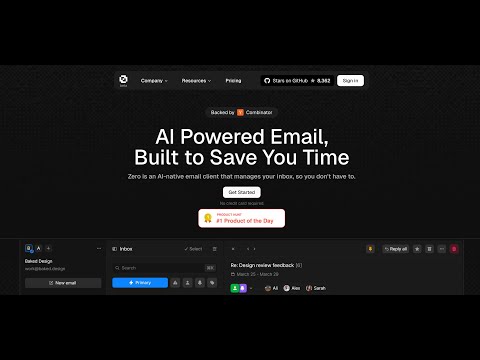




Что это такое?
 Zero (Mail0) — это почтовое приложение с открытым исходным кодом, которое можно развернуть на своём сервере. Оно объединяет Gmail, Outlook и другие сервисы в один почтовый ящик, дополненный AI-агентами, и при этом сохраняет ваши данные приватными.
Zero (Mail0) — это почтовое приложение с открытым исходным кодом, которое можно развернуть на своём сервере. Оно объединяет Gmail, Outlook и другие сервисы в один почтовый ящик, дополненный AI-агентами, и при этом сохраняет ваши данные приватными.Это почтовый сервис, в который я захожу по логину, или что-то, что я запускаю сам?Это веб-приложение, которое вы разворачиваете сами, а не почтовый SaaS-сервис. Суть Zero — дать вам свободу самостоятельного хостинга; оно построено на фронтенде Next.js/React и бэкенде Node.js/PostgreSQL.
Это веб-приложение, которое вы разворачиваете сами, а не почтовый SaaS-сервис. Суть Zero — дать вам свободу самостоятельного хостинга; оно построено на фронтенде Next.js/React и бэкенде Node.js/PostgreSQL.Как запустить это локально?Склонируйте репозиторий и установите зависимости через pnpm, выполните 'pnpm nizzy env' и 'pnpm nizzy sync', чтобы настроить переменные окружения, запустите Postgres командой 'pnpm docker:db:up', инициализируйте схему через 'pnpm db:push', затем выполните 'pnpm dev'.
Склонируйте репозиторий и установите зависимости через pnpm, выполните 'pnpm nizzy env' и 'pnpm nizzy sync', чтобы настроить переменные окружения, запустите Postgres командой 'pnpm docker:db:up', инициализируйте схему через 'pnpm db:push', затем выполните 'pnpm dev'.Что нужно установить и настроить, прежде чем запускать?Node.js v18+, pnpm v10+ и Docker v20+ для базы данных Postgres, а также учётные данные Google Cloud OAuth (People API и Gmail API) для подключения Gmail, секретный ключ Autumn для шифрования и, по желанию, учётные данные Twilio для интеграции SMS.
Node.js v18+, pnpm v10+ и Docker v20+ для базы данных Postgres, а также учётные данные Google Cloud OAuth (People API и Gmail API) для подключения Gmail, секретный ключ Autumn для шифрования и, по желанию, учётные данные Twilio для интеграции SMS.Установка — это быстро «склонировал и запустил» или сложнее?Это сложнее обычного «склонировал и запустил»: нужно вручную создать учётные данные Google OAuth с точно совпадающими URI перенаправления, сгенерировать секретный ключ Autumn и, по желанию, подключить Twilio для SMS, прежде чем приложение полностью заработает.
Это сложнее обычного «склонировал и запустил»: нужно вручную создать учётные данные Google OAuth с точно совпадающими URI перенаправления, сгенерировать секретный ключ Autumn и, по желанию, подключить Twilio для SMS, прежде чем приложение полностью заработает.Zero отслеживает или продаёт мои данные из почты?Нет — Zero заявляет, что не отслеживает, не собирает и не продаёт ваши данные. Однако всё, что проходит через подключённых провайдеров вроде Gmail, по-прежнему регулируется собственной политикой конфиденциальности этого провайдера.
Нет — Zero заявляет, что не отслеживает, не собирает и не продаёт ваши данные. Однако всё, что проходит через подключённых провайдеров вроде Gmail, по-прежнему регулируется собственной политикой конфиденциальности этого провайдера.Какой стек технологий лежит в основе Zero?Фронтенд построен на Next.js, React, TypeScript, TailwindCSS и Shadcn UI, а бэкенд работает на Node.js с Drizzle ORM и PostgreSQL. Аутентификация выполняется через Better Auth и Google OAuth.
Фронтенд построен на Next.js, React, TypeScript, TailwindCSS и Shadcn UI, а бэкенд работает на Node.js с Drizzle ORM и PostgreSQL. Аутентификация выполняется через Better Auth и Google OAuth.Можно ли управлять несколькими почтовыми аккаунтами в одном месте?Да, Zero предоставляет единый почтовый ящик, который объединяет несколько провайдеров, например Gmail и Outlook, в одном интерфейсе.
Да, Zero предоставляет единый почтовый ящик, который объединяет несколько провайдеров, например Gmail и Outlook, в одном интерфейсе.Зачем создавать Zero, если есть Gmail?В проекте утверждается, что большинство почтовых сервисов закрытые, собирают много данных или слишком сложны для самостоятельного развёртывания. Поэтому Zero предлагает открытую альтернативу с приоритетом приватности и AI-возможностями, которой вы полностью управляете.
В проекте утверждается, что большинство почтовых сервисов закрытые, собирают много данных или слишком сложны для самостоятельного развёртывания. Поэтому Zero предлагает открытую альтернативу с приоритетом приватности и AI-возможностями, которой вы полностью управляете.Как Zero обеспечивает быструю синхронизацию почты?Синхронизированные письма хранятся в Cloudflare Durable Object и в бакете R2. Переменные окружения, например THREAD_SYNC_MAX_COUNT, задают, сколько цепочек писем синхронизируется за один запрос.
Синхронизированные письма хранятся в Cloudflare Durable Object и в бакете R2. Переменные окружения, например THREAD_SYNC_MAX_COUNT, задают, сколько цепочек писем синхронизируется за один запрос.What are similar projects?crm, rankme.fast, chatbot, openhikmah-web, OpenStock, OpenInstinct, vibe-vibe, gemini-fullstack-langgraph-quickstart
crm, rankme.fast, chatbot, openhikmah-web, OpenStock, OpenInstinct, vibe-vibe, gemini-fullstack-langgraph-quickstartWhich topics is it in?drizzle-orm, shadcn-ui, oauth2, privacy-first, email, google, tailwindcss, nextjs, postgresql, web-app, agent, react
drizzle-orm, shadcn-ui, oauth2, privacy-first, email, google, tailwindcss, nextjs, postgresql, web-app, agent, react