Notes, tasks, and journal, encrypted on your device.
Your 12-word phrase is your identity and your key. With a phrase sign-up there is no email, no password and no account to leak.
A notes, tasks and journal app for macOS, Windows, Linux, Android, iOS and the browser, encrypted on your device. You get a 12-word phrase instead of an account, and everything you write is encrypted on your device under a key derived from it, on disk and on the way to us. Under self-custody, that key is yours alone. Notes, journal entries, tasks, a password vault, and file attachments all live under that one key.
Why this repo exists
Privacy claims need proof. The parts you actually have to trust are here: the client applications, the cryptographic core, and the threat model - the real files that ship, not summaries. Reading crypto.ts proves the encryption is sound; having the client around it proves the encryption is used on every path.
Three claims we make, and where to check each one without taking our word for it:
The claim
Check it here
Under self-custody, your phrase never leaves your device
VERIFY.md tier 1: watch your own notes leave in your browser's network tab
If any of those stops holding, the claim is broken and you can prove it. That is the entire point of this repo.
The first claim holds under self-custody, which every phrase sign-up uses. Its exception is custodial mode, which a sign-up with Google, Apple or GitHub preselects.
The client applications, as we build them: the web app, the desktop and mobile shells, and the shared crypto package. cd application && pnpm install && pnpm build.
Key derivation and note encryption, about 650 lines, commented step by step. Not a reference implementation. The production code, copied here so the link is short; the canonical file is application/packages/shared/src/crypto.ts. Attachments and images use the same cipher through crypto/blob.ts, which is another 50 lines.
Trust boundaries, cryptographic detail, and known limitations, including the unflattering ones. Written for auditors. Start here if you are reviewing the project.
The design in brief
Identity and key derivation. A 12-word BIP-39 mnemonic (128 bits of entropy) is generated on your device and turned into a 64-byte seed via the standard BIP-39 PBKDF2 path. Every key comes out of that seed via HKDF-SHA256, each under its own domain-separated info string so that no two uses share key material:
Info string
Produces
Used for
privacynotes-signing-v1
Ed25519 private key
Its public key is your user ID
privacynotes-encryption-v1
32-byte symmetric key
Note, attachment and image encryption
privacynotes-local-at-rest-v1
32-byte symmetric key
Seals note content at rest in the device's own storage; never stored, never transmitted
privacynotes-auth-password-v1
32-byte secret
The password for the anonymous account that carries your session
privacynotes-fp-pepper-v1
32-byte pepper
Hashes the device-grouping signals described in SECURITY.md, so the server never sees the raw values
Note encryption. Each note is encrypted with XChaCha20-Poly1305 under a random 24-byte nonce. The plaintext payload includes title, body, tags, and metadata such as trashed and starred state. The server sees none of it. The 24-byte nonce is what makes random generation safe without collision risk, unlike AES-GCM's 12 bytes.
Challenge signing. Pubkey-to-account binding uses Ed25519 signatures over structured challenges (link:<authUid>). Device registration and revocation use the same shape. Every signature binds to the session's auth UID, so a captured signature cannot be replayed into another session.
Dependencies, all from the @noble and @scure families: @scure/bip39, @noble/hashes, @noble/ed25519, @noble/ciphers. Zero dependencies each, written to be auditable, deployed in production by major wallets.
Verify it yourself
Read it.crypto/crypto.ts is one file and you can finish it in a sitting.
Run the derivation. The same path the app uses, from the same audited packages, in a scratch directory you can delete afterwards. Copy the whole block:
Two lines of that output are the ones that matter. Deterministic: true says the phrase alone reproduces the key, on any machine, forever, with nothing fetched from us. Domain-separated: true says the signing key and the encryption key cannot be derived from each other, so publishing your user ID does not leak the key your notes are under.
Diff it against production. The bundle is minified, so a textual diff is not practical, but the derivation is falsifiable anyway. Open the JavaScript served at PrivacyNotes.app and search it for privacynotes-signing-v1 and privacynotes-encryption-v1, the HKDF-SHA256 construction, and XChaCha20-Poly1305 with 24-byte nonces. They are in there right now. If they ever are not, we are lying and you can show it.
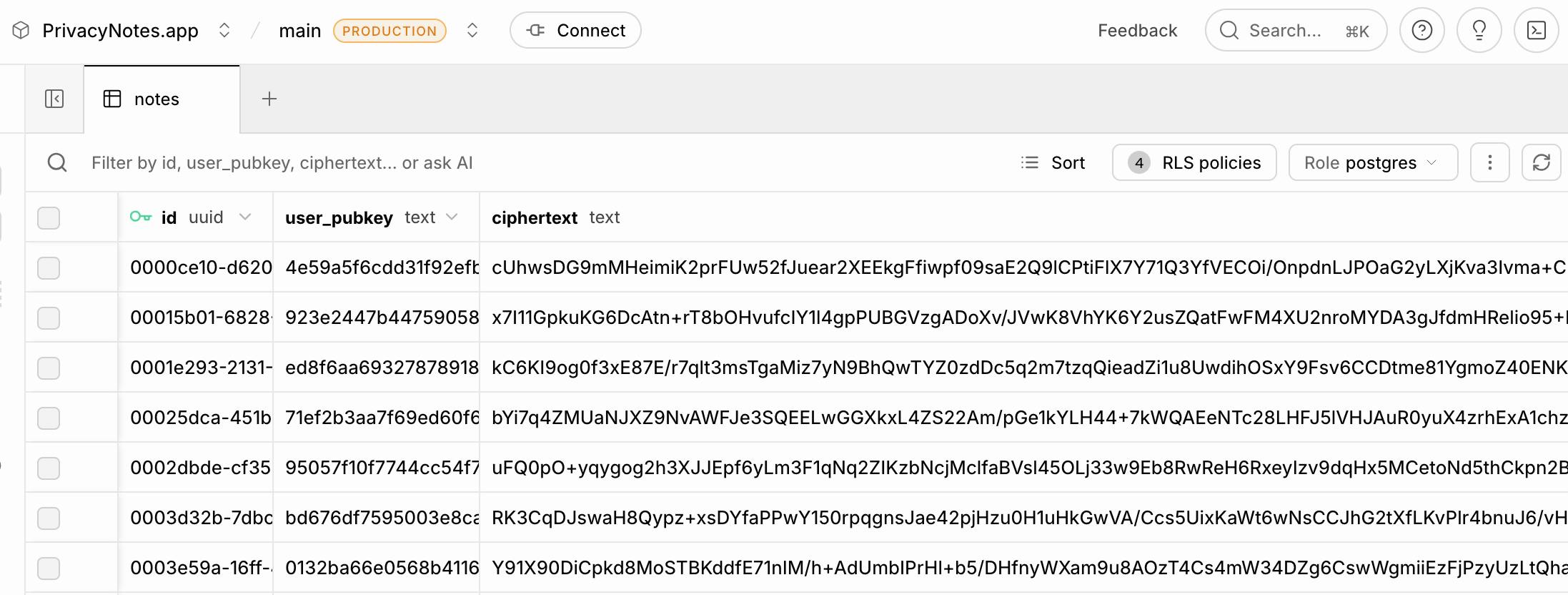
Watch the wire. The strongest check needs no source at all. Open your browser's network tab, type a word into a note, and read what the app sends: a ciphertext, a nonce, a public key and timestamps. No title, no body, nothing you typed. VERIFY.md walks it in about a minute. It beats reading our table definitions, because it measures what actually leaves your machine rather than what we say we store.
A sign-up with Google, Apple or GitHub preselects custodial mode: your phrase is kept on our server under a key we hold, so we could decrypt your notes. A phrase sign-up never uses it, and Settings > Account > Key custody switches either way. SECURITY.md has the full trade.
The rest, one line each
Metadata. The server sees your public key, ciphertext sizes, timestamps, note counts, request IPs and sync patterns.
OAuth. A Google, Apple or GitHub sign-in links that provider's email to your key, custodial or not.
Web code. A browser fetches the app's code again on every visit, so if your threat model includes us being coerced, prefer the signed native apps.
Your device. Malware on your device reads what you read, and a lost phrase under self-custody means lost notes.
Security contact
Found a flaw in the crypto, the derivation, or the client? Report it privately on GitHub rather than opening a public issue, so it can be fixed before it is public. A private report there reaches us fastest and keeps the whole exchange in one place.
If you cannot use GitHub, email [email protected] as a backup. That address is also published in our security.txt on our own domain, so you can confirm it is really us. If a fix needs coordination we will work with you on timing before disclosure. There is no paid bounty program yet.
No third-party audit has been performed yet. The first serious spend out of revenue is one, with Cure53 as the target firm.
Credits
PrivacyNotes is shaped by the people who report bugs and ask for features in our issues. 104 people have opened an issue, and 436 reports are now fixed or built.
This repository is AGPL-3.0. Read it, audit it, build it, fork it. If you run a modified version as a network service, publish your changes.
The name PrivacyNotes, the wordmark and the icon are not part of that grant. A fork needs its own name.
Writing about PrivacyNotes? The square app icon is assets/icon.svg, and the full brand kit, with lockups and usage rules, is at privacynotes.app/brand. NOTICE.md says what the license grant does not cover.
A note on the earlier MIT releases of the encryption files is in crypto/README.md.
The app is built on other open source software. Every package, font and crate it includes, each with its license, is listed at privacynotes.app/licenses.








 PrivacyNotes 是一款端到端加密应用,提供笔记、任务、日记、密码保险库、文件和书签功能,支持 macOS、Windows、Linux、Android、iOS 和浏览器。它不使用邮箱加密码,而是用一组 12 个单词的 BIP-39 助记词作为你的身份和加密密钥,因此不存在任何可能被泄露的账号。