







Что это такое?
 PrivacyNotes — это приложение со сквозным шифрованием для заметок, задач, дневника, хранилища паролей, файлов и закладок. Доступно для macOS, Windows, Linux, Android, iOS и в браузере. Вместо электронной почты и пароля вы получаете фразу из 12 слов по стандарту BIP-39, которая одновременно является и вашим идентификатором, и ключом шифрования, поэтому нет аккаунта, который мог бы утечь.
Это только исходный код криптографии или полноценное рабочее приложение?Это полноценное кроссплатформенное приложение с подписанными нативными сборками для macOS, Windows, Linux, Android и iOS, а также веб-версия. В репозитории также опубликован полный исходный код клиента, ядро шифрования (crypto/crypto.ts) и модель угроз, чтобы заявления о приватности можно было проверить независимо.
Это полноценное кроссплатформенное приложение с подписанными нативными сборками для macOS, Windows, Linux, Android и iOS, а также веб-версия. В репозитории также опубликован полный исходный код клиента, ядро шифрования (crypto/crypto.ts) и модель угроз, чтобы заявления о приватности можно было проверить независимо.Как начать пользоваться PrivacyNotes?Откройте PrivacyNotes.app в браузере, чтобы попробовать сразу, без регистрации, или установите подписанное приложение для своей платформы и зарегистрируйтесь с только что сгенерированной фразой из 12 слов. Чтобы собрать клиент из исходного кода: 'cd application && pnpm install && pnpm build'.
Откройте PrivacyNotes.app в браузере, чтобы попробовать сразу, без регистрации, или установите подписанное приложение для своей платформы и зарегистрируйтесь с только что сгенерированной фразой из 12 слов. Чтобы собрать клиент из исходного кода: 'cd application && pnpm install && pnpm build'.Нужны ли email или пароль для регистрации?Нет — для регистрации по фразе нужно только устройство, которое сгенерирует вашу мнемоническую фразу из 12 слов по BIP-39; ни почты, ни пароля, ни аккаунта не требуется. Сама криптография опирается только на прошедшие аудит библиотеки @noble и @scure (bip39, hashes, ed25519, ciphers).
Нет — для регистрации по фразе нужно только устройство, которое сгенерирует вашу мнемоническую фразу из 12 слов по BIP-39; ни почты, ни пароля, ни аккаунта не требуется. Сама криптография опирается только на прошедшие аудит библиотеки @noble и @scure (bip39, hashes, ed25519, ciphers).Что будет, если я потеряю фразу из 12 слов?При самостоятельном хранении ключей потеря фразы означает безвозвратную потерю заметок — сброса пароля нет, так как команда считает сброс бэкдором. Вход через Google, Apple или GitHub по умолчанию предполагает хранение фразы на их серверах, что нарушает гарантию полного самостоятельного хранения ключей.
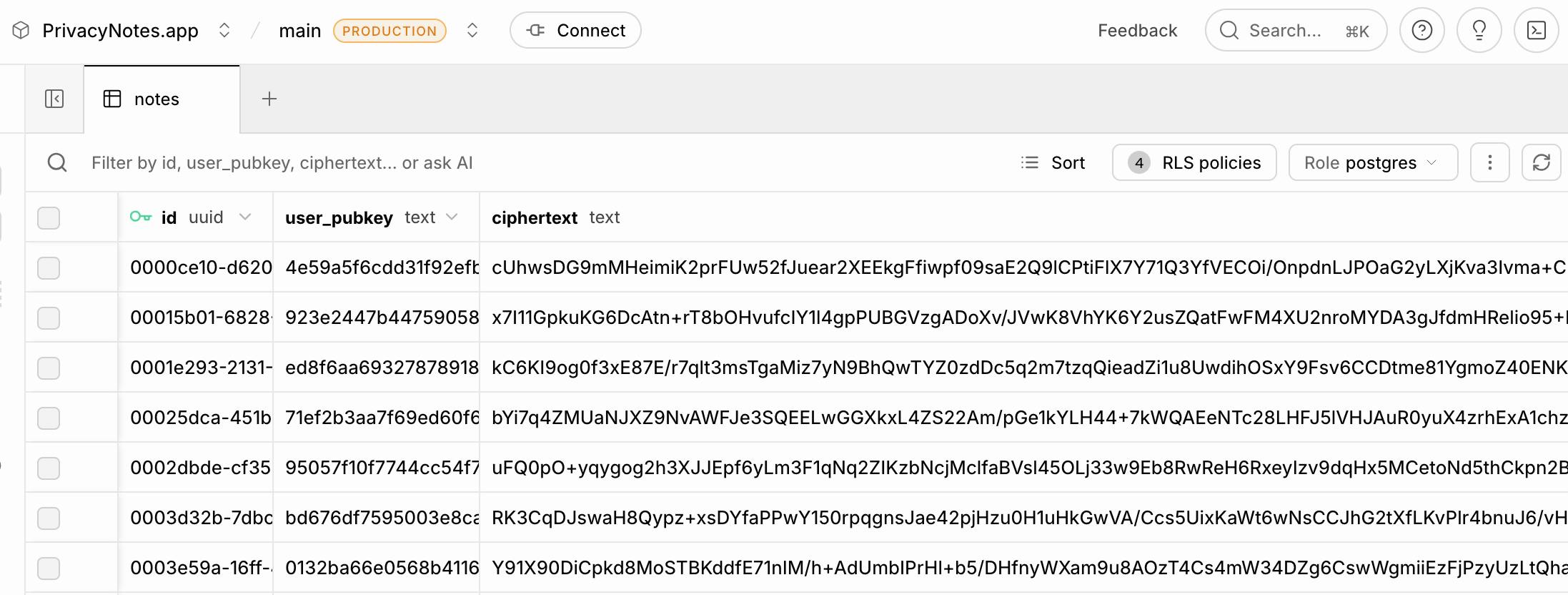
При самостоятельном хранении ключей потеря фразы означает безвозвратную потерю заметок — сброса пароля нет, так как команда считает сброс бэкдором. Вход через Google, Apple или GitHub по умолчанию предполагает хранение фразы на их серверах, что нарушает гарантию полного самостоятельного хранения ключей.Что сервер может увидеть о моих заметках?Только шифротекст: открытый ключ, nonce и байты, которые расшифровать может только ваша фраза — ни заголовка, ни текста, ни тегов. Сервер при этом видит метаданные: ваш псевдонимный открытый ключ, длину шифротекста, временные метки, количество заметок, паттерны синхронизации и IP-адрес запроса.
Только шифротекст: открытый ключ, nonce и байты, которые расшифровать может только ваша фраза — ни заголовка, ни текста, ни тегов. Сервер при этом видит метаданные: ваш псевдонимный открытый ключ, длину шифротекста, временные метки, количество заметок, паттерны синхронизации и IP-адрес запроса.В чём подвох с лицензией AGPL-3.0?Код можно свободно читать, проверять, собирать и форкать, но если вы запускаете изменённую версию как сетевой сервис, то обязаны опубликовать свои изменения. Название PrivacyNotes, логотип-надпись и значок не входят в действие лицензии, поэтому форк должен иметь собственный брендинг.
Код можно свободно читать, проверять, собирать и форкать, но если вы запускаете изменённую версию как сетевой сервис, то обязаны опубликовать свои изменения. Название PrivacyNotes, логотип-надпись и значок не входят в действие лицензии, поэтому форк должен иметь собственный брендинг.Что такое кастодиальный режим и зачем его выбирать?Если вы регистрируетесь через Google, Apple или GitHub вместо фразы, PrivacyNotes хранит вашу фразу на своих серверах, зашифрованной ключом, который хранит компания. Это делает настройку нового устройства одним нажатием вместо ввода 12 слов, но нарушает гарантию самостоятельного хранения ключей и подвергает вас риску по требованию властей или в случае компрометации компании.
Если вы регистрируетесь через Google, Apple или GitHub вместо фразы, PrivacyNotes хранит вашу фразу на своих серверах, зашифрованной ключом, который хранит компания. Это делает настройку нового устройства одним нажатием вместо ввода 12 слов, но нарушает гарантию самостоятельного хранения ключей и подвергает вас риску по требованию властей или в случае компрометации компании.Как проверить заявления о шифровании самостоятельно?Можно прочитать crypto/crypto.ts (около 590 строк), запустить скрипт деривации ключей, чтобы убедиться, что он детерминированный, поискать строки доменов HKDF в работающем JavaScript-бандле или открыть вкладку сети в браузере и увидеть, что при сохранении заметки уходят только шифротекст, nonce и открытый ключ.
Можно прочитать crypto/crypto.ts (около 590 строк), запустить скрипт деривации ключей, чтобы убедиться, что он детерминированный, поискать строки доменов HKDF в работающем JavaScript-бандле или открыть вкладку сети в браузере и увидеть, что при сохранении заметки уходят только шифротекст, nonce и открытый ключ.Код проверял кто-то из сторонних аудиторов?Стороннего аудита пока не проводилось; команда говорит, что первые серьёзные расходы из выручки пойдут именно на него, а целевой компанией является Cure53.
Стороннего аудита пока не проводилось; команда говорит, что первые серьёзные расходы из выручки пойдут именно на него, а целевой компанией является Cure53.Поддерживает ли PrivacyNotes пароли и вложения, а не только заметки?Да — тот же ключ шифрования охватывает заметки, записи дневника, задачи, хранилище паролей и вложения-файлы или изображения, которые шифруются на устройстве с помощью XChaCha20-Poly1305 до того, как что-либо покинет ваше устройство.
Да — тот же ключ шифрования охватывает заметки, записи дневника, задачи, хранилище паролей и вложения-файлы или изображения, которые шифруются на устройстве с помощью XChaCha20-Poly1305 до того, как что-либо покинет ваше устройство.- Автор
- LifetimeLabsHQ
- Размер
- 146.8 MB
- Звёзды
- 699
- Обновлён
- КоммитNov 17Релизv0.780.8Nov 14
- Возраст
- 6 мес
- Коммиты · 90 дней