ThinkRail is the agentic IDE that gets better every time you use it — learning your project through living specs today, and building its own capabilities tomorrow.
thinkrail (JetBrains/thinkrail)
Searching Database…
The project's README from github.com/JetBrains/thinkrail. As one markdown file: README.md.

ThinkRail is the agentic IDE that gets better every time you use it — learning your project through living specs today, and building its own capabilities tomorrow.
We built a rich interface around the pi
coding agent, isolated work into separate workspaces, and gave the agent durable project knowledge
through living specs and reusable skills. Next, we're adding full extension support, so ThinkRail can
create the tools it needs based on how you actually work.
Website: thinkrail.ai · Blog: thinkrail.ai/blog
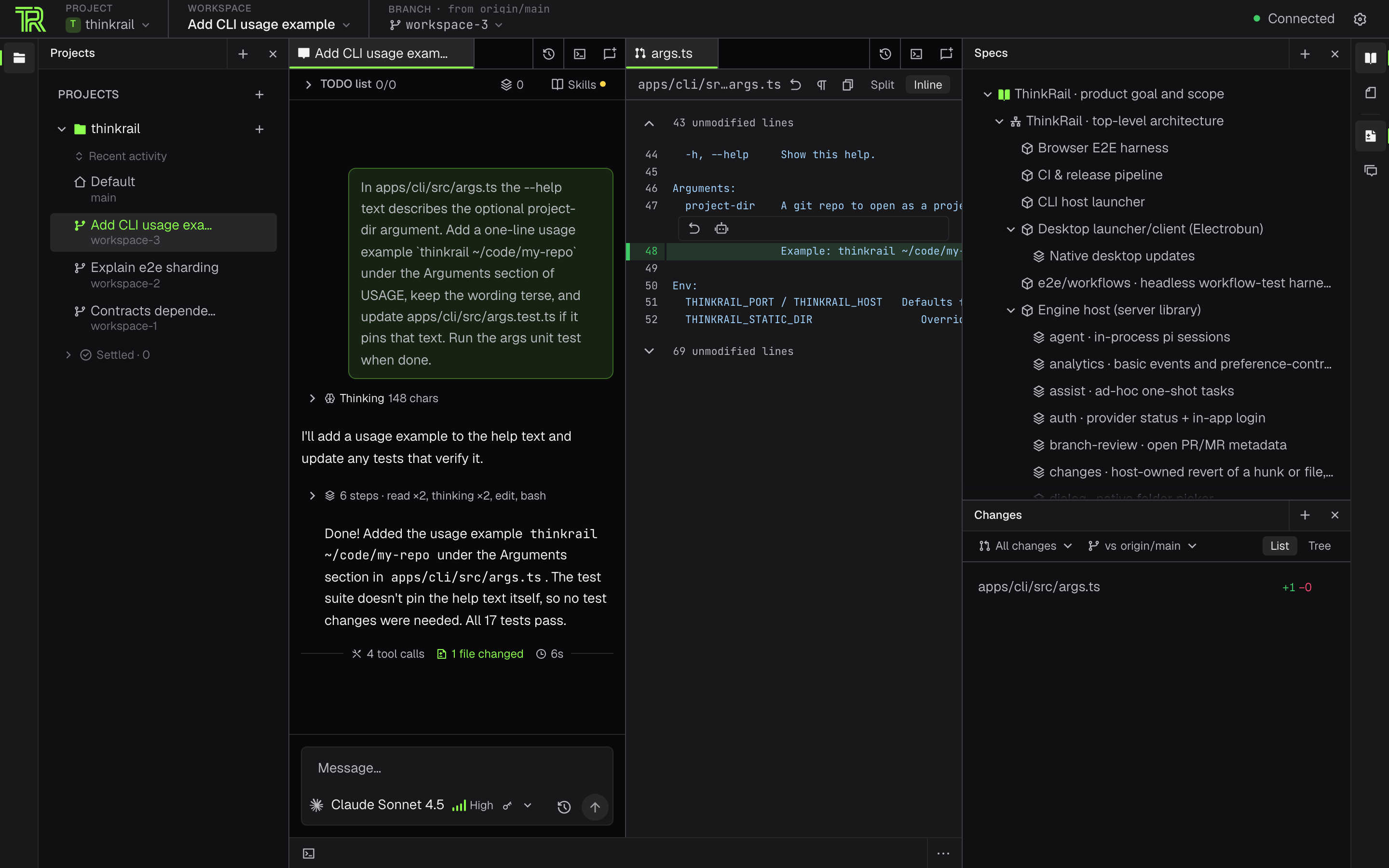
A pi session and the change it made, scoped to an isolated git-worktree workspace.
git worktrees,
each with its own branch and working directory. Agents work in parallel without touching your
checkout; merge the good branch, delete the rest. You can also attach existing worktrees or explicitly
work in the project folder itself. Finished and dormant workspaces settle onto a per-project shelf on
their own — when their pull request merges or closes, or after a quiet week — and come back the moment
you work in them.pi sessions per workspace, each with
its own model and live token and cost readout. Steer a running turn or queue a follow-up, delegate to
subagents, and work a shared plan the agent updates and you edit — each completed step can be committed
and reviewed on its own.SPEC.md files lives beside the code; the agent reads,
searches, and maintains it through dedicated spec_* tools, so intent survives the session. The
read-only Specs tool renders the graph as a tree in the workbench.gh.pi mcp.json (or add them, and a few presets, from
Settings): ThinkRail asks before calls the server does not mark read-only, keeps servers a repository
defines off until you approve them, signs you in to OAuth servers from Settings, and shows each chat's
servers next to its background commands and subagents.pi's own auth. ThinkRail has no accounts of its own.thinkrail CLI that opens the same app in your
browser. Both embed the same engine host; app state lives under ~/.thinkrail.
The project's spec graph as a tree, with the spec itself rendered alongside.
ThinkRail ships in two additive forms: a native desktop installer and the self-contained thinkrail CLI.
Both are published with SHA256SUMS on the releases page.
Download the thinkrail-desktop-* asset for your platform:
macOS (Apple Silicon) — open the DMG. There is no Intel desktop build.
Windows x64 — extract the complete setup ZIP, then run its setup executable in place, next to its payload.
Linux x64 / ARM64 — extract the setup tarball and run installer. Desktop builds need glibc 2.38+
with GTK 3, WebKitGTK 4.1, Ayatana AppIndicator 3, and librsvg 2 — Ubuntu 24.04 or newer:
sudo apt install libgtk-3-0 libwebkit2gtk-4.1-0 libayatana-appindicator3-1 librsvg2-2
Packaged stable and nightly desktop builds check for updates in the background and offer them in Settings → Updates: Download → Preparing update → Install & Restart. Nothing is applied until you choose Install & Restart. The updater appears only when the package carries a valid HTTPS feed identity; installations that predate that identity need one manual installation first.
The installer downloads the right binary, verifies its SHA-256 checksum, and puts thinkrail on your PATH.
macOS / Linux (also Windows under Git Bash):
curl -fsSL https://raw.githubusercontent.com/JetBrains/thinkrail/main/install.sh | bash
Windows — the same command works from cmd and PowerShell:
powershell -c "irm https://raw.githubusercontent.com/JetBrains/thinkrail/main/install.ps1 | iex"
Then run thinkrail, optionally with a git repo to open as a project:
thinkrail ~/code/my-repo
thinkrail needs git on your PATH and a model provider — sign in with JetBrains AI from the app or use
your own provider credentials. thinkrail --help lists the flags; thinkrail --version prints the build.
The installer takes --channel stable|nightly and --version; a pinned version must belong to the
selected channel:
curl -fsSL https://raw.githubusercontent.com/JetBrains/thinkrail/main/install.sh | bash -s -- --channel nightly
curl -fsSL https://raw.githubusercontent.com/JetBrains/thinkrail/main/install.sh | bash -s -- --channel stable --version 0.1.2
curl -fsSL https://raw.githubusercontent.com/JetBrains/thinkrail/main/install.sh | bash -s -- --channel nightly --version 0.2.0-nightly.10
On Windows the options are environment variables (THINKRAIL_CHANNEL, THINKRAIL_VERSION,
THINKRAIL_PREFIX, THINKRAIL_NO_MODIFY_PATH):
$env:THINKRAIL_CHANNEL='nightly'; irm https://raw.githubusercontent.com/JetBrains/thinkrail/main/install.ps1 | iex   # PowerShell
set "THINKRAIL_CHANNEL=stable" && set "THINKRAIL_VERSION=0.1.2" && powershell -c "irm https://raw.githubusercontent.com/JetBrains/thinkrail/main/install.ps1 | iex"   # cmd
Installed stable and nightly CLI hosts periodically offer Run Update in Settings → Updates. It runs
the host machine's thinkrail update in the background — also when the UI is open in a browser on another
machine — and a successful update asks you to restart the host manually. You can run thinkrail update
directly on any platform: it re-runs the installer for the installed channel and replaces
<prefix>/bin/thinkrail[.exe]; pass --channel or --version only for an explicit override.
thinkrail uninstall removes the executable, the PATH entry the installer added, and the install metadata,
and asks whether to delete your ~/.thinkrail app state (kept by default — --remove-data deletes it,
-y skips the questions).
Prefer a manual install? Download a binary and SHA256SUMS from the releases page and verify the checksum.
For self-update to work, rename it to thinkrail (thinkrail.exe on Windows) and place it at
<prefix>/bin/thinkrail[.exe]; a binary kept under its release filename or elsewhere must be replaced
manually or reinstalled with the script.
| Platform | Desktop | CLI |
|---|---|---|
| macOS Apple Silicon | DMG | signed binary |
| macOS Intel | no Electrobun build | not prebuilt — build from source |
| Windows x64 | signed setup executable | signed .exe |
| Linux x64 / ARM64 | setup tarball, unsigned | unsigned |
JetBrains signs the Windows CLI and desktop setup executable. The macOS CLI is signed but not yet notarized. Signed and notarized desktop DMGs require the coordinated JetBrains service pipeline; older published DMGs and locally built packages may still be unsigned and blocked by Gatekeeper. Linux artifacts are unsigned.
ThinkRail collects basic usage events — launches, chat creation, message sends, provider connections — tied to
a random installation ID. Usage analytics never include prompts, code, files, credentials, or account
identity. Additional product usage and how you found ThinkRail are shared only while Share additional usage
data is on; the switch is offered at first launch and lives in Settings → Privacy. When launching from
the command line, thinkrail --no-analytics (or THINKRAIL_NO_ANALYTICS=1) turns additional sharing off for
that run. With additional sharing on, a packaged build may open the ThinkRail blog in your browser once to
link your installation to the website visit that brought you here — only where you accepted marketing cookies on the
website or no consent is required — and that link expires after 30 days.
ThinkRail is a thin host that runs pi in-process and bridges it to a rich web UI. pi owns models,
skills, compaction, cost, and session state; the app owns the workspace, the editor, and the wire — it
never assembles prompts behind your back. Three rings:
packages/server (+ packages/shared): a Bun.serve HTTP+WS host with one in-process
pi session per chat, launched by apps/cli or apps/desktop.packages/contracts: the typed, versioned protocol between host and UI.apps/web: React 19 + Zustand + Tailwind v4, shipped independently; it dials a host over
the wire and depends on the contracts only.goal-and-requirements.md and architecture.md are the
canonical product and design specs. ThinkRail is developed spec-first: a SPEC.md sits beside every
module, and a change that moves a boundary, contract, or decision updates the spec in the same change.
You need Bun 1.4.0 (the pinned package manager and runtime), Node.js ≥ 22.19 (required by the
in-process pi engine), and an authenticated pi provider for agent work.
git clone https://github.com/JetBrains/thinkrail.git
cd thinkrail
bun install
bun run dev                          # host + web client together; Ctrl+C stops both
bun run --filter @thinkrail/cli dev  # browser launcher
bun run build:binary                 # standalone CLI artifact
bun run desktop:dev                  # package and open the Electrobun app
bun run desktop:build                # package without opening it
CONTRIBUTING.md covers the checks, the end-to-end suites, desktop packaging, and the
repository layout.
Contributions are welcome — see CONTRIBUTING.md. This project and community are
governed by the Code of Conduct.
Licensed under the Apache License 2.0.
ThinkRail is the agentic IDE that gets better every time you use it — learning your project through living specs today, and building its own capabilities tomorrow.