












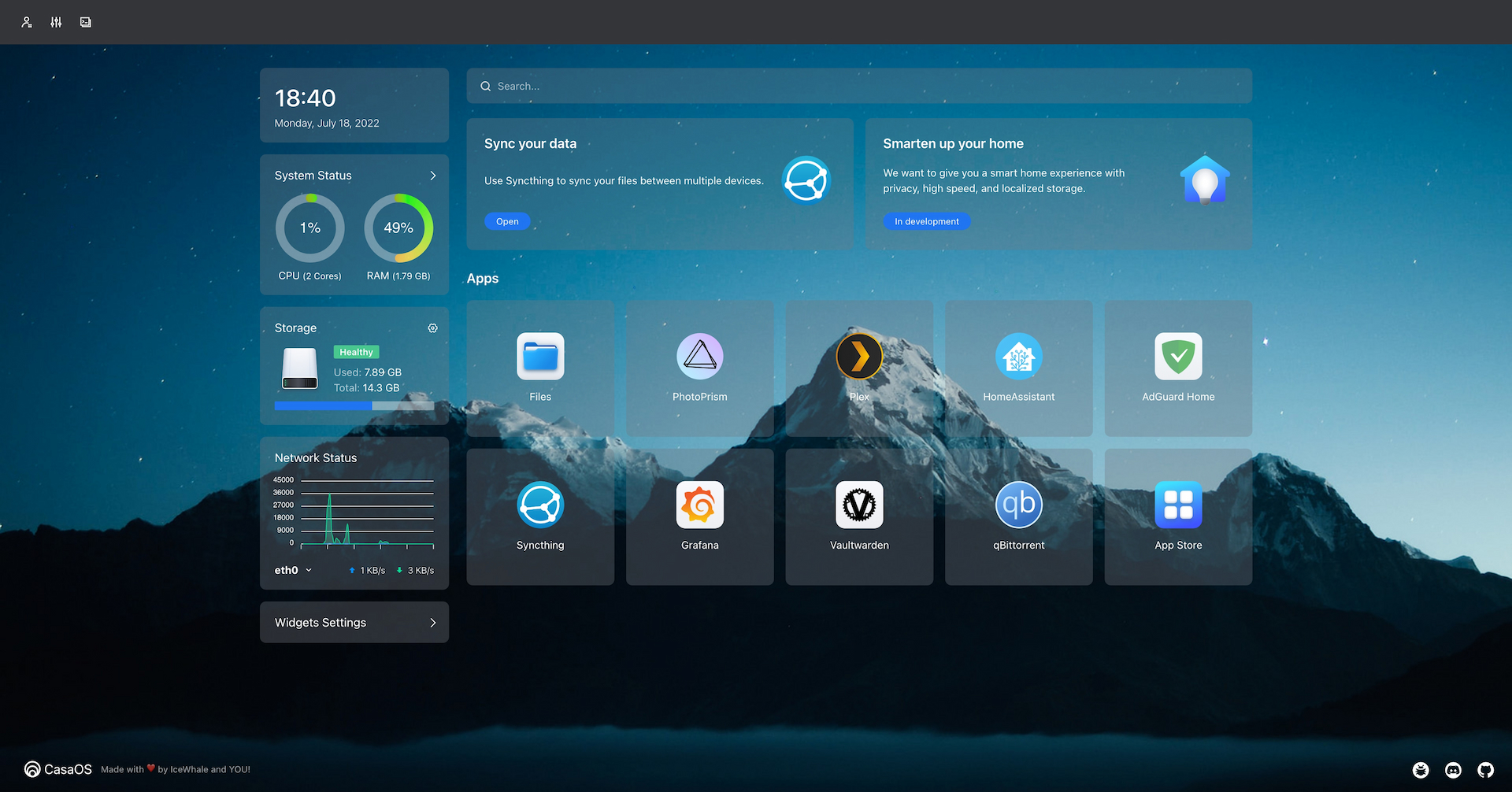


What is this?
 CasaOS is an open-source personal cloud operating system that turns a small computer (ZimaBoard, NUC, Raspberry Pi, or an old PC) into a home server with a friendly web UI for files, apps, and devices.
CasaOS is an open-source personal cloud operating system that turns a small computer (ZimaBoard, NUC, Raspberry Pi, or an old PC) into a home server with a friendly web UI for files, apps, and devices.Is this an app I install, or a whole operating system?It's installed on top of an existing Linux distro (Debian, Ubuntu Server, Raspberry Pi OS, etc.) via a one-liner script, turning that machine into a personal cloud server with a web dashboard — it's not a standalone OS image you flash.
It's installed on top of an existing Linux distro (Debian, Ubuntu Server, Raspberry Pi OS, etc.) via a one-liner script, turning that machine into a personal cloud server with a web dashboard — it's not a standalone OS image you flash.How do I get it running?Freshly install one of the supported Linux systems on your hardware, then run the official one-line install command from the terminal. Updates and some settings can later be managed from the CasaOS web UI itself.
Freshly install one of the supported Linux systems on your hardware, then run the official one-line install command from the terminal. Updates and some settings can later be managed from the CasaOS web UI itself.Do I need Docker or anything else installed first?CasaOS relies on the Docker ecosystem to run apps — it lets you install apps from its curated app store or pull in any of over 100,000 Docker images directly.
CasaOS relies on the Docker ecosystem to run apps — it lets you install apps from its curated app store or pull in any of over 100,000 Docker images directly.Will it work on any Linux system, or just the recommended ones?Full testing and official support cover Debian 12, Ubuntu Server 20.04, and Raspberry Pi OS; community-supported systems like Armbian, Alpine, OpenWrt, and ArchLinux exist but some are explicitly marked as not fully tested yet.
Full testing and official support cover Debian 12, Ubuntu Server 20.04, and Raspberry Pi OS; community-supported systems like Armbian, Alpine, OpenWrt, and ArchLinux exist but some are explicitly marked as not fully tested yet.What hardware does it actually run on?It targets home-server hardware: ZimaBoard, Intel NUC, Raspberry Pi, and repurposed old computers, on amd64/x86-64, arm64, or armv7 architectures.
It targets home-server hardware: ZimaBoard, Intel NUC, Raspberry Pi, and repurposed old computers, on amd64/x86-64, arm64, or armv7 architectures.What apps come preinstalled or easy to add?The app store includes one-click installs for popular self-hosted apps like Nextcloud, Home Assistant, AdGuard, Jellyfin, and various 'arr' media apps, alongside any Docker image you want.
The app store includes one-click installs for popular self-hosted apps like Nextcloud, Home Assistant, AdGuard, Jellyfin, and various 'arr' media apps, alongside any Docker image you want.Why is it called CasaOS?‘Casa’ is Spanish for ‘home’; the project started as the pre-installed software for the Kickstarter-funded ZimaBoard home server.
‘Casa’ is Spanish for ‘home’; the project started as the pre-installed software for the Kickstarter-funded ZimaBoard home server.How do I update or uninstall it?CasaOS can be updated from its own web UI (Settings > Update) or via a terminal command for the latest release; uninstall steps differ slightly depending on whether your version is before or after v0.3.3.
CasaOS can be updated from its own web UI (Settings > Update) or via a terminal command for the latest release; uninstall steps differ slightly depending on whether your version is before or after v0.3.3.Does it require technical skills to manage files and apps?No — it's designed with a no-code, intuitive UI so file management and app installation need no technical background, following a 'what you see is what you get' approach.
No — it's designed with a no-code, intuitive UI so file management and app installation need no technical background, following a 'what you see is what you get' approach.What are similar projects?awesome-raspberry-pi, navidrome, labtether, core, umbrel, dockge, EchoMuse, MagicMirror
awesome-raspberry-pi, navidrome, labtether, core, umbrel, dockge, EchoMuse, MagicMirrorWhich topics is it in?home-automation, file-manager, vuejs, homelab, iot, raspberry-pi, golang, dashboard, go, productivity, gui, terminal
home-automation, file-manager, vuejs, homelab, iot, raspberry-pi, golang, dashboard, go, productivity, gui, terminal