


capcut-mate README

The project's README from github.com/Hommy-master/capcut-mate. As one markdown file: README.md.

CapCut Mate API

🌐 Language Switch

中文版 | English


Project Introduction

CapCut Mate API is a completely open-source and free Jianying draft automation assistant built on FastAPI, supporting independent deployment. This project focuses on empowering large models with basic video editing capabilities, providing out-of-the-box video editing Skills, and has fully automated the entire Jianying core functionality workflow. It can directly connect with large models to achieve diverse intelligent video editing, enabling ordinary users to quickly create professional and advanced video works.

Flexible project usage: Can be independently deployed, or combined with Coze or n8n to build automated workflows, and can also connect with Jianying to achieve cloud rendering, directly generating final videos from drafts.

Project Resources

⭐ If you find this project helpful, please give us a Star! Your support is the greatest motivation for me to continuously maintain and improve the project 😊

Features

Tech Stack

Quick Start

Prerequisites

Installation:

Windows

powershell -ExecutionPolicy ByPass -c "irm https://astral.sh/uv/install.ps1 | iex"

Linux/macOS

sh -c "$(curl -LsSf https://astral.sh/uv/install.sh)"

Installation Steps

  1. Clone the project
git clone [email protected]:Hommy-master/capcut-mate.git
cd capcut-mate
  1. Install dependencies
# Install dependencies
uv sync

# Additional execution for Windows
uv pip install -e .[windows]
  1. Start the server
uv run main.py
  1. Access API documentation

Docker Deployment

📺 Video Tutorial: CapCut Mate Private Deployment Complete Tutorial

git clone https://github.com/Hommy-master/capcut-mate.git
cd capcut-mate
docker-compose pull && docker-compose up -d

After deployment, access the API documentation at: http://localhost:30000/docs

One-Click Import Coze Plugin

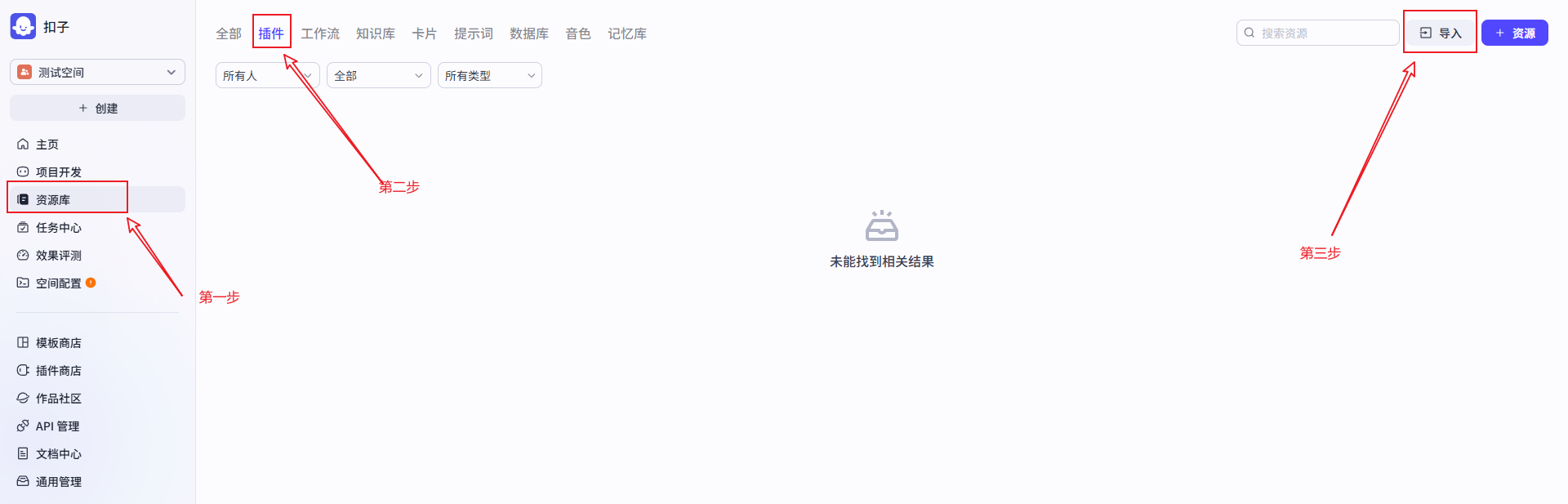
  1. Open Coze platform: https://coze.cn/home

    Step 1

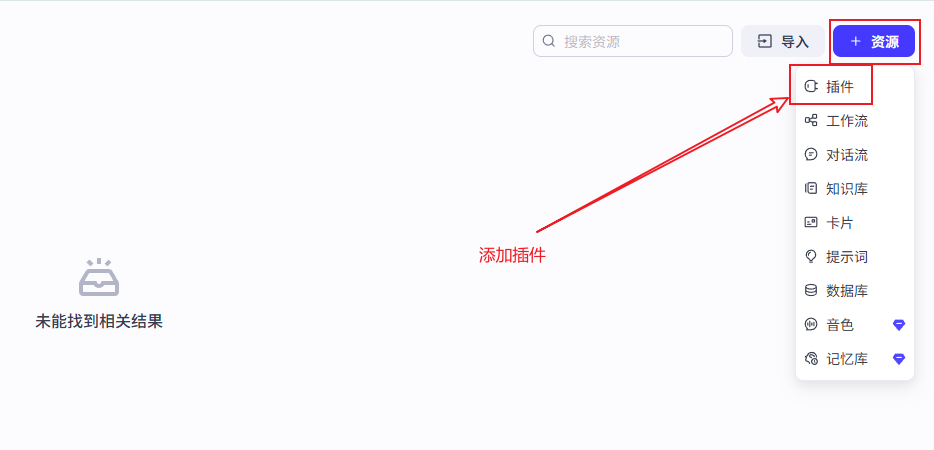
  2. Add Plugin

    Step 2

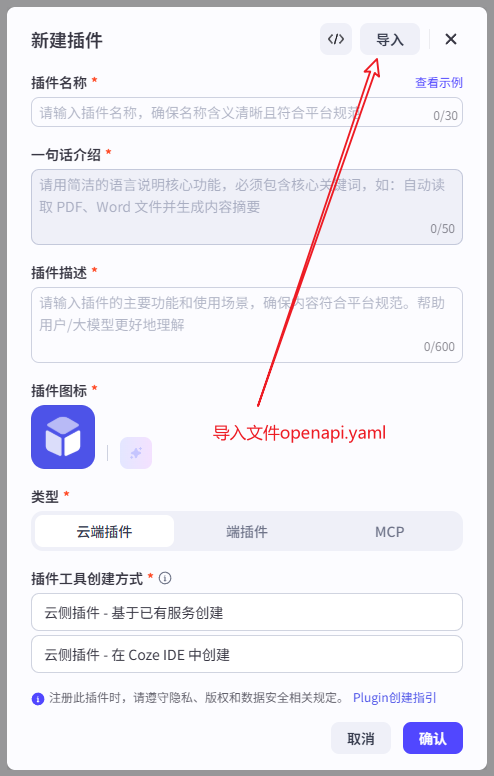
  3. Import Plugin

    Step 3

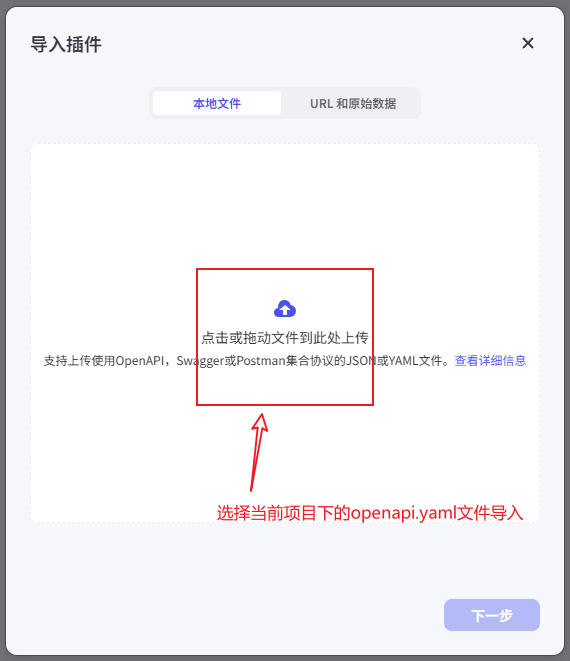
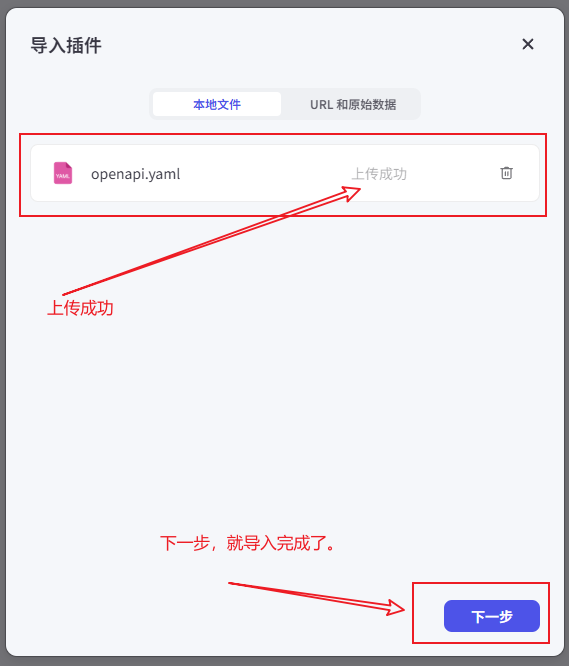
  4. Upload the openapi.yaml file in the current project directory

    Step 4

  5. Complete file upload

    Step 5

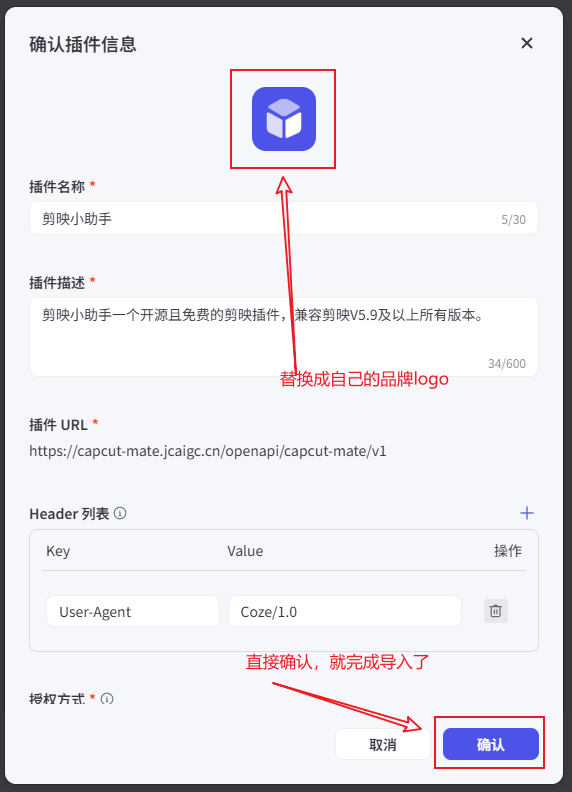
  6. Complete logo replacement

    Step 6

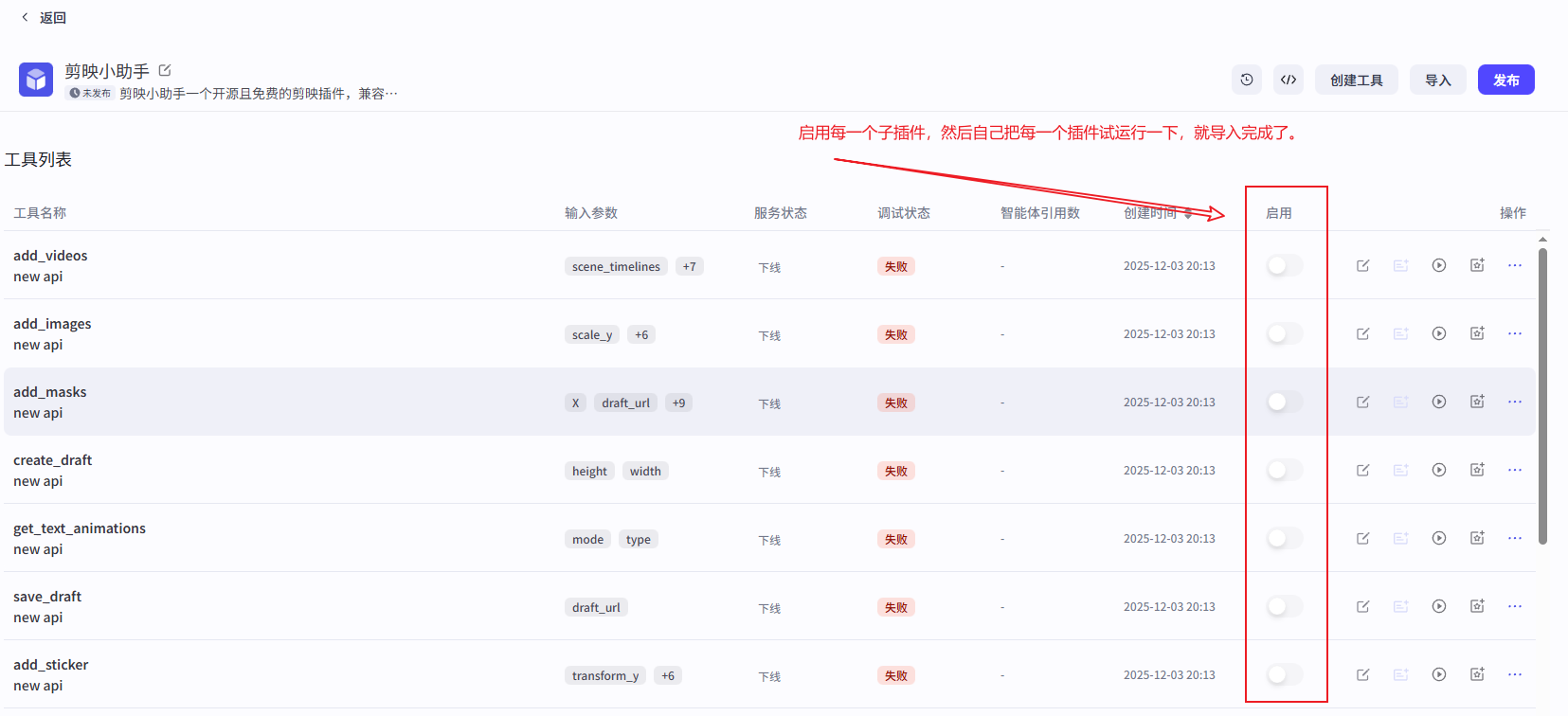
  7. Enable Plugin

    Step 7

API Documentation

The following are the core interfaces provided by CapCut Mate API, supporting a complete video creation workflow:

🏗️ Draft Management

Interface Function Description Documentation Link
create_draft Create Draft Create a new Jianying draft project, set canvas size 📖 View Documentation
save_draft Save Draft Save current draft state, ensure edit content persistence 📖 View Documentation
get_draft Get Draft Get draft file list and detailed information 📖 View Documentation

🎥 Video Materials

Interface Function Description Documentation Link
add_videos Add Videos Batch add video materials, support cropping, scaling, effects 📖 View Documentation
add_images Add Images Batch add image materials, support animations and transition effects 📖 View Documentation
add_sticker Add Stickers Add decorative stickers, support position and size adjustment 📖 View Documentation

🎵 Audio Processing

Interface Function Description Documentation Link
add_audios Add Audios Batch add audio materials, support volume and fade in/out 📖 View Documentation
get_audio_duration Get Audio Duration Get precise duration information of audio files 📖 View Documentation

📝 Text Subtitles

Interface Function Description Documentation Link
add_captions Add Captions Batch add captions, support keyword highlighting and style settings 📖 View Documentation
add_text_style Text Style Create rich text styles, support keyword colors and fonts 📖 View Documentation

✨ Effects & Animations

Interface Function Description Documentation Link
add_effects Add Effects Add visual effects, such as filters, borders, dynamic effects 📖 View Documentation
add_keyframes Keyframe Animation Create property animations for position, scale, rotation, etc. 📖 View Documentation
add_masks Mask Effects Add various shape masks, control visible areas of the screen 📖 View Documentation
add_mask_keyframes Mask Keyframes Animate mask position, size, feather, and rotation 📖 View Documentation
add_beauty Portrait Beautification Beauty, face shape, makeup and body sliders (smoothing, whitening, slim face, small head, ...) 📖 View Documentation

🎨 Animation Resources

Interface Function Description Documentation Link
get_text_animations Text Animations Get available text entrance, exit, and loop animations 📖 View Documentation
get_text_effects Text Effects Get available decorative text flower effects list 📖 View Documentation
get_image_animations Image Animations Get available image animation effects list 📖 View Documentation

🎬 Video Generation

Interface Function Description Documentation Link
gen_video Generate Video Submit video rendering task, asynchronous processing 📖 View Documentation
gen_video_status Query Status Query the progress and status of video generation tasks 📖 View Documentation

🚀 Quick Tools

Interface Function Description Documentation Link
easy_create_material Quick Creation Add multiple types of materials at once, simplify creation process 📖 View Documentation

📤 Material Upload

Interface Function Description Documentation Link
upload_file Upload File Server-relayed upload to object storage (max 500MB, 0.0005 CNY/MB), returns a usable signed URL 📖 View Documentation

🛠️ Utility Tools

Interface Function Description Documentation Link
get_url Extract URL Extract URL information from input content 📖 View Documentation
search_sticker Search Sticker Search sticker materials by keyword 📖 View Documentation
objs_to_str_list Objects to String List Convert object list to string list format 📖 View Documentation
str_list_to_objs String List to Objects Convert string list to object list format 📖 View Documentation
str_to_list String to List Convert string to list format 📖 View Documentation
timelines Create Timelines Generate timeline configurations for video editing 📖 View Documentation
audio_timelines Audio Timelines Calculate timelines based on audio durations 📖 View Documentation
audio_infos Audio Information Generate audio information from URLs and timelines 📖 View Documentation
imgs_infos Image Information Generate image information from URLs and timelines 📖 View Documentation
caption_infos Caption Information Generate caption information from text and timelines 📖 View Documentation
effect_infos Effect Information Generate effect information from names and timelines 📖 View Documentation
keyframes_infos Keyframe Information Generate keyframe information from configurations 📖 View Documentation
video_infos Video Information Generate video information from URLs and timelines 📖 View Documentation

API Usage Examples

Workflow Examples

Explore real-world workflow examples to learn how to integrate CapCut Mate with automation platforms like Coze and n8n:

👉 View Workflow Examples

Create Draft

curl -X POST "http://localhost:30000/openapi/capcut-mate/v1/create_draft" \
-H "Content-Type: application/json" \
-d '{"width": 1080, "height": 1920}'

Add Videos

video_infos is a JSON string (not a nested JSON array). Each item must include video_url, start, and end (microseconds on the timeline). See add_videos for optional fields.

curl -X POST "http://localhost:30000/openapi/capcut-mate/v1/add_videos" \
-H "Content-Type: application/json" \
-d '{
  "draft_url": "http://localhost:30000/openapi/capcut-mate/v1/get_draft?draft_id=20251126212753cab03392",
  "video_infos": "[{\"video_url\": \"https://example.com/video.mp4\", \"start\": 0, \"end\": 1000000}]"
}'

API Documentation

Jianying Assistant Client

The Jianying Assistant client provides a convenient desktop interface. Here are the startup methods:

macOS Sandbox Permissions Guide

When running on macOS, the application may request access permissions for specific folders. Please follow these steps:

  1. If permission prompts appear during the first run, allow the application to access the required folders
  2. For manual configuration, go to System Preferences > Security & Privacy > Privacy > Folder Access
  3. Ensure the CapCut Mate application is added to the allowed list

For more details, please refer to the macOS Sandbox Permissions Configuration Guide.

  1. Install Dependencies
# Switch npm mirror source - for Windows
set ELECTRON_MIRROR=https://npmmirror.com/mirrors/electron/

# Switch yarn mirror source - for Linux or macOS
export ELECTRON_MIRROR="https://npmmirror.com/mirrors/electron/"

# Install dependencies
npm install --verbose
  1. Start the Project
npm run web:dev
npm start

Contact

Type Method Description
📱 WeChat Group
Jianying Assistant
Open Source Community Discussion Group
💬 WeChat
WeChat QR code
Business Cooperation
📧 Email [email protected] Technical Support

capcut-mate (Hommy-master/capcut-mate)

Searching Database…

Что это?CapCut Mate API — опенсорсный сервис на FastAPI, автоматизирующий черновики видеомонтажа CapCut/Jianying: он позволяет программно или из LLM создавать черновики, добавлять материалы и рендерить финальные видео.
Это хостинговый сервис или то, что я запускаю сам?Это self-hosted бэкенд, который вы разворачиваете сами (через Python/uv или Docker), а затем можете встроить в workflow Coze или n8n либо подключить к Jianying для облачного рендеринга.
Как это запустить?Склонируйте репозиторий, установите зависимости с uv и запустите сервер через uvicorn; документация API появляется автоматически после запуска. Также предусмотрен вариант быстрого развёртывания на Docker.
Что нужно установить перед запуском?Нужны Python 3.11+ и менеджер пакетов uv; Docker — альтернатива, если не хочется настраивать Python локально.
Загрузка файлов или рендеринг что-то стоят?Загрузка файлов через встроенную ретрансляцию в object storage ограничена 500 МБ на файл и тарифицируется по 0.0005 CNY за МБ, так что масштабное использование встроенного конвейера загрузки/рендера не бесплатно, хотя сам код бесплатен.
Можно ли запустить сервер на любой ОС?Да, шаги быстрого старта покрывают и Windows, и Linux/macOS, плюс путь развёртывания через Docker.
Как подключить это к Coze?Вы открываете платформу Coze, добавляете плагин и импортируете файл openapi.yaml проекта; после замены логотипа и включения плагина эндпоинты CapCut Mate становятся доступны внутри workflow Coze.
Что реально можно собрать с этим API?Полные конвейеры от черновика до видео: создание черновиков, массовое добавление материалов видео/аудио/изображений/стикеров, субтитры с подсветкой ключевых слов, анимации по ключевым кадрам, маски, бьюти-фильтры и, наконец, отправка асинхронных задач облачного рендера.
Для чего нужен десктопный клиент Jianying Assistant?Это компаньон-приложение для десктопа, дающее GUI поверх API; на macOS ему нужны разрешения на доступ к папкам, выданные через System Preferences, чтобы приложение могло работать с локальными файлами Jianying.
Это подключается и к n8n, а не только к Coze?Да, в проекте есть примеры workflow, показывающие, как интегрировать REST-эндпоинты CapCut Mate с обеими платформами автоматизации — Coze и n8n.
Size
61 MB
Stars
2K
Age
1y
Commits · 90 Days