

oh — OpenHarness & ohmo
English ·
简体中文
OpenHarness delivers core lightweight agent infrastructure: tool-use, skills, memory, and multi-agent coordination.
ohmo is a personal AI agent built on OpenHarness — not another chatbot, but an assistant that actually works for you over long sessions. Chat with ohmo in Feishu / Slack / Telegram / Discord, and it forks branches, writes code, runs tests, and opens PRs on its own. ohmo runs on your existing Claude Code or Codex subscription — no extra API key needed.
Join the community: contribute Harness for open agent development.













One Command (oh) to Launch OpenHarness and Unlock All Agent Harnesses.
Supports CLI agent integration including OpenClaw, nanobot, Cursor, and more.

✨ OpenHarness's Key Harness Features
🔄 Agent Loop

• Streaming Tool-Call Cycle
• API Retry with Exponential Backoff
• Parallel Tool Execution
• Token Counting & Cost Tracking
|
🔧 Harness Toolkit
• 43 Tools (File, Shell, Search, Web, MCP)
• On-Demand Skill Loading (.md)
• Plugin Ecosystem (Skills + Hooks + Agents)
• Compatible with anthropics/skills & plugins
|
🧠 Context & Memory
• CLAUDE.md Discovery & Injection
• Context Compression (Auto-Compact)
• MEMORY.md Persistent Memory
• Session Resume & History
|
🛡️ Governance

• Multi-Level Permission Modes
• Path-Level & Command Rules
• PreToolUse / PostToolUse Hooks
• Interactive Approval Dialogs
|
🤝 Swarm Coordination
• Subagent Spawning & Delegation
• Team Registry & Task Management
• Background Task Lifecycle
• ClawTeam Integration (Roadmap)
|
🤔 What is an Agent Harness?
An Agent Harness is the complete infrastructure that wraps around an LLM to make it a functional agent. The model provides intelligence; the harness provides hands, eyes, memory, and safety boundaries.
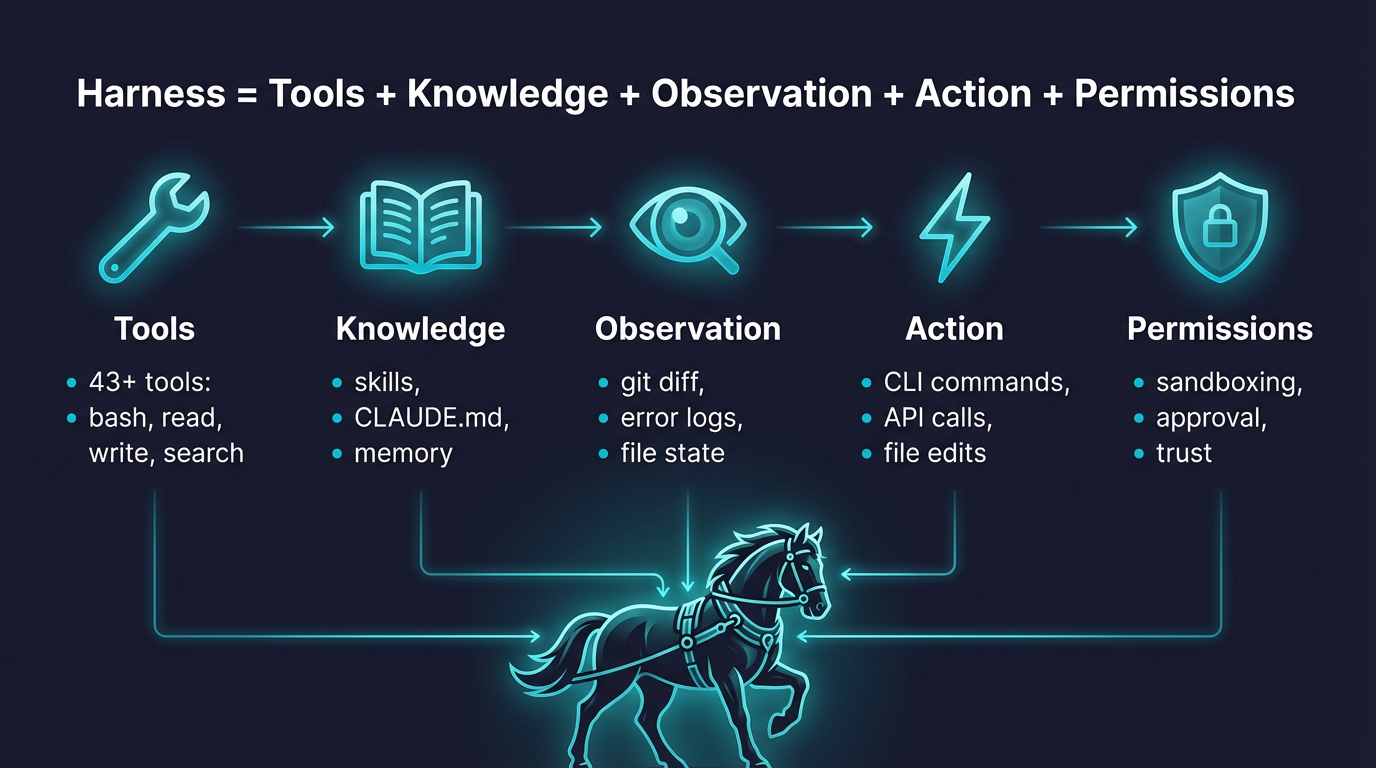
OpenHarness is an open-source Python implementation designed for researchers, builders, and the community:
- Understand how production AI agents work under the hood
- Experiment with cutting-edge tools, skills, and agent coordination patterns
- Extend the harness with custom plugins, providers, and domain knowledge
- Build specialized agents on top of proven architecture
📰 What's New
- Unreleased 🔍 Dry-run safe preview:
oh --dry-run previews resolved runtime settings, auth state, skills, commands, tools, and configured MCP servers without executing the model, tools, or subagents.- Dry-run now reports a
ready / warning / blocked readiness verdict with concrete next-step suggestions such as fixing auth, fixing MCP config, or running the prompt directly.
- Prompt previews include likely matching skills and tools, while slash-command previews show whether the command is mostly read-only or stateful.
- 2026-04-18 ⚙️ v0.1.7 — Packaging & TUI polish:
- Install script now links
oh, ohmo, and openharness into ~/.local/bin instead of prepending the virtualenv bin directory to PATH, which avoids clobbering Conda-managed shells.
- React TUI now supports
Shift+Enter to insert a newline while keeping plain Enter as submit.
- Busy-state animation in the React TUI is quieter and less error-prone on Windows terminals, with conservative spinner frames and reduced flashing.
- 2026-04-10 🧠 v0.1.6 — Auto-Compaction & Markdown TUI:
- Auto-Compaction preserves task state and channel logs across context compression — agents can run multi-day sessions without manual compact/clear
- Subprocess teammates run in headless worker mode; agent team creation stabilized
- Assistant messages now render full Markdown in the React TUI
ohmo gains channel slash commands and multimodal attachment support
- 2026-04-08 🔌 v0.1.5 — MCP HTTP transport & Swarm polling:
- MCP protocol adds HTTP transport, auto-reconnect on disconnect, and tool-only server compatibility
- JSON Schema types inferred for MCP tool inputs — no manual type mapping needed
ohmo channels support file attachments and multimodal gateway messages- Subprocess agents are now pollable in real runs; permission modals serialized to prevent input swallowing
- 2026-04-08 🌙 v0.1.4 — Multi-provider auth & Moonshot/Kimi:
- Native Moonshot/Kimi provider with
reasoning_content support for thinking models
- Auth overhaul: fixed provider-switching key mismatch,
OPENAI_BASE_URL env override, profile-scoped credential priority
- MCP gracefully handles disconnected servers in
call_tool / read_resource
- Security: built-in sensitive-path protection in PermissionChecker, hardened
web_fetch URL validation
- Stability: EIO crash recovery in Ink TUI,
--debug logging, Windows cmd flash fix
- 2026-04-06 🚀 v0.1.2 — Unified setup flows and
ohmo personal-agent app:
oh setup now guides provider selection as workflows instead of exposing raw auth/provider internals- Compatible API setup is now profile-scoped, so Anthropic/OpenAI-compatible endpoints can keep separate keys
ohmo ships as a packaged app with ~/.ohmo workspace, gateway, bootstrap prompts, and channel config flow
- 2026-04-01 🎨 v0.1.0 — Initial OpenHarness open-source release featuring complete Harness architecture:
Start here:
Quick Start ·
Provider Compatibility ·
Showcase ·
Contributing ·
Changelog
🚀 Quick Start
1. Install
Linux / macOS / WSL
# One-click install
curl -fsSL https://raw.githubusercontent.com/HKUDS/OpenHarness/main/scripts/install.sh | bash

# Or via pip
pip install openharness-ai
Windows (Native)
# One-click install (PowerShell)
iex (Invoke-WebRequest -Uri 'https://raw.githubusercontent.com/HKUDS/OpenHarness/main/scripts/install.ps1')

# Or via pip
pip install openharness-ai
Note: Windows support is now native. In PowerShell, use openh instead of oh because oh can resolve to the built-in Out-Host alias.
oh setup    # interactive wizard — pick a provider, authenticate, done
# On Windows PowerShell, use: openh setup
Supports Claude / OpenAI / Copilot / Codex / Moonshot(Kimi) / GLM / MiniMax / NVIDIA NIM and any compatible endpoint.
3. Run
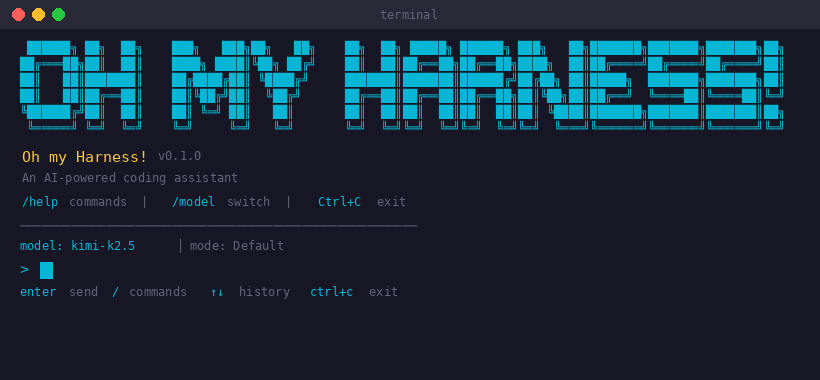
oh
# On Windows PowerShell, use: openh
4. Set up ohmo (Personal Agent)
Want an AI agent that works for you from Feishu / Slack / Telegram / Discord?
ohmo init             # initialize ~/.ohmo workspace
ohmo config           # configure channels and provider
ohmo gateway start    # start the gateway — ohmo is now live in your chat app
ohmo runs on your existing Claude Code subscription or Codex subscription — no extra API key needed.
Non-Interactive Mode (Pipes & Scripts)
# Single prompt → stdout
oh -p "Explain this codebase"

# JSON output for programmatic use
oh -p "List all functions in main.py" --output-format json

# Stream JSON events in real-time
oh -p "Fix the bug" --output-format stream-json
Dry Run (Safe Preview)
Use --dry-run when you want to inspect what OpenHarness would use before any live execution starts.
# Preview an interactive session setup
oh --dry-run

# Preview one prompt without executing the model or tools
oh --dry-run -p "Review this bug fix and grep for failing tests"

# Preview a slash command path
oh --dry-run -p "/plugin list"

# Get structured output for scripts or channels
oh --dry-run -p "Explain this repository" --output-format json
Dry-run is intentionally static:
- It does not call the model
- It does not execute tools or spawn subagents
- It does not connect to MCP servers
- It does resolve settings, auth status, prompt assembly, skills, commands, tools, and obvious MCP config problems
Readiness levels:
ready: configuration looks usable; the next suggested action is usually to run the prompt directlywarning: OpenHarness can resolve the session, but something important still looks wrong, such as broken MCP config or missing auth for later model workblocked: the requested path will not run successfully as-is, for example an unknown slash command or a prompt that cannot resolve a runtime client
next actions in the dry-run output tell you the shortest fix or follow-up step, such as:
- run
oh auth login
- fix or disable broken MCP configuration
- run the prompt directly with
oh -p "..." or open the interactive UI with oh
🔌 Provider Compatibility
OpenHarness treats providers as workflows backed by named profiles. In day-to-day use, prefer:
oh setup
oh provider list
oh provider use <profile>
Built-in Workflows
| Workflow |
What it is |
Typical backends |
| Anthropic-Compatible API |
Anthropic-style request format |
Claude official, Kimi, GLM, MiniMax, internal Anthropic-compatible gateways |
| Claude Subscription |
Claude CLI subscription bridge |
Local ~/.claude/.credentials.json |
| OpenAI-Compatible API |
OpenAI-style request format |
OpenAI official, OpenRouter, DashScope, DeepSeek, SiliconFlow, Groq, Ollama, GitHub Models |
| Codex Subscription |
Codex CLI subscription bridge |
Local ~/.codex/auth.json |
| GitHub Copilot |
Copilot OAuth workflow |
GitHub Copilot device-flow login |
Compatible API Families
Anthropic-Compatible API
Typical examples:
| Backend |
Base URL |
Example models |
| Claude official |
https://api.anthropic.com |
claude-sonnet-4-6, claude-opus-4-6 |
| Moonshot / Kimi |
https://api.moonshot.cn/anthropic |
kimi-k2.5 |
| Zhipu / GLM |
custom Anthropic-compatible endpoint |
glm-4.5 |
| MiniMax |
custom Anthropic-compatible endpoint |
minimax-m1 |
OpenAI-Compatible API
Any provider implementing the OpenAI /v1/chat/completions style API works:
| Backend |
Base URL |
Example models |
| OpenAI |
https://api.openai.com/v1 |
gpt-5.4, gpt-4.1 |
| OpenRouter |
https://openrouter.ai/api/v1 |
provider-specific |
| Alibaba DashScope |
https://dashscope.aliyuncs.com/compatible-mode/v1 |
qwen3.5-flash, qwen3-max, deepseek-r1 |
| DeepSeek |
https://api.deepseek.com |
deepseek-chat, deepseek-reasoner |
| GitHub Models |
https://models.inference.ai.azure.com |
gpt-4o, Meta-Llama-3.1-405B-Instruct |
| SiliconFlow |
https://api.siliconflow.cn/v1 |
deepseek-ai/DeepSeek-V3 |
| NVIDIA NIM |
https://integrate.api.nvidia.com/v1 |
openai/gpt-oss-120b, nvidia/llama-3.3-nemotron-super-49b-v1 |
| Google Gemini |
https://generativelanguage.googleapis.com/v1beta/openai |
gemini-2.5-flash, gemini-2.5-pro |
| Groq |
https://api.groq.com/openai/v1 |
llama-3.3-70b-versatile |
| Ollama (local) |
http://localhost:11434/v1 |
any local model |
Advanced Profile Management
# List saved workflows
oh provider list

# Switch the active workflow
oh provider use codex

# Add your own compatible endpoint
oh provider add my-endpoint \
  --label "My Endpoint" \
  --provider openai \
  --api-format openai \
  --auth-source openai_api_key \
  --model my-model \
  --base-url https://example.com/v1
For custom compatible endpoints, OpenHarness can bind credentials per profile instead of forcing every Anthropic-compatible or OpenAI-compatible backend to share the same API key.
Ollama (Local Models)
Run local models through Ollama's OpenAI-compatible endpoint:
# Add an Ollama provider profile
oh provider add ollama \
  --label "Ollama" \
  --provider Ollama \
  --api-format openai \
  --auth-source openai_api_key \
  --model glm-4.7-flash:q8_0 \
  --base-url http://localhost:11434/v1
Saved provider profile: ollama
# Activate and verify
oh provider use ollama
Activated provider profile: ollama
oh provider list
  claude-api: Anthropic-Compatible API [ready]
  ...
  moonshot: Moonshot (Kimi) [missing auth]
    auth=moonshot_api_key model=kimi-k2.5 base_url=https://api.moonshot.cn/v1
* ollama: Ollama [ready]
    auth=openai_api_key model=glm-4.7-flash:q8_0 base_url=http://localhost:11434/v1
Use your existing GitHub Copilot subscription as the LLM backend. Authentication uses GitHub's OAuth device flow — no API keys needed.
# One-time login (opens browser for GitHub authorization)
oh auth copilot-login

# Then launch with Copilot as the provider
uv run oh --api-format copilot

# Or via environment variable
export OPENHARNESS_API_FORMAT=copilot
uv run oh

# Check auth status
oh auth status

# Remove stored credentials
oh auth copilot-logout
| Feature |
Details |
| Auth method |
GitHub OAuth device flow (no API key needed) |
| Token management |
Automatic refresh of short-lived session tokens |
| Enterprise |
Supports GitHub Enterprise via --github-domain flag |
| Models |
Uses Copilot's default model selection |
| API |
OpenAI-compatible chat completions under the hood |
🏗️ Harness Architecture
OpenHarness implements the core Agent Harness pattern with 10 subsystems:
openharness/
  engine/          # 🧠 Agent Loop — query → stream → tool-call → loop
  tools/           # 🔧 43 Tools — file I/O, shell, search, web, MCP
  skills/          # 📚 Knowledge — on-demand skill loading (.md files)
  plugins/         # 🔌 Extensions — commands, hooks, agents, MCP servers
  permissions/     # 🛡️ Safety — multi-level modes, path rules, command deny
  hooks/           # ⚡ Lifecycle — PreToolUse/PostToolUse event hooks
  commands/        # 💬 54 Commands — /help, /commit, /plan, /resume, ...
  mcp/             # 🌐 MCP — Model Context Protocol client
  memory/          # 🧠 Memory — persistent cross-session knowledge
  tasks/           # 📋 Tasks — background task management
  coordinator/     # 🤝 Multi-Agent — subagent spawning, team coordination
  prompts/         # 📝 Context — system prompt assembly, CLAUDE.md, skills
  config/          # ⚙️ Settings — multi-layer config, migrations
  ui/              # 🖥️ React TUI — backend protocol + frontend
The Agent Loop
The heart of the harness. One loop, endlessly composable:
while True:
    response = await api.stream(messages, tools)

    if response.stop_reason != "tool_use":
        break  # Model is done

    for tool_call in response.tool_uses:
        # Permission check → Hook → Execute → Hook → Result
        result = await harness.execute_tool(tool_call)

    messages.append(tool_results)
    # Loop continues — model sees results, decides next action
The model decides






 OpenHarness 是一个开源的 Python 智能体框架:它提供把大语言模型变成可用智能体所需的基础设施,包括工具调用、技能、记忆和多智能体协作。它还附带 ohmo,一个在聊天应用里为你干活的个人智能体。