New: AutoSwarm Desktop Released — All Your Agents in One Private Workspace
One window to coordinate agents, share context, review approvals, and track progress.
Watch all your agents work together for you. What AutoSwarm does
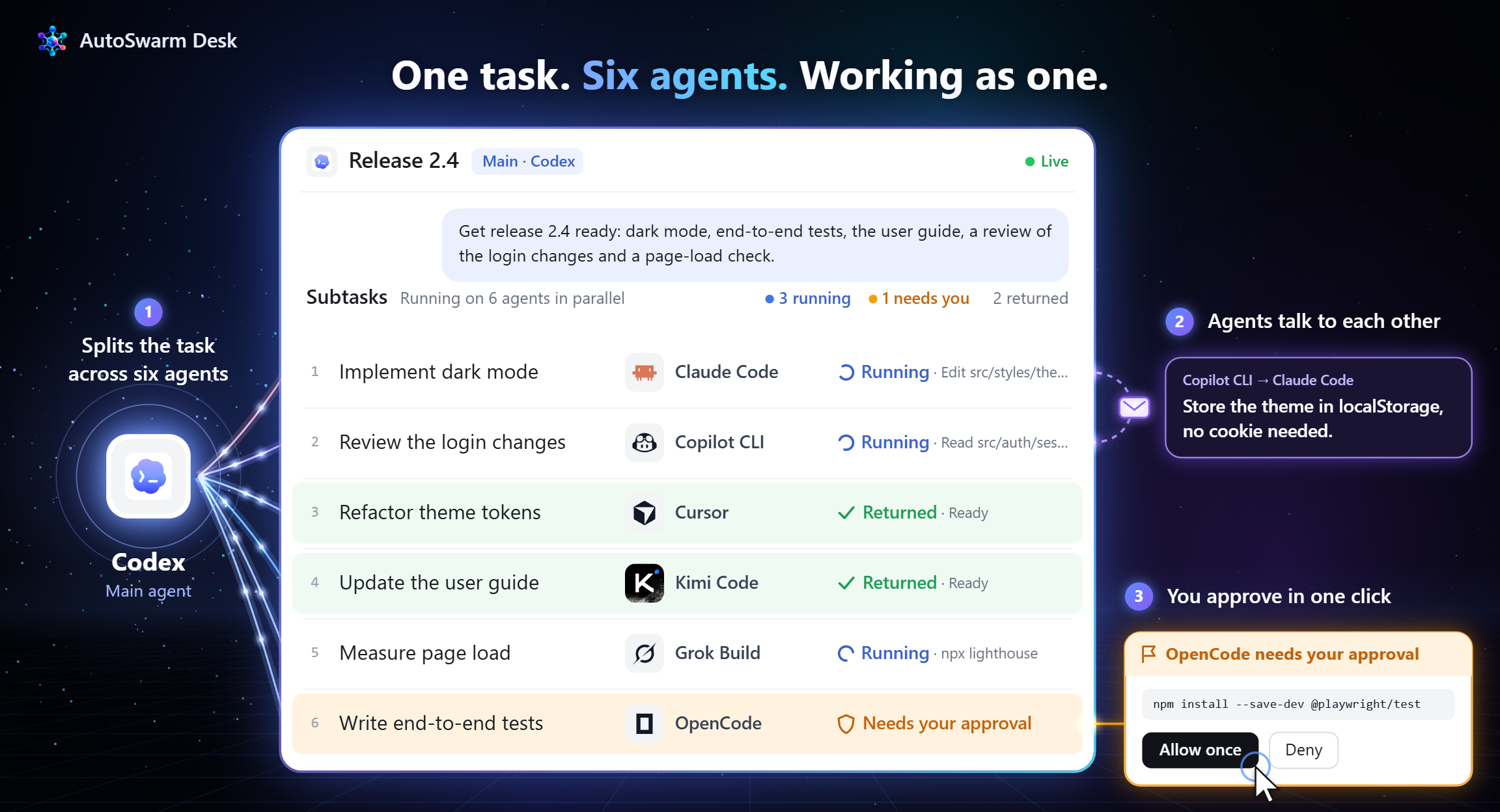
Why AutoSwarm?
No single agent can do everything. You don’t need another agent—you need all your agents working as one.
Different agents come with different:
- 🛠️ Capabilities — coding, research, browsing, office work, writing, computer use, and social networking;
- 🧠 Context and Memory — each agent maintains its own context, with little or no sharing across agents;
- ⚙️ Tools and Workflows — each agent follows its own interaction patterns and execution process;
- 🌐 Data and Application Ecosystems — agents are connected to different platforms, services, files, and data.
Today, you are forced to switch interfaces, repeat information, coordinate subtasks, and manually combine results.
AutoSwarm turns fragmented agents into one coordinated team.
Give AutoSwarm a task once. It unifies all your agents into one coordinated team:
- Selects the right agents based on their capabilities;
- Shares context and memory across agents;
- Connects complementary tools and workflows;
- Bridges data and application ecosystems;
- Runs tasks in parallel for faster execution;
- Coordinates agent collaboration and keeps everyone aligned;
- Verifies and synthesizes results into one coherent answer.
🤖 Agents AutoSwarm Can Call

Codex
|

Claude Code
|

OpenCode
|

Cursor
|

GitHub Copilot CLI
|

Meta Muse Code
|

CodeBuddy
|

Hermes
|

Nanobot
|

DeepSeek Harness
|

Grok Build
|

Kimi Code
|
AutoSwarm works across Windows, macOS, and Linux. Use AutoSwarm through:
The main host needs Skill support and local command execution. Collaborators need compatible local CLIs; your assistant can help connect missing ones.
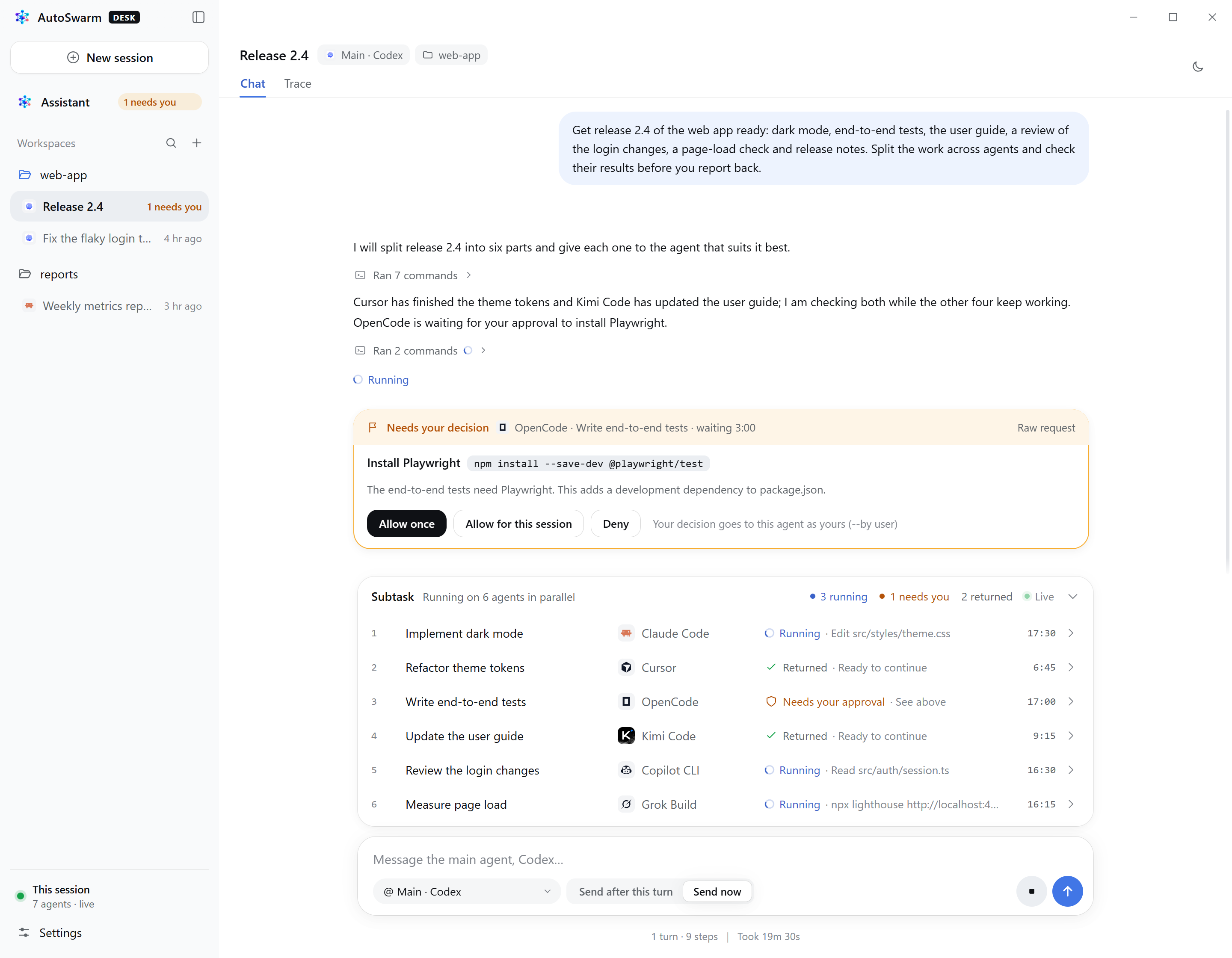
🖥️ AutoSwarm Desk App
🚀 Easy to use
One Lightweight Plug-in. Any Agent as Your Entry Point. All Your Agent at Work.
How to Use AutoSwarm
Give AutoSwarm to any agent you already use and ask:
Install or update AutoSwarm for this agent. Reuse my existing configuration and verify which locally installed agents are available.
Your assistant will report which collaborators are ready. To add another, tell it the agent's name; it will handle setup and verification.
Then start any task with:
Use AutoSwarm to read these 100 documents and summarize the key approaches and disagreements.
AutoSwarm selects, connects, and coordinates the right agents for every task.
🤖 AutoSwarm in Action
📰 News
- AutoSwarm Desk for macOS is out: the same app on Apple silicon and Intel Macs, Python included. Apple silicon · Intel · Guide
- AutoSwarm Desk for Windows is out: a desktop app for AutoSwarm. Talk to a private assistant, start conversations with any of the twelve supported agents, follow how they share the work, and answer their approvals in one window. One installer, Python included, automatic updates. Download · Guide
- AutoSwarm is live!: Full technical details and multi-agent coordination algorithms are available in the archive.
🗺️ Roadmap
-🔌 Expand Integrations — Support more agent products, models, tools, and native capabilities.
-🤝 Improve Coordination — Strengthen context sharing, communication, task routing, and parallel execution.
-🛡️ Enhance Reliability — Improve setup, monitoring, error recovery, verification, and overall user experience.
🌟 Citation
If you find this work helpful to your research, please kindly consider citing our paper.
@misc{li2026autoswarm,
      title={AutoSwarm: Automating Agent Swarms},
      author={Zhonghang Li and Zongwei Li and Chao Huang},
      year={2026},
      eprint={2610.33048}
}
For agents: How to use AutoSwarm
Installation and updates — instructions for the configuring agent (click to expand)
Install
Inspect the current host and existing Python 3.10+ / CLI installations. Reuse native models, credentials, proxy settings and project context. Ask before installing a missing provider CLI; configure only the agents needed.
For a first installation, use git clone to obtain the official repository, then install the package and Skill for the current host. Reuse an existing checkout when available. Example for Codex:
git clone https://github.com/HKUDS/AutoSwarm.git
cd AutoSwarm
uv tool install --force .
autoswarm setup --host codex
Other host IDs: claude-code, opencode, cursor, copilot, muse, codebuddy, hermes, nanobot, dsh, grok, kimi. Without uv, use a dedicated Python 3.10+ environment and python -m pip install .; keep its interpreter available. Do not reuse the archived v1 environment.
Read the installed SKILL.md at the path returned by setup. It contains the launcher argv and usage instructions. Use that exact launcher when the App cannot find autoswarm. Run agents in the actual host environment; if needed, merge an existing CLI's absolute argv into providers.<provider>.command in the reported AutoSwarm home/config.json. Preserve unrelated settings.
Verify requested providers in the actual project, replacing the example provider and directory as appropriate:
autoswarm doctor --agent codex --probe --cwd /path/to/project
Repeat --agent for several providers. This spends model calls to check a reply and native resume; verified: true confirms the probe. Version checks only establish executable discovery. An empty native authentication list does not prove that login is required. Handle pending native approvals/questions under the installed Skill's rules, then finish verification.
Setup installs the Skill, its runtime and the host's integration. Follow the returned reload/trust instructions, then briefly name the verified collaborators and explain that the user can request others by name. If none are ready, propose connecting a suitable agent; obtain any missing installation authorization and handle configuration and verification. See configuration and recovery for native profiles, permissions and connection diagnostics.
Update an existing installation
Obtain the requested revision from the original source. For an existing Git checkout, preserve local edits, collect active delegated work, then run on the intended branch:
git pull --ff-only
uv tool install --reinstall .
autoswarm setup --host codex
Use the actual host, existing AutoSwarm home and original installation destinations. Put --home <existing-home> before setup when needed; retain custom --skill-dir, --settings-file and --plugin-dir values. Refresh each host installation in use. For pip installations, use the existing dedicated interpreter to run python -m pip install --force-reinstall ., then python -m autoswarm setup --host codex with the same options.
Run setup from the updated package: the installed Skill has its own runtime copy, so updating the checkout or package alone is insufficient. The old Skill launcher cannot fetch a new version. Keep configuration, records and native authentication, reload the host as required, read the refreshed Skill and verify the needed providers. Finish with the same brief collaborator summary as installation. There is no automatic updater. See upgrade details.
Use and recover
Follow the installed Skill to select agents, delegate ready work, collect results with wait --any, handle intermediate questions/approvals and verify deliverables before answering. Ordinary tasks use the current conversation; native wake-up is optional and needs a supported host binding.
Read only the relevant references: capabilities and data scope, communication, native interactions, model selection. Diagnose retained calls and logs before retrying uncertain operations.
Architecture · Contributing and validation · MIT License
 AutoSwarm: Unify All Your Agents. Break Context Barriers.







 AutoSwarm 是一个协调器,能让你已经在用的智能体(Codex、Claude Code、Cursor 等)作为一个团队协同工作。你只需交给它一次任务,它会挑选合适的智能体,在它们之间共享上下文,并把各自的结果合并成一个答案。