 AutoSwarm: Unify All Your Agents. Break Context Barriers.












Что это такое?
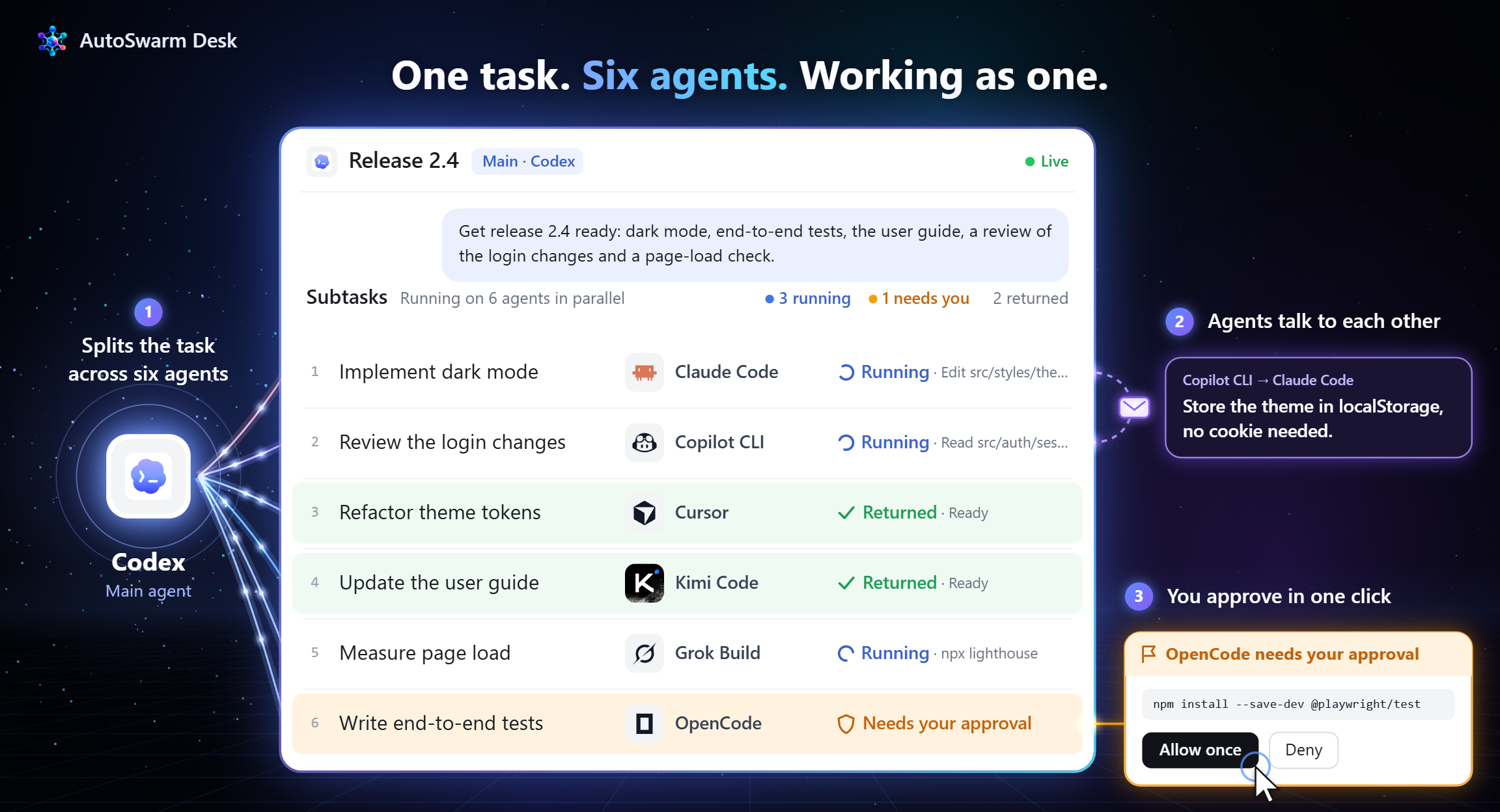
 AutoSwarm — это координатор, который позволяет агентам, которые вы уже используете (Codex, Claude Code, Cursor и другие), работать как одна команда. Вы один раз ставите задачу, а он подбирает нужных агентов, передаёт контекст между ними и объединяет их результаты в один ответ.
Это новый ИИ-агент или надстройка над существующими?Это не новый агент. Это плагин или навык (Skill), который вы добавляете к уже используемому агенту. Затем этот хост подключает ваших других агентов как помощников.
Это не новый агент. Это плагин или навык (Skill), который вы добавляете к уже используемому агенту. Затем этот хост подключает ваших других агентов как помощников.Как его запустить?Склонируйте официальный репозиторий командой git clone, установите пакет командой python -m pip install . (или uv), затем выполните python -m autoswarm setup --host codex. Перезапустите хост, как указано в инструкциях, и спросите ассистента, какие помощники готовы к работе.
Склонируйте официальный репозиторий командой git clone, установите пакет командой python -m pip install . (или uv), затем выполните python -m autoswarm setup --host codex. Перезапустите хост, как указано в инструкциях, и спросите ассистента, какие помощники готовы к работе.Что нужно сначала?Python 3.10 или новее и хост-агент, который поддерживает навыки (Skills) и выполнение локальных команд. Каждому другому агенту, которого вы хотите использовать, нужен свой совместимый локальный CLI.
Python 3.10 или новее и хост-агент, который поддерживает навыки (Skills) и выполнение локальных команд. Каждому другому агенту, которого вы хотите использовать, нужен свой совместимый локальный CLI.На что обратить внимание?Проверка расходует вызовы моделей с ваших аккаунтов, а установка спрашивает разрешение, прежде чем ставить недостающий CLI провайдера. Каждый добавляемый агент нужно установить и войти в его аккаунт отдельно. В дорожной карте всё ещё значатся восстановление после ошибок и надёжность как задачи в работе.
Проверка расходует вызовы моделей с ваших аккаунтов, а установка спрашивает разрешение, прежде чем ставить недостающий CLI провайдера. Каждый добавляемый агент нужно установить и войти в его аккаунт отдельно. В дорожной карте всё ещё значатся восстановление после ошибок и надёжность как задачи в работе.Работает ли он на Windows, macOS и Linux?В README сказано, что он работает в Windows, macOS и Linux. Настольное приложение AutoSwarm Desk указано для Windows и macOS, а CLI и расширения для IDE — это другие способы им пользоваться.
В README сказано, что он работает в Windows, macOS и Linux. Настольное приложение AutoSwarm Desk указано для Windows и macOS, а CLI и расширения для IDE — это другие способы им пользоваться.Это бесплатно?Проект распространяется по лицензии MIT. Подключаемые агенты, например Claude Code или Codex, имеют собственные аккаунты и платные модели, за которые вы платите отдельно.
Проект распространяется по лицензии MIT. Подключаемые агенты, например Claude Code или Codex, имеют собственные аккаунты и платные модели, за которые вы платите отдельно.Как он решает, какой агент что делает?Он выбирает агентов по их возможностям, подключает взаимодополняющие инструменты, выполняет части задачи параллельно, а затем проверяет результаты и объединяет их в один цельный ответ.
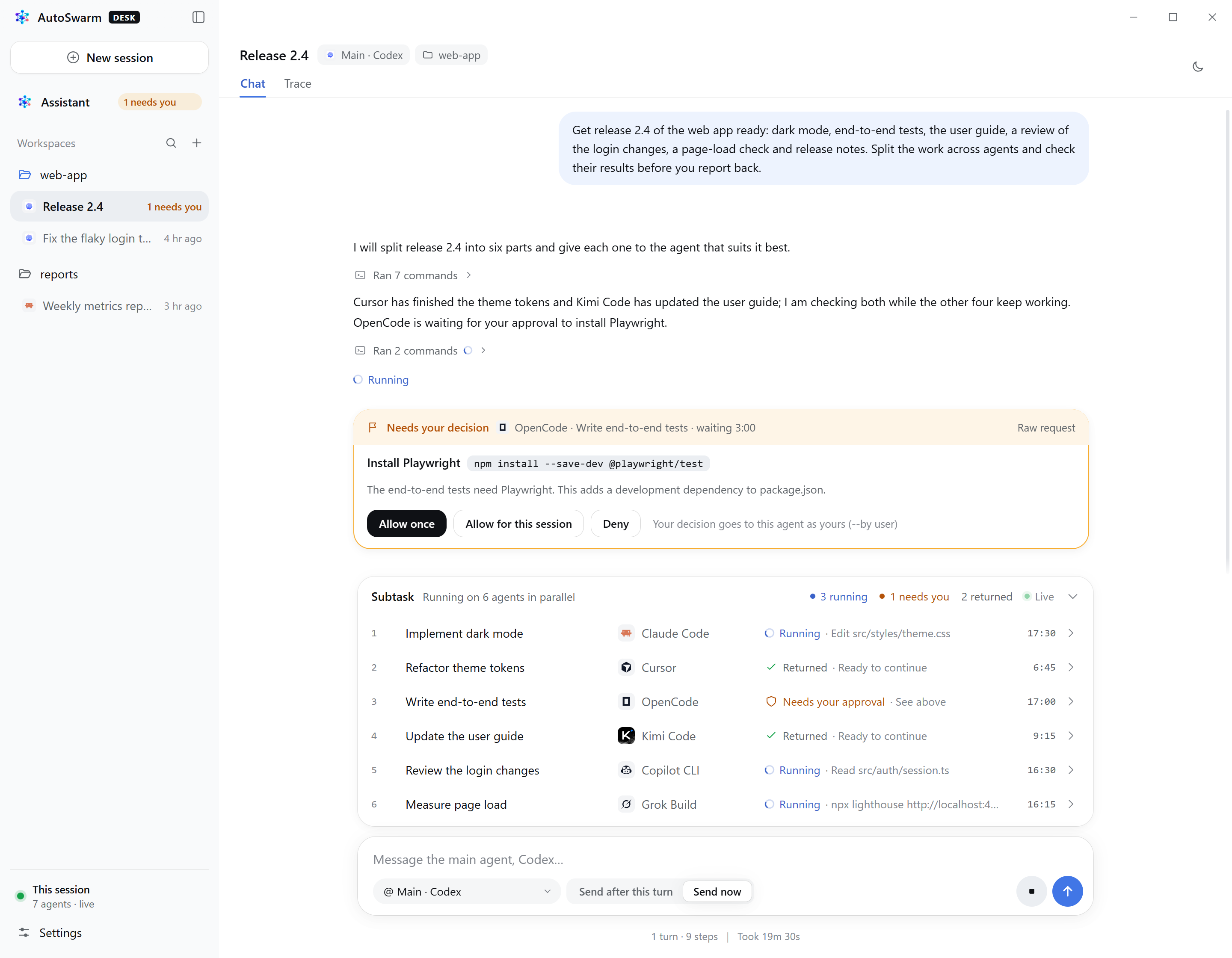
Он выбирает агентов по их возможностям, подключает взаимодополняющие инструменты, выполняет части задачи параллельно, а затем проверяет результаты и объединяет их в один цельный ответ.Что AutoSwarm Desk добавляет к CLI?AutoSwarm Desk — настольное приложение для Windows и macOS. Оно даёт личного ассистента и одно окно, чтобы начинать диалоги с поддерживаемыми агентами, следить за тем, как они делят работу, и отвечать на их запросы на подтверждение. Поставляется одним установщиком со встроенным Python и обновляется автоматически.
AutoSwarm Desk — настольное приложение для Windows и macOS. Оно даёт личного ассистента и одно окно, чтобы начинать диалоги с поддерживаемыми агентами, следить за тем, как они делят работу, и отвечать на их запросы на подтверждение. Поставляется одним установщиком со встроенным Python и обновляется автоматически.Агенты используют общую память?Да. Обычно каждый агент хранит собственный контекст, а AutoSwarm устроен так, чтобы делить контекст и память между всеми ними, чтобы вам не приходилось повторять информацию между инструментами.
Да. Обычно каждый агент хранит собственный контекст, а AutoSwarm устроен так, чтобы делить контекст и память между всеми ними, чтобы вам не приходилось повторять информацию между инструментами.Какие есть похожие проекты?Paradev, frink, agents, orca, vicoa, oh-my-openagent, pstack-claude, squadra
Paradev, frink, agents, orca, vicoa, oh-my-openagent, pstack-claude, squadraВ каких он темах?agent-collaboration, parallel-agents, ide, multi-agent-systems, github-copilot, agent-memory, opencode, coding-agents, agent-orchestration, skill, cursor, multi-agent
agent-collaboration, parallel-agents, ide, multi-agent-systems, github-copilot, agent-memory, opencode, coding-agents, agent-orchestration, skill, cursor, multi-agent