
10.6K ·GitHub
What is this?
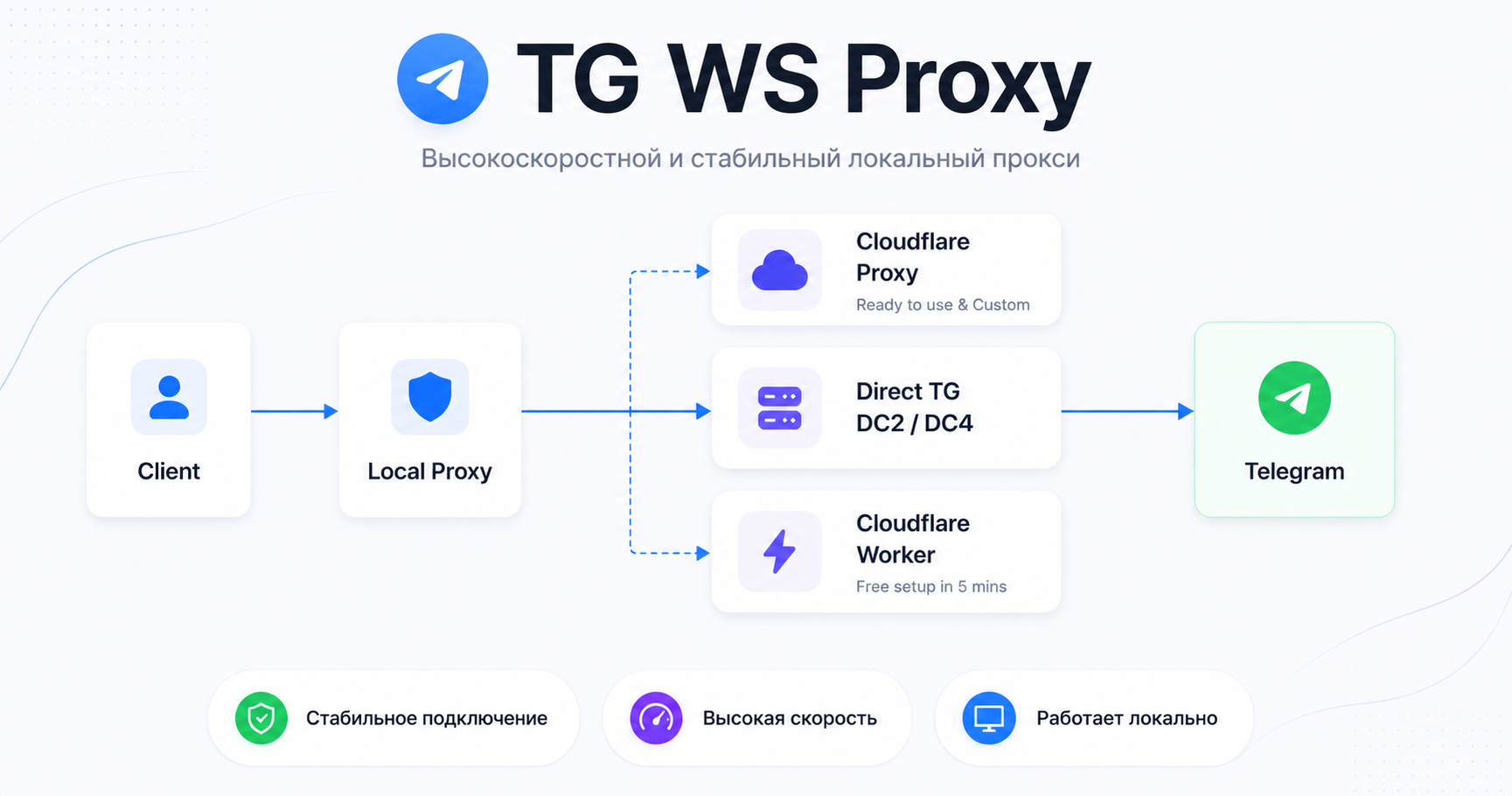
 TG WS Proxy is a local MTProto proxy for Telegram Desktop that speeds up or partially bypasses Telegram's blocking by routing traffic through WebSocket (TLS) connections, without relying on any third-party servers.
TG WS Proxy is a local MTProto proxy for Telegram Desktop that speeds up or partially bypasses Telegram's blocking by routing traffic through WebSocket (TLS) connections, without relying on any third-party servers.Is this a command-line tool or a desktop app with a GUI?It is a desktop app that runs as a tray application with a GUI settings editor; it minimizes to the system tray after launch and lets you open or configure Telegram directly from the tray menu.
It is a desktop app that runs as a tray application with a GUI settings editor; it minimizes to the system tray after launch and lets you open or configure Telegram directly from the tray menu.How do I get it running?Download the prebuilt binary for your OS from the Releases page (separate builds for Windows 10+ x64/ARM64, Windows 7 x64/x32, Intel macOS, Apple Silicon macOS, and Linux x86_64) or run it via Docker, then right-click the tray icon and choose 'Open in Telegram' to auto-configure Telegram Desktop.
Download the prebuilt binary for your OS from the Releases page (separate builds for Windows 10+ x64/ARM64, Windows 7 x64/x32, Intel macOS, Apple Silicon macOS, and Linux x86_64) or run it via Docker, then right-click the tray icon and choose 'Open in Telegram' to auto-configure Telegram Desktop.Do I need any accounts, API keys, or external servers?No — the proxy works without any third-party servers; you just need Telegram Desktop installed. On Linux, the system tray icon requires AppIndicator support.
No — the proxy works without any third-party servers; you just need Telegram Desktop installed. On Linux, the system tray icon requires AppIndicator support.Does photo and video loading always work through the proxy?Not always. If media fails to load, remove every DC→IP entry in the proxy settings except '4:149.154.167.220', or clear the field entirely; this issue is more common on accounts without Telegram Premium.
Not always. If media fails to load, remove every DC→IP entry in the proxy settings except '4:149.154.167.220', or clear the field entirely; this issue is more common on accounts without Telegram Premium.Which Windows and macOS versions are supported?Windows 10+ x64/ARM64 and Windows 7 x64/x32 builds are provided, along with Intel macOS 10.15+, Apple Silicon macOS 11.0+, and Linux x86_64 (with AppIndicator for the tray icon).
Windows 10+ x64/ARM64 and Windows 7 x64/x32 builds are provided, along with Intel macOS 10.15+, Apple Silicon macOS 11.0+, and Linux x86_64 (with AppIndicator for the tray icon).Where does my Telegram traffic actually go?Traffic stays encrypted the same way normal MTProto traffic is, and no third-party servers are used — connections go through WebSocket/TLS directly to Telegram's own datacenter domains, with an optional Cloudflare-based fallback.
Traffic stays encrypted the same way normal MTProto traffic is, and no third-party servers are used — connections go through WebSocket/TLS directly to Telegram's own datacenter domains, with an optional Cloudflare-based fallback.How does the proxy technically get around Telegram blocking?It extracts the DC ID from the MTProto obfuscation init packet, then opens a WebSocket (TLS) connection to Telegram's own domain for that datacenter; if the WebSocket connection is blocked (302 redirect), it automatically falls back to CfProxy or a direct TCP connection.
It extracts the DC ID from the MTProto obfuscation init packet, then opens a WebSocket (TLS) connection to Telegram's own domain for that datacenter; if the WebSocket connection is blocked (302 redirect), it automatically falls back to CfProxy or a direct TCP connection.What is CfProxy?CfProxy is an optional Cloudflare-based fallback path (with instructions for a free Cloudflare Worker alternative or your own Cloudflare domain) used when direct WebSocket connections to Telegram get blocked.
CfProxy is an optional Cloudflare-based fallback path (with instructions for a free Cloudflare Worker alternative or your own Cloudflare domain) used when direct WebSocket connections to Telegram get blocked.Why does antivirus software flag the download as a virus?Many antivirus engines falsely flag the packed executable; the README suggests trying the Windows 7 build instead, or temporarily disabling your antivirus and whitelisting the file while verifying it on VirusTotal.
Many antivirus engines falsely flag the packed executable; the README suggests trying the Windows 7 build instead, or temporarily disabling your antivirus and whitelisting the file while verifying it on VirusTotal.Can I test the proxy against Telegram's test datacenters?Yes, the README includes a dedicated guide for configuring a Telegram test environment with test DCs, useful for development and troubleshooting.
Yes, the README includes a dedicated guide for configuring a Telegram test environment with test DCs, useful for development and troubleshooting.What are similar projects?nyx, ProxyBridge, xdp-dns-evadeproxy, mtproto.zig, CF-Workers-TGProxy, SSPanel-UIM, NewYork, V2rayU
nyx, ProxyBridge, xdp-dns-evadeproxy, mtproto.zig, CF-Workers-TGProxy, SSPanel-UIM, NewYork, V2rayUWhich topics is it in?pyinstaller, proxy-server, linux-app, menu-bar, anti-censorship, tls, censorship-circumvention, telegram, github-actions, macos-app, windows-app, websocket
pyinstaller, proxy-server, linux-app, menu-bar, anti-censorship, tls, censorship-circumvention, telegram, github-actions, macos-app, windows-app, websocket