




402 ·GitHub
What is this?
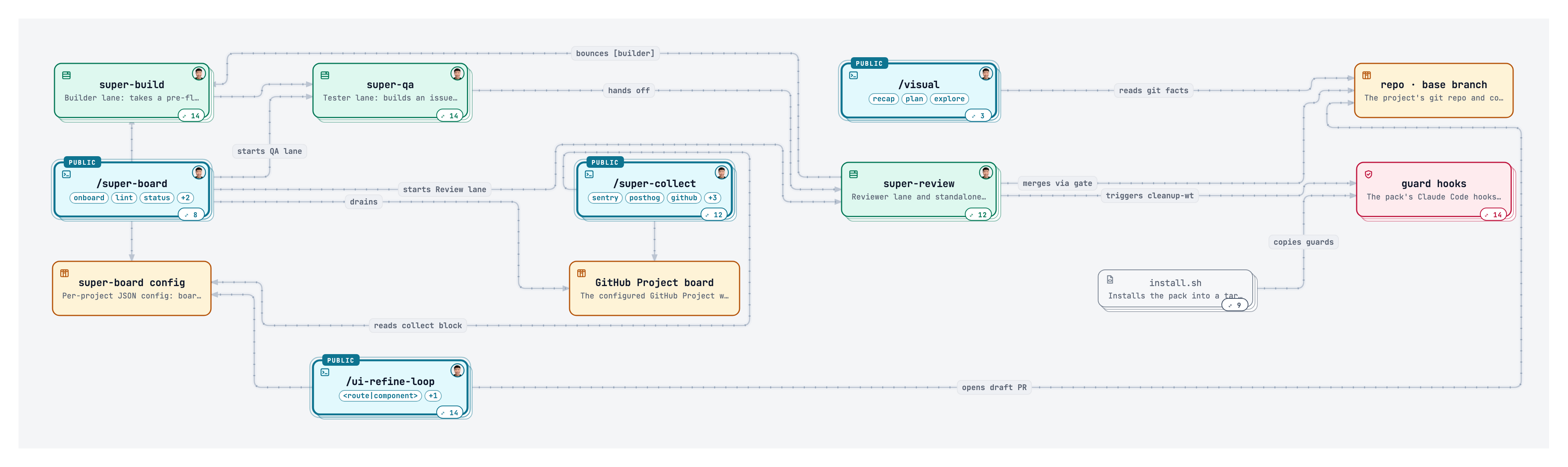
 super-board is an autonomous Build → QA → Review loop for Claude Code: you drop cards into a Ready column and the system plans the work, codes it, tests it, reviews it, and merges the PR once everything passes.
super-board is an autonomous Build → QA → Review loop for Claude Code: you drop cards into a Ready column and the system plans the work, codes it, tests it, reviews it, and merges the PR once everything passes.Is this a standalone app, or does it run inside Claude Code?It is a Claude Code skill/plugin pack, not a separate application: it adds 8 skills (5 you type, 3 the board runs automatically), 9 slash commands, and 6 guard hooks to your existing project.
It is a Claude Code skill/plugin pack, not a separate application: it adds 8 skills (5 you type, 3 the board runs automatically), 9 slash commands, and 6 guard hooks to your existing project.How do I get it running on a project?Run the one-line installer in your project folder (or install it as a Claude Code plugin), then run the onboard command to configure checks, GitHub, branch policy and bug sources. After that, just add cards to the Ready column and the board works through them on its own.
Run the one-line installer in your project folder (or install it as a Claude Code plugin), then run the onboard command to configure checks, GitHub, branch policy and bug sources. After that, just add cards to the Ready column and the board works through them on its own.What do I need installed before setting this up?You need Claude Code itself, plus the gh CLI, jq, bash 3.2+ and Python 3.9+; the installer checks for these automatically.
You need Claude Code itself, plus the gh CLI, jq, bash 3.2+ and Python 3.9+; the installer checks for these automatically.Does the plugin install everything I need right away?No — the Claude Code plugin install only brings the skills themselves. You still have to run the onboard command, whose Checks step adds the guard hooks, scripts and workflows that actually enforce safety rules.
No — the Claude Code plugin install only brings the skills themselves. You still have to run the onboard command, whose Checks step adds the guard hooks, scripts and workflows that actually enforce safety rules.What do the guard hooks actually block?They stop risky actions automatically: creating worktrees outside the allowed folder, reading or piping secrets like dotenv files and SSH keys, writing a live-looking API key into a file, deleting things outside the project, and force-pushing to main unless you opted in.
They stop risky actions automatically: creating worktrees outside the allowed folder, reading or piping secrets like dotenv files and SSH keys, writing a live-looking API key into a file, deleting things outside the project, and force-pushing to main unless you opted in.How does it decide which AI model to use for a task?A cheap router first grades each card as easy, medium or hard, then the run flag you chose (default, --low or --high) maps that grade to a specific Claude model, from Haiku up to Opus.
A cheap router first grades each card as easy, medium or hard, then the run flag you chose (default, --low or --high) maps that grade to a specific Claude model, from Haiku up to Opus.Can I use Codex/GPT models instead of Claude?Yes — passing --codex switches every lane (Build, QA, Review) to GPT models via the same router logic, and since Codex has no native /super-board command, it finds the skills through symlinks in .agents/skills/.
Yes — passing --codex switches every lane (Build, QA, Review) to GPT models via the same router logic, and since Codex has no native /super-board command, it finds the skills through symlinks in .agents/skills/.What happens if I'm upgrading from an older version?Re-run the install line, then run the onboard command, which upgrades your setup and keeps a backup; it's recommended to test board-migrate --dry-run on a copy of your board first.
Re-run the install line, then run the onboard command, which upgrades your setup and keeps a backup; it's recommended to test board-migrate --dry-run on a copy of your board first.What are similar projects?Archon, agent-orchestrator, orca, agor, 1code, shipyard, swarm-forge, emdash
Archon, agent-orchestrator, orca, agor, 1code, shipyard, swarm-forge, emdashWhich topics is it in?workflow-engine, coding-assistant, kanban, git-worktrees, project-management, agentic-coding, bash, code-review, playwright, agent-framework, claude-skills, github
workflow-engine, coding-assistant, kanban, git-worktrees, project-management, agentic-coding, bash, code-review, playwright, agent-framework, claude-skills, github